1. Introducció
The Datavideo SE-3200 is a professional 12-channel digital video switcher designed for high-definition video production environments. It supports native 1080p/60 3G HD video processing and offers a comprehensive set of features for live event production, broadcasting, and studio applications. This manual provides detailed instructions for the setup, operation, and maintenance of your SE-3200 switcher.
2. Informació important de seguretat
- Font d'alimentació: Use only the specified power adapter. Ensure the power cord is not damaged or pinched.
- Ventilació: No bloquegeu les obertures de ventilació. Assegureu-vos que hi hagi un flux d'aire adequat al voltant de la unitat per evitar el sobreescalfament.
- Humitat: Do not expose the unit to rain, moisture, or liquids. Operating in damp conditions can cause electric shock.
- Manteniment: No intenteu atendre aquest producte vosaltres mateixos. Consulteu tots els serveis a personal de servei qualificat.
- Col·locació: Col·loqueu la unitat sobre una superfície estable i plana. Eviteu col·locar-la a prop de fonts de calor o sota la llum solar directa.
3. Contingut del paquet
Si us plau, verifiqueu que tots els elements que s'enumeren a continuació estiguin inclosos al vostre paquet:
- Datavideo SE-3200 Main Processing Unit (2U rackmount)
- Datavideo SE-3200 Control Panel
- Adaptador/cable de corrent
- USB Cable (for firmware upgrades)
- Manual d'usuari (aquest document)
4. Producte acabatview
4.1. Tauler frontal

The front panel of the SE-3200 control unit provides access to all operational controls. This includes input selection buttons for Program and Preset rows, transition controls (T-bar, CUT, AUTO), keyer controls, Picture-in-Picture (PIP) settings, and various effects buttons. The layout is designed for intuitive and efficient live production switching.
4.2. Panell posterior
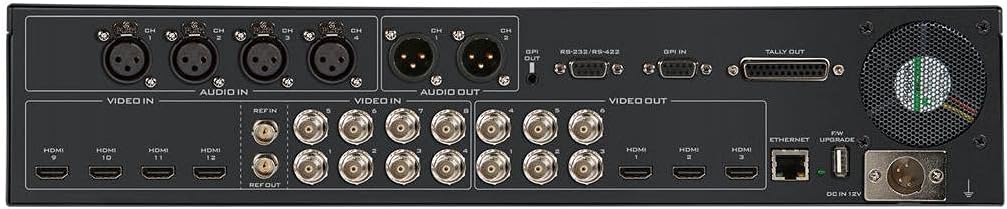
The rear panel of the main processing unit houses all input and output connections. It features 8 SDI inputs and 4 HDMI inputs, allowing for a total of 12 video sources. For outputs, there are 6 SDI and 3 HDMI ports. Additionally, the rear panel includes 4 XLR analog audio inputs, 2 XLR analog audio outputs, GenLock, RS-232/RS-422 control ports, GPI, Tally output, Ethernet for remote control and streaming, and a USB port for firmware upgrades.
5. Guia de configuració
Follow these steps for initial setup of your Datavideo SE-3200:
- Muntatge: Install the 2U main processing unit into a standard 19-inch rack. Place the control panel on a stable surface or integrate it into your control room setup.
- Connecta el tauler de control: Connect the control panel to the main processing unit using the provided cable.
- Entrades de vídeo: Connect your video sources (cameras, media players, computers) to the SDI (1-8) and HDMI (9-12) input ports on the rear panel. The SE-3200 features frame synchronizers on all inputs.
- Sortides de vídeo: Connect your program monitors, recorders, and streaming encoders to the SDI (1-6) and HDMI (1-3) output ports.
- Connexions d'àudio: Connect your audio sources to the 4 XLR analog audio inputs. Connect your audio monitoring or mixing equipment to the 2 XLR analog audio outputs.
- GenLock: If synchronizing with external equipment, connect your reference signal to the GenLock input.
- Potència: Connect the power adapter to the main processing unit and then to a suitable power outlet. Power on the unit.
- Xarxa (opcional): Connect an Ethernet cable for remote control or streaming functionalities.
6. Instruccions de funcionament
The SE-3200 offers a wide range of features for professional video switching. This section covers basic operation.
6.1. Selecció d'entrada
- Use the numbered buttons on the PROGRAMA row to select the video source currently on air.
- Use the numbered buttons on the PRESET row to select the next video source to be transitioned to.
6.2. Transitions
- TALLAR: Premeu el botó TALLAR button for an instantaneous switch between Program and Preset.
- AUTOMÀTIC: Premeu el botó AUTO button for an automatic transition (mix or wipe) based on the selected transition type and duration.
- T-Bar: Manually control the speed and direction of transitions using the T-bar fader.
- Wipe Patterns: Select various wipe patterns and adjust border width, color, and softness using the dedicated controls.
6.3. Keying Functions
The SE-3200 features 4 upstream keyers and 2 DSKs.
- Clau de croma: Used for green/blue screen effects. Select the keyer, enable Chroma Key, and adjust parameters for a clean key.
- Luma Key: Keys based on brightness levels.
- Linear Key: Keys using a fill and key source.
- DSK (Downstream Keyer): Used for graphics, lower thirds, and titles over the main program output.
6.4. Imatge dins d'imatge (PIP)
The switcher supports 4 independent PIPs. Configure the size, position, and source for each PIP using the dedicated controls on the panel.
6.5. Still Store and Logo Insertion
The SE-3200 allows you to store still images and logos for instant recall and insertion into your program. Refer to the on-screen menu for managing still stores.
6.6. Control d'àudio
The switcher provides embedded audio processing and analog audio inputs/outputs. Monitor audio levels on the multiview output and adjust as needed. Audio delay up to 16 fields or 8 frames per channel is available.
7. Manteniment
- Neteja: Feu servir un drap suau i sec per netejar l'exterior de la unitat. No utilitzeu netejadors líquids ni en aerosol.
- Ventilació: Regularly check that the ventilation openings are clear of dust and obstructions.
- Actualitzacions de firmware: Periodically check the Datavideo website for firmware updates to ensure optimal performance and access to new features. Use the USB port for updates.
8. Solució De Problemes
- Sense sortida de vídeo:
- Ensure all video cables are securely connected.
- Verify that the correct input is selected on the Program row.
- Check monitor input selection.
- Sense àudio:
- Comproveu les connexions del cable d'àudio.
- Verify audio levels on the multiview.
- Ensure audio embedding/de-embedding settings are correct.
- La unitat no s'encén:
- Comproveu la connexió del cable d'alimentació i la presa de corrent.
- Assegureu-vos que l'adaptador d'alimentació funciona correctament.
- Keyer Not Working:
- Verify keyer is enabled and the correct key type (Chroma, Luma, Linear) is selected.
- Adjust keyer parameters (threshold, gain, clip) for optimal results.
9. Especificacions tècniques
| Característica | Especificació |
|---|---|
| Dimensions del producte | 21.75 x 15 x 12.5 polzades |
| Pes de l'article | 16 lliures |
| Número de model de l'article | SE-3200 |
| Total d'entrades de vídeo | 12 (8 x SDI, 4 x HDMI) |
| Sortides totals de vídeo | 9 (6 x SDI, 3 x HDMI) |
| Entrades d'àudio analògics | 4 x XLR |
| Sortides d'àudio analògics | 2 x XLR |
| Internal Frame Synchronizers | 12 (All Inputs) |
| Processament de vídeo | Native 1080p/60 3G HD |
| Keyers | 4 Upstream (Chroma, Linear, Luma), 2 DSK |
| Imatge en imatge (PIP) | 4 independent PIPs |
| Transicions | Wipe, Mix, Cut, Stinger |
| Connectivitat | Ethernet, RS-232/RS-422, GPI, Tally, USB |
10. Garantia i Suport
Datavideo products are covered by a manufacturer's warranty. For specific warranty terms and conditions, please refer to the warranty card included with your product or visit the official Datavideo website. For technical support, service, or further assistance, please contact your local Datavideo dealer or visit the Datavideo support portal online.


