1. Què hi ha a la caixa
Before you begin, verify that all items are present:
- CUBOT X30 Unlocked Smartphone
- Carregador
- Cable USB-Type C
- Manual d'usuari
- Funda protectora
- PIN de la SIM
Model: x30
Welcome to the CUBOT X30 Unlocked Smartphone user manual. This guide provides essential information for setting up, operating, maintaining, and troubleshooting your device. Please read this manual thoroughly to ensure optimal performance and longevity of your smartphone.

Imatge: Anvers i revers view of the CUBOT X30 smartphone, showcasing its design and multi-camera setup.
Before you begin, verify that all items are present:
The CUBOT X30 supports dual Nano SIM cards or one Nano SIM card and one TF (microSD) card for expanded storage.
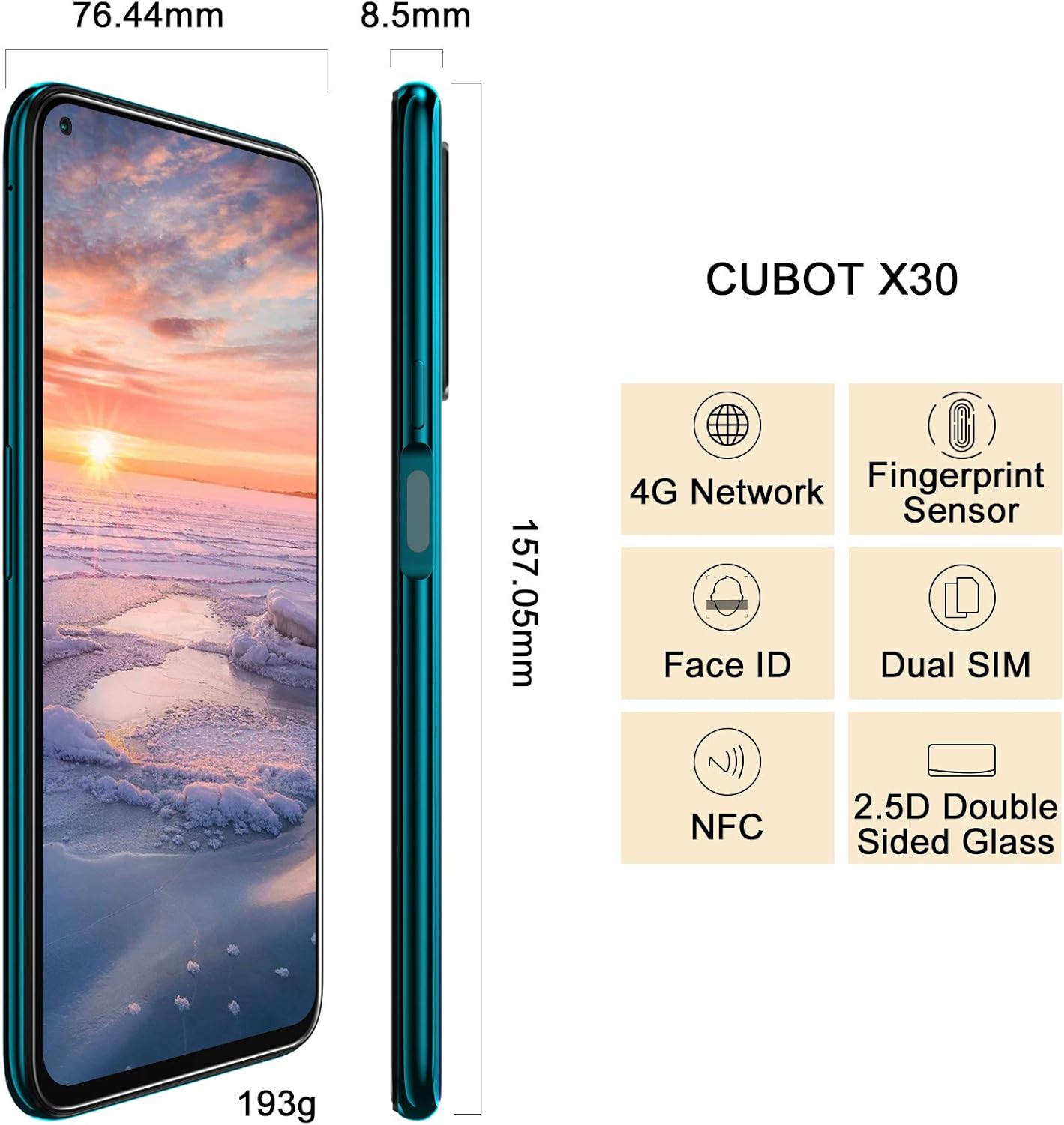
Image: Diagram showing the dimensions of the CUBOT X30 and icons representing its features like 4G Network, Fingerprint Sensor, Face ID, Dual SIM, and NFC. This image also implicitly shows the side profile where the SIM tray would be located.
To power on your device, press and hold the power button located on the side until the CUBOT logo appears. For first-time use, it is recommended to fully charge the battery.

Image: The CUBOT X30 display showing a battery charging indicator at 98%, illustrating the fast charging capability.
Your CUBOT X30 runs on Android 10. Navigation is primarily touch-based:

Image: The CUBOT X30 displaying the Android 10 interface, highlighting its operating system and the Helio P60 Octa-Core Processor.
Enhance your phone's security with biometric authentication:
The CUBOT X30 features a versatile camera system:

Image: The CUBOT X30's camera capabilities are highlighted, featuring the 48MP Samsung S5KGM1 Main Lens, AI Beauty Camera Mode, and Super Night Mode, with examples fotos.
Your device supports multiple connectivity options:
The CUBOT X30 comes with 8GB RAM and 256GB ROM, expandable via TF card up to 256GB.

Image: The CUBOT X30 display, emphasizing its 8GB RAM and 256GB ROM, with various application icons floating around, suggesting smooth multitasking and ampl'emmagatzematge.
Feu servir un drap suau i sense borrissol per netejar la pantalla i la carcassa del telèfon. Eviteu utilitzar productes químics agressius o materials abrasius.
Per allargar la durada de la bateria:
Comproveu regularment si hi ha actualitzacions del sistema per assegurar-vos que el dispositiu tingui les funcions i els pegats de seguretat més recents. Aneu a Configuració > Sistema > Avançat > Actualització del sistema.
Avís: A factory reset will erase all data from your phone. Back up important data before proceeding.
Per restablir la fàbrica, aneu a Configuració > Sistema > Avançat > Opcions de restabliment > Esborra totes les dades (restabliment de fàbrica). Seguiu les instruccions a la pantalla.

Image: The CUBOT X30's 6.4-inch FHD+ hole-punch screen, highlighting its 90% screen-to-body ratio and 1080*2310 pixel resolution.
| CPU | MT6771 Helio P60, Octa-core, ARM Mali-G72 MP3 GPU |
| Sistema operatiu | Android 10.0 |
| Memòria | 8GB RAM + 256GB ROM (expandable via TF card up to 256GB) |
| Mostra | 6.4-inch FHD+ hole-punch screen, 1080*2310 resolution |
| Càmera posterior | 48MP Main (Samsung S5KGM1), 16MP Ultra Wide, 5MP Macro, 2MP Depth, 0.3MP Photosensitive |
| Càmera frontal | 32MP AI Beauty |
| Bateria | 4200 mAh, Undetachable Battery, 5V/2A Fast Charge |
| Connectivitat | Wi-Fi 2.4G/5.0G (802.1.1 a/b/g/n), Bluetooth 4.2, Type-C USB, OTG, NFC |
| Navegació | GPS / A-GPS, Gallileo, Glonass, Beidou |
| Sensors | Fingerprint Scanner, Face ID, Proximity, Accelerometer, Magnetic, Gyroscope, Light sensor |
| Dimensions | 6.18 x 3 x 0.33 polzades (157.05 x 76.44 x 8.5 mm) |
| Pes | 6.8 unces (193 g) |
| Jack d'àudio | Type C (no 3.5mm headphone jack) |
Your CUBOT X30 smartphone is covered by a limited manufacturer's warranty. Please refer to the warranty card included in your product packaging or visit the official CUBOT weblloc web per obtenir informació detallada sobre els termes i condicions de la cobertura i la durada de la garantia.
For further assistance, technical support, or service inquiries, please contact CUBOT customer support through their official website or the contact information provided in your product documentation. When contacting support, please have your device model (X30) and purchase information ready.
Official CUBOT Store: Visit CUBOT Store on Amazon
 |
Guia d'inici ràpid i manual d'usuari de CUBOT Quest Guia completa per al telèfon intel·ligent CUBOT Quest, que cobreix la configuració, les funcions, la configuració, la seguretat i el compliment normatiu. Apreneu a utilitzar trucades, missatges, Internet, la càmera i molt més. |
 |
Guia d'inici ràpid del CUBOT J5 - Manual d'usuari Guia completa d'inici ràpid per al telèfon intel·ligent CUBOT J5, que cobreix la configuració, les funcions, la configuració i la informació normativa. Apreneu a utilitzar el vostre nou dispositiu CUBOT de manera eficaç. |
 |
Cubot King Kong CS Android 10.0 User Manual Comprehensive user manual for the Cubot King Kong CS smartphone running Android 10.0, covering setup, features, settings, multimedia, safety, and care. |
 |
Manual d'usuari del telèfon mòbil Cubot X1: configuració, característiques i especificacions Manual d'usuari complet per al telèfon intel·ligent Cubot X1. Apreneu a configurar el dispositiu, utilitzar les seves funcions, navegar per la configuració i trobar especificacions tècniques. Inclou pautes de seguretat i consells per a la resolució de problemes. |
 |
Cubot Quick Start Guide A quick start guide for the Cubot mobile phone, covering phone overview, getting started with battery and SIM card installation, and button functions. |
 |
Guia d'inici ràpid del CUBOT KINGKONG ES 3 Comença a utilitzar el teu telèfon intel·ligent CUBOT KINGKONG ES 3. Aquesta guia d'inici ràpid proporciona informació essencial sobre l'ús segur, l'assistència i el compliment normatiu. |