Introducció
The EKSA E900 Wired Gaming Headset is designed to provide a high-quality audio experience for gaming, communication, and multimedia. Featuring a detachable noise-canceling microphone, 3D surround sound capabilities, and a comfortable design, this headset is compatible with a wide range of devices including PCs, PlayStation consoles, Xbox consoles, and other devices with a 3.5mm audio jack.
Què hi ha a la caixa
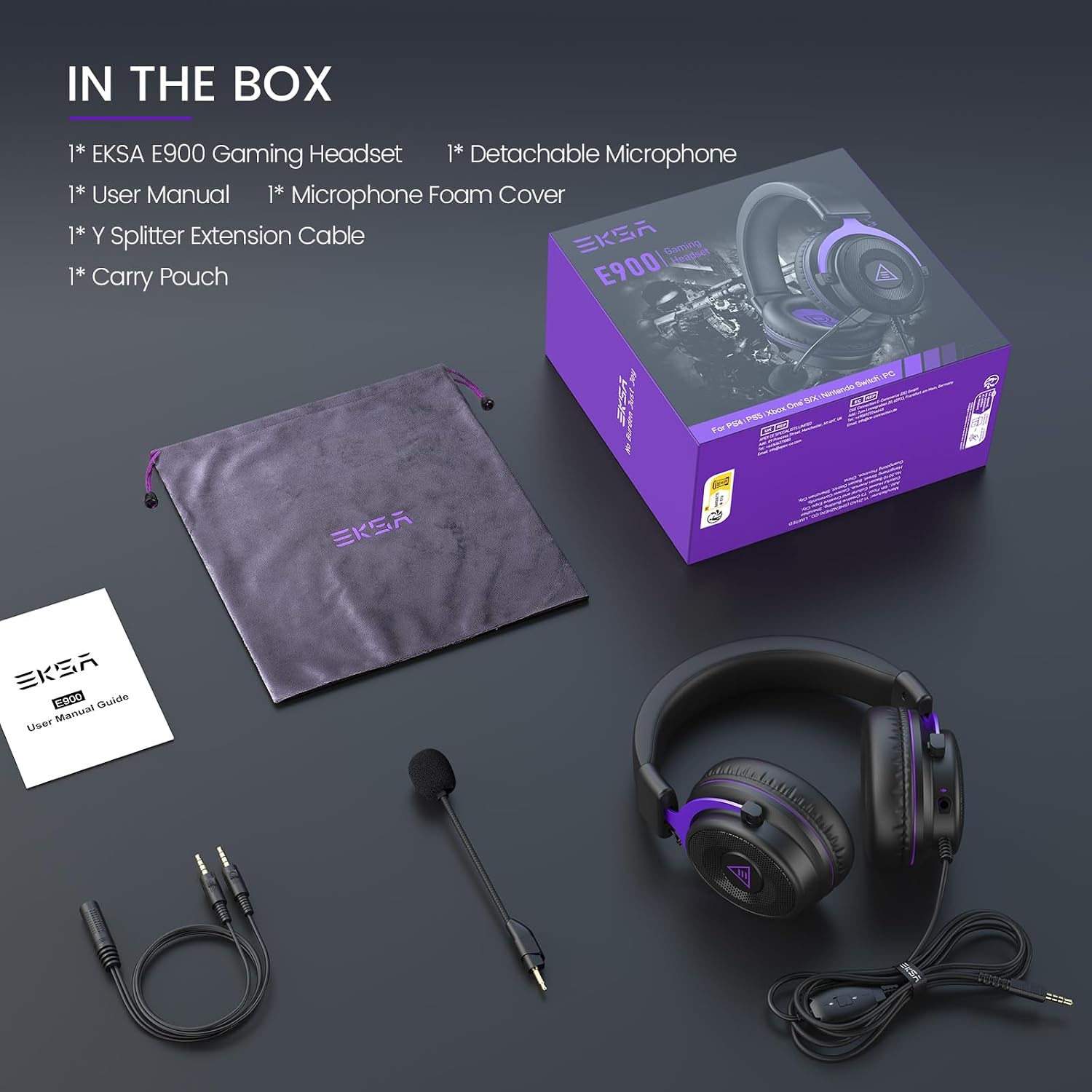
Image: All components included in the EKSA E900 Gaming Headset package.
- Auriculars per a jocs EKSA E900
- Micròfon desmuntable
- Funda d'escuma de micròfon
- Cable d'extensió del divisor en Y
- Funda protectora
Producte acabatview
Disseny i comoditat

Image: The adjustable metal headband of the EKSA E900 headset, designed for durability and a customized fit.
The E900 headset features thick memory foam cushion pads and soft, large earmuffs for optimized comfort during extended use. The adjustable metal headband ensures a perfect fit for various head sizes, providing both durability and flexibility.
Funcions d'àudio

Image: Visual representation of the 3D surround sound experience provided by the headset's 50mm drivers.
Equipped with upgraded 50mm large-size driver units and OFC copper voice coils, the E900 delivers a wide dynamic range of sound. This design enhances spatial awareness and positioning, contributing to an immersive audio experience.
Micròfon desmuntable amb cancel·lació de soroll

Image: The detachable, omnidirectional noise-canceling microphone, designed for clear voice transmission.
The E900 features a highly sensitive, omnidirectional noise-reduction microphone. This technology minimizes background noise, ensuring clear and high-quality voice transmissions during gaming or chats. The microphone is detachable for convenience when not needed.
Setup & Compatibility

Image: The EKSA E900 headset demonstrating its multi-platform compatibility with consoles, PCs, and mobile devices.
Connecting to Devices (3.5mm Jack)
The E900 headset connects via a standard 3.5mm audio jack. Simply plug the headset's 3.5mm connector into the corresponding port on your device. This method is compatible with:
- PC (using the Y Splitter for separate mic/audio ports if needed)
- PlayStation 4/5 controllers
- Xbox One/Series X/S controllers
- Nintendo Switch
- Portàtils
- Mobile devices (smartphones, tablets)
PC Setup for 3D Surround Sound
For optimal 3D surround sound on PC, it is recommended to install the dedicated 7.1 virtual surround sound driver from the official EKSA website. This driver enhances the audio experience for gaming and multimedia on Windows systems.
Instruccions de funcionament
Ajust de volum
The headset features an in-line volume control for easy audio level adjustments during use. Locate the volume wheel on the cable and rotate it to increase or decrease the sound output.
Silenci del micròfon
A one-key mic mute switch is integrated into the headset's controls, allowing for quick and convenient muting of the microphone during gameplay or calls.
Detaching/Attaching the Microphone
The microphone is detachable. To attach, align the microphone's 3.5mm jack with the port on the left ear cup and push firmly until it clicks into place. To detach, gently pull the microphone away from the ear cup. This allows for versatile use, whether for gaming communication or simply listening to audio without the microphone.
Manteniment
To ensure the longevity of your EKSA E900 headset:
- Clean the soft protein leather ear cups and headband with a damp tela segons sigui necessari.
- Store the headset in its protective case when not in use to prevent dust accumulation and physical damage.
- Avoid exposing the headset to extreme temperatures or direct sunlight.
- Handle cables gently to prevent fraying or damage to connectors.
Resolució de problemes
No Sound/Low Volume
- Assegureu-vos que el connector de 3.5 mm estigui completament inserit al dispositiu.
- Check the in-line volume control on the headset and adjust it.
- Verify the audio output settings on your connected device (PC, console, phone).
- If on PC, ensure the correct audio device is selected in your sound settings.
El micròfon no funciona
- Assegureu-vos que el micròfon estigui ben connectat als auriculars.
- Check if the mic mute switch on the cable is in the 'unmute' position.
- Verify microphone input settings on your connected device.
- If on PC, ensure the correct microphone device is selected and its volume is not muted in sound settings.
- If using the Y Splitter, ensure it is correctly connected to both mic and audio ports on your PC.
Especificacions
| Característica | Detall |
|---|---|
| Nom del model | E900 |
| Tecnologia de connectivitat | Cablejat (connector de 3.5 mm) |
| Mida del controlador d'àudio | 50 mil·límetres |
| Impedància | 32 ohms |
| Col·locació de l'orella | Sobre l'orella |
| Micròfon | Desmuntable, amb cancel·lació de soroll |
| Tipus de control | Control de volum, silenci de micròfon |
| Pes de l'article | 13.7 unces |
| Dimensions del producte | 7.08 x 3.93 x 6.88 polzades |
Garantia i suport
EKSA gaming headsets are produced under strict quality inspection. The EKSA E900 comes with a 24 mesos de garantia. Customer service is available 24/7 to answer questions and provide any required assistance. For support, please refer to the contact information provided in your product packaging or visit the official EKSA weblloc.
Vídeo oficial del producte
Vídeo: Un funcionari ha acabatview of the EKSA Gaming Headset with microphone, showcasing les seves característiques i disseny.


