Introducció
Gràcies per la compraasing the Crown 32-inch HD Ready Smart TV. This manual provides essential information for setting up, operating, maintaining, and troubleshooting your new television. Please read this manual thoroughly before using the product and retain it for future reference.
This television features HD Ready resolution, a 178-degree viewing angle, and an Android operating system for smart functionalities. It includes Dolby Audio for an enhanced sound experience.
Contingut del paquet
Verifiqueu que tots els elements que s'enumeren a continuació s'inclouen al vostre paquet:
- 1 unitat de TV LED
- 1 Table Stand Pair
- 1 Control remot
- 1 Targeta de garantia
- 1 Manual d'usuari (aquest document)
Instruccions de configuració
1. Desembalatge i col·locació
Carefully remove the TV from its packaging. Place the TV on a stable, flat surface or prepare for wall mounting. Ensure adequate ventilation around the TV.
2. Installing the Table Stand
- Col·loqueu el televisor cara avall sobre un drap suau i net per evitar que es facin malbé la pantalla.
- Align the table stand pair with the corresponding holes on the bottom of the TV.
- Fixeu els suports amb els cargols proporcionats. No els estrenyeu massa.
Note: If wall mounting, refer to the wall mount kit instructions. The TV supports VESA standard wall mounts.
3. Potència de connexió
Plug the power cord into the TV's power input, then into a standard electrical outlet. Ensure the power outlet is easily accessible.
4. Connexió de dispositius externs
El televisor ofereix diverses opcions de connectivitat:
- Ports HDMI (x2): Connect set-top boxes, Blu-ray players, gaming consoles.
- Ports USB (x2): Connect USB drives for media playback, or other USB devices.
- VGA Port (x1): Connect a laptop or PC.
- Entrada d'àudio: For external audio sources.
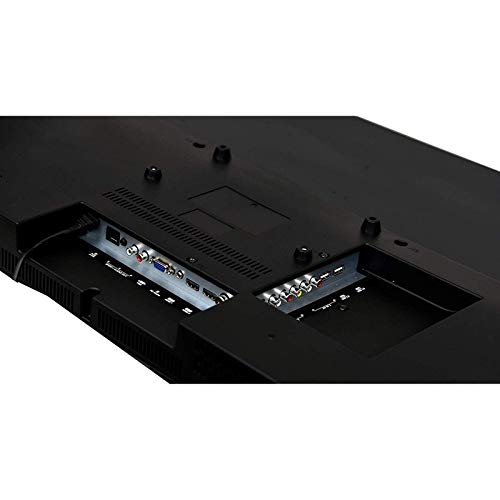
Image: Rear panel of the TV displaying HDMI, USB, and VGA ports for connecting external devices.
Instruccions de funcionament
1. First Time Setup and Initial Power On
- Premeu el botó Poder botó del comandament a distància o del televisor.
- Follow the on-screen instructions to select your language, country, and connect to a Wi-Fi network.
- Complete the initial Android TV setup, including signing in with your Google account for full smart TV functionality.

Image: The TV displaying its smart interface with various application shortcuts.
2. Funcions bàsiques del televisor
- Encès/apagat: Feu servir el botó d'engegada del comandament a distància o del televisor.
- Control de volum: Utilitza el VOL +/- botons del comandament a distància.
- Selecció de canals: Utilitza el CH +/- buttons or number pad on the remote.
- Font d'entrada: Premeu el botó Font or Entrada button on the remote to switch between HDMI, USB, VGA, and TV inputs.
- Navegació del menú: Feu servir les tecles de fletxa i OK botó per navegar pels menús.
3. Smart TV Features (Android OS)
Your Crown Smart TV runs on the Android operating system, providing access to a wide range of applications and features:
- Accés a l'aplicació: Navigate to the home screen to access pre-installed apps like YouTube, or download new apps from the Google Play Store.
- Connectivitat a Internet: Connect to your home Wi-Fi network for online streaming and browsing.
- Bluetooth: The TV supports Bluetooth technology for connecting compatible wireless devices.
Manteniment i cura
- Neteja de la pantalla: Netegeu suaument la pantalla amb un drap suau i sense borrissol. Per a marques difícils, netegeu lleugerament.ampNetegeu el drap amb aigua o un netejador de pantalles especialitzat. No ruixeu líquid directament sobre la pantalla.
- Neteja de l'armari: Feu servir un drap suau i sec per netejar el moble del televisor. Eviteu utilitzar productes de neteja o dissolvents abrasius.
- Ventilació: Assegureu-vos que les obertures de ventilació del televisor no estiguin bloquejades per evitar el sobreescalfament.
- Cable d'alimentació: Regularly check the power cord for any damage. If damaged, contact customer support for replacement.
- Desendollament: Desendolleu el televisor de la presa de corrent durant tempestes o quan no el fareu servir durant períodes prolongats.
Guia de resolució de problemes
| Problema | Causa possible | Solució |
|---|---|---|
| Sense poder | Cable d'alimentació no connectat; presa de corrent no funciona | Ensure power cord is securely plugged in; Test the outlet with another device. |
| No hi ha imatge, però hi ha so | Incorrect input source selected; External device not connected properly | Premeu el botó Font button to select the correct input; Check HDMI/VGA cable connections. |
| No hi ha so, però hi ha imatge | Volume is muted or too low; Audio cables not connected; External audio system issue | Increase volume; Check if mute is active; Ensure audio cables are connected correctly; If using external audio, check its settings. |
| El comandament a distància no funciona | Les piles estan gastades o mal inserides; Obstrucció entre el comandament a distància i el televisor | Replace batteries; Ensure correct polarity; Remove any obstructions; Point remote directly at the TV's IR sensor. |
| Smart TV apps not loading or slow | Poor Wi-Fi connection; App cache issues; Outdated software | Check Wi-Fi signal strength; Restart router; Clear app cache in TV settings; Check for system software updates. |
If the problem persists after trying these solutions, please contact Crown customer support.
Especificacions tècniques
| Marca | Crown (Generic) |
| Nom del model | 24DJ |
| Número de model | Crown-SmartTv-32-inch |
| Mida de la pantalla | 32 polzades |
| Tecnologia de visualització | LED |
| Resolució | HD Ready (1366 x 768 píxels) |
| Freqüència d'actualització | 60 Hz |
| Viewangle ing | 178 graus |
| Sistema operatiu | Android |
| Sortida d'àudio | 150 watts |
| Formats d'àudio compatibles | MP3, WAV, MKA |
| Connectivitat | 2 HDMI, 2 USB, 1 VGA |
| Suport Bluetooth | Sí |
| Dimensions del producte (LxWxH) | 7 x 55.5 x 33 centímetres |
| Pes de l'article | 4 kg |
| Tipus de muntatge | Suport de paret, suport de taula |
| Característiques especials | Flat Panel, Dolby Audio, 178-degree viewing angle, dot noise reduction, A+ grade panel, reduced motion blur, enhanced skin tone, real colors, moisture resistant and dust resistant. |
Garantia i Suport
Your Crown 32-inch HD Ready Smart TV comes with a 1 any de garantia des de la data de compra. Consulteu la targeta de garantia inclosa per conèixer els termes i condicions detallats.
For technical assistance, troubleshooting beyond this manual, or warranty claims, please contact Crown customer support. Keep your purchase receipt and warranty card handy when contacting support.
Contact information for support is typically found on the warranty card or the manufacturer's official weblloc.


