Dell KB216 Wired USB QWERTY Keyboard Instruction Manual
Model: KB216 | Brand: Dell
Introducció
This manual provides essential information for setting up, operating, and maintaining your Dell KB216 Wired USB QWERTY Keyboard. Designed for comfort and durability, this full-size keyboard is a reliable input solution for both home and office environments.
1. Configuració
1.1 Connexió del teclat
The Dell KB216 keyboard features a simple plug-and-play design, requiring no additional software installation. To connect your keyboard:
Locate an available USB-A port on your computer (desktop or laptop).
Plug the USB connector from the keyboard cable into the USB-A port.
The operating system will automatically detect and install the necessary drivers. Your keyboard is now ready for use.
1.2 Compatibilitat
This keyboard is compatible with both Windows and Mac operating systems, offering versatile use across different computing platforms.
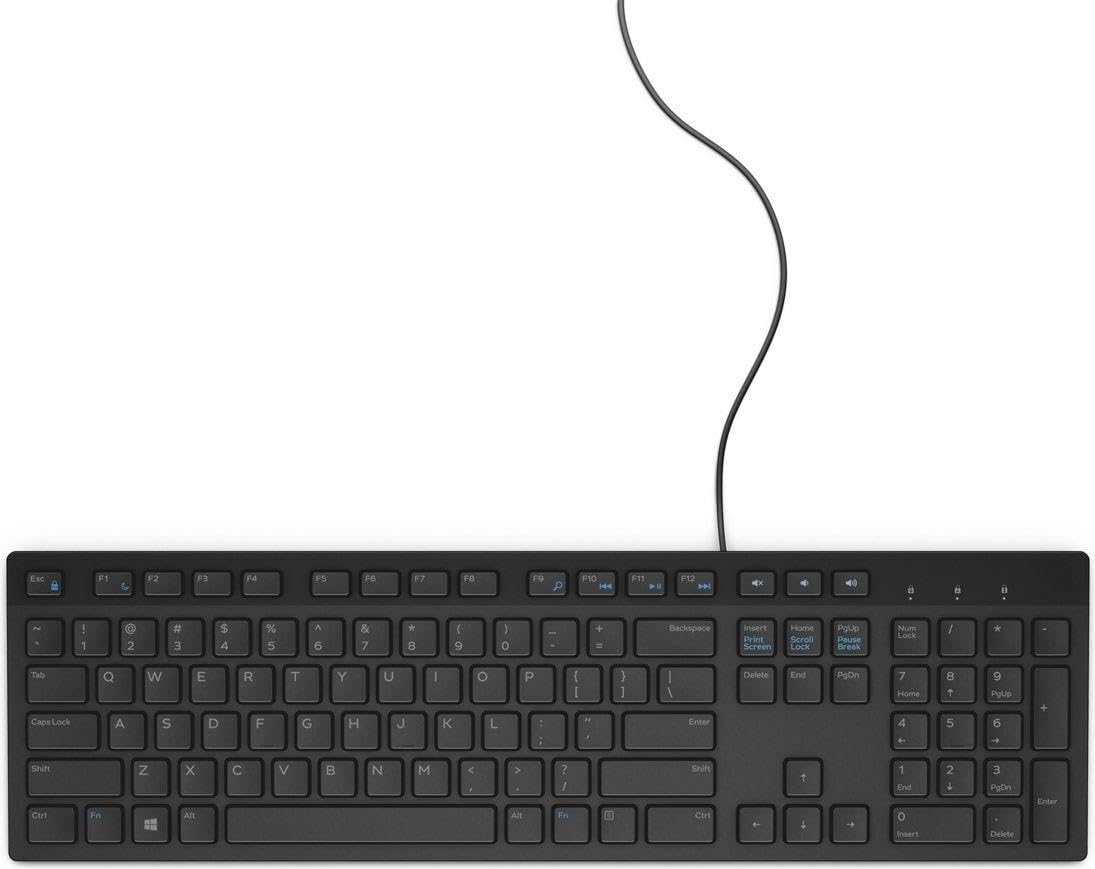
Figure 1: Dell KB216 Wired USB QWERTY Keyboard, showcasing its full layout and wired USB connection.
2. Funcionament del teclat
2.1 Key Layout and Typing Experience
The Dell KB216 features a full-size QWERTY layout with a dedicated number pad, providing a complete typing solution. The keys are designed to be quiet and low-profile, ensuring a smooth and comfortable typing experience suitable for both casual use and extended work sessions.
2.2 Media Control Keys
The keyboard includes dedicated media control keys for convenient access to audio and video playback functions. These keys allow you to quickly adjust volume, play, pause, and skip tracks without interrupting your workflow.
Pujar/Baixar volum/Silenciar: Control your system's audio output.
Reproduir/pausa: Start or stop media playback.
Pista anterior/següent: Navigate through your media playlist.
2.3 Num Lock Indicator
An indicator light for Num Lock is located on the top right of the keyboard, providing visual confirmation of its activation status.
3. Manteniment
To ensure the longevity and optimal performance of your Dell KB216 keyboard, follow these simple maintenance guidelines:
Neteja: Regularly wipe the keyboard surface with a soft, damp cloth. For deeper cleaning, use compressed air to remove dust and debris from between the keys. Avoid using harsh chemicals or abrasive cleaners.
Vessaments: In case of a liquid spill, immediately unplug the keyboard from your computer. Turn it upside down to drain any liquid and allow it to dry completely before reconnecting.
Emmagatzematge: Quan no l'utilitzeu durant períodes prolongats, guardeu el teclat en un lloc net i sec, allunyat de temperatures extremes.
4. Solució De Problemes
If you encounter any issues with your Dell KB216 keyboard, refer to the following common troubleshooting steps:
El teclat no respon:
Assegureu-vos que el connector USB estigui ben connectat a un port USB que funcioni de l'ordinador.
Try plugging the keyboard into a different USB port or a different computer to rule out port or system issues.
Reinicieu l'ordinador.
Tecles específiques que no funcionen:
Check for any physical obstructions or debris under the affected key.
Premeu suaument la tecla diverses vegades per desprendre les partícules enganxades.
Num Lock Not Working:
Press the "Num Lock" key located above the number pad to toggle its function. Check the indicator light.
If the problem persists after trying these steps, please contact Dell customer support for further assistance.
5. Especificacions
Marca
Dell
Número de model
KB216 (7239273000)
Tecnologia de connectivitat
USB Cable, USB-A (Wired)
Descripció del teclat
QWERTY, Full-Size (100%)
Color
Negre
Dispositius compatibles
Escriptori, ordinador portàtil
Estil
Modern
Components inclosos
Cable USB
Font d'alimentació
Elèctric amb cable
Tipus de canvi
Membrana
Orientació de la mà
Ambidextre
Data de primera disponibilitat
11 d'agost de 2020
6. Garantia i Suport
Your Dell KB216 keyboard is covered by Dell's standard manufacturer warranty. For detailed warranty information, product registration, or technical support, please visit the official Dell support weblloc web o poseu-vos en contacte amb el servei d'atenció al client. Conserveu el rebut de compra per a reclamacions de garantia.
Per obtenir recursos addicionals i informació sobre el producte, podeu visitar la Dell Store on Amazon.
Dell Full-Size Wireless Mouse MS300 User Guide User guide for the Dell Full-Size Wireless Mouse MS300, detailing setup, features, specifications, troubleshooting, and warranty information. Learn to effectively connect and use this wireless peripheral with this comprehensive manual.
Dell MS3220 Laser Wired Mouse User's Guide Comprehensive user's guide for the Dell MS3220 Laser Wired Mouse, covering setup, features, specifications, troubleshooting, and warranty information. Learn how to connect, configure, and maintain your Dell mouse.