1. Introducció
This manual provides detailed instructions for the installation, operation, and maintenance of your DDPAI Mola N3 GPS Front Dash Cam. Please read this manual thoroughly before using the device to ensure proper functionality and safety. The DDPAI Mola N3 is designed to record high-quality video footage of your journeys, offering features such as GPS logging, 24-hour parking mode, and Wi-Fi connectivity for easy access via a smartphone application.
2. Què hi ha a la caixa
Verifiqueu que tots els elements que s'enumeren a continuació s'inclouen al vostre paquet:
- Targeta de memòria
- Manual d'usuari
- Cable
- Ventosa

3. Configuració
3.1 Instal·lació física
For optimal recording, install the dash cam on your vehicle's windshield, ideally behind the rearview mirror to ensure a clear view of the road without obstructing your driving vision. Ensure the lens is clean and free from obstructions.

3.2 Instal·lació de l'aplicació i connexió Wi-Fi
The DDPAI app is essential for managing your dash cam, viewing footage, and adjusting settings. Follow these steps to install the app and connect to your device:
- Download the DDPAI App: Cerca "DDPAI" in your smartphone's app store (Google Play Store for Android or Apple App Store for iOS) and install it.
- Ensure necessary permissions are granted for the app, including location and local network access.
- Open the DDPAI App and select your device type (e.g., Screen-less Dash Cam).
- Turn on your phone's Wi-Fi and search for the dash cam's hotspot (usually named DDPAI_XXXX).
- Connect to the dash cam's Wi-Fi network. The default password is 1234567890.
3.3 Hardwire Kit Installation (Optional)
For continuous 24-hour parking monitoring, a hardwire kit is required. This kit connects the dash cam directly to your car's fuse box, providing constant power even when the vehicle is turned off. Ensure the car is stalled before beginning installation.
Key steps for hardwire kit installation:
- Locate your car's fuse box (typically under the dashboard or in the engine bay).
- Remove the fuse box cover.
- Identify the ACC (Accessory) and VCC (Constant Power) fuse positions using a multimeter. ACC provides power only when the car is on, while VCC provides constant power.
- Select the correct fuse tap size for your car's original fuses.
- Insert the original car fuse into the appropriate slot on the fuse tap, and the new DDPAI fuse into the other slot.
- Connect the red wire of the hardwire kit to the ACC fuse slot and the yellow wire to the VCC fuse slot.
- Connect the black ground wire to a metal screw on the car's chassis.
- Route the hardwire cable neatly along the car's interior edges using a wire trim tool to conceal it.
- Connect the Type-C cable end to the dash cam.
4. Funcionament de la càmera del salpicader
4.1 Enregistrament automàtic
Once powered on, the DDPAI Mola N3 dash cam automatically begins recording. It features loop recording, which means it continuously records and overwrites the oldest footage when the memory card is full. Important footage can be protected from being overwritten.
4.2 G-Sensor and Emergency Recording
The built-in G-Sensor detects sudden movements or collisions. In the event of an impact, the dash cam automatically locks the current video segment, preventing it from being overwritten by loop recording. These emergency videos are stored in a separate folder.
4.3 App Features: Live Preview, Reproducció i Descàrrega
The DDPAI app allows you to interact with your dash cam in real-time and manage recorded footage:
- Pre Liveview: View a real-time feed from your dash cam on your smartphone. This is useful for adjusting the camera angle during installation.
- Reproducció: Access recorded videos directly from the dash cam's memory card. You can scroll through the timeline to find specific moments. G-Sensor triggered events are highlighted on the timeline.
- Descarrega: Select and download video clips to your smartphone's local album. This allows for easy sharing or backup without removing the SD card.
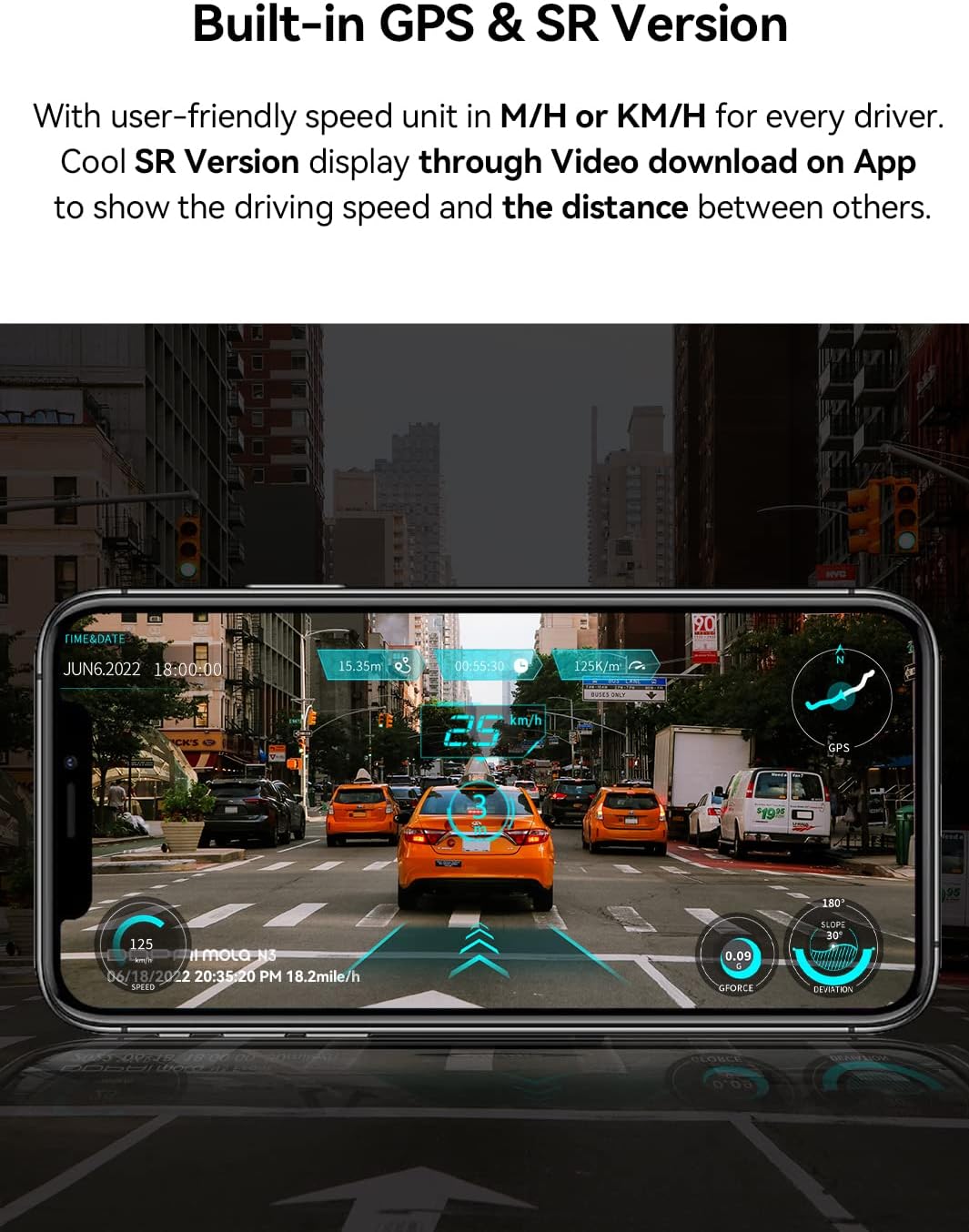
- SR Virtual Vision: For GPS-enabled models, the app can overlay driving data (speed, distance) onto your video footage, creating a more immersive viewexperiència.
4.4 Configuració de l'aplicació
You can customize various dash cam settings through the DDPAI app:
- Resolució de gravació: Adjust the video resolution (e.g., 1600P, 2K). Higher resolutions offer better detail but consume more memory and take longer to download.
- Sensibilitat del sensor G: Modify the sensitivity of the G-Sensor. If the camera is triggering emergency recordings too often or not enough, adjust this setting.
- Supervisió del pàrquing: If using a hardwire kit, configure parking monitoring modes (e.g., time-lapse, collision detection, motion detection).
- Unitat de mesura: Change speed display between miles per hour (mph) or kilometers per hour (km/h).
- Actualitzacions de firmware: Check for and install the latest firmware updates for improved performance and new features.
5. Manteniment
5.1 Gestió de targetes SD
Regularly format the memory card (at least once a month) through the DDPAI app to ensure stable recording performance and prevent data corruption. Use a high-quality Class 10 or U3 microSD card from a reputable brand.
5.2 Neteja
Wipe the dash cam lens periodically with a soft, lint-free cloth to ensure clear video quality. Avoid using abrasive cleaners or solvents that could damage the lens or casing.
5.3 actualitzacions de microprogramari
Check for firmware updates regularly via the DDPAI app. Updates often include bug fixes, performance improvements, and new features. Follow the app's instructions carefully during the update process.
6. Solució De Problemes
If you encounter issues with your DDPAI Mola N3 Dash Cam, refer to the solutions below. For further assistance, contact DDPAI customer support.
| Problema | Causa possible | Solució |
|---|---|---|
| La càmera no s'encén. | Loose power connection, car not started, reversed ACC/VCC wiring (for hardwire kit). | Ensure car starts normally. Check that the power cable is securely plugged into the dash cam and the car's power source. If using a hardwire kit, verify ACC and VCC connections are correct and tightly inserted. |
| La connexió Wi-Fi falla. | Incorrect password, phone too far from camera, app permissions. | Confirm the Wi-Fi password (default: 1234567890). Keep your phone within 2 meters of the device. Check that the DDPAI app has local network and location permissions enabled. |
| Vídeo footage és borrós o poc clar. | Dirty lens, protective film on lens, improper focus. | Clean the camera lens with a soft cloth. Remove any protective film from the lens. Ensure the camera is securely mounted and not vibrating. |
| El sensor G és massa sensible/no prou sensible. | La configuració de sensibilitat del sensor G és massa alta/baixa. | Adjust the G-Sensor sensitivity in the DDPAI app settings. |
| Parking monitoring not working. | Hardwire kit not installed, incorrect settings, insufficient power. | Ensure the hardwire kit is correctly installed and connected to constant power (VCC). Verify parking monitoring settings in the app. |
| Error de targeta SD. | Targeta corrupta, targeta incompatible, targeta plena. | Format the SD card via the app. If the issue persists, try a different high-quality Class 10 or U3 microSD card. |
7. Especificacions
| Característica | Detall |
|---|---|
| Nom del model | N3 |
| Pes de l'article | 3.6 unces |
| Dimensions del producte | 1.69 x 4.33 x 2.2 polzades |
| Número de model de l'article | DDPAI-N3 |
| Bateries | 1 AAA batteries required (for internal clock/settings retention) |
| Tipus de visualització | LCD (via app) |
| Reproducció multimèdia compatible | Wi-Fi (802.11a/b/g/n) |
| Tecnologia de connectivitat | Wi-Fi, USB |
| Característica especial | Night Vision, Built-In GPS |
| Resolució de captura de vídeo | 1600p (2K) |
| Tipus de muntatge | Muntatge del parabrisa |
| Fabricant | DDPAI Technology Limited |
| Primera data disponible | 19 d'agost de 2020 |
8. Garantia i Suport
The DDPAI Mola N3 GPS Front Dash Cam comes with a Fully 2-Year Warranty. For warranty claims, technical support, or any inquiries not covered in this manual, please refer to the contact information provided on the official DDPAI website or through the DDPAI app's feedback section.


