Introducció
The SteelSeries Rival 3 Wireless Gaming Mouse is engineered for performance and versatility. It features Quantum 2.0 Dual Wireless technology, offering ultra-low latency connectivity via both 2.4 GHz and Bluetooth 5.0. Designed for power efficiency, this mouse delivers over 400 hours of battery life. Equipped with an 18,000 CPI TrueMove Air Optical Sensor, on-board memory, and customizable RGB notifications, it caters to diverse user needs. Its construction utilizes hyper-durable materials and 60 million click mechanical switches, ensuring long-lasting performance and reliability.
Contingut del paquet
- Ratolí de joc sense fils SteelSeries Rival 3
- Dongle sense fil USB
- 2x piles AAA
Producte acabatview
Familiarize yourself with the components of your SteelSeries Rival 3 Wireless Gaming Mouse.
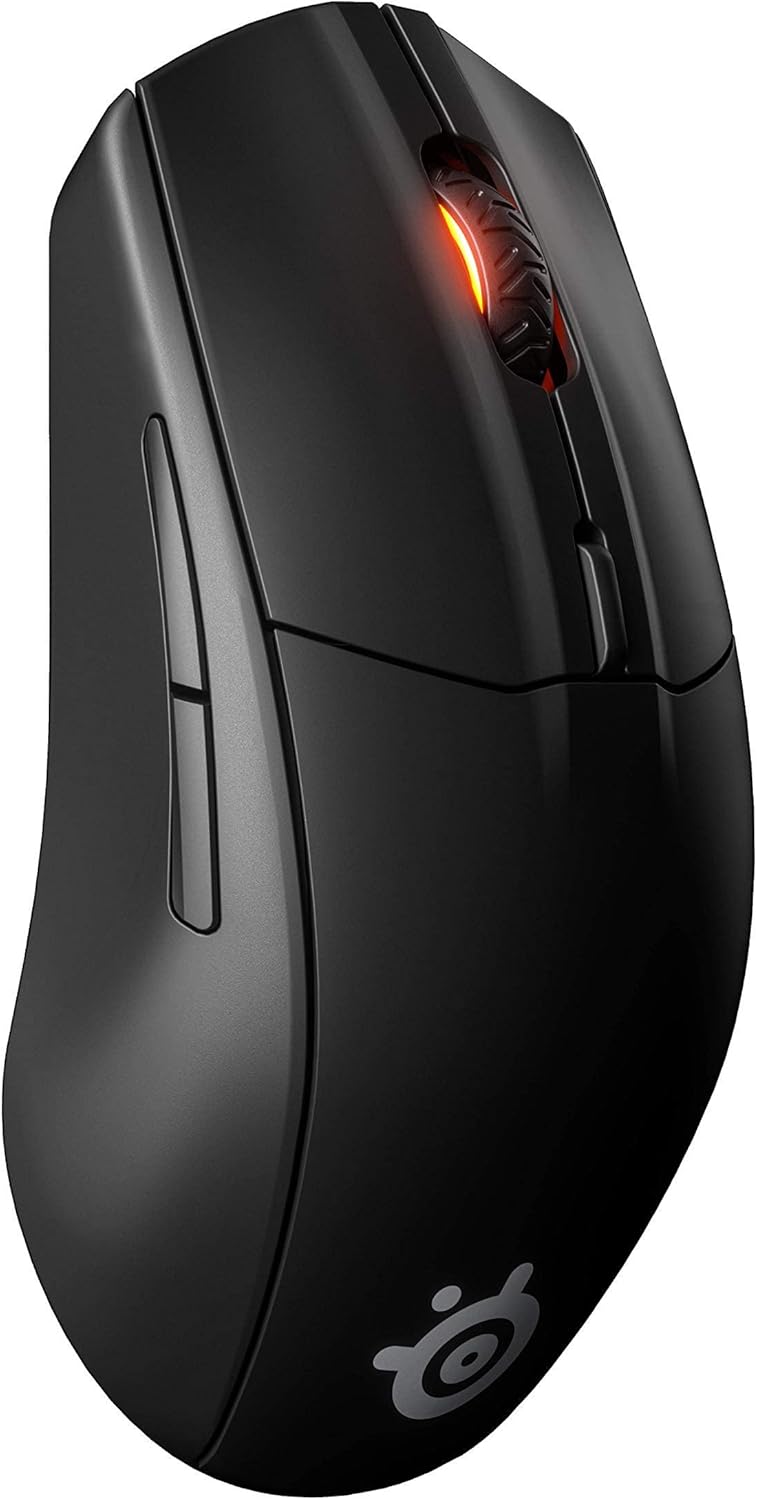
Figura 1: Part superior frontal view of the SteelSeries Rival 3 Wireless Gaming Mouse. This image displays the overall ergonomic design, the left and right click buttons, the scroll wheel with RGB lighting, and the CPI adjustment button located behind the scroll wheel.

Figura 2: Interna view of the SteelSeries Rival 3 Wireless Gaming Mouse with the top cover removed. This reveals the two AAA battery compartments and the dedicated storage slot for the USB wireless dongle, facilitating easy transport and setup.

Figura 3: Underside of the SteelSeries Rival 3 Wireless Gaming Mouse. Visible components include the TrueMove Air optical sensor, the power switch with 'OFF', 'Bluetooth', and '2.4G' modes, and the PTFE glide feet for smooth movement.
Configuració
1. Instal·lació de la bateria
- Gently remove the top cover of the mouse by lifting it from the rear.
- Insert the two included AAA batteries into the designated compartments, ensuring correct polarity (+/-). Refer to Figure 2.
- Replace the top cover, ensuring it clicks securely into place.
2. Connectar el ratolí
2.1. 2.4 GHz Wireless Connection (Recommended for Gaming)
- Locate the USB wireless dongle stored inside the mouse (refer to Figure 2).
- Connecteu el dongle sense fil USB a un port USB disponible de l'ordinador.
- On the underside of the mouse, slide the power/connectivity switch to the '2.4G' position (refer to Figure 3).
- El ratolí s'hauria de connectar automàticament a l'ordinador.
2.2. Connexió Bluetooth 5.0
- On the underside of the mouse, slide the power/connectivity switch to the 'Bluetooth' position (refer to Figure 3).
- A l'ordinador o dispositiu, navega fins a la configuració de Bluetooth i activa el Bluetooth.
- Cerca available devices and select 'Rival 3 Wireless' to pair.
- Seguiu les indicacions de la pantalla per completar el procés de vinculació.
Instruccions de funcionament
1. Ajust de DPI
The Rival 3 Wireless features an 18,000 CPI TrueMove Air Optical Sensor. You can adjust the mouse sensitivity (DPI/CPI) on-the-fly using the dedicated CPI button located behind the scroll wheel (refer to Figure 1). Pressing this button cycles through pre-set sensitivity levels. These levels can be customized further using the SteelSeries Engine software.
2. Customizing Settings (SteelSeries Engine)
For advanced customization, including button remapping, RGB lighting effects, and precise CPI adjustments, download and install the SteelSeries Engine software from the official SteelSeries website. This software allows you to personalize your mouse settings to suit your preferences and gaming style.
Manteniment
1. Neteja
Per mantenir un rendiment òptim, netegeu el ratolí regularment. Feu servir un drap suau i sec per netejar l'exterior. Per al sensor òptic, feu servir un bastonet de cotó suaument humit.ampened with isopropyl alcohol, ensuring no liquid enters the mouse's internal components.
2. Substitució de la bateria
The Rival 3 Wireless uses two AAA batteries. When the battery life indicator (often visible through the scroll wheel's RGB lighting or via SteelSeries Engine software) suggests low power, replace both batteries with new AAA alkaline or rechargeable batteries. Refer to the battery installation steps in the Setup section.
Resolució de problemes
Problemes comuns i solucions
- El ratolí no respon:
- Ensure the mouse is powered on and the connectivity switch is set to the correct mode (2.4G or Bluetooth).
- Comproveu els nivells de la bateria i substituïu-la si cal.
- For 2.4 GHz, ensure the USB dongle is securely plugged into a working USB port. Try a different USB port.
- For Bluetooth, ensure Bluetooth is enabled on your device and the mouse is paired. Try unpairing and re-pairing.
- Connexió intermitent o retard:
- Ensure the mouse is within range of the USB dongle or Bluetooth device.
- Minimitzar les interferències d'altres dispositius sense fil (per exemple, encaminadors Wi-Fi, telèfons sense fil).
- Update mouse firmware using SteelSeries Engine software.
- Scroll wheel issues:
- Netegeu el voltant de la roda de desplaçament per eliminar la pols o les restes.
- Assegureu-vos que el programari SteelSeries Engine estigui actualitzat.
- Excessive battery drain:
- Reduce RGB lighting brightness or disable it via SteelSeries Engine.
- Ensure the mouse is switched off when not in use.
- Utilitzeu piles alcalines o recarregables d'alta qualitat.
Especificacions

Figura 4: Dimensions of the SteelSeries Rival 3 Wireless Gaming Mouse, showing a length of 4.75 inches and a width of 2.64 inches.
| Característica | Detall |
|---|---|
| Marca | SteelSeries |
| Model | Rival 3 Wireless (62521) |
| Connectivitat | Quantum 2.0 Dual Wireless (2.4 GHz, Bluetooth 5.0) |
| Sensor | Sensor òptic d'aire TrueMove |
| CPI/DPI Range | 100-18,000 CPI (adjustable in 100 CPI increments) |
| IPS | 400 IPS |
| Acceleració | 40G |
| Tipus de canvi | 60 Million Click Mechanical Switches |
| Durada de la bateria | 400+ hours (with 2x AAA batteries) |
| Piles necessàries | 2x AAA (included) |
| Pes | 3.84 unces (109 g) |
| Dimensions (LxWxH) | 4.75 x 2.64 x 1.5 polzades (120.6 x 67 x 38.1 mm) |
| Compatibilitat de sistemes operatius | Windows 7 or later, macOS 10.13 or later, iOS 13.7 or later, Chrome OS, PlayStation 4/5, Xbox One/Series S/X (USB port required for dongle) |
Garantia i Suport
1. Informació de la garantia
The SteelSeries Rival 3 Wireless Gaming Mouse comes with a 1-Year Limited Warranty. This warranty covers defects in materials and workmanship under normal use. For specific terms and conditions, please refer to the official SteelSeries warranty policy available on their weblloc.
2. Atenció al client
For technical assistance, troubleshooting, or warranty claims, please visit the official SteelSeries support website. You can find FAQs, driver downloads, and contact information for their customer service team.


