Introducció
The RAINPOINT Sprinkler Timer WiFi Water Timer is a smart irrigation device designed to automate your garden watering system. This device allows for remote control via a smartphone application, voice commands, and offers intelligent watering features such as weather-based rain delay and soil moisture integration (with an optional sensor). This manual provides comprehensive instructions for setting up, operating, maintaining, and troubleshooting your RAINPOINT WiFi Water Timer.

Figure 1: The RAINPOINT WiFi Sprinkler Timer, its accompanying WiFi Hub, and a smartphone displaying the control application interface.
Configuració
1. Instal·lació física
- Attach the Timer: Screw the RAINPOINT WiFi Water Timer onto your outdoor faucet. Ensure a tight, leak-free connection.
- Connecteu la mànega: Attach your garden hose to the outlet of the water timer.
- Instal·leu les bateries: Open the battery compartment on the timer and insert the required batteries (typically AA, refer to packaging for exact type and quantity).
2. WiFi Hub Setup and App Pairing
- Plug in the WiFi Hub: Insert the WiFi Hub into a standard electrical outlet indoors, within range of your home's 2.4GHz WiFi network and the water timer.
- Descarrega l'aplicació: Download the official RAINPOINT App from your smartphone's app store (iOS or Android).
- Crea un compte: Obriu l'aplicació i seguiu les instruccions que apareixen a la pantalla per crear un compte d'usuari nou o iniciar la sessió si ja en teniu un.
- Afegeix un dispositiu: In the app, select the option to add a new device. Follow the guided steps to connect the WiFi Hub to your 2.4GHz WiFi network. Note: The device only supports 2.4GHz WiFi. If you have a dual-band router, ensure the 2.4GHz band is enabled and distinct from the 5GHz band.
- Pair the Timer: Once the hub is connected, the app will guide you through pairing the water timer with the hub. Ensure the timer is powered on and within range of the hub.

Figure 2: Illustration of the RAINPOINT WiFi Sprinkler Timer system demonstrating stable wireless connection between the timer, WiFi hub, and an optional soil sensor for comprehensive garden management.
Instruccions de funcionament
1. App Interface and Programming
The RAINPOINT App features a simple and intuitive user interface (UI) for easy programming and control of your sprinkler timer.
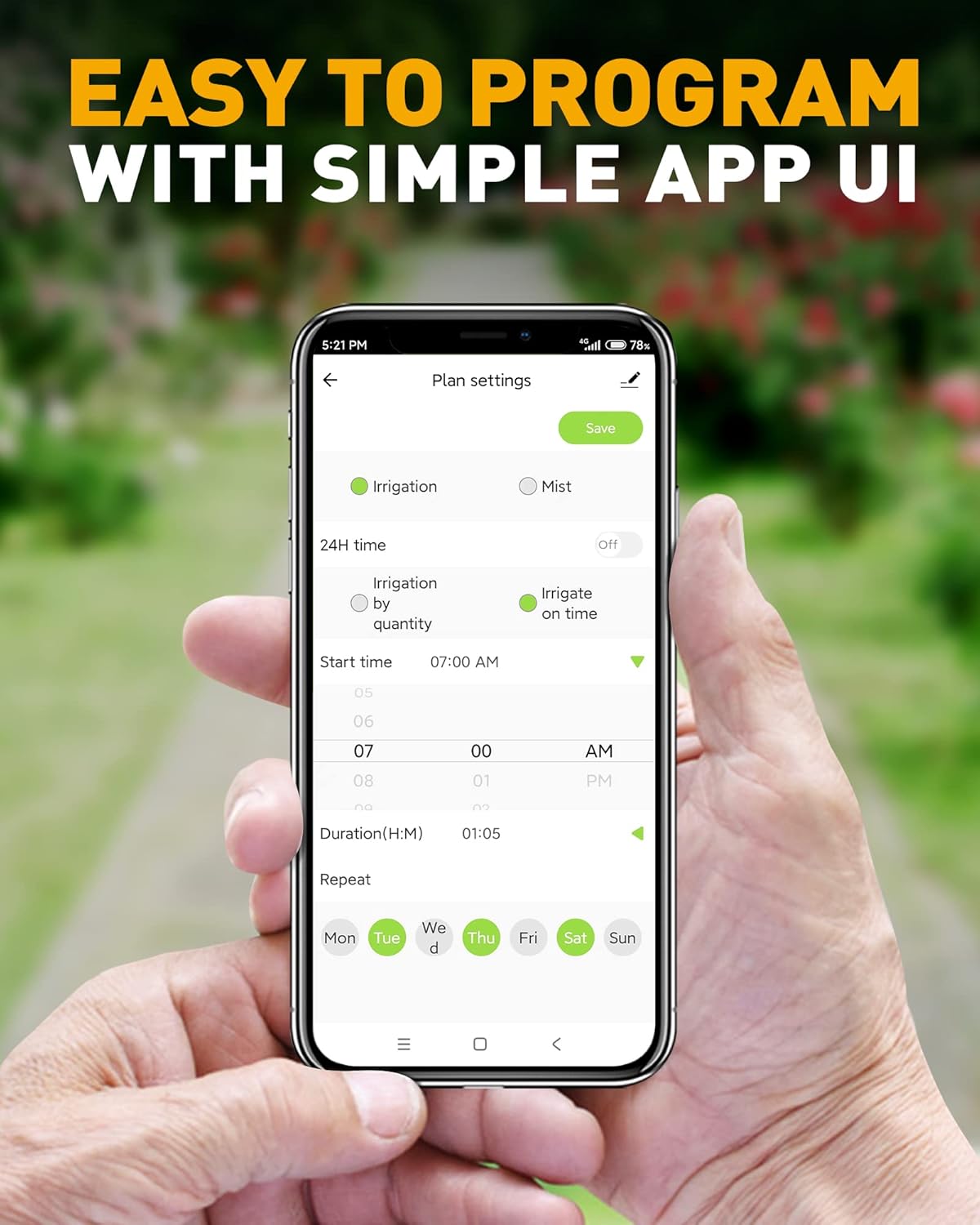
Figure 3: The RAINPOINT app's plan settings screen, illustrating how to easily program watering schedules with options for irrigation or mist mode, start time, duration, and repeat days.
2. Watering Modes
- Mode de reg: This mode provides continuous watering for a set duration. It is suitable for general lawn watering, filling pools, or watering flower beds. You can set the duration from 1 minute to 11 hours and 59 minutes.
- Mode de boira: Designed for misting systems, this mode operates in short bursts with adjustable intervals. It is ideal for misting, outdoor cooling, and dust reduction. You can set misting periods from 5 to 59 seconds and intervals from 1 second to 15 minutes and 59 seconds.
3. Programació de plans de reg
The timer supports up to 3 independent watering plans (Plan A, Plan B, Plan C), each with customizable start times, durations, and watering frequencies (Monday-Sunday).

Figura 4: Mésview of the flexible watering schedule options, including three distinct programs, two operational modes (Irrigation and Mist), and two methods for determining watering duration (by water volume or by time).
4. Funcions de reg intel·ligent
- Weather-based Auto Rain Delay: The timer can automatically delay watering for 24, 48, or 72 hours based on local weather forecasts, preventing unnecessary watering during rain.
- Soil Moisture Integration: When paired with an optional WiFi soil sensor (not included), the timer can adjust watering based on real-time soil moisture levels. It can delay watering if the soil is too wet and initiate watering if it's too dry, optimizing water usage and plant health.

Figure 5: The RAINPOINT WiFi Sprinkler Timer's ability to automatically delay watering based on detected weather conditions such as rain, snow, or cloudy skies, helping to conserve water.

Figure 6: The RAINPOINT WiFi Sprinkler Timer's smart feature to maintain optimal soil moisture by delaying watering when the soil is wet and replenishing when it is dry, preventing over or under-watering.
Video 1: Demonstrates the smart watering capabilities of the RAINPOINT WiFi Water Timer, including weather-based adjustments.
5. Control per veu
The 2nd Gen (2022) WiFi Water Timer supports voice control. To enable this feature, you will need to acquire the necessary voice skills through the Smart Life APP, allowing for hands-free operation of your watering system.
6. Reg manual
You can initiate temporary manual watering without altering your programmed schedules. This can be done directly from the timer button or through the app, typically for durations of 1 to 60 minutes.
7. Compartir en família
The RAINPOINT App allows for family sharing, enabling multiple users to manage and control the watering system from their respective devices. This feature simplifies joint management of your garden.
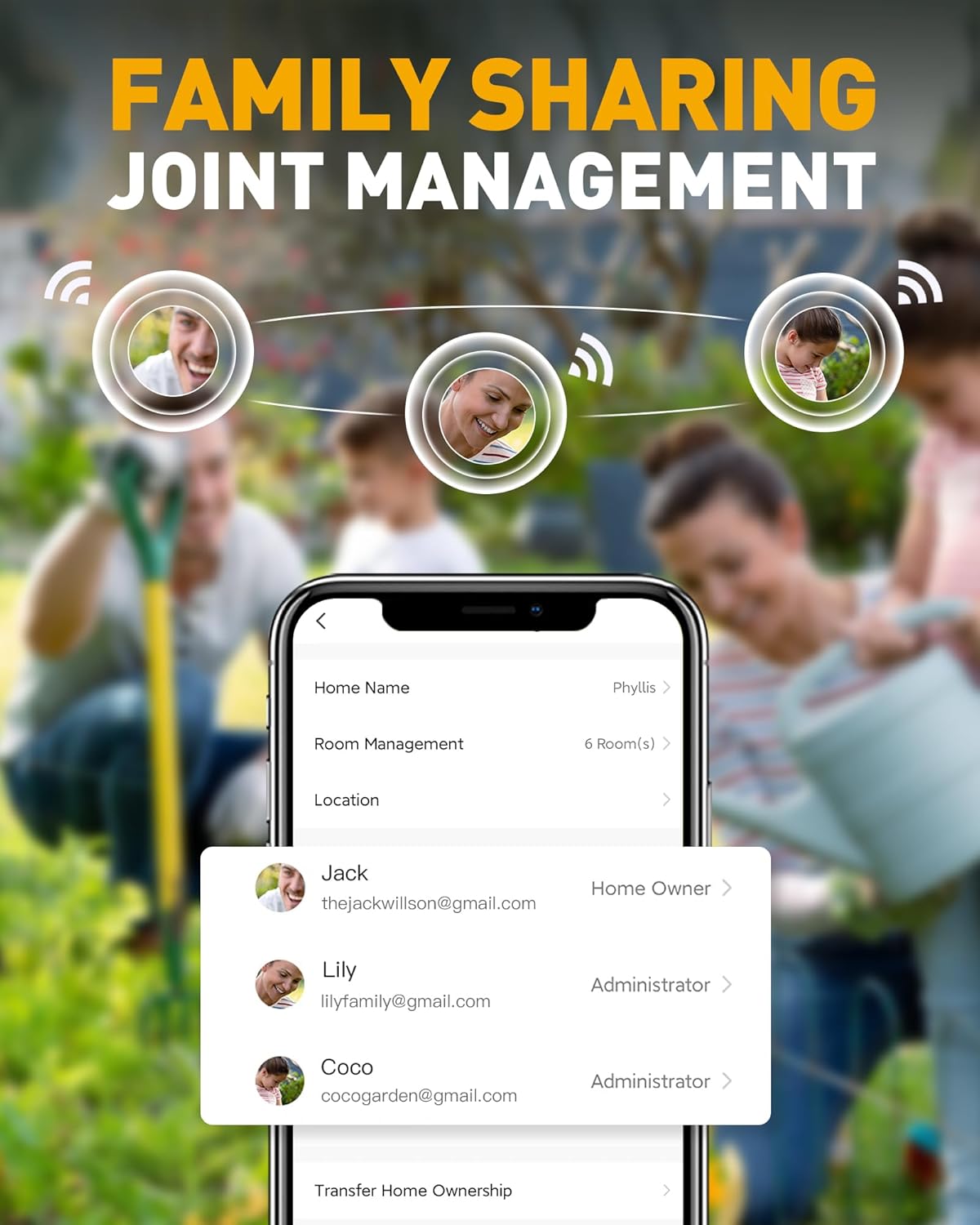
Figure 7: The family sharing interface within the RAINPOINT app, demonstrating how multiple users can be granted access and different management roles for the watering system.
Manteniment
1. Substitució de la bateria
Monitor the battery status via the RAINPOINT App. When the battery level is low, replace all batteries with new ones of the specified type to ensure continuous operation.
2. Neteja
Periodically check the filter washer located at the water inlet of the timer for debris. Remove and clean the filter as needed to prevent blockages and maintain optimal water flow.
3. Hivernació
Before the first frost, disconnect the water timer from the faucet and hose. Remove the batteries. Store the timer indoors in a dry, frost-free location to prevent damage from freezing temperatures.
Resolució de problemes
1. Problemes de connectivitat
- Timer Offline: Ensure the WiFi Hub is plugged in and connected to your 2.4GHz WiFi network. Verify the timer's batteries are not depleted.
- Cannot Connect to 2.4GHz WiFi: If your router is dual-band, ensure the 2.4GHz band is enabled and has a unique name. Move the hub closer to the router if signal strength is weak.
- Torna a emparellar: If the timer loses connection to the hub, follow the app's instructions to re-pair the devices.
Video 2: Instructions on how to reset the RAINPOINT WiFi Sprinkler Timer, which can resolve connectivity issues.
2. Water Flow Issues
- Sense flux d'aigua: Check if the faucet is fully open. Ensure the timer's schedule is active and not delayed by rain or soil moisture conditions.
- Baixa pressió d'aigua: Inspect the filter washer at the inlet for clogs and clean if necessary.
3. Timer Not Activating
- Check Schedule: Verify that your watering plans are correctly set up and enabled in the app.
- Nivell de bateria: Ensure the timer has sufficient battery power.
- Rain Delay Active: Confirm that the automatic rain delay or soil moisture-based delay is not currently active, preventing scheduled watering.
Especificacions
| Característica | Detall |
|---|---|
| Número de model | RP-TTV103WRF |
| Marca | PUNT DE LLUVIA |
| Material | Plàstic |
| Dimensions del producte | 6.1 "P x 3.27" W x 6.81" H |
| Pes de l'article | 8.8 unces |
| Nombre de configuracions | 12 |
| UPC | 850025185707 |
| Connectivitat | Només WiFi de 2.4 GHz |
Garantia i Suport
RAINPOINT is committed to providing excellent customer service. If you encounter any issues with your product, please contact our local service team in the United States for assistance.


