Introducció
This manual provides comprehensive instructions for setting up, operating, and maintaining your Macally Bluetooth Keyboard. Designed for multi-device compatibility, this wireless keyboard features a built-in stand, a rechargeable battery, and 78 keys for efficient typing across various devices including tablets, smartphones, and computers.

Image: The Macally Bluetooth Keyboard in white, with a tablet securely docked in its integrated stand, showcasinel seu disseny compacte i la seva funcionalitat.
Què hi ha a la caixa
Upon unboxing your Macally Bluetooth Keyboard, please ensure all the following items are present:
- Macally Bluetooth Keyboard
- Cable de càrrega USB
- Manual d'usuari (aquest document)
If any items are missing or damaged, please contact Macally customer support.
Característiques del producte
The Macally Bluetooth Keyboard is designed for versatility and convenience, offering several key features:
- Connectivitat multidispositiu: Seamlessly switch between up to 3 Bluetooth-enabled devices (e.g., tablet, smartphone, computer).
- Suport de dispositiu integrat: Features a built-in 10.5-inch slot to securely hold your smartphone or tablet.
- Compacte i portàtil: Small enough to fit into most bags, making it ideal for on-the-go use.
- Bateria recarregable: Equipat amb una bateria recarregable de 280 mAh per a un ús prolongat.
- Efficient Layout: Includes 78 quiet scissor-switch keys and 13 convenient shortcut/media keys for enhanced productivity.

Image: The keyboard demonstrating seamless Bluetooth connectivity with a 30ft wireless range, compatible with Apple, Windows, iOS, and Android operating systems.

Image: A visual representation of the keyboard's multi-device capability, showing it paired with a laptop, a desktop computer, and a smartphone simultaneously.

Image: The keyboard positioned on a desk, with both a tablet and a smartphone docked in its integrated 10.5-inch stand, highlighting its "setup anywhere" convenience.
Configuració
Carregant el teclat
Before first use, fully charge your Macally Bluetooth Keyboard. Connect the provided USB charging cable to the keyboard's charging port and the other end to a USB power source (e.g., computer USB port, USB wall adapter). The charging indicator light will show the charging status.

Image: The keyboard with its charging cable connected, illustrating the rechargeable 280mAh battery and the included charging cable.
Emparellament Bluetooth
Follow these steps to pair your keyboard with a device:
- Ensure the keyboard is charged and powered on. The power switch is located on the top right of the keyboard.
- On your device (tablet, smartphone, computer), enable Bluetooth.
- Manteniu premut el botó Fn tecla i una de les tecles del canal Bluetooth (B1, B2, o B3) simultaneously for a few seconds until the corresponding Bluetooth indicator light starts blinking rapidly. This indicates the keyboard is in pairing mode.
- On your device, search for "Macally Keyboard" or a similar name in the Bluetooth device list and select it to connect.
- Once connected, the indicator light will stop blinking and remain solid for a moment before turning off, indicating successful pairing.
To pair additional devices, repeat steps 3-5 using a different Bluetooth channel key (B1, B2, or B3).
Instruccions de funcionament
Canvi entre dispositius
To switch between paired devices, simply press the Fn tecla juntament amb la tecla del canal Bluetooth corresponent (B1, B2, o B3) for the desired device. The keyboard will quickly connect to the selected device.
Using Shortcut Keys
The keyboard features 13 dedicated shortcut/media keys for quick access to common functions. These keys are typically located on the top row (F1-F12 and an additional key). Functions may vary slightly depending on the operating system of your connected device.
Common shortcut functions include:
- Media playback controls (play/pause, next/previous track)
- Volume control (mute, volume up/down)
- Ajust de la brillantor de la pantalla
- Home screen/desktop access
- Funció de cerca
Refer to your device's operating system documentation for specific compatibility and functionality of these keys.

Imatge: Una imatge detallada view of the keyboard's layout, emphasizing its 78 quiet scissor-switch keys and the 13 dedicated shortcut/media keys for efficient use.
Manteniment
To ensure the longevity and optimal performance of your Macally Bluetooth Keyboard, follow these maintenance guidelines:
- Neteja: Feu servir un drap suau, sec i sense borrissol per netejar la superfície del teclat. Per a la brutícia persistent, netegeu lleugerament.ampNetegeu el drap amb aigua o un netejador suau i no abrasiu. Eviteu la humitat excessiva.
- Emmagatzematge: Quan no l'utilitzeu durant períodes prolongats, guardeu el teclat en un lloc fresc i sec, allunyat de la llum solar directa i de temperatures extremes.
- Cura de la bateria: To preserve battery life, avoid fully discharging the keyboard frequently. Recharge it when the low battery indicator appears. If storing for a long time, charge it to about 50% every few months.
- Eviteu els vessaments: Keep liquids away from the keyboard to prevent internal damage.
Resolució de problemes
If you encounter issues with your Macally Bluetooth Keyboard, try the following solutions:
| Problema | Possible solució |
|---|---|
| El teclat no s'encén. | Ensure the keyboard is charged. Connect it to a power source using the USB cable. |
| Unable to pair the keyboard. |
|
| El teclat es desconnecta sovint. |
|
| Les claus no responen. |
|
If these solutions do not resolve the issue, please contact Macally customer support for further assistance.
Especificacions
| Característica | Detall |
|---|---|
| Número de model | BTTABKEYBAT |
| Tecnologia de connectivitat | Bluetooth |
| Nombre de claus | 78 |
| Tipus de bateria | 1 bateria de ions de liti (inclosa) |
| Pes de l'article | 1.92 lliures |
| Dimensions del paquet | 13.98 x 7.91 x 2.48 polzades |
| Fabricant | Mace Group Inc / Macally Peripherals |
| Dispositius compatibles | PC, Tablet, Apple devices, Windows Desktop/Laptop, Surface, Chromebook, Smartphones, TVs (any device with Bluetooth) |
| Usos recomanats | Office, School, Everyday Use, Personal, Education, Business |
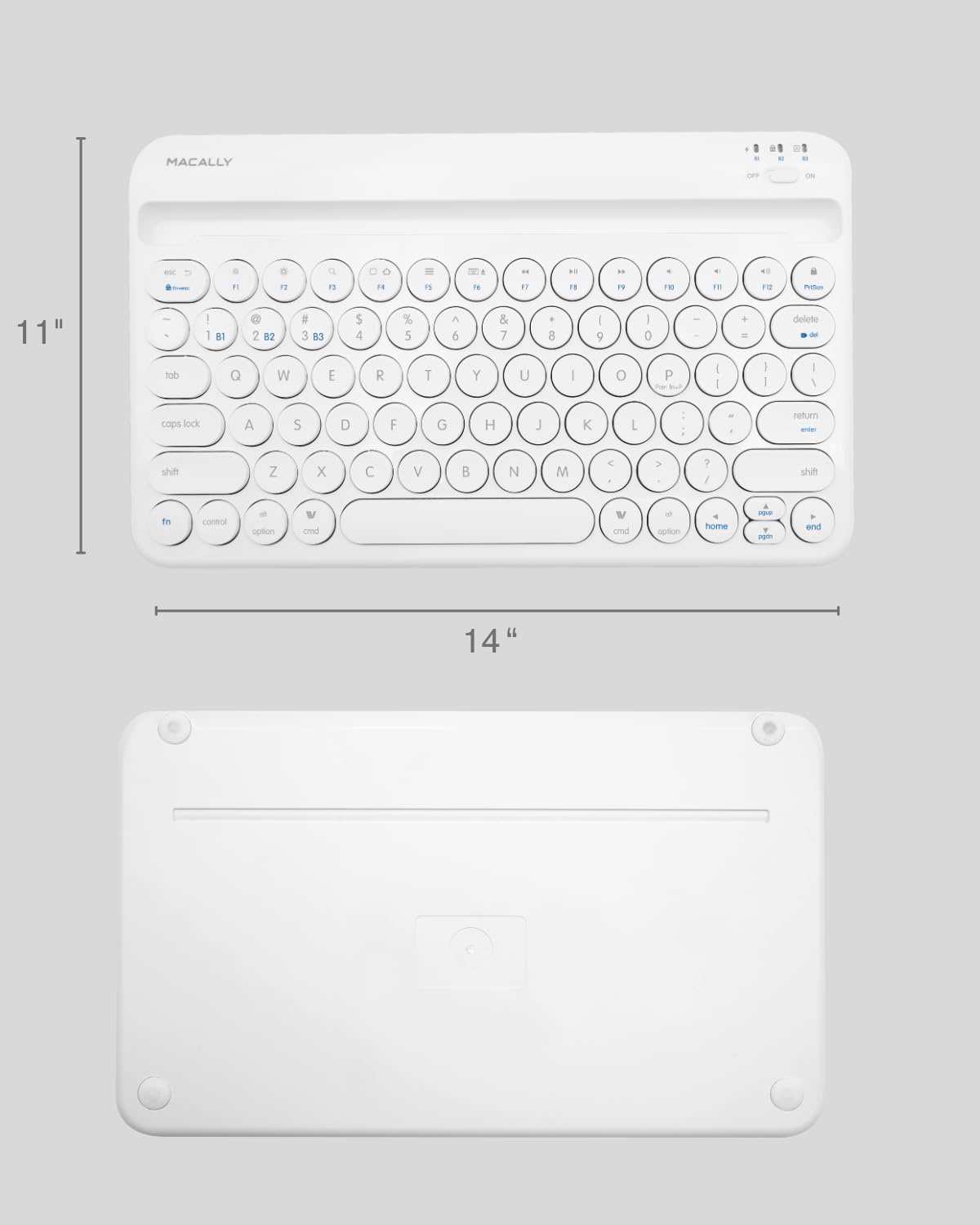
Image: The physical dimensions of the keyboard, measuring approximately 11 inches in width and 14 inches in length.

Image: The keyboard fitting easily into a backpack, demonstrating its compact size and suitability for travel and on-the-go use.
Garantia i Suport
Macally products are designed for quality and reliability. For information regarding product warranty, technical support, or service, please visit the official Macally weblloc web o poseu-vos en contacte amb el seu departament d'atenció al client. Conserveu el rebut de compra com a comprovant de compra per a reclamacions de garantia.
Podeu trobar més informació i suport a Botiga Macally a Amazon.


