Introducció
The NVIDIA SHIELD Remote is designed to enhance your SHIELD TV experience with advanced features for intuitive control. This manual provides comprehensive instructions for setting up, operating, and maintaining your remote.
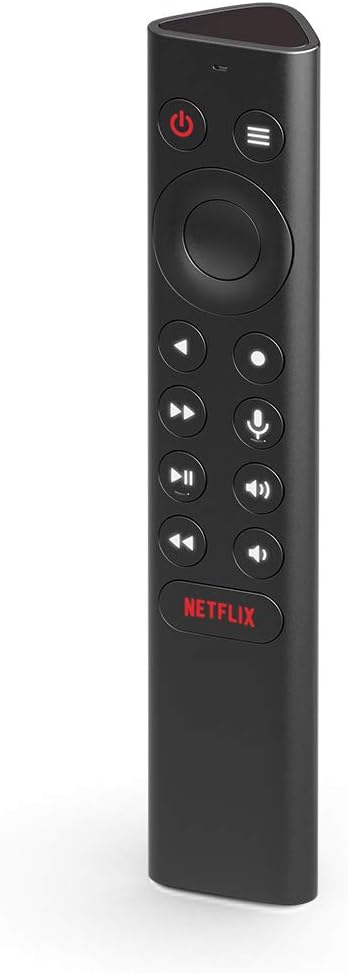
Davant view of the NVIDIA SHIELD Remote, showcasinel seu disseny elegant i la disposició dels botons.
Què s'inclou
Your NVIDIA SHIELD Remote package includes the following items:
- NVIDIA SHIELD Remote
- 2 AAA Batteries (pre-installed or included separately)

The retail packaging for the NVIDIA SHIELD Remote, indicating the product inside.

lateral view of the NVIDIA SHIELD Remote box, highlighting the "WHAT'S INSIDE" section.
Característiques
The NVIDIA SHIELD Remote offers a range of features designed for convenience and enhanced control:
- Cerca per veu: Integrated microphone for Google Assistant and voice control.
- Motion-Activated Backlit Buttons: Buttons illuminate automatically when the remote is picked up, ideal for low-light environments.
- Blaster IR: Control your home theater devices, including TV volume, power, and input source.
- Customizable Menu Button: A three-way user-customizable button for quick access to favorite apps, AI upscaling, mute, and more.
- Botons dedicats: Includes specific buttons for power, volume, fast-forward, rewind, and play/pause.
- Connectivitat Bluetooth: Connects wirelessly to your SHIELD TV, allowing control even when the device is out of sight.
- Remote Locator: Use the SHIELD remote app to locate a misplaced remote.
- Standard AAA Batteries: Uses easily replaceable AAA batteries.

Back of the NVIDIA SHIELD Remote box, detailing key features such as voice control, backlit buttons, and IR blaster.
Configuració
1. Instal·lació de la bateria
The NVIDIA SHIELD Remote requires two AAA batteries. These are typically included with your purchase.
- Localitza la tapa del compartiment de les piles a la part posterior del comandament a distància.
- Feu lliscar la tapa cap avall per obrir el compartiment.
- Introduïu dues piles AAA, assegurant-vos que els terminals positiu (+) i negatiu (-) s'alineïn correctament amb els indicadors de l'interior del compartiment.
- Feu lliscar la tapa del compartiment de la bateria fins que faci clic de manera segura.
2. Pairing with SHIELD TV
The remote connects to your SHIELD TV via Bluetooth. Ensure your SHIELD TV is powered on and connected to a display.
- On your SHIELD TV, navigate to Configuració.
- Seleccioneu Comandaments a distància i accessoris.
- Tria Afegeix un accessori.
- The SHIELD TV will begin searching for nearby Bluetooth devices.
- On the NVIDIA SHIELD Remote, press and hold the Seleccioneu button (center of the directional pad) and the Enrere button (left of the directional pad) simultaneously for approximately 5 seconds until the remote's LED indicator begins to flash.
- Once "NVIDIA SHIELD Remote" appears on your SHIELD TV screen, select it to complete the pairing process.
- If pairing issues occur, try resetting the remote by holding down the Enrere i Casa buttons while inserting the batteries, then re-attempt pairing.
3. IR Blaster Setup (Optional)
The IR blaster allows the SHIELD Remote to control your TV or AV receiver's power, volume, and input. This is configured through your SHIELD TV settings.
- On your SHIELD TV, go to Configuració.
- Seleccioneu Pantalla i so.
- Tria Control de potència or Control de volum (depending on what you want to configure).
- Follow the on-screen prompts to select your TV or AV receiver brand and test the IR functions.
Funcionament del comandament a distància
Familiaritzeu-vos amb els botons i les seves funcions:
- Botó d'encesa: Turns your SHIELD TV on or off.
- Coixinet direccional (D-Pad): Navega pels menús i selecciona elements.
- Botó de selecció: Confirma les seleccions.
- Botó enrere: Torna a la pantalla anterior.
- Botó d'inici: Returns to the SHIELD TV home screen.
- Botons de volum: Adjusts the volume of your SHIELD TV or connected IR device.
- Botó Reproduir/Pausa: Controla la reproducció de suports.
- Fast-Forward/Rewind Buttons: Skips forward or backward in media.
- Botó del micròfon: Activates Google Assistant for voice commands and search.
- Customizable Menu Button: Performs a user-defined action (see Customization section).
- Botó de Netflix: Launches the Netflix application directly.
Control de veu
Manteniu premut el botó Botó del micròfon to activate Google Assistant. Speak clearly into the remote to search for content, control smart home devices, get information, and more.
Personalització
The NVIDIA SHIELD Remote features a highly customizable menu button, allowing you to assign up to three different actions based on how you press it:
- Premsa única: Una pressió i alliberament ràpids.
- Doble premsa: Dues pulsacions ràpides seguides.
- Premsa llarga: Manteniu premut el botó.
To customize the menu button:
- On your SHIELD TV, go to Configuració.
- Seleccioneu Comandaments a distància i accessoris.
- Tria el teu Comandament SHIELD.
- Seleccioneu Customize Menu Button.
- From the options, assign desired actions for single, double, and long presses. Options include launching apps, enabling AI upscaling, muting sound, taking screenshots, and more.

An illustration of the customization options available for the SHIELD Remote, including launching apps, AI upscaling, and quick settings.
Manteniment
To ensure the longevity and optimal performance of your NVIDIA SHIELD Remote, follow these maintenance guidelines:
- Neteja: Use a soft, dry, lint-free cloth to clean the remote. Do not use liquid cleaners, aerosols, or abrasive solvents.
- Substitució de la bateria: Replace batteries when the remote's performance degrades or the SHIELD TV indicates low battery. Always use new AAA batteries.
- Emmagatzematge: Guardeu el comandament a distància en un lloc fresc i sec, allunyat de la llum solar directa i de temperatures extremes.
- Eviteu líquids: Do not expose the remote to water or other liquids.
- Manejar amb cura: Eviteu deixar caure el comandament a distància ni sotmetre'l a impactes forts.
Resolució de problemes
| Problema | Solució |
|---|---|
| El comandament a distància no respon. |
|
| Buttons not lighting up. |
|
| Les ordres de veu no funcionen. |
|
| IR control (TV/AVR volume/power) not working. |
|
| Remote locator not working. |
|
Especificacions
| Atribut | Detall |
|---|---|
| Número de model | 930-13700-2500-100 |
| Dimensions (L x A x A) | 6.5 x 1.57 x 1.57 polzades |
| Pes | 4.8 unces |
| Font d'alimentació | 2 piles AAA (incloses) |
| Connectivitat | Bluetooth, IR Blaster |
| Dispositius compatibles | NVIDIA SHIELD TV (2015/2017/2019 models) |
| Color | Negre |
| Fabricant | NVIDIA |
| País d'origen | Corea, República de |
Informació de la garantia
NVIDIA provides a limited warranty for the SHIELD Remote. For detailed information regarding warranty terms, conditions, and duration, please refer to the official NVIDIA website or the warranty card included with your product. You can typically find this information at nvidia.com/warranty.
Suport
For further assistance, technical support, or to access frequently asked questions, please visit the official NVIDIA SHIELD support page:
- NVIDIA SHIELD Support: nvidia.com/shield
- Fòrums en línia: Engage with the NVIDIA community for tips and solutions.
- Contacte amb l'assistència: Information for direct contact with NVIDIA customer service can be found on their support weblloc.


