1. Introducció
This manual provides detailed instructions for the IPEGA PG-SW023 Bluetooth Wireless Game Controller. This versatile controller is designed to enhance your gaming experience across multiple platforms, including N-S consoles, PlayStation 3 (PS3), Android devices, and personal computers running Windows 7, 8, or 10.
Please read this manual carefully before using the product to ensure proper operation and to maximize its features.
2. Característiques del producte
- Compatibilitat multiplataforma: Suitable for gaming on N-S consoles, PS3, Android devices, and PCs (Windows 7/8/10).
- Experiència de joc millorada: Supports vibration feedback and a six-axis gyroscope function for immersive gameplay and precise control.
- Customizable Macro Function: Rear buttons can be configured as common keys or combination keys for simplified actions.
- Continuous TURBO Function: Features a dedicated TURBO button for rapid-fire actions, compatible with N-S Pro gamepads.
- Disseny ergonòmic: Engineered for comfort during extended gaming sessions, fitting securely in the palm.

Image: The IPEGA PG-SW023 Wireless Game Controller highlighting its key features: two vibrating motors, six-axis design, high-sensitive buttons, and Turbo function.
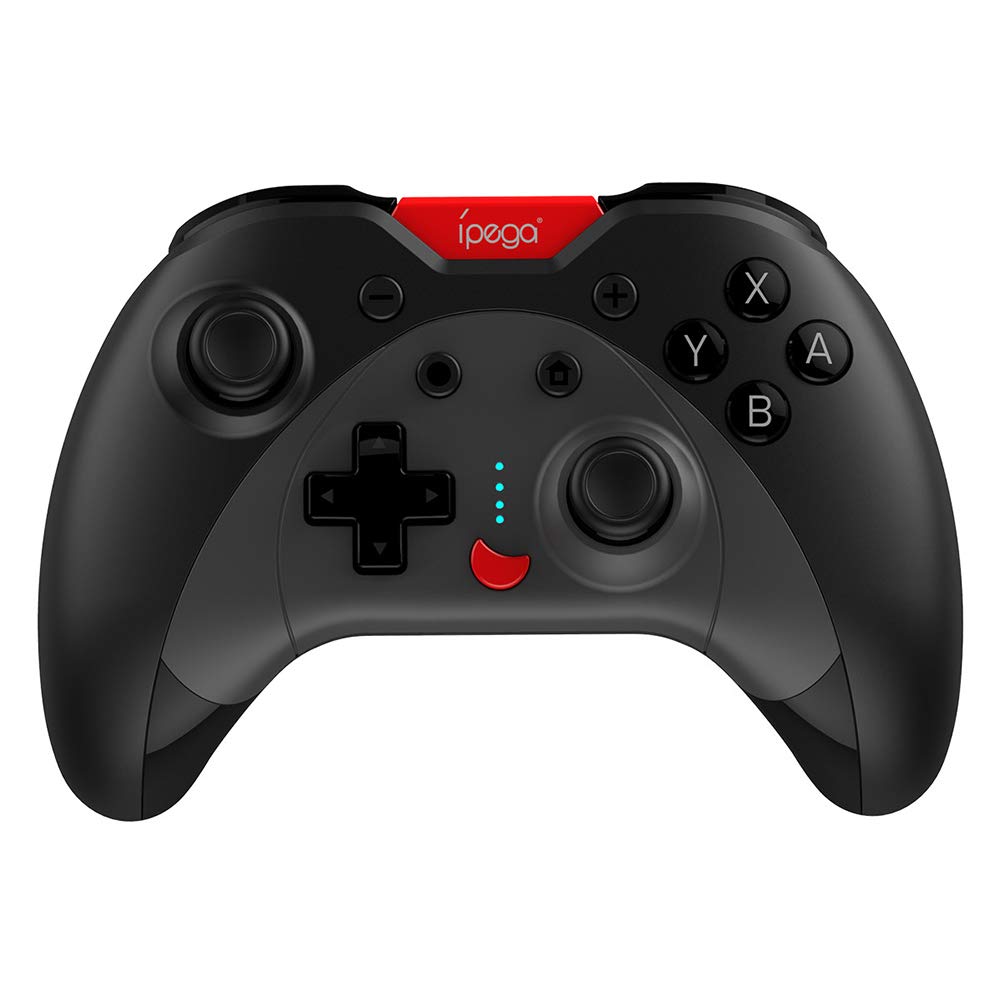
Image: A green IPEGA PG-SW023 controller illustrating its built-in six-axis gyroscope design for improved body feeling and accurate targeting.
3. Contingut del paquet
Si us plau, verifiqueu que tots els elements siguin presents al paquet:
- 1 x IPEGA PG-SW023 Wireless Game Controller
- 1 x cable de càrrega tipus C
- 1 x Manual d'usuari
4. Especificacions
| Característica | Especificació |
|---|---|
| Marca | Ipega |
| Model | PG-SW023 |
| Opcions de color | Black, Green, Blue, Yellow |
| Vol. Operatiutage | DC 3.7V |
| Corrent de funcionament | <30 mA |
| Corrent estàtic | <20uA |
| Temps de joc continu | Aprox. 15 hores |
| Entrada Voltage / Actual | DC 5 V/500 mA |
| Temps de càrrega | Aprox. 2 hores |
| Versió Bluetooth | 3.0 |
| Distància de transmissió | ≤8 metres |
| Capacitat de la bateria | 400 mAh |
| Dimensions del producte | 15 x 10 x 5.5 cm (5.91 x 3.94 x 2.17 polzades) |
| Pes del producte | Aprox. 215 g (7.58 unces) |
| Dispositius compatibles | N-S Console, PS3, Android, PC (Win 7/8/10) |
| Connectivitat | Sense fil (Bluetooth) |
| Font d'alimentació | Funciona amb bateria |
5. Configuració
5.1 Càrrega del controlador
- Connect the provided Type-C charging cable to the controller's charging port.
- Connect the other end of the cable to a USB power source (e.g., PC, USB wall adapter).
- The indicator lights on the controller will show charging status. Once fully charged (approx. 2 hours), the lights will indicate completion or turn off.
5.2 Emparellament amb dispositius
The pairing method varies slightly depending on the device. Ensure the controller is sufficiently charged before attempting to pair.

Image: A blue IPEGA PG-SW023 controller positioned in front of a Nintendo Switch, PlayStation 3, and a laptop, illustrating its multi-platform compatibility.
5.2.1 Pairing with N-S Console
- On your N-S console, go to the HOME Menu.
- Seleccioneu "Controladors" > "Canvia l'empunyadura/l'ordre".
- Press and hold the pairing button on the IPEGA controller (refer to controller diagram for exact location) until the indicator lights begin to flash rapidly.
- The console will detect the controller. Once paired, the indicator light will become solid.
5.2.2 Emparellament amb PS3
- Connecteu el comandament a la consola PS3 amb el cable tipus C.
- Premeu el botó HOME del controlador.
- Once recognized, you can disconnect the cable and the controller should remain paired wirelessly.
5.2.3 Emparellament amb dispositius Android
- Activa el Bluetooth al teu dispositiu Android.
- On the controller, press and hold the Android pairing button combination (refer to controller diagram or quick start guide for specific button combination, usually 'A' + HOME or 'X' + HOME) until the indicator lights flash rapidly.
- On your Android device, search for new Bluetooth devices and select 'IPEGA PG-SW023' (or similar name) from the list.
- Un cop emparellat, l'indicador lluminós del controlador es mantindrà fix.
5.2.4 Emparellament amb PC (Windows 7/8/10)
- Assegureu-vos que el vostre ordinador tingui el Bluetooth habilitat.
- Go to 'Settings' > 'Devices' > 'Bluetooth & other devices' and click 'Add Bluetooth or other device'.
- Select 'Bluetooth'.
- On the controller, press and hold the PC pairing button combination (refer to controller diagram or quick start guide for specific button combination, usually 'L1' + HOME or 'Y' + HOME) until the indicator lights flash rapidly.
- Select 'IPEGA PG-SW023' (or similar name) from the list of available devices on your PC.
- Un cop emparellat, l'indicador lluminós del controlador es mantindrà fix.
6. Instruccions de funcionament
6.1 Funcions bàsiques dels botons
The controller features standard gaming buttons including directional pad, analog sticks, action buttons (A, B, X, Y), shoulder buttons (L1, R1), and triggers (L2, R2). Specific button mapping may vary by game and platform.

Image: Hands comfortably gripping a black IPEGA PG-SW023 controller, showcasing its ergonomic design for comfortable and convenient use.
6.2 Funció TURBO
The TURBO function allows for continuous rapid input of a selected button. This can be useful in games requiring fast, repeated button presses.
- To activate TURBO: Press and hold the desired action button (e.g., A, B, X, Y) and then press the TURBO button simultaneously. The button will now continuously input as long as it's held down.
- To deactivate TURBO: Repeat the same process (press the action button and TURBO button simultaneously).

Image: A yellow IPEGA PG-SW023 controller with its prominent TURBO button, shown with a Nintendo Switch console, illustrating the auto-fire feature.
6.3 Funcions macro
The macro function allows you to assign a sequence of button presses or a single common button to the programmable rear buttons. This can simplify complex in-game actions.
- Refer to the specific instructions provided in the quick start guide or on the manufacturer's website for detailed steps on programming macro buttons, as this process can vary.
6.4 Vibration and Gyroscope
The controller features dual motors for vibration feedback, providing tactile sensations that correspond to in-game events. The built-in six-axis gyroscope allows for motion control in supported games, offering a more immersive and precise aiming experience.

Image: A blue IPEGA PG-SW023 controller in use, with visual cues indicating its double motor vibrating design for immersive feedback during gameplay.
7. Manteniment
Proper care will extend the life of your controller:
- Neteja: Feu servir un drap suau i sec per netejar el controlador. Per a la brutícia persistent, netegeu lleugerament.ampNetegeu el drap amb aigua o una solució de neteja suau. Eviteu productes químics agressius.
- Emmagatzematge: Guardeu el controlador en un lloc fresc i sec, allunyat de la llum solar directa i de temperatures extremes.
- Evitar l'impacte: No deixeu caure el controlador ni el sotmeteu a impactes forts, ja que això pot danyar els components interns.
- Exposició líquida: Keep the controller away from liquids. If it comes into contact with liquid, power it off immediately and allow it to dry completely before attempting to use it again.
8. Solució De Problemes
If you encounter issues with your IPEGA PG-SW023 controller, try the following solutions:
- El controlador no es connecta:
- Assegureu-vos que el controlador estigui completament carregat.
- Comproveu que el Bluetooth estigui habilitat al vostre dispositiu.
- Try re-pairing the controller by following the setup instructions for your specific device.
- Move the controller closer to the device to ensure it is within the 8-meter transmission range.
- Reinicieu tant el controlador com el dispositiu de joc.
- Botons que no responen:
- Check if the controller is properly connected and paired.
- Test the controller with another game or application to rule out software-specific issues.
- Assegureu-vos que no hi hagi restes enganxades sota els botons.
- La vibració no funciona:
- Verify that the game or system settings have vibration enabled.
- És possible que alguns jocs no admetin la resposta per vibració.
- Durada de la bateria curta:
- Assegureu-vos que el controlador estigui completament carregat abans d'utilitzar-lo.
- Battery life can vary based on usage intensity (e.g., continuous vibration).
- Eviteu carregar-lo en entorns extremadament calents o freds.
9. Garantia i Suport
For warranty information, technical support, or service inquiries regarding your IPEGA PG-SW023 Bluetooth Wireless Game Controller, please refer to the product packaging or contact the manufacturer directly through their official weblloc web o canals d'atenció al client. Conserveu el rebut de compra com a comprovant de compra per a qualsevol reclamació de garantia.


