1. Introducció
The Brook Wingman XB Converter allows you to use a wide range of controllers, including those from PlayStation (PS5/PS4/PS3), Xbox Elite (1/2), and Nintendo Switch Pro, on your Xbox Series X/S/One/360 consoles. This device provides enhanced gaming flexibility by enabling cross-platform controller compatibility, along with features like Turbo and Remap functions.
This manual provides detailed instructions for setting up, operating, and maintaining your Wingman XB Converter to ensure optimal performance and an enjoyable gaming experience.
2. Característiques clau
- Àmplia compatibilitat: Supports PS5, PS4, PS3, Xbox Elite 1/2, and Switch Pro controllers on Xbox Series X/S/One/360 consoles.
- Funció turbo: Enables rapid-fire button presses for competitive gaming.
- Funció de remapatge: Customize button layouts to suit your playstyle.
- No Input Lag: Designed for responsive and seamless gameplay.
- Actualitzable de firmware: Ensures ongoing compatibility and feature enhancements.
3. Compatibilitat anteriorview
The Wingman XB Converter supports a broad spectrum of controllers and consoles. Below is a general overview of its compatibility:

Image: Detailed compatibility diagram for the Brook Wingman XB Converter. This image illustrates how different controllers (PS3, PS4, PS5, Xbox Elite 1/2, Switch Pro, Xbox 360/One wireless receiver, fighting sticks, Xbox Adaptive Controller, SEGA Astro City mini, MEGA Drive mini) can be used with Xbox One, Xbox 360, Xbox Series X|S, Xbox Original, and PC (X-Input) via the converter. Note: Xbox Original requires a USB Adapter Cable.
The converter allows for both wired and Bluetooth wireless connections for supported controllers. For Xbox Original consoles, a USB adapter cable is required.

Image: This image highlights the compatibility of the PS5 DualSense controller with Xbox consoles when using the Wingman XB converter.
Supported Controllers and Consoles:
- Input Controllers: PS5 DualSense, PS4 DualShock 4, PS3 DualShock 3, Xbox Elite 1/2, Xbox One, Xbox 360, Nintendo Switch Pro, various fighting sticks (Hori, Mad Catz, Qanba, etc.), Xbox Adaptive Controller, SEGA Astro City mini, MEGA Drive mini controllers.
- Output Consoles: Xbox Series X|S, Xbox One, Xbox 360, Xbox Original (with adapter), PC (X-Input).
Video: This video demonstrates the Brook Wingman Converters supporting the PS5 DualSense controller across various platforms, showcasing la seva versatilitat.
Video: This is the official product trailer for the Brook Wingman XB, highlighting its features and broad compatibility with various controllers and Xbox consoles.
4. Instruccions de configuració
4.1 Connecting the Converter
- Insert the Wingman XB Converter into an available USB port on your Xbox console (Xbox Series X/S/One/360) or PC.
- For Xbox Original, connect the converter to a compatible USB adapter cable, then plug the adapter into the console.

Image: The Brook Wingman XB Converter is shown plugged into the USB port of an Xbox console, ready for controller connection.
4.2 Pairing Your Controller
The pairing method depends on whether your controller is wired or wireless (Bluetooth).
- Controladors amb cable: Connect your wired controller directly to the USB port on the Wingman XB Converter. The converter will automatically detect and configure the controller.
- Wireless (Bluetooth) Controllers:
- Ensure the Wingman XB Converter is plugged into your console/PC.
- Put your Bluetooth controller into pairing mode (refer to your controller's manual for specific instructions, e.g., holding Share + PS button for DualShock 4).
- The blue LED on the Wingman XB will fast blink, indicating it is searching for a device.
- Once paired, the blue LED will become permanently on.
5. Instruccions de funcionament
5.1 Funció Turbo
The Turbo function allows a button to be pressed repeatedly as long as it is held down. To activate or deactivate Turbo for a specific button:
- Manteniu premut el botó Turbo/Remap button on the Wingman XB Converter.
- While holding, press the desired button on your controller that you wish to apply or remove the Turbo function from.
- Release both buttons. The red LED will blink briefly to confirm the change.
5.2 Remap Function
The Remap function allows you to reassign controller buttons. To remap buttons:
- Manteniu premut el botó Turbo/Remap button on the Wingman XB Converter until the red LED is permanently on. This indicates entering Remap Settings.
- Press the button you want to remap (the source button).
- Press the button you want it to function as (the target button).
- Allibera el Turbo/Remap button. The red LED will turn off, and the remapping is complete.

Image: This image displays a graphical user interface for setting up button configurations, specifically for a Taiko Drum controller, demonstrating the remapping capabilities.
6. LED Display Indicators
The LED lights on the Wingman XB Converter provide important status information:
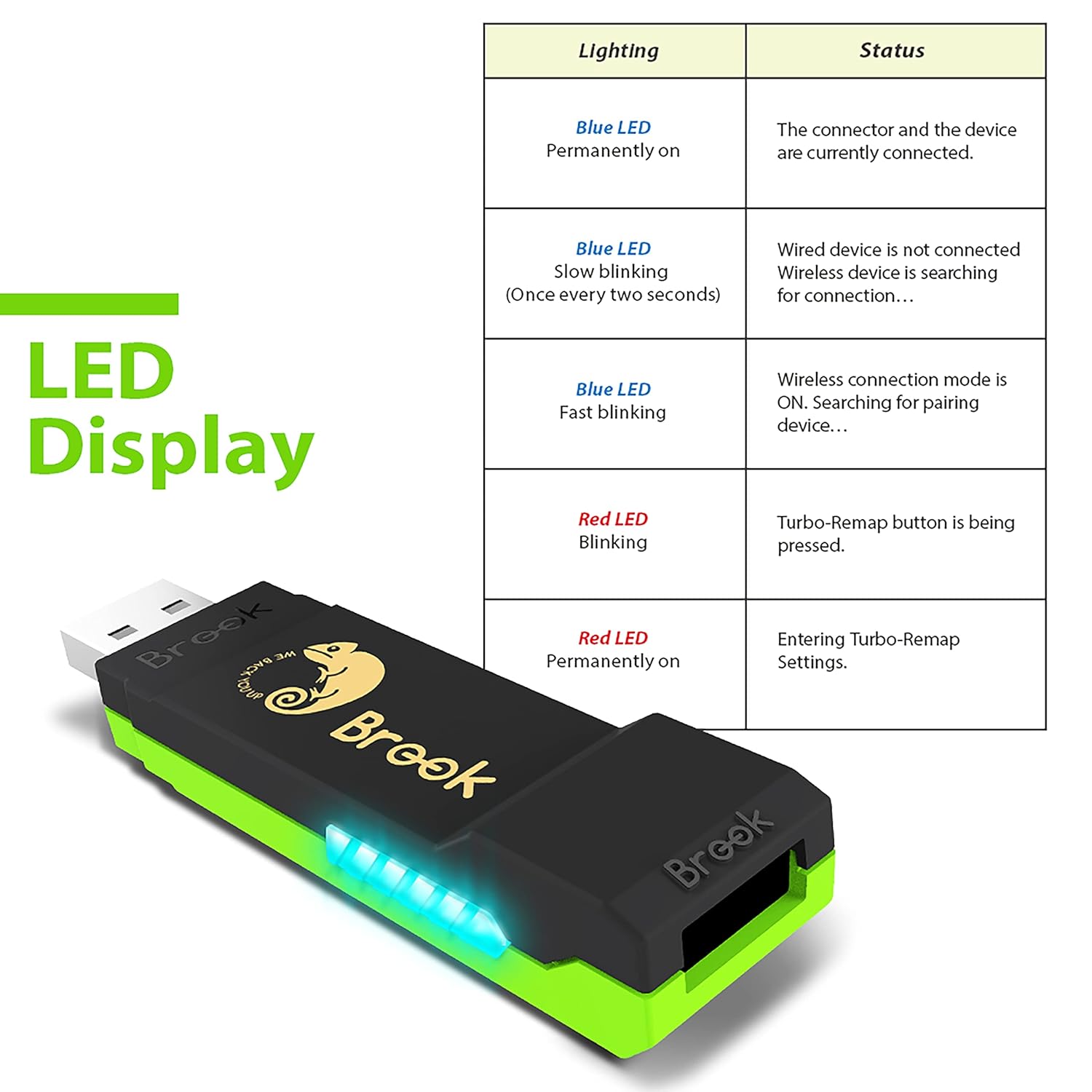
Image: A table illustrating the different lighting patterns of the blue and red LEDs on the Wingman XB Converter and their corresponding status meanings, such as connected, searching for connection, or entering Turbo-Remap settings.
| Il·luminació | Estat |
|---|---|
| LED blau encès permanentment | The controller and the device are currently connected. |
| LED blau parpellejant lentament (un cop cada dos segons) | Wired device is not connected. Wireless device is searching for connection. |
| LED blau intermitent ràpid | Wireless connection mode is ON. Searching for pairing device. |
| LED vermell parpellejant | S'està prement el botó Turbo-Remap. |
| LED vermell encès permanentment | Entrant a la configuració de Turbo-Remap. |
7. Actualització del firmware
Brook regularly releases firmware updates to improve compatibility, add new features, and address any potential issues. It is highly recommended to update your Wingman XB Converter's firmware regularly to ensure the best performance and support for the latest controllers and consoles.
Per actualitzar el firmware:
- Visit the official Brook Gaming weblloc.
- Navigate to the support or download section for the Wingman XB Converter.
- Download the latest firmware update tool and instructions.
- Follow the on-screen instructions provided by the update tool carefully. Typically, this involves connecting the converter to your PC while holding a specific button on the converter.
Important: Always ensure your computer remains powered on and the converter is not disconnected during the firmware update process to prevent damage.
8. Solució De Problemes
- Controller Not Connecting/Lagging:
- Ensure the Wingman XB Converter has the latest firmware. This often resolves connectivity and performance issues.
- Try re-pairing your wireless controller.
- If using a wired connection, ensure the cable is securely connected to both the controller and the converter.
- Check if the controller's battery is low, as this can affect wireless performance.
- Tight USB Port on Converter:
- Some users report the converter's USB port being very tight initially. This may loosen over time.
- Consider using a short USB extension cable to reduce strain on the console's USB port when connecting/disconnecting controllers.
- No Audio/Mic Support:
- The Wingman XB Converter primarily focuses on controller input. Audio and microphone functionalities are generally not supported through the converter.
- Console Power On/Off Issues:
- While you can typically turn off the console using the connected controller, turning it on may require manual interaction with the console's power button.
9. Especificacions
- Número de model: Wingman XB
- Dimensions del producte: 0.43 x 0.12 x 0.28 polzades
- Pes de l'article: 1.06 unces
- Connectivitat: USB (for console/PC), supports Bluetooth for wireless controllers
- Consoles compatibles: Xbox Series X/S, Xbox One, Xbox 360, Xbox Original, PC (X-Input)
10. Garantia i Suport
Brook products typically come with a manufacturer's warranty. For specific warranty details, return policies, or technical support, please refer to the official Brook Gaming weblloc web o contacteu directament amb el servei d'atenció al client. Conserveu el rebut de compra per a reclamacions de garantia.
For the latest information, firmware updates, and additional support resources, please visit the Botiga Brook a Amazon or the official Brook Gaming weblloc.


