Producte acabatview
The FLYLINKTECH CF500 is a versatile and powerful portable car jump starter and power bank designed for emergency vehicle starting and charging electronic devices. It features a high peak current for reliable jump-starting, a large battery capacity for extended use, and multiple charging options including wireless charging.
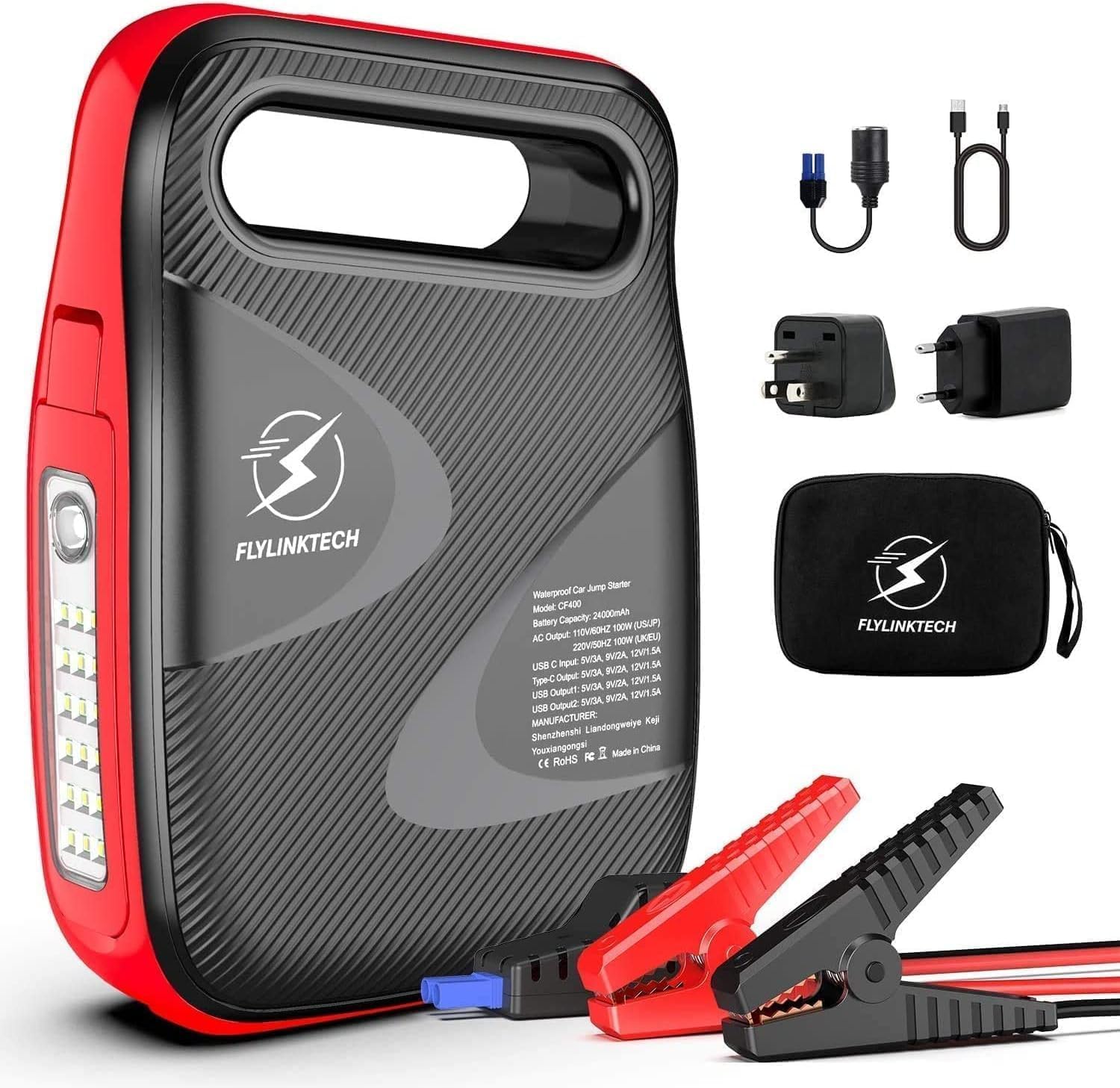
Image: The FLYLINKTECH CF500 jump starter unit shown with its included accessories, including smart clamps, charging cables, and a storage bag.
Característiques principals:
- Potent arrencador de salts: 1500A peak current, capable of starting 12V vehicles (up to 8.0L gasoline or 6.0L diesel engines).
- Banc d'energia d'alta capacitat: Proporciona una bateria de 18000 mAh ample power for smartphones, tablets, and other USB-powered devices.
- Càrrega sense fils: Integrated 10W wireless charging pad for compatible devices.
- Càrrega ràpida 3.0: USB output port for rapid charging of supported devices.
- Llum LED multimode: Features a 180° rotatable LED light with Normal, SOS, and Strobe modes for illumination and emergency signaling.
- Base magnètica: Allows the unit to be securely attached to metal surfaces for hands-free operation, especially useful during vehicle maintenance.
Precaucions de seguretat
Si us plau, llegiu i comprengui tota la informació de seguretat abans d'utilitzar aquest producte. Si no segueix aquestes instruccions, pot provocar descàrregues elèctriques, incendis o lesions greus.
- Do not operate the jump starter if it is damaged or has been modified.
- No engegueu una bateria congelada.
- Assegureu-vos de connectar la polaritat correcta (clavilla vermella)amp a positiu, negre clamp a negatiu) per evitar espurnes o danys.
- Mantenir fora de l'abast dels nens.
- No exposeu la unitat a la pluja o a condicions humides.
- Emmagatzemar en un lloc fresc i sec quan no s'utilitzi.
- No desmunteu la unitat. Encarregueu tot el manteniment a personal qualificat.
- Feu servir protecció ocular quan treballeu amb piles.
Contingut del paquet
Verifiqueu que tots els elements siguin presents al paquet:
- 1 x Arrencador de bateria FLYLINKTECH CF500
- 1 x Smart Clamps with 8 Safety Devices
- 1 x 3-in-1 Charging Cable (USB to USB-C, Lightning, Micro USB)
- 1 cable de càrrega USB a USB-C
- 1 x adaptador d'encenedor de cigarrets
- 1 x bossa d'emmagatzematge
- 1 x Manual d'usuari
- 1 targeta de garantia d'2 any
Components del producte
Familiarize yourself with the different parts of the FLYLINKTECH CF500 unit:

Image: A detailed diagram illustrating the various ports and buttons on the FLYLINKTECH CF500 jump starter, including the jump starting port, USB outputs, AC output, Type-C input, ON/OFF button, flashlight, and electricity display lamps.
- Port d'arrencada ràpida: Connects to the smart clamps per a l'arrencada auxiliar del vehicle.
- Entrada tipus C: Per carregar la unitat d'arrencada.
- USB Output 1 & 2: For charging electronic devices (USB Output 1 supports Quick Charge 3.0).
- Sortida de CA: For powering small AC appliances (if applicable to model CF500, based on image PT05).
- Interruptor de CA: To activate the AC output.
- Botó ON/OFF: Encén o apaga la unitat.
- Llanterna: Llum LED integrada amb múltiples modes.
- Electricity Display Lamp: Indicates the remaining battery charge level.
- Magnetic Suction Base: Located on the bottom for attaching to metal surfaces.
Setup and Charging the Unit
Before first use, fully charge the FLYLINKTECH CF500. It is recommended to fully charge the unit every 3-6 months to maintain battery health, especially if stored for long periods.
- Connect the provided USB-C charging cable to the Type-C Input port on the jump starter.
- Connect the other end of the USB-C cable to a suitable USB wall adapter (not included) or a car charger.
- The electricity display lamps will illuminate and flash during charging, indicating the charge progress. All lights will be solid when fully charged.
The unit can also be charged via the cigarette lighter adapter using the DC input port (if available on your model, refer to specifications).
Instruccions de funcionament
Arrancar un vehicle
Segueix aquests passos amb atenció per engegar el teu vehicle:

Image: A visual guide demonstrating the four steps to jump start a vehicle: 1. Turn on the power button. 2. Insert the smart clamp plug into the jump starter. 3. Connect the clamps to the car battery. 4. Turn on the car and then remove the clamps.
- Preparar el vehicle: Assegureu-vos que el vehicle estigui apagat i que tots els accessoris (llums, ràdio, aire condicionat) estiguin apagats. Poseu el vehicle en posició d'aparcament (automàtica) o neutral (manual) i activeu el fre d'estacionament.
- Turn On the Jump Starter: Press the ON/OFF button on the FLYLINKTECH CF500 unit. The battery indicator lights will illuminate.
- Connecta Smart Clamps: Inseriu el connector blau del llamp intel·ligentamps firmly into the jump starting port on the unit. Ensure a secure connection.
- Connectar a la bateria:
- Connecteu el VERMELL (+) clamp al positiu (+) terminal de la bateria del vehicle.
- Connecteu el NEGRE (-) clamp al negatiu (-) terminal de la bateria del vehicle.
El llum indicador del cl intel·ligentamp will show green if the connection is correct and safe to proceed. If it shows red or flashes, check the connections and battery status.
- Arrancar el vehicle: Un cop el cl intel·ligentamp indicator is green, start your vehicle's engine. If it doesn't start on the first attempt, wait at least 30 seconds before trying again. Do not crank for more than 3 seconds per attempt.
- Desconnectar Clamps: Tan bon punt el vehicle arrenqui, traieu immediatament el clauer intel·ligentampdels terminals de la bateria del vehicle i, a continuació, desconnecteu el carregador intel·ligentamps de la unitat d'arrencada de bateria.
Important: Do not leave the smart clamps connected to the battery after the vehicle has started for more than 30 seconds.
Using as a Power Bank (Charging Devices)
The FLYLINKTECH CF500 can charge various electronic devices:

Image: The FLYLINKTECH CF500 unit connected via USB cables to charge a smartphone and a tablet, demonstrating its power bank capabilities.
- Càrrega USB: Connect your device's USB charging cable to either USB Output 1 (Quick Charge 3.0) or USB Output 2. The unit will automatically begin charging.
- Càrrega sense fils: Place your Qi-compatible smartphone directly on the wireless charging pad located on top of the unit. Ensure the phone is centered for optimal charging.
- AC Output (if applicable): For models with an AC outlet, press the AC switch to activate the AC output. Plug your small appliance into the AC outlet. Ensure the appliance's power consumption does not exceed the unit's maximum AC output.
Ús de la llum LED
The integrated LED light offers multiple modes for various situations:

Image: Icons representing the different modes of the FLYLINKTECH CF500's LED light: Strobe, Torch (Normal), SOS, and Glare, indicating its versatility for illumination and emergency signaling.
- Press the flashlight button once for Normal il·luminació.
- Premeu de nou per Strobe mode.
- Press a third time for SOS signal mode.
- Premeu una quarta vegada per apagar la llum.

Image: The FLYLINKTECH CF500 unit with its LED light extended and attached to the underside of a car hood via its magnetic base, illustrating its use as a hands-free work light during car repairs.
The LED light can be rotated 180° and features a magnetic base, allowing it to be attached to metal surfaces (e.g., car hood) for hands-free lighting during repairs or in dark environments.
Manteniment
- Recàrrega: For optimal battery life, recharge the unit every 3-6 months, even if not used. This prevents deep discharge and prolongs the lifespan of the internal battery.
- Neteja: Feu servir un drap suau i sec per netejar la unitat. No utilitzeu productes químics agressius ni materials abrasius.
- Emmagatzematge: Store the jump starter in a cool, dry place, away from direct sunlight, heat sources, and moisture. Ensure it is stored within the recommended temperature range (refer to specifications).
- Cura de la bateria: Avoid fully depleting the battery frequently. Recharge it when the indicator shows low charge.
Resolució de problemes
| Problema | Causa possible | Solució |
|---|---|---|
| La unitat no s'encén. | La bateria està completament descarregada. | Carregueu la unitat completament abans d'utilitzar-la. |
| El vehicle no arrenca amb ajuda d'un cable. | cl. incorrectaamp connection; Battery is severely damaged; Vehicle engine size exceeds unit capacity. | Comproveu clamp polarity and ensure secure connection. Ensure battery is not completely dead or damaged. Verify vehicle engine size is within specifications (8.0L Gas / 6.0L Diesel). |
| Smart clamp indicator is red/flashing. | Polaritat inversa; Curtcircuit; Sobretemperatura. | Desconnectar clamps immediately and re-connect with correct polarity. Allow unit to cool down if overheated. |
| Devices not charging via USB/Wireless. | Unit is off; Low battery on unit; Device not Qi-compatible (for wireless). | Turn on the unit. Recharge the unit. Ensure device supports Qi wireless charging. |
Especificacions
| Característica | Detall |
|---|---|
| Model | CF500 (CEP104) |
| Corrent màxima | 1500A |
| Capacitat de la bateria | 18000 mAh (ió de liti) |
| Compatibilitat de vehicles | 12V vehicles, up to 8.0L Gasoline / 6.0L Diesel engines |
| Sortida de corrent continu | 12-16V / 10A (for cigarette lighter adapter) |
| Sortida USB 1 (QC 3.0) | 5V/3A, 9V/2A, 12V/1.5A |
| Sortida USB 2 | 5V/2A |
| Sortida de càrrega sense fils | 10W |
| Dimensions (L x A x A) | 17.5 x 9.5 x 3.8 cm |
| Pes | 1.15 quilos |
| Temperatura de funcionament | -20 °C a +60 °C |
Nota: Les especificacions estan subjectes a canvis sense previ avís.
Garantia i Suport
Garantia: This FLYLINKTECH product comes with a 2-year warranty from the date of purchase. Please retain your proof of purchase for warranty claims. The warranty covers defects in materials and workmanship under normal use.
Exclusions: The warranty does not cover damage caused by misuse, abuse, unauthorized modification, accident, or natural disasters. It also does not cover normal wear and tear.
Atenció al client: For technical assistance, warranty claims, or any questions regarding your FLYLINKTECH CF500 jump starter, please contact FLYLINKTECH customer service. Refer to the contact information provided on the warranty card or the official FLYLINKTECH weblloc.
FLYLINKTECH is committed to providing reliable products and excellent customer service. Your satisfaction is our priority.


