1. Introducció
Gràcies per la compraasing the Moukey MAMPPotència estèreo de 3 Amplifier. This device is designed to provide high-quality audio amplification for various applications, including home theater, karaoke, and general sound systems. It features multiple input options, including Bluetooth 5.0, USB/SD card playback, FM radio, and microphone inputs. Please read this manual thoroughly before use to ensure proper operation and to maximize your listening experience.

Image: The Moukey MAMP3 amplifier integrated into a home entertainment setup with speakers and a TV.
2. Instruccions de seguretat
- Do not expose this appliance to rain or moisture to prevent fire or shock hazards.
- No obriu la c.asing. No hi ha peces a l'interior que l'usuari pugui reparar. Demaneu totes les tasques de manteniment a personal qualificat.
- Assegureu-vos una ventilació adequada. No bloquegeu les obertures de ventilació.
- Utilitzeu només l'adaptador d'alimentació subministrat amb la unitat.
- Keep the unit away from heat sources, direct sunlight, and strong magnetic fields.
- Netegeu només amb un drap sec.
3. Contingut del paquet
Si us plau, comproveu que hi hagi tots els elements:
- Moukey MAMPPotència estèreo de 3 Ampmés viu
- Remote Control (requires 1 CR2 battery, included)
- Antena FM
- Adaptador d'alimentació (DC 12V/3A)
- Manual d'usuari
4. Producte acabatview
4.1 Tauler frontal

Image: Front panel of the Moukey MAMP3 amplifier and included remote control.
- Interruptor d'alimentació: Encén/apaga la unitat.
- Port USB: Per a unitats flaix USB (fins a 32 GB).
- Ranura per a targetes SD/MMC: For SD/MMC cards (up to 16GB).
- MIC1/MIC2 Inputs: 1/4" (6.35mm) microphone inputs.
- MIC VOL: Ajusta el volum del micròfon.
- ECO: Ajusta l'efecte d'eco del micròfon.
- AGUTS: Ajusta l'àudio d'alta freqüència.
- BAIX: Ajusta l'àudio de baixa freqüència.
- VOLUM MÀSTER: Main volume control for all audio outputs.
- Botó MODE: Switches between input modes (Bluetooth, FM, USB, SD, AUX).
- Pantalla LED digital: Mostra el mode actual, la informació de la pista i la freqüència FM.
- Control Buttons (Play/Pause, Next/Previous, CH+/CH-, Repeat): For media playback and FM radio tuning.
4.2 Panell posterior

Image: Rear panel connections of the Moukey MAMP3 ampmés viu.
- AUDIO INPUT (RCA L/R): Connect external audio sources like CD players, DVD players, or tape drives.
- POWER DC INPUT (12V/3A): Connecteu l'adaptador de corrent proporcionat.
- ANTENA FM: Connecteu l'antena FM inclosa per a la recepció de ràdio.
- AUDIO OUTPUT (Speaker Terminals): Connect passive bookshelf speakers.
5. Configuració
- Connexió de l'altaveu: Connect your passive bookshelf speakers to the AUDIO OUTPUT terminals on the rear panel. Ensure correct polarity (red to red, black to black).
- FM Antenna Connection: Screw the included FM antenna into the FM ANTENNA port on the rear panel. Extend the antenna for optimal reception.
- Audio Input Connection (Optional): If using an external audio source (e.g., CD player), connect its RCA output to the AUDIO INPUT (RCA L/R) on the rear panel.
- Microphone Connection (Optional): If using microphones for karaoke, plug them into the MIC1 or MIC2 1/4" (6.35mm) inputs on the front panel.
- Connexió d'alimentació: Connect the provided power adapter to the POWER DC INPUT (12V/3A) on the rear panel, then plug the adapter into a wall outlet.
6. Instruccions de funcionament
6.1 Encès/Apagat
Premeu el botó Interruptor d'alimentació al panell frontal per engegar el amplifier on or off. The LED display will illuminate when the unit is powered on.
6.2 Selecció d'entrada
Premeu el botó MODE button on the front panel or the remote control to cycle through available input sources: Bluetooth (BT), FM Radio, USB, SD, and AUX (RCA input).
6.3 Funcionament Bluetooth

Image: Connecting a smartphone via Bluetooth to the Moukey MAMP3 ampmés viu.
- Canvia el amplifier a Bluetooth (BT) mode using the MODE button. The LED display will show "BLUE" and flash, indicating it's ready for pairing.
- Al telèfon intel·ligent, la tauleta o l'ordinador, activeu el Bluetooth i cerqueu els dispositius disponibles.
- Select "Moukey MAMP3" from the list of devices to pair. Once connected, the "BLUE" indicator will stop flashing.
- Ara podeu reproduir àudio des del vostre dispositiu a través de amplifier. The effective range for Bluetooth is approximately 12 meters.
6.4 Reproducció des de targeta USB/SD

Image: USB and SD card inputs on the Moukey MAMP3 ampmés viu.
- Insert a USB flash drive (up to 32GB) into the Port USB or an SD/MMC card (up to 16GB) into the Ranura per a targetes SD/MMC.
- El amplifier will automatically switch to USB or SD mode and begin playing compatible audio files (e.g., MP3). If it doesn't, press the MODE botó per seleccionar la font correcta.
- Use the Play/Pause, Next/Previous, and Repeat buttons on the front panel or remote control to manage playback.
6.5 Funcionament de la ràdio FM
- Canvia el amplifier a Ràdio FM mode using the MODE button.
- Premeu el botó AUTO button (or Play/Pause button) to automatically scan and save available FM stations.
- Utilitza el CH+ i CH- botons per navegar per les emissores desades.
- For manual tuning, use the Next/Previous buttons to fine-tune the frequency.
6.6 Funcions de micròfon i karaoke

Image: Microphone input jacks on the Moukey MAMP3 ampmés viu.
- Plug your microphones into the MIC1 or MIC2 entrades.
- Ajusteu el volum del micròfon amb el botó MIC VOL perilla.
- Adjust the echo effect for the microphones using the ECO perilla.
- The BASS and TREBLE knobs will affect both music and microphone audio.
6.7 Tone and Master Volume Control
- Utilitza el BASS i AGUTS knobs to adjust the low and high frequencies of the audio output.
- El MÀSTER VOLUM knob controls the overall output volume of the ampmés viu.
7. Solució De Problemes
| Problema | Causa possible | Solució |
|---|---|---|
| Sense poder | Power cable not connected; Power switch off | Ensure power cable is securely connected and power switch is on. |
| Sense sortida de so | Incorrect input selected; Volume too low; Speaker wires loose | Select correct input mode; Increase MASTER VOLUME; Check speaker connections. |
| Bluetooth no connectat | No està en mode Bluetooth; Dispositiu massa lluny; Ja està emparellat amb un altre dispositiu | Switch to BT mode; Move device closer (within 12m); Disconnect from other devices. |
| Mala recepció FM | Antenna not extended; Weak signal area | Extend FM antenna fully; Try repositioning the antenna or unit. |
| La targeta USB/SD no es reprodueix | Incorrect format; Card/drive not inserted correctly; Unsupported capacity | Assegureu-vos files are MP3; Reinsert card/drive; Check capacity (USB max 32GB, SD max 16GB). |
8. Especificacions
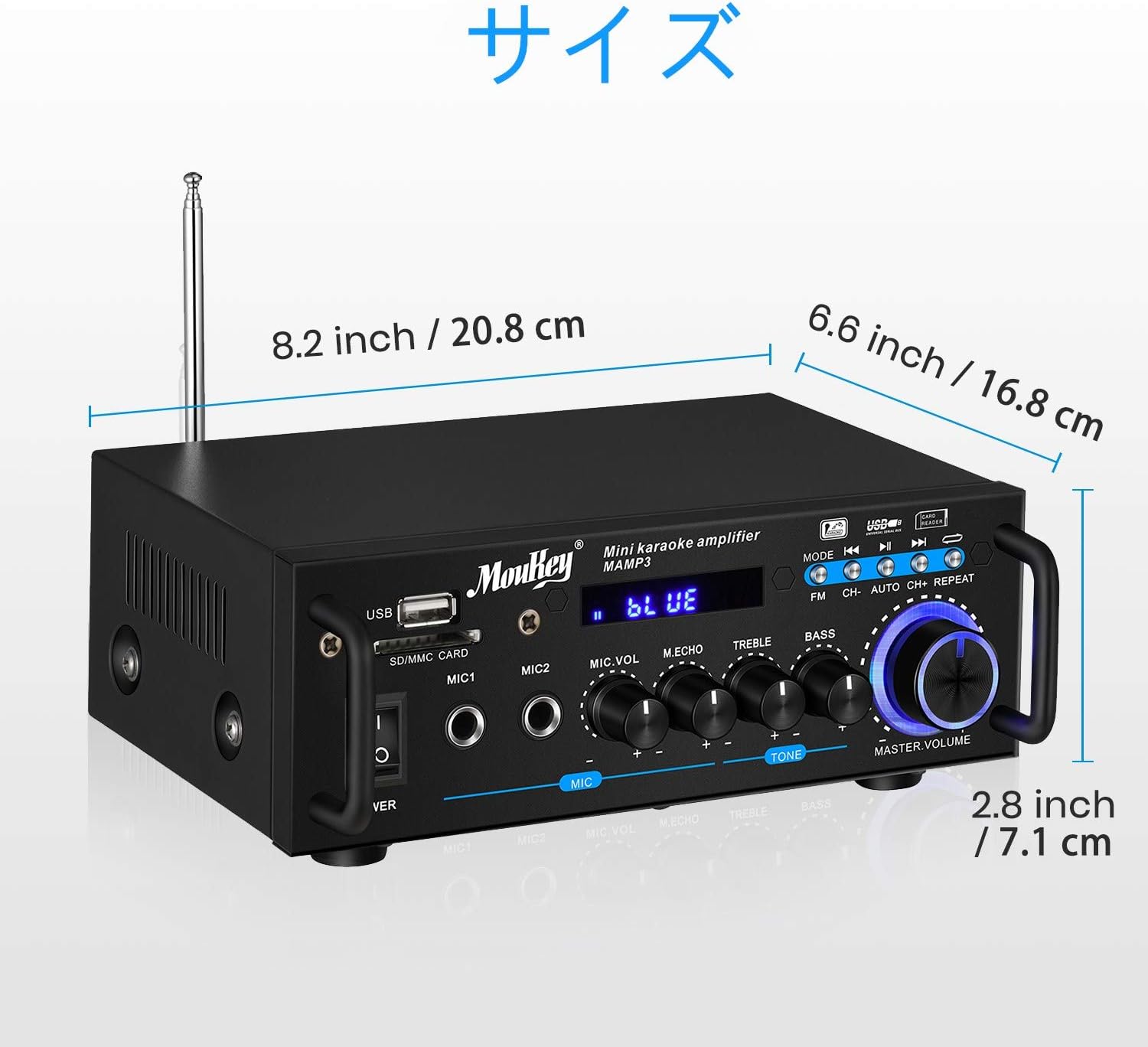
Image: Dimensions of the Moukey MAMP3 ampmés viu.
- Model: MAMP3
- Potència de sortida: 100 W (pic)
- Font d'alimentació: Corded Electric (DC 12V/3A adapter)
- Versió Bluetooth: 5.0
- Rang Bluetooth: Fins a 12 metres
- Suport USB: Fins a 32 GB
- Suport de la targeta SD: Fins a 16 GB
- Entrades de micròfon: 2 x 1/4" (6.35mm)
- Entrades d'àudio: 1 x RCA (L/R)
- Sortides d'àudio: 2 x Speaker Terminals (L/R)
- Freqüència de ràdio FM: 76.1-108 MHz (may vary by region)
- Bateria de control remot: 1 x CR2 (inclòs)
- Dimensions: Approximately 20.8 cm (W) x 16.8 cm (D) x 7.1 cm (H) / 8.2 in (W) x 6.6 in (D) x 2.8 in (H)
9. Manteniment
- Neteja: Wipe the unit with a soft, dry cloth. Do not use liquid cleaners or aerosols.
- Emmagatzematge: Quan no s'utilitzi durant períodes prolongats, guardeu-lo ampGuardar en un lloc fresc i sec, allunyat de la llum solar directa i de temperatures extremes.
- Ventilació: Assegureu-vos que les obertures de ventilació estiguin netes de pols i deixalles per evitar el sobreescalfament.
10. Garantia i Suport
Moukey products are designed for reliability and performance. For warranty information, technical support, or service inquiries, please refer to the warranty card included with your product or visit the official Moukey weblloc web. Si us plau, conserveu el comprovant de compra per a reclamacions de garantia.
For further assistance, you may contact Moukey customer support through their official channels.


