1. Introducció
The Pyle PDA9HBU is a versatile home audio amplifier and stereo receiver designed to enhance your home theater experience. It features multiple input options including HDMI, optical, coaxial, phono, USB, SD, and auxiliary, along with Bluetooth connectivity for wireless audio streaming. This manual provides detailed instructions for setting up, operating, and maintaining your device to ensure optimal performance.
2. Instruccions de seguretat
- Font d'alimentació: Assegureu-vos que la font d'alimentació coincideixi amb el voltage requirements of the unit (115V/230V switchable).
- Ventilació: No bloquegeu les obertures de ventilació. Deixeu prou espai al voltant de la unitat per a un flux d'aire adequat.
- Aigua i humitat: No exposeu la unitat a la pluja, la humitat o l'excés d'humitat.
- Fonts de calor: Mantingueu la unitat allunyada de fonts de calor com ara radiadors, registres de calor, estufes o altres aparells que produeixin calor.
- Neteja: Desendolleu la unitat de la presa de corrent abans de netejar-la. Feu servir un drap sec per netejar-la.
- Manteniment: No intenteu fer el manteniment de la unitat vosaltres mateixos. Envieu totes les tasques de manteniment a personal de servei qualificat.
3. Contingut del paquet
Marqueu la casella per als elements següents:

Image: Contents of the Pyle PDA9HBU package, showing the amplifier, remote control, and FM antenna.
- Pyle PDA9HBU Stereo Ampmés viu
- Control remot
- Antena FM
4. Producte acabatview
4.1 Controls del panell frontal

Image: Front panel of the Pyle PDA9HBU amplifier, displaying the power button, input selector, volume knob, microphone inputs, and tone controls.
- Botó d'encesa: Encén o apaga la unitat.
- Selector d'entrada: Rotates to choose between different audio sources (HDMI, Optical, Coaxial, Phono, CD/DVD, MP3/BT/AUX, USB/SD).
- Control de volum: Ajusta el nivell de volum principal.
- MIC/VOL & ECHO Controls: Adjusts microphone volume and echo effect for karaoke.
- Bass & Treble Controls: Ajusta la resposta de freqüència baixa i alta.
- Control d'equilibri: Ajusta el balanç del canal esquerre/dret.
- Ranures per a targetes USB/SD: Per reproduir àudio files from USB flash drives or SD memory cards.
- Entrada AUX (3.5 mm): Per connectar dispositius d'àudio externs.
- Pantalla digital LCD: Shows current input, track information, FM station, and other status indicators.
4.2 Connexions del panell posterior
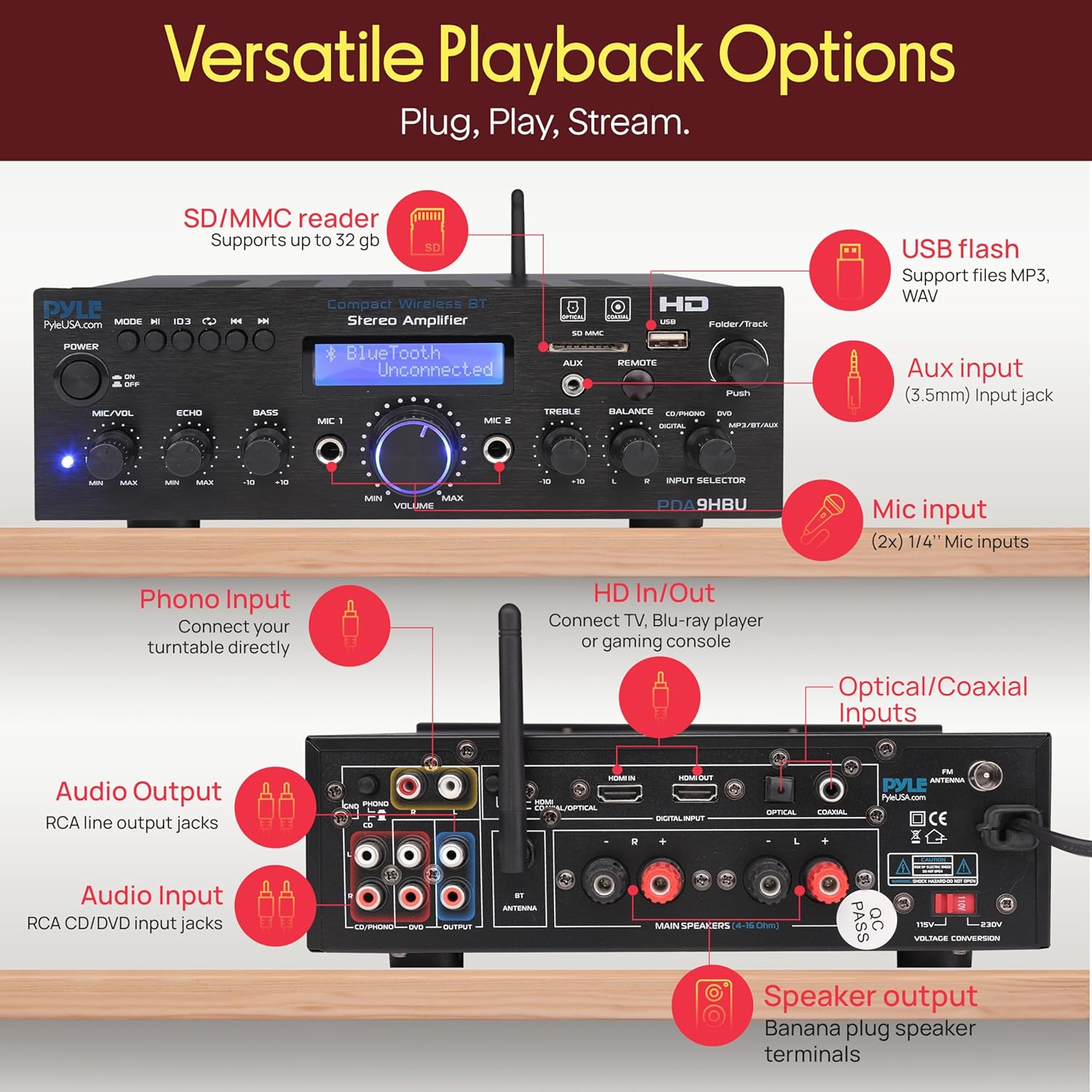
Image: Rear panel of the Pyle PDA9HBU amplifier, detailing HDMI, optical, coaxial, phono, RCA, and speaker output connections.
- ENTRADA/SORTIDA HDMI: For connecting HDMI-enabled devices like TVs, Blu-ray players, or gaming consoles.
- Optical/Coaxial Inputs: Per a connexions d'àudio digital.
- Entrada fonètica: For connecting a turntable.
- Entrada d'àudio (RCA L/R): For connecting analog audio sources (e.g., CD/DVD players).
- Audio Output (RCA L/R): For connecting to other audio devices or recorders.
- Terminals de sortida d'altaveus: For connecting passive speakers (4-8 Ohm).
- Connector d'antena FM: For connecting the included FM antenna.
- Entrada d'alimentació: Per connectar el cable d'alimentació.
5. Configuració
5.1 Connectar altaveus
- Assegureu-vos el ampl'amplificador està apagat i desendollat de la presa de corrent.
- Connect your passive speakers to the speaker output terminals on the rear panel. Match the positive (+) terminal of the amplifier to the positive (+) terminal of the speaker, and the negative (-) to the negative (-).
- Assegureu-vos que totes les connexions estiguin ben fixades per evitar curtcircuits.
5.2 Connexió de fonts d'àudio
Connect your desired audio sources to the appropriate input ports on the rear or front panel:
- HDMI: Use an HDMI cable to connect your TV, Blu-ray player, or gaming console to the HDMI IN port. If connecting to a TV, use the HDMI OUT port to send video to the TV.
- Òptic/Coaxial: For digital audio from devices like TVs or media players, use an optical or coaxial cable.
- Fono: Connect your turntable to the PHONO input.
- RCA (L/R): For analog audio devices (e.g., CD player), connect to the AUDIO INPUT (CD/DVD) ports.
- AUX (3.5 mm): For portable devices, connect to the AUX input on the front panel.
5.3 Connexió d'alimentació
- Abans de connectar-lo, verifiqueu el volumtage selector switch (if present) on the rear panel is set to your local voltage (115V o 230V).
- Connect the power cable to the power input on the rear panel and then plug it into a wall outlet.
6. Instruccions de funcionament
6.1 Encès/Apagat
Premeu el botó Poder botó del panell frontal o del comandament a distància per encendre o apagar la unitat.
6.2 Selecció d'entrada
Gira el Selector d'entrada knob on the front panel or use the corresponding buttons on the remote control to choose your desired audio source (e.g., HDMI, Bluetooth, USB/SD, FM).
6.3 Control de volum
Ajusteu el Volum knob on the front panel or use the volume buttons on the remote control to set the overall sound level.
6.4 Vinculació Bluetooth

Image: A smartphone displaying music playback, with concentric circles indicating a wireless Bluetooth connection to the Pyle PDA9HBU ampmés viu.
- Select the 'MP3/BT/AUX' input using the Input Selector. The LCD display will show 'Bluetooth Unconnected'.
- Activa el Bluetooth al teu dispositiu mòbil (telèfon intel·ligent, tauleta, ordinador portàtil).
- Cerca Bluetooth devices and select 'PDA9HBU' from the list.
- Once connected, the LCD display will show 'Bluetooth Connected'. You can now stream audio wirelessly.
- The wireless range is approximately 40 feet (12 meters).
Reproducció USB/SD de 6.5"

Imatge: Detallada view de la amplifier's front panel, highlighting the USB and SD card slots, and demonstrating a smartphone charging via the USB port.
- Insert a USB flash drive or SD card into the corresponding slot on the front panel.
- Select the 'USB/SD' input. The unit will automatically begin playing compatible audio files (MP3/WAV).
- Use the Folder/Track knob or remote control buttons to navigate tracks and folders.
- El port USB també funciona com a port de càrrega per a dispositius compatibles.
6.6 Funcionament de la ràdio FM
- Connect the included FM antenna to the FM ANTENNA connector on the rear panel.
- Select the 'FM' input.
- Use the automatic station search scan function (refer to remote control instructions) to find and save available FM stations.
- The LCD display will show the current FM station frequency.
6.7 Ús del micròfon (karaoke)

Image: Two individuals enjoying karaoke, singing into microphones connected to the Pyle PDA9HBU amplifier, which is visible in the foreground.
- Connect up to two 6.35mm microphones to the MIC 1 and MIC 2 input jacks on the front panel.
- Ajusteu el MIC/VOL botó per controlar el volum del micròfon.
- Ajusteu el ECO knob to add an echo effect to the microphone sound.
6.8 Controls de to
Utilitza el Baix i Aguts knobs on the front panel to fine-tune the audio output to your preference.
6.9 Funcions de control remot
The included remote control provides convenient access to various functions, including power, input selection, volume, mute, track navigation, FM station tuning, and tone adjustments. Refer to the remote control diagram for specific button functions.
7. Manteniment
- Neteja: Use a soft, dry cloth to clean the exterior of the unit. Do not use liquid cleaners or aerosol sprays.
- Ventilació: Comproveu periòdicament que les obertures de ventilació estiguin netes de pols i deixalles.
- Emmagatzematge: Si guardeu la unitat durant un període prolongat, desendolleu-la de la presa de corrent i guardeu-la en un lloc fresc i sec.
8. Solució De Problemes
- Sense energia:
- Check if the power cable is securely connected to the unit and the wall outlet.
- Assegureu-vos que la presa de corrent funcioni.
- Comproveu el voltage selector switch (if applicable) is set correctly.
- Sense so:
- Check all speaker connections.
- Assegureu-vos que s'ha seleccionat la font d'entrada correcta.
- Augmenta el volum mestre.
- Comproveu si la funció de silenci està activada.
- Verify audio cables from source devices are properly connected.
- Problemes de connexió Bluetooth:
- Assegureu-vos el ampEl lifer està en mode Bluetooth.
- Make sure Bluetooth is enabled on your device and it's within range (approx. 40 ft).
- Prova de desvincular i tornar a vincular el dispositiu.
- Reinicieu tots dos amplifier and your Bluetooth device.
- USB/SD Playback Errors:
- Ensure the USB drive or SD card is inserted correctly.
- Comproveu que l'àudio files are in a supported format (MP3/WAV).
- Prova una altra unitat USB o targeta SD.
- El control remot no funciona:
- Reviseu i substituïu les piles del comandament a distància.
- Assegureu-vos que no hi hagi obstruccions entre el comandament a distància i el ampsensor d'infrarojos del lifer.
9. Especificacions
| Característica | Especificació |
|---|---|
| Marca | Pyle |
| Model | PDA9HBU |
| Potència de sortida (màx.) | 25W (@ 4 Ohm) |
| Potència de sortida (RMS) | 20W x 2 (@ 8 Ohm) |
| Resposta de freqüència | 20 Hz - 20 kHz |
| Tone Control (Bass) | f = 100 Hz +/-8 dB |
| Tone Control (Treble) | f = 10 kHz +/-8 dB |
| Ràtio senyal / soroll | > 71 dB |
| Distorsió harmònica total (THD) | 48 dB |
| Versió Bluetooth | 2.1 |
| Interval sense fil Bluetooth | 40 peus (aprox. 12 m) |
| Font d'alimentació | 115V/230V (commutable) |
| Dimensions del producte (L x A x A) | 9.8" x 9.8" x 3.15" (24.89 x 24.89 x 8 cm) |
| Pes de l'article | 2.97 quilos |
| Dispositius compatibles | Smartphones, tablets, laptops, computers, TVs, gaming consoles, Blu-ray players, speakers |
| Tecnologia de connectivitat | HDMI, RCA, Auxiliary, Bluetooth, Optical, Coaxial, USB, SD |
| Mode de sortida d'àudio | estèreo |
| Configuració del canal de so envoltant | 2.0 |
10. Garantia i Suport
Pyle products are designed for reliability and performance. For warranty information or technical support, please refer to the documentation included with your purchase or visit the official Pyle weblloc web. Conserveu el comprovant de compra per a reclamacions de garantia.


