1. Producte acabatview
The Logitech G513 Carbon is a high-performance mechanical gaming keyboard featuring LIGHTSYNC RGB lighting and GX Red Linear switches. Designed for durability and comfort, it includes a memory foam palm rest and a USB pass-through port for convenience.

Imatge 1.1: De dalt a baix view of the Logitech G513 Carbon keyboard with its detachable palm rest.
Característiques principals:
- LIGHTSYNC RGB Lighting: Personalize lighting for each individual key with a spectrum of 16.8 million colors. Customize lighting effects and integrate with in-game actions using Logitech G HUB software.
- GX Red Linear Switches: Experience a smooth and consistent keystroke, ideal for rapid, precise key presses during gaming.
- Memory Foam Palm Rest: Provides enhanced comfort during extended use, designed to quickly recover its shape.
- Aircraft-Grade Aluminum Top Case: Constructed from 5052 aluminum for a slim, premium design combined with rigid durability.
- USB Pass-Through Port: Conveniently connect a mouse, flash drive, or phone for direct data transmission or charging.
- Integrated Media Controls: Access volume, play/pause, skip track, mute, toggle lighting, and game mode functions directly via FN-F keys.
- Logitech G HUB Software: Customize lighting, game mode settings, and macro programming for a personalized experience.
2. Contingut del paquet
Verifiqueu que tots els elements estiguin presents a l'embalatge del producte:
- Logitech G513 Carbon LIGHTSYNC RGB Mechanical Gaming Keyboard
- Detachable Memory Foam Palm Rest
- USB Cable (Integrated)
- User Documentation (This Manual)
3. Instruccions de configuració
Follow these steps to set up your Logitech G513 keyboard:
- Connecteu el teclat: Plug the integrated USB cable from the keyboard into an available USB port on your computer. The keyboard requires a single USB port for full functionality.
- Attach Palm Rest (Optional): Align the detachable memory foam palm rest with the front edge of the keyboard and position it for comfort.
- Install Logitech G HUB Software: For full customization of LIGHTSYNC RGB lighting, macro programming, and game mode settings, download and install the Logitech G HUB software from the official Logitech weblloc (www.logitechg.com/ghub).
- Pass-Through USB: If you wish to use the USB pass-through port on the keyboard, ensure your computer has a second available USB port. Connect the secondary USB connector (if present on your keyboard's cable) to this port.
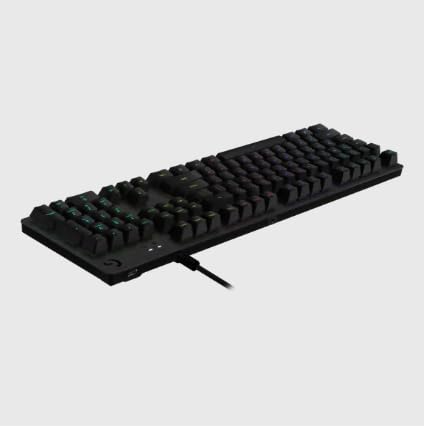
Imatge 3.1: posterior view of the keyboard illustrating the USB cable connection.
4. Instruccions de funcionament
This section details the primary functions and controls of your G513 keyboard.

Imatge 4.1: Anglesa view of the Logitech G513 Carbon keyboard in operation.
4.1. Il·luminació RGB LIGHTSYNC
The G513 features per-key LIGHTSYNC RGB lighting. You can control and customize this lighting:
- Onboard Controls: Use the FN + F5/F6/F7 keys to cycle through various lighting effects and brightness levels.
- Logitech G HUB Software: For advanced customization, including per-key color assignment, animation effects, and synchronization with other Logitech G devices, use the G HUB software.
4.2. GX Red Linear Switches
The GX Red switches provide a smooth, linear keystroke without a tactile bump or audible click. This design is favored by many gamers for its rapid actuation and consistent feel.
4.3. USB Pass-Through
The dedicated USB pass-through port on the keyboard allows you to connect a USB device directly to your keyboard, extending a USB port from your computer to a more accessible location. This is useful for connecting a gaming mouse, headset, or charging a mobile device.
4.4. Tecles multimèdia i de funció
The G513 integrates media and function controls directly into the F-keys. To activate these functions, press the FN key simultaneously with the corresponding F-key:
- FN + F1-F4: Customizable function keys via G HUB.
- FN + F5: Cycle through LIGHTSYNC lighting effects.
- FN + F6: Decrease LIGHTSYNC brightness.
- FN + F7: Increase LIGHTSYNC brightness.
- FN + F8: Game Mode toggle (disables Windows key and other customizable keys).
- FN + F9: Reproducció/pausa multimèdia.
- FN + F10: Stop media.
- FN + F11: Pista anterior.
- FN + F12: Pista següent.
- FN + PRTSC: Silencia l'àudio.
- FN + SCRLK: Baixar el volum.
- FN + PAUSA: Puja el volum.
5. Manteniment
Un manteniment adequat garanteix la longevitat i el rendiment del teclat.
- Neteja del teclat: Utilitzeu un drap suau i sense pelusa lleugerament dampNetegeu les tecles i el xassís amb aigua o una solució de neteja suau. Eviteu productes químics agressius o materials abrasius.
- Cleaning Under Keycaps: For deeper cleaning, you may carefully remove keycaps using a keycap puller (not included) and use compressed air to remove dust and debris from beneath. Reattach keycaps by pressing them firmly onto the switch stems.
- Palm Rest Care: The memory foam palm rest can be wiped clean with a damp tela. Eviteu submergir-lo a l'aigua.
- Gestió de cables: Ensure the USB cable is not kinked or strained to prevent damage.
6. Solució De Problemes
If you encounter issues with your G513 keyboard, refer to the following common solutions:
- El teclat no respon:
- Ensure the USB cable is securely plugged into your computer.
- Prova de connectar el teclat a un port USB diferent.
- Reinicieu l'ordinador.
- LIGHTSYNC RGB Not Working/Incorrect:
- Verify Logitech G HUB software is installed and up to date.
- Comproveu la configuració de la il·luminació dins del G HUB.
- Ensure the keyboard's firmware is updated via G HUB.
- Claus que no es registren o escrivien dues vegades:
- Clean the affected keycap and switch area for debris.
- If the issue persists, contact Logitech support for further assistance.
- USB Pass-Through Not Functioning:
- Ensure both USB connectors from the keyboard (if applicable) are plugged into your computer.
- Test the connected device directly in your computer's USB port to rule out device issues.
For more detailed troubleshooting or persistent issues, visit the Logitech support weblloc o poseu-vos en contacte amb el seu servei d'atenció al client.
7. Especificacions
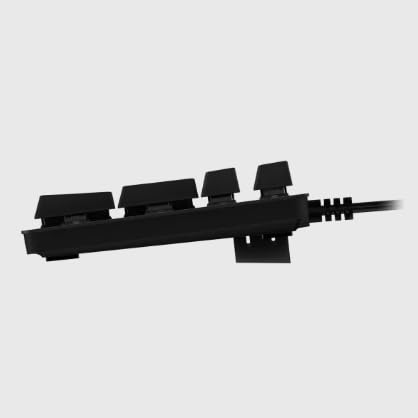
Imatge 7.1: Lateral view of the Logitech G513 Carbon keyboard.
| Atribut | Detall |
|---|---|
| Número de model | G513 |
| Dimensions (L x A x A) | 17.52 x 3.46 x 0.85 polzades (44.5 x 8.8 x 2.16 cm) |
| Pes | 2.44 lliures (1.11 kg) |
| Tipus de canvi | GX Red Linear Mechanical Switches |
| Il·luminació | LIGHTSYNC RGB (Per-key customizable) |
| Connectivitat | USB 2.0 Pass-Through |
| Longitud del cable | Uns 6 m (1.8 peus) |
| Material | Aircraft-grade 5052 aluminum top case |
8. Garantia i Suport
Logitech products are manufactured to high quality standards. For information regarding your product's warranty, please refer to the warranty documentation included with your purchase or visit the official Logitech support weblloc.
For technical support, driver downloads, FAQs, and community forums, please visit the Logitech G support page:


