1. Introducció
Welcome to the user manual for your Behringer RHYTHM DESIGNER RD-6 Analog Drum Machine. This device is designed to provide authentic analog drum sounds with modern connectivity and sequencing capabilities. The RD-6 features true analog circuitry, 8 distinct drum voices, a 16-step sequencer, and a built-in distortion effect. Please read this manual thoroughly to ensure proper setup, operation, and maintenance, allowing you to fully explore its creative potential.
2. Instruccions de seguretat importants
- Llegeix aquestes instruccions.
- Conserveu aquestes instruccions.
- Compte amb totes les advertències.
- Seguiu totes les instruccions.
- No utilitzeu aquest aparell prop de l'aigua.
- Netejar només amb un drap sec.
- No obstruïu cap obertura de ventilació. Instal·leu d'acord amb les instruccions del fabricant.
- No instal·leu a prop de cap font de calor com ara radiadors, registres de calor, estufes o altres aparells (inclosos amplificadors) que produeixen calor.
- No anul·leu el propòsit de seguretat de l'endoll polaritzat o de connexió a terra. Un endoll polaritzat té dues fulles, una més ampla que l'altra. Un endoll de tipus posada a terra té dues fulles i una tercera punta de connexió a terra. La fulla ampla o la tercera punta es proporcionen per a la vostra seguretat. Si l'endoll proporcionat no encaixa a la vostra presa de corrent, consulteu un electricista per substituir la presa obsoleta.
- Eviteu que el cable d'alimentació sigui trepitjat o pessigat, especialment als endolls, els receptacles i el punt on surten de l'aparell.
- Utilitzeu només accessoris/accessoris especificats pel fabricant.
- Utilitzeu només amb el carro, suport, trípode, suport o taula especificats pel fabricant o venuts amb l'aparell. Quan utilitzeu un carro, aneu amb compte en moure la combinació de carro/aparell per evitar lesions per bolcar.
- Desendolleu aquest aparell durant les tempestes amb llamps o quan no l'utilitzeu durant llargs períodes de temps.
- Demaneu tot el servei a personal de servei qualificat. El manteniment és necessari quan l'aparell s'ha fet malbé d'alguna manera, com ara el cable d'alimentació o l'endoll està danyat, s'ha vessat líquid o han caigut objectes a l'aparell, l'aparell ha estat exposat a la pluja o la humitat, no funciona amb normalitat. , o s'ha deixat caure.
3. Què hi ha a la caixa
- Behringer RHYTHM DESIGNER RD-6 Analog Drum Machine
- Adaptador d'alimentació
- Cable USB
- Guia d'inici ràpid
4. Controls and Connectors Overview
The Behringer RD-6 features an intuitive layout for easy access to all its functions, designed for both performance and studio integration.
4.1 Controls del panell frontal

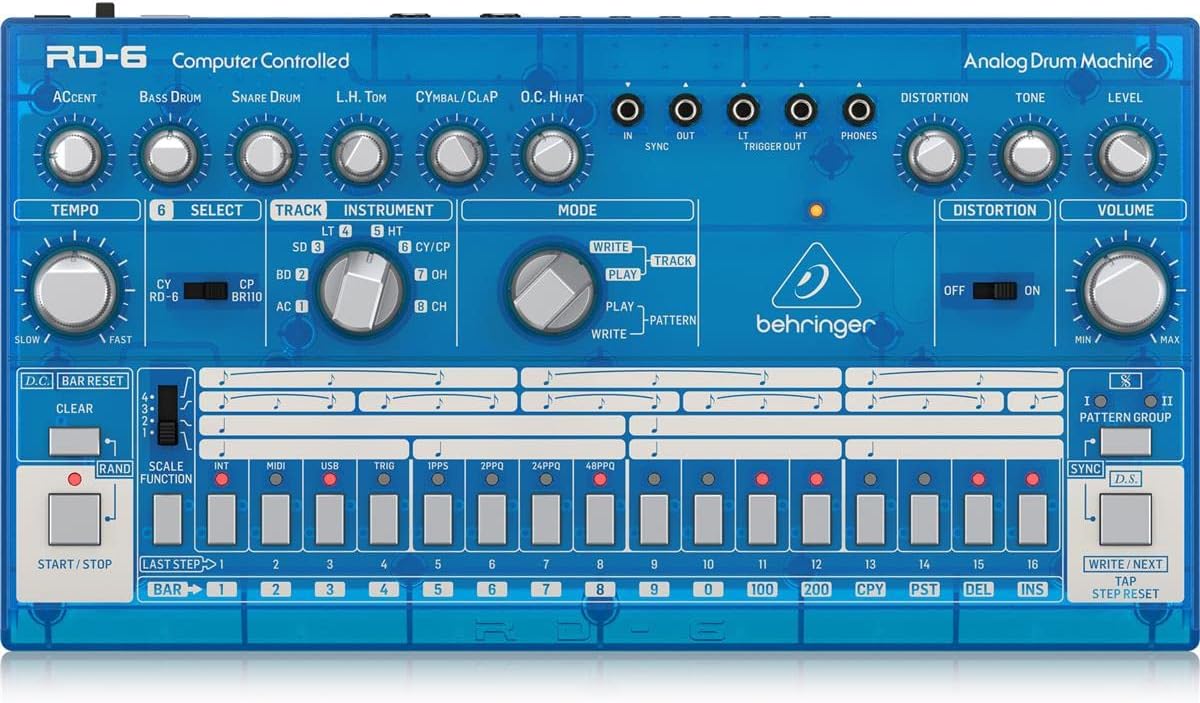
Imatge: De dalt a baix view of the Behringer RD-6 front panel, showing various knobs, buttons, and the 16-step sequencer.
- TEMPS: Adjusts the playback speed of patterns.
- ACCENT: Controls the intensity of accented steps.
- BASS DRUM, SNARE DRUM, L.H. TOM, CYMBAL/CLAP, O.C. HI HAT: Individual controls for tone, decay, and level of each drum voice.
- DISTORSIÓ: Activates the built-in distortion effect.
- TONE/LEVEL (Distortion): Adjusts the character and intensity of the distortion.
- VOLUM: Control de volum de sortida principal.
- SELECCIONAR: Used to select various functions or parameters.
- TRACK/INSTRUMENT: Selects the current track or instrument for editing.
- MODE (WRITE/PLAY/PATTERN): Switches between pattern writing, playback, and pattern selection modes.
- 16 STEP BUTTONS: Used to program steps in a pattern or select patterns.
- INICI / PARADA: Initiates or halts pattern playback.
- ESBORAR: Erases patterns or steps.
- SCALE FUNCTION: Adjusts the timing scale for patterns.
- SINCRONITZACIÓ: Selects the synchronization source (Internal, MIDI, USB, Clock).
- ESCRIU/SEGÜENT: Saves patterns or advances to the next step/pattern.
- TAP/STEP RESET: Used for tap tempo or resetting the step sequencer.
4.2 connectors del panell posterior
Imatge: Part posterior view of the Behringer RD-6, highlighting the various audio outputs, MIDI ports, USB port, and power input.
- VOICE OUT (OH/CH, CP, CY, LT/HT, SD, BD): Individual 3.5 mm TS outputs for each drum voice, allowing for external processing.
- MEZCLA: 6.35 mm TS output for the main stereo mix.
- INICI / PARADA: 3.5 mm TS input for external start/stop control.
- MIDI ENTRADA/SORTIDA/A TRAVÉS: 5-pin DIN connectors for MIDI communication with other devices.
- USB: USB-B port for MIDI over USB and firmware updates.
- POWER DC INPUT: Connexió per a l'adaptador d'alimentació de 9 V CC inclòs.
5. Configuració inicial
5.1 Connexió d'alimentació
Connecteu l'adaptador de corrent continu de 9 V inclòs al ENTRADA DE POTÈNCIA DC on the rear panel. Plug the adapter into a suitable power outlet. Ensure the PODER switch is in the OFF position before connecting the power supply.
5.2 Connexió d'àudio
For a combined stereo mix, connect the BARREJA (6.35 mm TS) to your mixer or audio interface. For individual drum sound processing and recording, use the dedicated VOICE OUT jacks (3.5 mm TS) for each drum voice (OH/CH, CP, CY, LT/HT, SD, BD).
5.3 USB/MIDI Connection
Connecteu el USB port to your computer for MIDI control and firmware updates. Use the MIDI ENTRADA/SORTIDA/A TRAVÉS ports for connecting to other MIDI devices such as synthesizers, sequencers, or MIDI interfaces.
6. Funcionament bàsic
6.1 Engegada/apagada
Gira el PODER switch on the rear panel to the ON position. The unit will power up and be ready for use. To power off, flip the switch back to OFF.
6.2 Creating a Pattern
- Select a pattern bank (I or II) using the PATTERN GROUP botons.
- Premeu el botó ESCRIURE button to enter pattern write mode. The ESCRIURE El LED s'il·luminarà.
- Select an instrument (e.g., Bass Drum, Snare Drum) using the INSTRUMENT botó selector.
- Utilitza el 16 step buttons to program your rhythm. Pressing a button will activate or deactivate a step for the selected instrument. Illuminated buttons indicate active steps.
- Adjust parameters like ACCENT, TEMPO, and individual drum sound controls (e.g., Tone, Decay) as desired to shape your sound.
- Premeu JUGAR to hear your pattern.
- Premeu ESCRIURE again to exit write mode and save the pattern.
6.3 Real-time Recording
Mentre a dins JUGAR mode, premeu ESCRIURE button to enable real-time recording. The ESCRIURE LED will flash. Play the drum sounds using the step buttons or an external MIDI controller. The notes will be recorded into the current pattern. Press ESCRIURE again to stop real-time recording.
6.4 Using Distortion
Involucrar el DISTORSIÓ switch to activate the built-in distortion effect. Adjust the TO i NIVELL knobs to shape the distortion character and intensity to add grit and aggression to your drum sounds.
7. MIDI and USB Connectivity
7.1 MIDI Control
The RD-6 supports MIDI In, Out, and Thru via its 5-pin DIN connectors. Connect to other MIDI devices to synchronize tempo, trigger sounds, or control parameters. The MIDI THRU port allows you to daisy-chain multiple MIDI devices. Refer to the full MIDI implementation chart in the comprehensive manual for detailed CC messages and settings.
7.2 USB Audio/MIDI
The USB port provides class-compliant MIDI connectivity to your computer. This allows the RD-6 to be used as a MIDI controller or to receive MIDI data from your Digital Audio Workstation (DAW) for seamless integration into your production environment.
8. Manteniment
8.1 Neteja
Keep the unit clean using a soft, dry cloth. Avoid abrasive cleaners, solvents, or waxes, as these can damage the finish and internal components.
8.2 Emmagatzematge
Protect the RD-6 from dust, moisture, and extreme temperatures. When not in use for extended periods, store it in a cool, dry place, preferably in its original packaging or a protective case.
8.3 Manteniment
Do not attempt to service the unit yourself. Refer all servicing to qualified service personnel to prevent electric shock or damage to the device.
9. Solució De Problemes
9.1 Sense sortida de so
- Check that the power adapter is securely connected and the unit is powered ON.
- Verify all audio cables are correctly connected to the BARREJA or individual VOICE OUT ports and to your audio system.
- Ensure the master VOLUM knob and individual instrument level knobs are turned up.
- Confirm that a pattern is playing and that the selected instrument has active steps.
9.2 MIDI Not Responding
- Verify MIDI cables are correctly connected to the MIDI IN / OUT ports of the RD-6 and your external device.
- Check that the MIDI channel settings on both the RD-6 and your external device match.
- Ensure the RD-6 is in the correct sync mode (e.g., MIDI Sync, USB Sync) if synchronizing with an external clock.
9.3 Unexpected Behavior
If the unit exhibits unexpected behavior, try powering it off and on again. If the issue persists, a factory reset may resolve it. Refer to the comprehensive manual for instructions on how to perform a factory reset.
10. Especificacions tècniques
| Característica | Detall |
|---|---|
| Nom del model | RD-6 |
| Marca | Behringer |
| Pes de l'article | 1.98 lliures (900 grams) |
| Dimensions del producte | 17.2 x 8.95 x 3.8 polzades |
| Material del cos | Coal Fiber |
| Material | Acer inoxidable |
| Color | Blau |
| Tipus de connector | USB |
| Voltage | 230 Volts |
| Número de model de l'article | 000-EE204-00010 |
| UPC | 644216639205 |
| Fabricant | Music Tribe EUA |
10.1 Característiques clau
- True analog circuitry for authentic sound reproduction.
- 8 original drum sounds, including Bass Drum, Snare Drum, Low Tom, High Tom, Cymbal, Clap, Open Hi-Hat, and Closed Hi-Hat.
- 16-step sequencer with 256 patterns for complex rhythm creation.
- Built-in distortion effect with Tone and Level controls.
- USB/MIDI connectivity for seamless integration with modern DAWs and external MIDI devices.
- 7 independent analog outputs for flexible mixing and individual drum sound processing.
- Multiple sync options: USB, MIDI, Clock, and Internal.
11. Garantia i Suport
Per obtenir informació detallada sobre la garantia, el registre del producte i l'assistència tècnica, visiteu el lloc web oficial de Behringer. weblloc web o poseu-vos en contacte amb el vostre distribuïdor local. Es recomana conservar el comprovant de compra per a qualsevol reclamació de garantia.


