Introducció
Thank you for choosing the BlueParrott B350-XT Noise Cancelling Bluetooth Headset. This manual provides essential information for setting up, operating, maintaining, and troubleshooting your device. The B350-XT is engineered for superior calls in high-noise environments, offering industry-leading noise cancellation and extended wireless range.
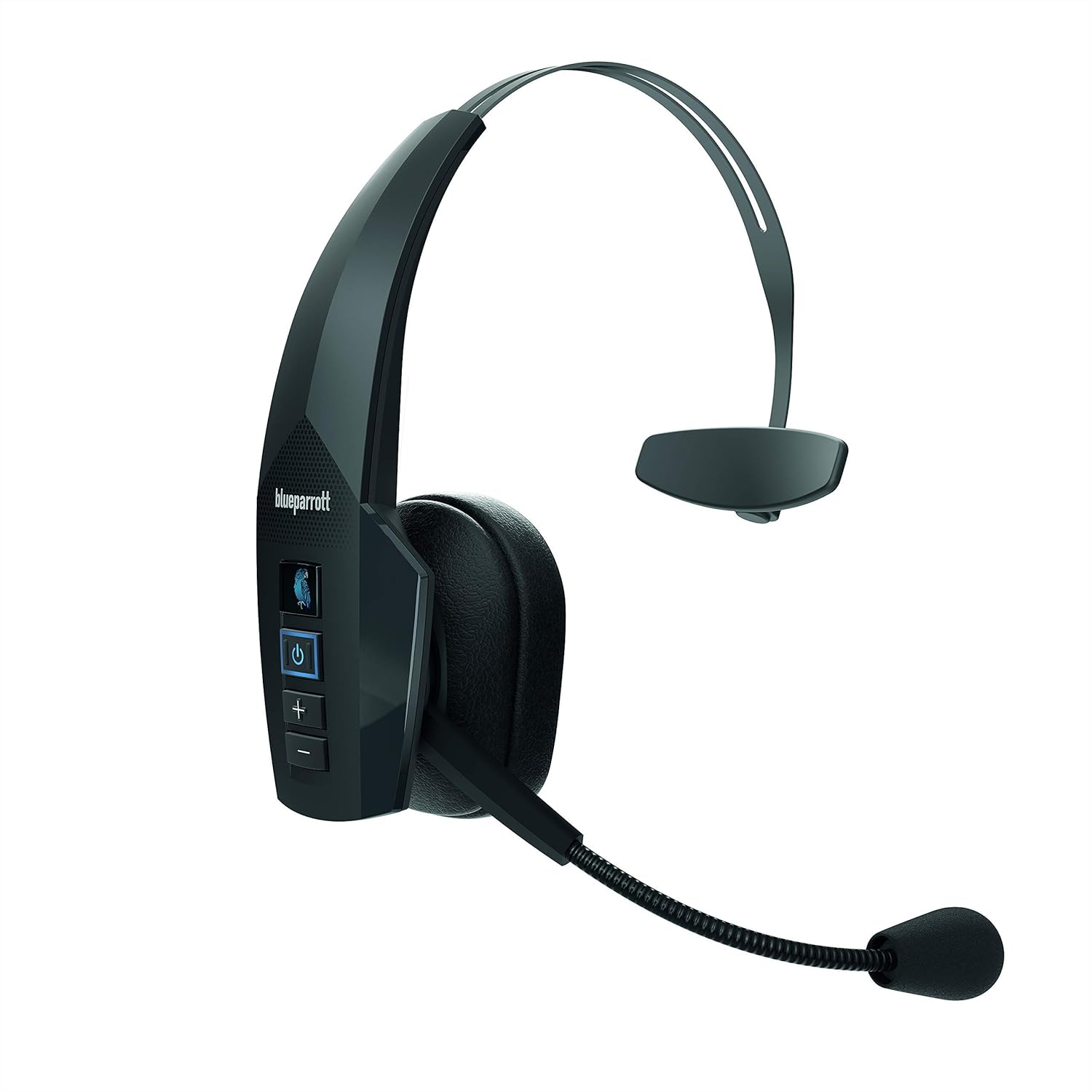
Figure 1: BlueParrott B350-XT Noise Cancelling Bluetooth Headset. This image shows the full headset from a front-side angle, highlighting its over-ear design and microphone boom.
Contingut del paquet
Assegureu-vos que tots els elements estiguin presents al vostre paquet:
- BlueParrott B350-XT Headset
- Cable de càrrega USB
- Foam Ear Cushion (spare)
- Parabrisa de recanvi de micròfon
- Carregador mòbil

Figure 2: Contents included in the BlueParrott B350-XT package. This image displays the headset, USB cable, foam ear cushion, spare mic windscreen, and mobile charger.
Configuració
Càrrega dels auriculars
Before first use, fully charge your B350-XT headset. Connect the USB charging cable to the headset's charging port and plug the other end into the provided mobile charger or a compatible USB power source. The LED indicator will show charging status.
- Una càrrega completa proporciona fins a 24 hores de temps de conversa.
Vinculació amb un dispositiu Bluetooth
The B350-XT uses Bluetooth 5.0 for wireless connectivity. Follow these steps to pair your headset:
- Assegureu-vos que els auriculars estiguin carregats i apagats.
- Manteniu premut el botó d'engegada (⑂) for approximately 5 seconds until the LED indicator flashes blue and red, indicating pairing mode.
- On your mobile phone, tablet, or laptop, enable Bluetooth and search for new devices.
- Select "BlueParrott B350-XT" from the list of available devices.
- Si se us demana un codi d'accés, introduïu "0000" (quatre zeros).
- Un cop emparellat, l'indicador LED es tornarà de color blau continu.
The headset supports Near-Field Communication (NFC) for streamlined pairing with compatible devices. Simply tap the headset to the NFC-enabled device to initiate pairing.

Figura 3: Primer pla view of the BlueParrott B350-XT headset controls, including the power button and volume controls, alongside a smartphone screen demonstrating the Parrot Button customization options.
Instruccions de funcionament
Encès/Apagat
- Per engegar: premeu i manteniu premut el botó d'engegada (⑂) durant 2 segons.
- Per apagar: premeu i manteniu premut el botó d'engegada (⑂) durant 3 segons.
Gestió de trucades
- Answer Call: Press the Power button (⑂) una vegada.
- End Call: Press the Power button (⑂) una vegada.
- Reject Call: Press and hold the Power button (⑂) durant 2 segons.
- Redial Last Number: Double-press the Power button (⑂).
Control de volum
- Increase Volume: Press the Volume Up button (+).
- Decrease Volume: Press the Volume Down button (-).
Parrot Button Customization
The customizable Parrot Button allows quick access to your preferred features. Use the BlueParrott app on your smartphone to configure its function, such as:
- Silencia / activa el micròfon
- Speed Dial a contact
- Push-to-Talk (PTT) with compatible applications
- Launch a selected application

Figura 4: Detallada view of the BlueParrott B350-XT control panel, showing the Parrot Button, Power button, and Volume Up/Down buttons.
Manteniment
Neteja
- Netegeu els auriculars amb un drap suauamp tela.
- No utilitzeu productes químics ni productes de neteja abrasius.
- Assegureu-vos que el port de càrrega estigui sec abans de carregar.
Emmagatzematge
- Guardeu els auriculars en un lloc fresc i sec, allunyat de la llum solar directa i de temperatures extremes.
- If storing for an extended period, charge the headset periodically to maintain battery health.
Substitució de components
- The foam ear cushion and microphone windscreen are replaceable. Refer to the "Package Contents" section for spare parts.
- For replacement parts, visit the official BlueParrott support weblloc.
Resolució de problemes
| Problema | Causa possible | Solució |
|---|---|---|
| Els auriculars no s'encén. | Bateria baixa. | Carregueu completament els auriculars. |
| No es poden emparellar els auriculars. | Headset not in pairing mode; Bluetooth disabled on device; Device out of range. | Ensure headset is in pairing mode (flashing blue/red LED). Enable Bluetooth on your device. Move device closer to headset (within 100 meters). |
| No hi ha àudio o hi ha mala qualitat d'àudio. | Volume too low; Headset not selected as audio output; Interference. | Increase headset volume. Check device's audio settings to ensure B350-XT is selected. Move away from other wireless devices. |
| El micròfon no funciona. | Microphone muted; Microphone boom not positioned correctly. | Unmute the microphone (via Parrot Button or device settings). Adjust the microphone boom closer to your mouth. |
| Durada de la bateria curta. | Battery degradation; Frequent use at high volume. | Ensure full charge before use. Reduce volume if possible. Contact support if battery life significantly degrades. |
Especificacions
| Característica | Detall |
|---|---|
| Model | B350-XT |
| Connectivitat | Bluetooth 5.0, NFC |
| abast sense fils | Fins a 100 metres (300 peus) |
| Temps de conversa | Fins a 24 hores |
| Cancel·lació de soroll | Blocks 96% of background noise |
| Durabilitat | IP54-rated (dust and moisture protection) |
| Col·locació de l'orella | A l'orella |
| Pes | Aproximadament 4.7 unces |
| Interval de freqüència | 20 Hz a 20,000 Hz |
| Dispositius compatibles | Telèfons mòbils, tauletes, ordinadors portàtils |
| Tipus de control | Physical Buttons (Power, Volume, Parrot Button) |
Garantia i Suport
This product is sold as "Renewed" by Amazon Renewed. Please refer to the Amazon Renewed Guarantee for specific warranty information and return policies. Typically, Amazon Renewed products come with a 90-day guarantee.
For technical support, product registration, or to purchase accessories, please visit the official BlueParrott website or contact their customer service. You may also refer to your Amazon order details for seller-specific support information.
- Garantia renovada d'Amazon: Més informació
- BlueParrott Official Weblloc: www.blueparrott.com