Introducció
Welcome and thank you for choosing the Umax Webcam W5. This manual provides essential information for setting up, operating, maintaining, and troubleshooting your webcam. Please read it carefully before use to ensure proper functionality and longevity of your device.
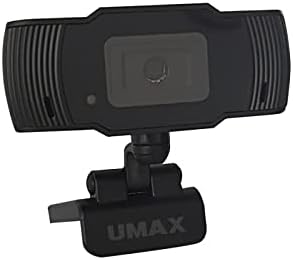
Imatge: Frontal view of the Umax W5 Webcam. This image displays the main unit of the webcam, highlighting its lens and overall design.
1. Configuració
1.1 Contingut del paquet
- Umax W5 Weblleva
- Mirall
1.2 Requisits del sistema
El Umax W5 Webcam is compatible with most operating systems that support standard USB webcams, including Windows, macOS, and Linux distributions.
1.3 Connexió del Weblleva
- Desplegueu el webcam's integrated clip/stand.
- Col·loca el webcam securely on top of your monitor, laptop screen, or a flat surface.
- Connecteu el cable USB de la webcàmera a un port USB disponible de l'ordinador.
- El webcam should be automatically recognized by your operating system. No additional drivers are typically required for basic functionality.
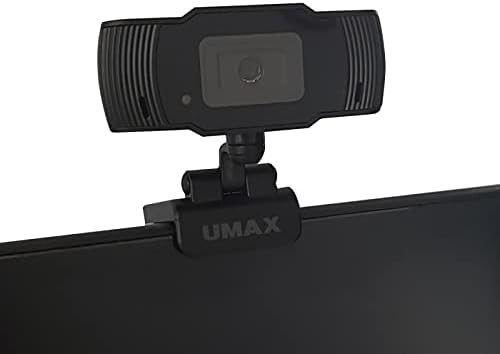
Image: Umax W5 Webcam mounted on top of a computer monitor. This image shows the webcam securely positioned on the upper edge of a computer monitor, demonstrating its typical mounting configuration.
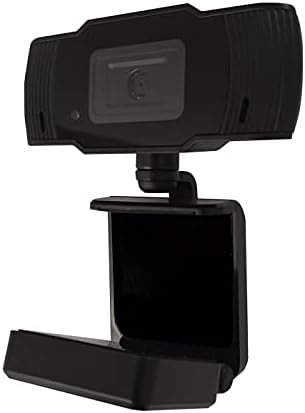
Image: Umax W5 Webcam with its adjustable clip/stand unfolded. This image displays the webcam with its integrated clip fully extended, illustrating how it can be adjusted to fit various monitor thicknesses or stand independently on a flat surface.
2. Funcionament del Weblleva
2.1 Funcionalitat bàsica
Once connected, the Umax W5 Webcam is ready for use with various video conferencing applications, streaming software, and other programs that utilize a weblleva.
2.2 Ús amb aplicacions
- Open your desired application (e.g., Zoom, Skype, OBS Studio).
- Navegueu fins al menú de configuració o preferències de l'aplicació.
- Select "Umax W5 Webcam" as your primary video input device.
- Adjust video settings such as resolution or frame rate within the application if these options are available.
2.3 Enfocament manual
El Umax W5 Webcam features manual focus. To adjust the focus, gently rotate the lens ring located around the camera lens until the image displayed on your screen appears clear and sharp.
3. Manteniment
3.1 Neteja de la lent
To ensure optimal image quality, periodically clean the weblent de càmera.
- Use a soft, lint-free cloth specifically designed for optical surfaces.
- Avoid abrasive materials or harsh chemical cleaners, as these can damage the lens coating.
- Netegeu suaument la lent amb un moviment circular per eliminar la pols o les taques.
3.2 Emmagatzematge
Quan no s’utilitzi, emmagatzemeu el fitxer webcam in a clean, dry place away from extreme temperatures, high humidity, and direct sunlight to prevent damage.
4. Solució De Problemes
4.1 Webcàmera no detectada
- Assegureu-vos que el cable USB estigui connectat correctament a tots dos webcam and an active USB port on your computer.
- Intenta connectar el webcàmera a un port USB diferent de l'ordinador.
- Reinicieu l'ordinador.
- Check your operating system's Device Manager (Windows) or System Information (macOS) to see if the webLa càmera està a la llista.
4.2 Mala qualitat d'imatge
- Adjust the manual focus ring on the webcam until the image is clear.
- Assegureu-vos d'una il·luminació adequada al vostre entorn. Una il·luminació deficient pot afectar significativament la qualitat de la imatge.
- Netegeu el weblent de lleva tal com es descriu a la secció Manteniment.
- Check the video settings within your application (e.g., resolution, frame rate) to ensure they are set appropriately.
5. Especificacions
| Característica | Detall |
|---|---|
| Marca | Umàx |
| Nom del model | W5 |
| Número de model de l'article | W5 |
| Color | Negre |
| Dimensions del paquet | 6.18 x 3.43 x 1.89 polzades |
| Pes de l'article | 5.6 unces |
| Tipus de lent | Zoom |
| Tipus d'enfocament | Enfocament manual |
| Estabilització d'imatge | No |
| Bateries | Necessites 2 piles AA. (inclòs) |
| Components inclosos | Mirall |
| Data de primera disponibilitat | 14 de setembre de 2020 |
| Fabricant | Umàx |
6. Garantia i Suport
For warranty information and technical support, please refer to the official Umax weblloc web o contacteu directament amb el seu servei d'atenció al client. Es recomana conservar el rebut de compra com a comprovant de compra per a qualsevol reclamació de garantia.
Fabricant: Umàx
Data de primera disponibilitat: 14 de setembre de 2020


