Introducció
This manual provides essential information for setting up, operating, maintaining, and troubleshooting your HP 240 G7 Laptop, Model 1S5F1PA#ACJ. Please read this guide thoroughly to ensure proper use and to maximize the lifespan of your device.

Imatge: Frontal view of the HP 240 G7 Laptop with the screen displaying the Windows operating system desktop.
Contingut del paquet
Verifiqueu que els elements següents s'inclouen al paquet del producte:
- HP 240 G7 Laptop (Model 1S5F1PA#ACJ)
- Adaptador de corrent altern i cable d'alimentació
- Documentació (Guia d'inici ràpid, Informació de garantia)
Producte acabatview
Familiarize yourself with the physical features and ports of your HP 240 G7 Laptop.
Components del costat esquerre

Image: Left side of the laptop, illustrating the various ports and connectors.
- Connector d'alimentació CA: Per connectar l'adaptador de corrent.
- Port RJ-45 (Ethernet): Per a connexions de xarxa per cable.
- Port HDMI 1.4b: Per connectar pantalles o projectors externs.
- Ports USB 3.1 Gen 1 (x2): Per connectar dispositius USB d'alta velocitat.
- Presa combinada per a auriculars/micròfon: For connecting a headset or external audio devices.
Components del costat dret
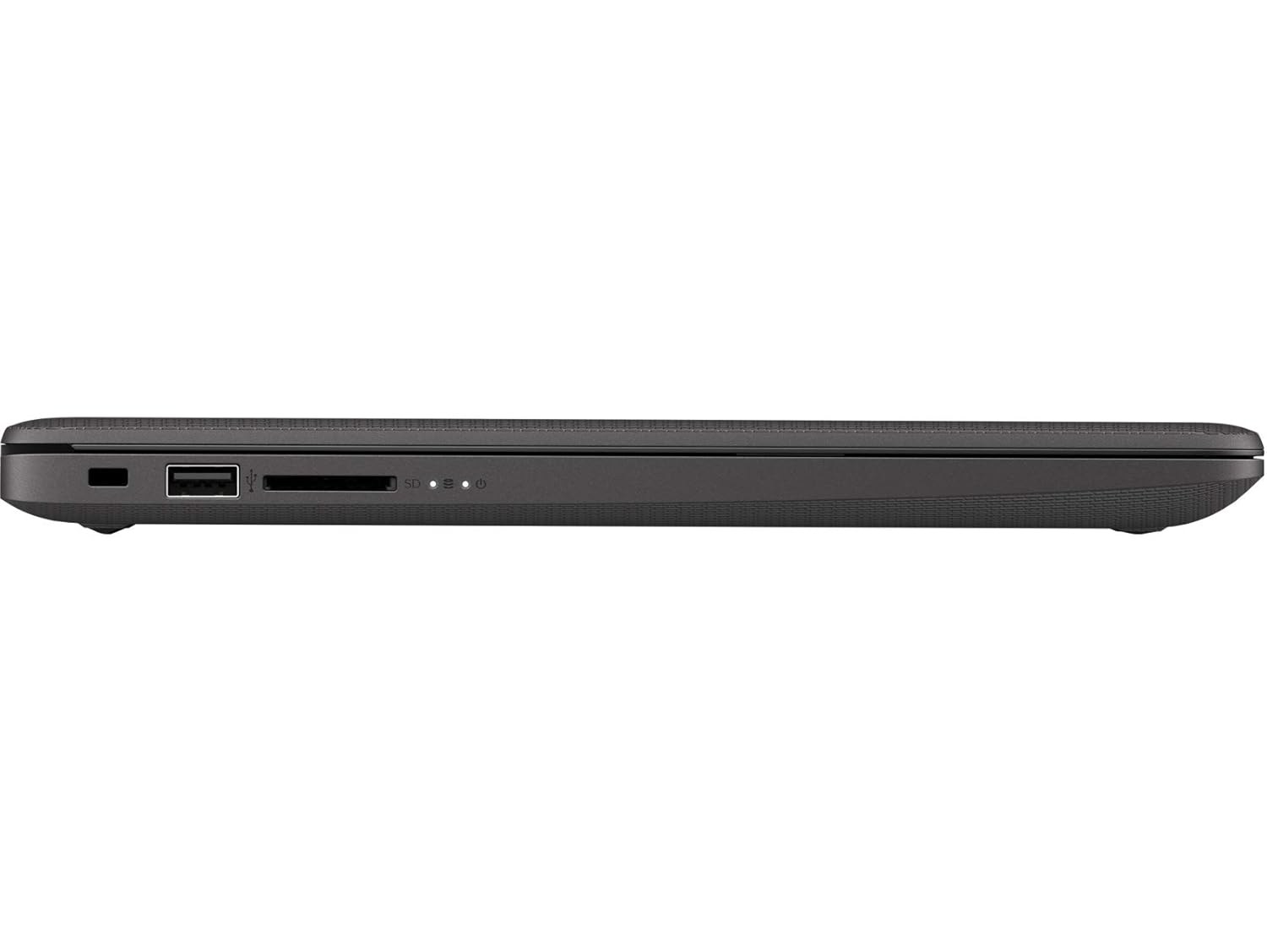
Image: Right side of the laptop, illustrating the USB port and media card reader.
- Ranura per a pany de seguretat: Per connectar un cable de seguretat.
- Port USB 2.0: Per connectar dispositius USB estàndard.
- Multi-Format Digital Media Reader: Admet targetes de memòria SD, SDHC i SDXC.
A dalt i enrere Views

Imatge: De dalt a baix view of the laptop with the lid closed, showing the HP logo.

Imatge: Anglesa view of the laptop's back, highlighting the textured finish and HP logo.
The top cover features the HP logo. The back of the laptop is designed for durability and aesthetics.
Configuració
- Connectar l'alimentació: Plug the AC power adapter into the laptop's AC power connector and then into a wall outlet.
- Encesa inicial: Obriu la tapa del portàtil i premeu el botó d'engegada. El portàtil començarà la seva seqüència d'arrencada inicial.
- Configuració del sistema operatiu: Seguiu les instruccions que apareixen a la pantalla per completar la configuració del Windows 10 Pro, inclosa la selecció d'idioma, la connexió de xarxa i la creació d'un compte d'usuari.
En funcionament
Gestió d'energia
- Encès: Premeu el botó d'engegada que es troba a la plataforma del teclat.
- Apagar: Feu clic al botó Inici i, a continuació, a Energia > Apagar.
- Mode de repòs: Feu clic al botó Inici i, a continuació, a Engegada > Repòs o tanqueu la tapa del portàtil.
Teclat i Touchpad
- Teclat: Use the integrated keyboard for typing. Function keys (F1-F12) provide shortcuts for various system functions when pressed with the Fn key.
- Touchpad: El touchpad admet gestos multitàctils per a la navegació, el desplaçament i el zoom. Consulteu la configuració de Windows per personalitzar-lo.
Connectivitat
- Wi-Fi: Connect to wireless networks via the Realtek RTL8822CE 802.11a/b/g/n/ac (2x2) Wi-Fi adapter. Access Wi-Fi settings through the Windows taskbar.
- Bluetooth: Pair Bluetooth 5 compatible devices such as headphones or mice. Manage Bluetooth devices in Windows settings.
- Pantalles externes: Connect an external monitor or projector using the HDMI 1.4b port. Press Tecla Windows + P to manage display modes.
Manteniment
- Neteja: Utilitzeu un drap suau i sense pelusa lleugerament dampened with water or a screen cleaner to clean the display and exterior surfaces. Avoid harsh chemicals.
- Cura de la bateria: To prolong battery life, avoid extreme temperatures. Periodically allow the battery to discharge partially before recharging.
- Actualitzacions de programari: Comproveu i instal·leu regularment si hi ha actualitzacions de Windows i de controladors HP per garantir un rendiment i una seguretat òptims.
- Còpia de seguretat de dades: Feu còpies de seguretat de les dades importants regularment en un disc dur extern o en un emmagatzematge al núvol per evitar la pèrdua de dades.
Resolució de problemes
This section addresses common issues you might encounter with your HP 240 G7 Laptop.
Problemes de rendiment del sistema
- Rendiment lent: If the system feels slow, check for background applications consuming resources. Ensure sufficient free space on the hard drive. Consider upgrading RAM if performance remains an issue for your usage.
- Laptop Not Booting: Ensure the power adapter is securely connected and the battery has sufficient charge. Try performing a hard reset by holding the power button for 15 seconds. If the issue persists, contact HP Support.
Pantalla i gràfics
- Whitish/Dull Screen: Adjust display brightness and contrast settings in Windows. Ensure display drivers are up to date. Note that the display resolution is 1366 x 768, which may appear less sharp compared to higher-resolution screens.
- Sense pantalla: If the screen is black, try connecting an external monitor to verify if the issue is with the laptop's internal display. Restart the laptop.
Sobreescalfament
- Calor excessiu: Ensure the laptop's vents are not obstructed. Use the laptop on a hard, flat surface to allow for proper airflow. Avoid operating in direct sunlight or hot environments. If a specific area, like the palm rest, feels excessively hot, this could indicate internal component heat. Ensure all system drivers and BIOS are updated.
Per obtenir més ajuda, consulteu el servei d'assistència d'HP weblloc o poseu-vos en contacte amb el seu servei d'atenció al client.
Especificacions
| Característica | Detall |
|---|---|
| Nom del model | HP 240 G7 |
| Número de model de l'article | 1S5F1PA#ACJ |
| Processador | Intel Core i3-1005G1 (1.2 GHz base, up to 3.4 GHz with Intel Turbo Boost, 4 MB L3 Cache, 2 Cores) |
| RAM | 4 GB DDR4-2666 SDRAM (1 x 4 GB) |
| Emmagatzematge | Disc dur SATA d'1 TB i 5400 RPM |
| Mostra | 14-inch Diagonal, HD (1366 x 768), Anti-glare, 220 Nits, 45% NTSC |
| Gràfics | Gràfics Intel UHD |
| Sistema operatiu | Windows 10 Pro |
| Connectivitat sense fil | Realtek RTL8822CE 802.11a/b/g/n/ac (2x2) Wi-Fi and Bluetooth 5 Combo |
| Ports | 2x USB 3.1 Gen 1, 1x USB 2.0, 1x HDMI 1.4b, 1x RJ-45, 1x Headphone/Microphone Combo, 1x AC Power, 1x Multi-Format Digital Media Reader |
| Dimensions (L x P x A) | 33.5 x 23.4 x 1.99 cm |
| Pes | 1.52 kg |
| Bateria | Lithium Battery, 4.9 Watt Hours |
Garantia i Suport
Your HP 240 G7 Laptop comes with a standard manufacturer's warranty. Please refer to the warranty documentation included in your package for specific terms and conditions.
For technical support, driver downloads, or service inquiries, please visit the official HP support website or contact HP customer service. You can find more information and resources on the Botiga HP a Amazon o el HP principal weblloc.