1. Introducció
The AtGames Legends Ultimate Arcade is a full-size home arcade machine designed to provide an authentic gaming experience with a vast library of classic and modern titles. This manual provides essential information for the assembly, setup, operation, and maintenance of your Legends Ultimate Arcade machine, ensuring safe and enjoyable use.
2. Informació de seguretat
Please read all safety warnings and instructions carefully before assembling and operating your Legends Ultimate Arcade machine. Retain this manual for future reference.
- Seguretat elèctrica: Ensure the machine is connected to a grounded power outlet. Do not expose the machine to water or excessive moisture. Disconnect power before cleaning or servicing.
- Ventilació: Do not block ventilation openings. Ensure adequate airflow around the machine to prevent overheating.
- Estabilitat: Place the machine on a flat, stable surface to prevent tipping.
- Nens: This product contains small parts and electrical components. Adult supervision is recommended for children operating the machine.
3. Contingut del paquet
Verifiqueu que tots els components siguin presents abans de començar el muntatge:
- Legends Ultimate Arcade Cabinet (various panels)
- Control Panel Assembly (with joysticks, buttons, trackball, spinner)
- Assemblea de monitors
- Adaptador d'alimentació
- Assembly Hardware (screws, bolts, cam locks, etc.)
- Manual d'instruccions (aquest document)
4. Muntatge
Assembly typically requires two adults and takes approximately 1-2 hours. Follow the step-by-step instructions provided in the included assembly guide for detailed diagrams and procedures. Ensure all connections are secure and all screws are tightened appropriately.
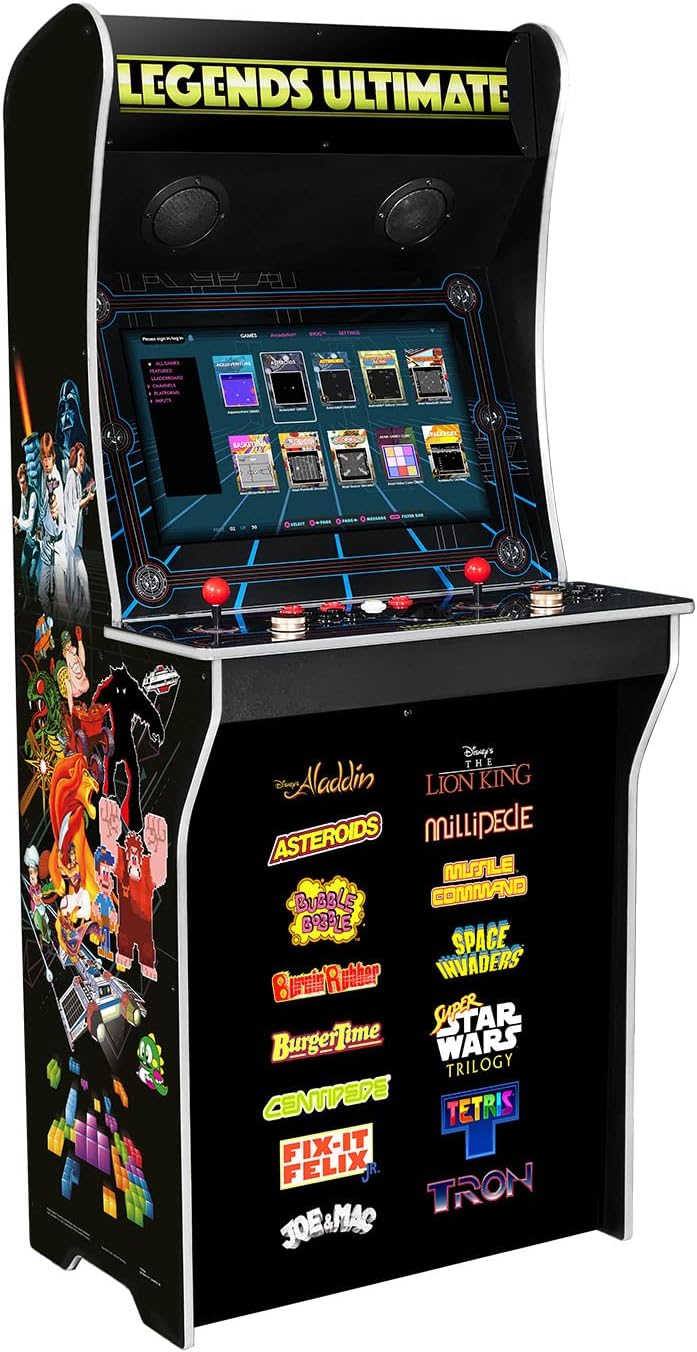
Figure 4.1: The fully assembled Legends Ultimate Arcade Machine.
Passos clau del muntatge:
- Desembaleu tots els components i col·loqueu-los sobre una superfície neta i plana.
- Assemble the main cabinet structure using the provided panels and hardware.
- Install the monitor assembly into the cabinet.
- Attach the control panel assembly, ensuring all internal cables are properly connected to the main board.
- Secure the back panel and any remaining covers.
5. Configuració
Once assembled, connect your Legends Ultimate Arcade machine for power and network access.
5.1 Connexió d'alimentació
Connect the provided power adapter to the DC input port on the back of the machine, then plug the adapter into a standard AC wall outlet.
5.2 Connexió de xarxa
The Legends Ultimate Arcade supports both Wi-Fi and Ethernet connectivity for online features, game streaming, and firmware updates.
- Wi-Fi: Navigate to the network settings in the main menu, select your Wi-Fi network, and enter the password.
- Ethernet: Connect an Ethernet cable from your router to the Ethernet port on the back of the machine.
5.3 Connectivitat de dispositius externs
The machine features HDMI and USB ports for connecting external devices such as game consoles, PCs, or specialized controllers like racing wheels and flight yokes. Ensure the external device is powered on and connected to the appropriate port. Use the input selection button on the control panel to switch to the desired input source.

Figure 5.1: The comprehensive control panel of the Legends Ultimate Arcade.
6. Instruccions de funcionament
Familiarize yourself with the controls and menu navigation to fully enjoy your arcade experience.
6.1 Engegada/apagada
Press the power button, usually located on the top right of the control panel, to turn the machine on. To power off, press and hold the power button until the shutdown options appear, then select 'Shutdown'.
6.2 Navegació de menús
Use the joysticks and action buttons on the control panel to navigate through the Legends Arcade Platform interface. The main menu provides access to the game library, settings, and online features like ArcadeNet.
6.3 Jugar a jocs
Select a game from the library using the joystick and 'A' button (or equivalent action button). Follow any on-screen prompts to start the game. The control panel features two sets of joysticks and action buttons for two-player gameplay.

Figure 6.1: Users engaging with the Legends Ultimate Arcade machine.
6.4 Online Features (ArcadeNet, BYOG)
Connect to the internet to access ArcadeNet, which offers a growing library of games, online multiplayer, leaderboards, and downloadable content. BYOG (Bring Your Own Game) allows you to stream games from your PC to the arcade machine, utilizing the arcade controls.
7. Manteniment
Regular maintenance ensures the longevity and optimal performance of your Legends Ultimate Arcade machine.
- Neteja: Use a soft, dry cloth to wipe down the cabinet and control panel. For the screen, use a microfiber cloth and a screen-safe cleaning solution. Avoid abrasive cleaners or excessive moisture.
- Emmagatzematge: If storing the machine for an extended period, disconnect it from power and cover it to protect from dust and debris. Store in a dry, temperature-controlled environment.
8. Solució De Problemes
Consulteu els següents problemes comuns i les seves possibles solucions:
| Problema | Causa possible | Solució |
|---|---|---|
| La màquina no s'encén. | Cable d'alimentació desconnectat, presa de corrent defectuosa. | Comproveu les connexions d'alimentació, proveu una presa de corrent diferent. |
| Sense visualització a la pantalla. | Loose internal monitor cable, incorrect input source. | Ensure internal cables are secure. Press the input selection button to cycle through sources. |
| Els controls no responen. | Loose control panel connection, software glitch. | Check control panel cable connections. Restart the machine. |
| No es pot connectar a la Wi-Fi. | Contrasenya incorrecta, senyal feble, problema amb el router. | Verify password, move closer to router, restart router. |
9. Especificacions
- Dimensions del producte: 29.53 x 21.65 x 66.44 polzades
- Pes de l'article: 10 lliures
- Plataforma: Electronic Game, Not Machine Specific
- Dispositiu d'entrada: Gamepad (integrated joysticks, buttons, trackball, spinner)
- Tecnologia de connectivitat: HDMI, Wi-Fi, Bluetooth, Ethernet
- Fabricant: Als Jocs
- Nom del model: HA8801
10. Garantia i Suport
The AtGames Legends Ultimate Arcade machine comes with a manufacturer's warranty. For detailed warranty information, including terms and conditions, please refer to the warranty card included in your product packaging or visit the official AtGames support website. For technical assistance, troubleshooting beyond this manual, or replacement parts, please contact AtGames customer support directly.
AtGames Support: www.atgames.net/arcades/support/


