1. Introducció
Thank you for choosing the SilverStone Technology FX500-G 500W Flex ATX Power Supply. This power supply unit (PSU) is designed to provide stable and efficient power to your computer system, particularly in small form factor (SFF) builds and 1U rackmount server applications. Featuring 80 PLUS Gold level efficiency and a powerful single +12V rail, the FX500-G delivers 500W continuous output at 40°C for reliable 24/7 operation. This manual provides essential information for proper installation, operation, and maintenance of your new power supply.
2. Informació de seguretat
- Desconnecteu sempre el cable d'alimentació de la presa de corrent abans d'instal·lar, treure o netejar la font d'alimentació.
- This power supply is designed for use in computer systems. Do not use it for any other purpose.
- No obriu la font d'alimentació casing. Alt volumtages are present inside, and opening the unit will void the warranty and poses a risk of electric shock.
- Ensure proper ventilation around the power supply. Do not block any ventilation openings.
- Mantingueu la font d'alimentació allunyada de l'aigua, la humitat i les temperatures extremes.
- Use only the cables provided with the power supply. Using incompatible cables may cause damage.
- If the power supply is not functioning correctly, contact SilverStone support or a qualified technician. Do not attempt to repair it yourself.
3. Contingut del paquet
Please check the contents of your package. If any items are missing or damaged, contact your retailer or SilverStone support.
- SilverStone FX500-G Flex ATX Power Supply
- Cable d'alimentació CA
- Modular Cable Set (if applicable, otherwise attached cables)
- Cargols de muntatge
- Manual d'usuari

Image: SilverStone FX500-G Power Supply and its retail packaging.
4. Característiques clau
- Supports standard Flex ATX form factor for compact builds.
- High efficiency with 80 PLUS Gold certification.
- Equipped with Japanese primary capacitor for enhanced reliability.
- Provides 500W continuous power output at 40°C, rated for 24/7 operation.
- Features a class-leading single +12V rail for stable power delivery.
- All black exterior coating and sleeved cables for a clean aesthetic.
- Includes support for PCIe 8-pin and 6-pin connectors.
5. Guia d'instal·lació
Follow these steps to properly install your SilverStone FX500-G power supply into your computer system.
- Prepareu el vostre sistema: Assegureu-vos que l'ordinador estigui completament apagat i desendollat de la presa de corrent. Obriu la carcassa de l'ordinador per accedir a la zona de muntatge de la font d'alimentació.
- Traieu la font d'alimentació antiga (si escau): If replacing an existing power supply, disconnect all cables from the motherboard and components. Unscrew and remove the old PSU from the case.
- Muntar la nova font d'alimentació: Carefully slide the FX500-G into the Flex ATX power supply bay in your case. Align the screw holes on the PSU with those on the case. Secure the PSU using the provided mounting screws.
- Connecteu l'alimentació de la placa base: Connect the 24-pin ATX power connector to your motherboard. Ensure it clicks securely into place.
- Connecteu l'alimentació de la CPU: Connect the 4+4-pin or 8-pin EPS/ATX 12V connector to the CPU power socket on your motherboard.
- Connect PCIe Power (if needed): If your graphics card requires additional power, connect the appropriate 6-pin or 6+2-pin PCIe power connectors from the PSU to your graphics card.
- Connect SATA/Peripheral Power: Connect SATA power connectors to your storage drives (HDDs, SSDs) and optical drives. Use peripheral (Molex) connectors for other devices as needed.
- Gestió de cables: Route cables neatly to improve airflow and aesthetics. Use cable ties or straps if available.
- Tanqueu la caixa i connecteu l'alimentació: Once all connections are secure, close your computer case. Connect the AC power cord to the power supply and then to a wall outlet or surge protector.

Imatge: Anglesa view of the SilverStone FX500-G power supply, showing its compact form factor and cable exit point.

Imatge: Part posterior view of the SilverStone FX500-G, highlighting the AC power inlet, power switch, and exhaust fan.
6. Funcionament
After successful installation, you can power on your system.
- Encès: Ensure the power switch on the back of the PSU is in the "I" (On) position. Press the power button on your computer case.
- Arrencada inicial: Your system should boot normally. Monitor for any unusual noises or smells. If any issues arise, refer to the Troubleshooting section.
- Apagar: To shut down your system, use the operating system's shutdown procedure. For a complete power cycle, switch the PSU's power switch to the "O" (Off) position after shutting down the system.
7. Manteniment
Un manteniment regular ajuda a garantir la longevitat i el rendiment òptim de la vostra font d'alimentació.
- Neteja de pols: Periodically clean dust from the power supply's fan and ventilation grilles. Use compressed air to gently blow dust out. Always disconnect the power cord before cleaning.
- Condicions ambientals: Operate the power supply in a well-ventilated area with stable room temperature. Avoid environments with excessive dust, humidity, or extreme temperatures.
- Inspecció del cable: Occasionally inspect power cables for any signs of wear, fraying, or damage. Replace damaged cables immediately.
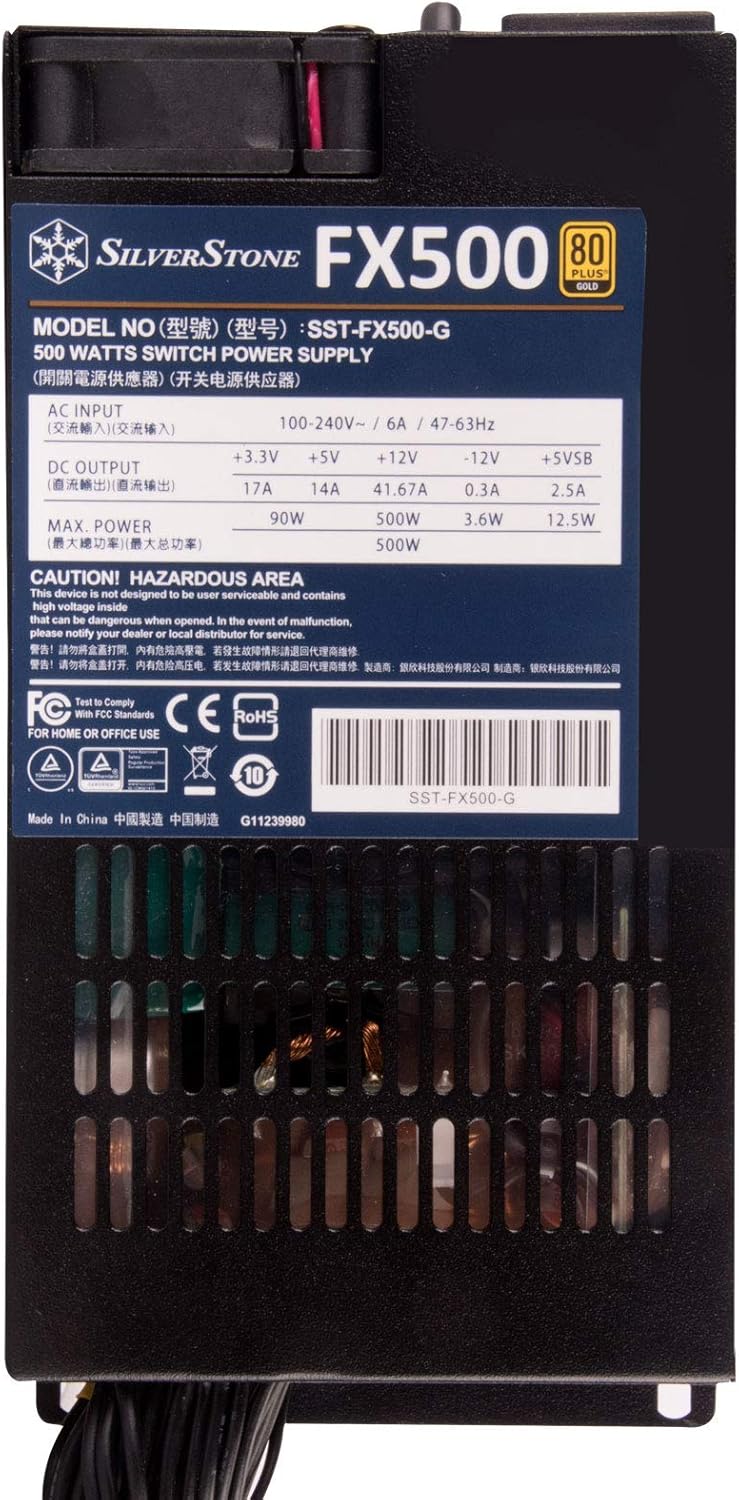
Imatge: Superior view of the SilverStone FX500-G, showing the product label with electrical specifications and certifications.
8. Solució De Problemes
If you encounter issues with your power supply, refer to the following common problems and solutions.
| Problema | Causa possible | Solució |
|---|---|---|
| El sistema no s'encén. |
|
|
| El sistema s'encén però s'apaga inesperadament. |
|
|
| Fort soroll del ventilador de la font d'alimentació. |
|
|
9. Especificacions
Detailed technical specifications for the SilverStone FX500-G power supply.
| Característica | Detall |
|---|---|
| Nom del model | SST-FX500-G |
| Factor de forma | Flex ATX |
| Potència de sortidatage | 500W (Continuous at 40°C) |
| Eficiència | Certificat 80 PLUS Gold |
| Entrada Voltage | 100-240V AC |
| Freqüència d'entrada | 47-63 Hz |
| PFC | PFC actiu |
| Mètode de refrigeració | Aire (ventilador intern) |
| Dimensions (LxWxH) | 150 mm x 81.5 mm x 40.5 mm (5.91 x 3.21 x 1.59 polzades) |
| Pes | 1.3 kg (2.86 lliures) |
| Connector principal | ATX de 24 pins |
| Connector de CPU | 4+4-pin EPS/ATX 12V |
| Connectors PCIe | 6-pin, 6+2-pin |
| Connectors SATA | Múltiples |
| Peripheral (Molex) Connectors | Múltiples |

Imatge: Superior view of the SilverStone FX500-G, showing the detailed specifications label.
10. Garantia i Suport
SilverStone Technology products are designed and manufactured to the highest quality standards. In the unlikely event that you experience any issues with your FX500-G power supply, please refer to the following information.
Informació de la garantia
SilverStone Technology provides a limited warranty for its power supply units. The specific terms and duration of the warranty may vary by region and product. Please retain your proof of purchase for warranty claims. For detailed warranty information, including coverage and exclusions, please visit the official SilverStone Technology weblloc o poseu-vos en contacte amb el seu servei d'atenció al client.
Atenció al client
If you require technical assistance, have questions about your product, or need to initiate a warranty claim, please contact SilverStone Technology customer support.
- Oficial Weblloc: Visita www.silverstonetek.com per obtenir informació sobre el producte, preguntes freqüents i recursos d'assistència.
- Informació de contacte: Refer to the "Support" or "Contact Us" section on the SilverStone website for regional contact details, including email and phone numbers.
When contacting support, please have your product model (FX500-G) and proof of purchase ready.


