1. Producte acabatview
The Ortizan Bluetooth Speaker X20 is a portable wireless speaker designed to deliver high-quality audio with deep bass. It features Bluetooth 5.0 connectivity, IPX6 waterproof rating, and a power bank function for charging other devices. This manual provides detailed instructions for its setup, operation, and maintenance.

Imatge 1.1: Frontal view of the Ortizan Bluetooth Speaker X20, showcasinel seu disseny cilíndric i el panell de control.
2. Contingut del paquet
Si us plau, comproveu el paquet per veure si hi ha els elements següents:
- Ortizan Bluetooth Speaker X20
- Portable Soft Cord
- Cable de càrrega (USB-C)
- Manual d'usuari
3. Controls i indicadors
Familiaritzeu-vos amb els botons i els ports de l'altaveu per a un ús òptim.
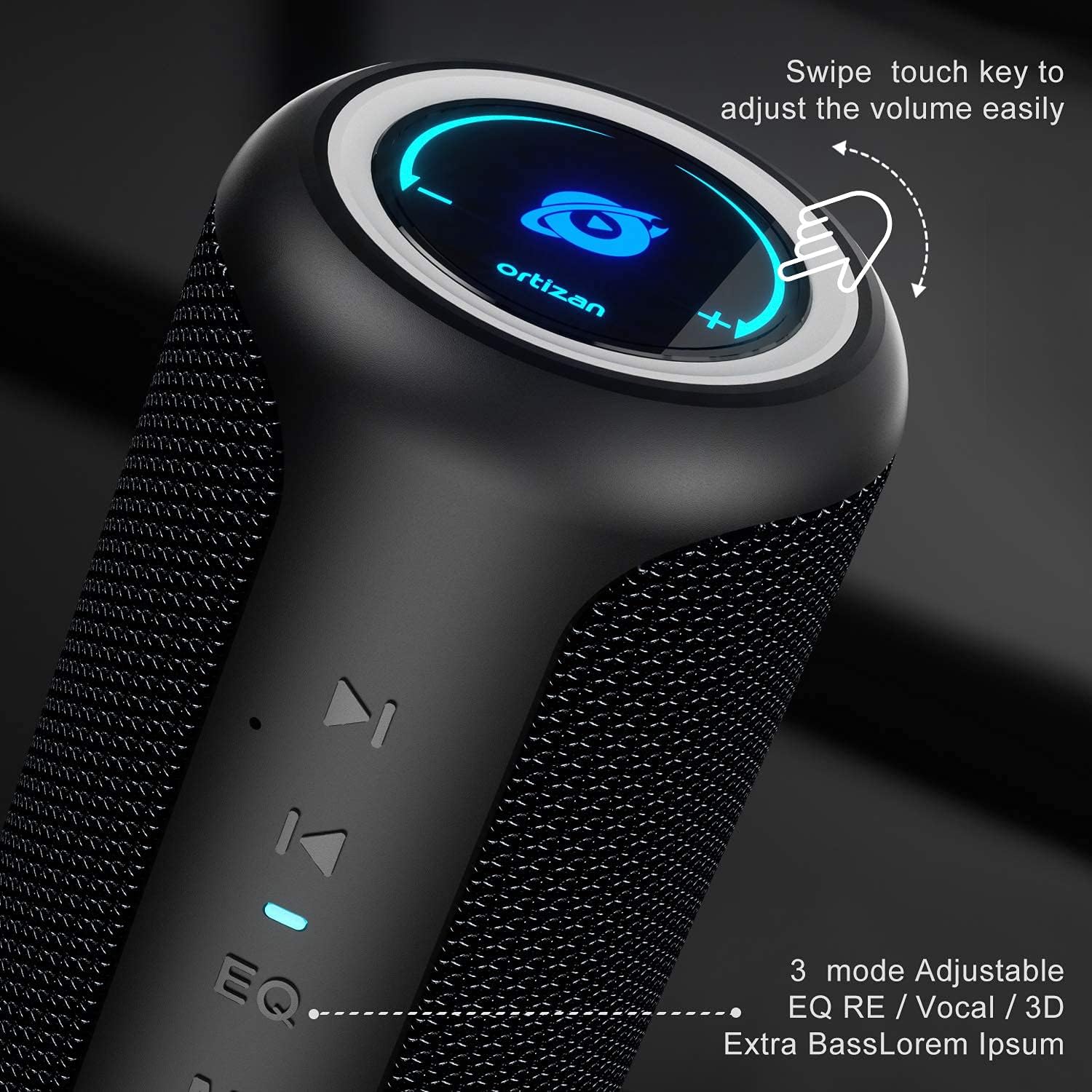
Imatge 3.1: Primer pla view of the speaker's control panel, highlighting the touch-sensitive volume ring and EQ button.
- Power Button (⑂): Press and hold to power on/off.
- Botó de mode (M): Press to switch between Bluetooth, AUX, and TF Card modes.
- EQ Button (EQ): Press to cycle through sound effects (Balanced, 3D, Deep Bass).
- Play/Pause (⏸): Press to play or pause audio.
- Previous Track (⏮): Press to go to the previous track.
- Next Track (⏴): Press to go to the next track.
- Anell de volum: Swipe clockwise to increase volume, counter-clockwise to decrease volume.
- Port USB: For power bank function.
- Ranura per a targetes TF: For playing music from a MicroSD card.
- Port d'entrada AUX: Per a connexió d'àudio amb cable.
- Port de càrrega tipus C.: Per carregar l'altaveu.
4. Carregant l’altaveu
Before first use, fully charge the speaker. A full charge provides up to 15 hours of playtime at moderate volume.
- Connect the provided USB-C charging cable to the Type-C port on the speaker.
- Connecteu l'altre extrem del cable a un adaptador de corrent USB (no inclòs) o al port USB d'un ordinador.
- El llum indicador de càrrega s'il·luminarà durant la càrrega i s'apagarà quan estigui completament carregat.

Image 4.1: Visual representation of the speaker's 15-hour playtime capability after a full charge.
5. Emparellament Bluetooth
Follow these steps to connect your speaker to a Bluetooth-enabled device.
- Power on the speaker by pressing and holding the Power button. The Bluetooth indicator will flash, indicating it is in pairing mode.
- Al dispositiu (telèfon intel·ligent, tauleta, etc.), activeu el Bluetooth i cerqueu els dispositius disponibles.
- Select "Ortizan X20" from the list of devices.
- Once connected, the Bluetooth indicator will stop flashing and remain solid. You can now play audio through the speaker.
6. Emparellatge estèreo sense fil veritable (TWS)
To achieve a stereo surround sound experience, you can pair two Ortizan X20 speakers together.
- Assegureu-vos que tots dos altaveus estiguin encesos i no connectats a cap altre dispositiu Bluetooth.
- On one speaker (this will be the primary speaker), press and hold the Play/Pause button for 2-3 seconds until you hear a prompt sound.
- The two speakers will automatically search for and connect to each other. Once connected, you will hear a confirmation sound, and the Bluetooth indicator on the primary speaker will flash, while the secondary speaker's indicator will be solid.
- Now, connect your device to the primary speaker via Bluetooth as described in Section 5. The audio will play in stereo across both speakers.

Image 6.1: Diagram illustrating two Ortizan X20 speakers wirelessly paired for an immersive 360-degree surround sound experience.
7. Funcionament de l'altaveu
7.1. Encendre/apagar
- Press and hold the Power button for approximately 3 seconds to turn the speaker on or off.
7.2. Control de volum
- Swipe your finger clockwise along the top ring to increase the volume.
- Swipe your finger counter-clockwise along the top ring to decrease the volume.
7.3. Control de reproducció
- Premeu el botó Reproduir/Pausa per reproduir o posar en pausa la pista actual.
- Press the Previous Track button (⏮) to go to the beginning of the current track or to the previous track.
- Press the Next Track button (⏴) to skip to the next track.
7.4. Modes d'equalització
The speaker offers three equalizer modes to customize your listening experience.
- Press the EQ button to cycle through the modes: Equilibrat, Envoltant 3D, i Baix profund.

Image 7.1: The speaker's design, emphasizing the EQ button for selecting different audio effects.
8. Funció de bateria externa
The Ortizan X20 can be used to charge other devices in an emergency.
- Connecteu el cable de càrrega del dispositiu al port de sortida USB-A de l'altaveu.
- L'altaveu començarà a carregar el dispositiu.

Image 8.1: The Ortizan X20 speaker connected via USB to a smartphone, demonstrating its power bank functionality.
9. Other Connectivity Options
In addition to Bluetooth, the speaker supports AUX-in and TF card playback.

Image 9.1: Icons representing the speaker's compatibility with various devices and input methods, including built-in mic, TF card, AUX-in, Bluetooth 5.0, and hands-free calling.
9.1. AUX-in Mode
- Connect a 3.5mm audio cable (not included) from your audio source to the speaker's AUX-in port.
- Press the Mode button (M) to switch to AUX mode. The speaker will automatically play audio from the connected device.
9.2. Mode de targeta TF
- Insert a MicroSD (TF) card with MP3 audio files a la ranura de la targeta TF.
- Press the Mode button (M) to switch to TF Card mode. The speaker will automatically begin playing music from the card.
10. Waterproof Information (IPX6)
The Ortizan X20 speaker features an IPX6 waterproof rating, meaning it is protected against high-pressure water jets from any direction. This makes it suitable for outdoor use and environments where it might be exposed to splashes or rain.
- NO immerse the speaker in water.
- Assegureu-vos que totes les cobertes dels ports estiguin ben tancades abans d'exposar l'altaveu a l'aigua.
- Després de l'exposició a l'aigua, eixugueu l'altaveu amb un drap suau.

Image 10.1: The speaker shown with water droplets, indicating its waterproof capabilities. Note: The product is rated IPX6.
11. Manteniment
Un manteniment adequat garanteix la longevitat del vostre altaveu.
- Neteja: Use a soft, dry cloth to clean the speaker. Do not use abrasive cleaners or solvents.
- Emmagatzematge: Guardeu l'altaveu en un lloc fresc i sec, allunyat de la llum solar directa i de temperatures extremes.
- Cura de la bateria: If not used for extended periods, charge the speaker at least once every three months to maintain battery health.
12. Solució De Problemes
If you encounter issues with your speaker, refer to the following common problems and solutions.
| Problema | Causa possible | Solució |
|---|---|---|
| L'altaveu no s'encén. | Bateria baixa. | Carregueu l'altaveu completament. |
| No es pot emparellar per Bluetooth. | Speaker not in pairing mode; device's Bluetooth off; too far from device. | Ensure speaker is in pairing mode (flashing indicator). Turn device's Bluetooth off/on. Move speaker closer to device (within 20m). |
| Sense so o amb un volum baix. | Volum massa baix a l'altaveu o al dispositiu; mode d'entrada incorrecte. | Increase volume on both speaker and connected device. Press 'M' button to select correct input mode (Bluetooth, AUX, TF Card). |
| L'emparellament TWS falla. | Altaveus ja connectats a altres dispositius; procediment d'emparellament incorrecte. | Ensure both speakers are disconnected from other devices. Follow TWS pairing steps precisely (Section 6). |
| La funció del banc d'energia no funciona. | Speaker battery too low; incorrect cable. | Ensure speaker has sufficient charge. Use a compatible charging cable for your device. |
13. Especificacions
Technical details of the Ortizan Bluetooth Speaker X20.
| Característica | Detall |
|---|---|
| Marca | Ortizan |
| Nom del model | KWSS4548 (X20) |
| Tecnologia de connectivitat | Bluetooth 5.0 |
| abast sense fils | Up to 20 meters (66 feet) without barriers |
| Potència màxima de sortida de l'altaveu | 40 watts |
| Resposta de freqüència | 20 Hz - 16,000 Hz |
| Mode de sortida d'àudio | estèreo |
| Classificació impermeable | IPX6 |
| Font d'alimentació | Alimentat per bateria (1 bateria de liti-ió inclosa) |
| Hora de joc | Fins a 15 hores (a un volum moderat) |
| Dispositius compatibles | Smartphone, TV, Laptop, etc. |
| Opcions d'entrada | Bluetooth, AUX-in, TF Card |
| Material | Silicone TPU |
| Dimensions del producte (L x A x A) | 18 x 18 x 27 cm |
| Pes | 830 grams |
14. Informació de seguretat
Si us plau, llegiu i seguiu aquestes pautes de seguretat:
- No exposeu l'altaveu a temperatures extremes ni a la llum solar directa durant períodes prolongats.
- Eviteu deixar caure o sotmetre l'altaveu a forts impactes.
- Mantingueu l'altaveu allunyat de dispositius mèdics, ja que conté imants.
- Do not attempt to disassemble, repair, or modify the speaker yourself. Contact qualified service personnel.
- Desfeu-vos de l'altaveu i la bateria de manera responsable d'acord amb la normativa local.
15. Garantia i Suport
Ortizan products are designed and manufactured to the highest quality standards. For warranty information or technical support, please refer to the contact details provided on the product packaging or the official Ortizan weblloc web. Conserveu el comprovant de compra per a reclamacions de garantia.