1. Producte acabatview
The ADVANTECH UNO-220 is an industrial-grade gateway kit designed for customers utilizing Raspberry Pi 4 (RPi 4) single-board computers (SBCs) in Internet of Things (IoT) applications. This kit provides a Raspberry Pi-ready solution for rapid prototyping in shop floor environments.
Característiques clau
- Compact size for RPi-based IoT solutions (100x 70x 33 mm)
- Industrial grade I/O board for the Raspberry Pi
- Battery-backed Real-Time Clock (RTC) chip for accurate timekeeping
- Includes Operating System (OS) for automatic configuration of GPIOs and drivers

Figura 1: Frontal view of the ADVANTECH UNO-220-P4N1AE Raspberry Pi Gateway Kit.
2. Contingut del paquet
Verifiqueu que tots els elements que s'enumeren a continuació s'inclouen al vostre paquet:
- UNO-220 board
- Raspberry Pi
- Sistema operatiu
- Conductors
- Battery-backed RTC chip
- 4 pins GPIO
3. Instruccions de configuració
Follow these steps to set up your ADVANTECH UNO-220-P4N1AE Raspberry Pi Gateway Kit:
Step 1: Insert SD Card
First, remove the screws from the chassis and carefully take out the internal components to access the SD card slot. Insert the provided SD card into your Raspberry Pi 4 SBC.
Step 2: Affix Raspberry Pi 4 SBC
Remove the protective film from under the thermal pad. Carefully position and affix the Raspberry Pi 4 SBC in place within the chassis, securing it with a screw. Ensure that the GPIO pins are correctly aligned and installed.
Step 3: Secure Raspberry Pi 4 SBC to Chassis
Once the Raspberry Pi 4 SBC is correctly positioned, secure it to the chassis using the provided screws. Ensure all connections are firm.
Step 4: Develop IoT Applications
The kit is now ready for use. Utilize the provided GPIO pins and pre-installed software to develop your IoT applications.
Video 1: This video demonstrates the 4 easy steps for integrating the UNO-220 with Raspberry Pi 4, including SD card insertion, thermal pad application, securing the SBC, and preparing for IoT application development.
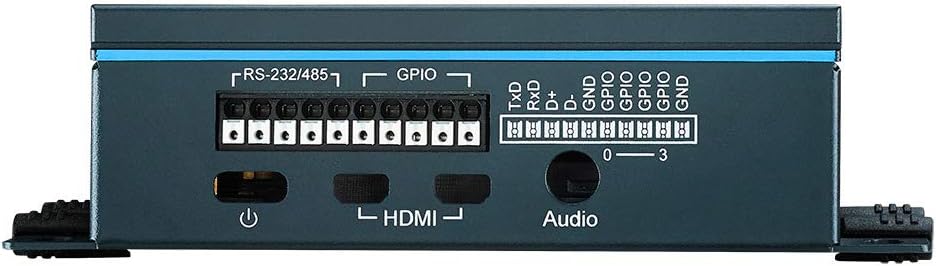
Figura 2: posterior view of the UNO-220-P4N1AE, highlighting the RS-232/485, GPIO, HDMI, and audio ports for connectivity.
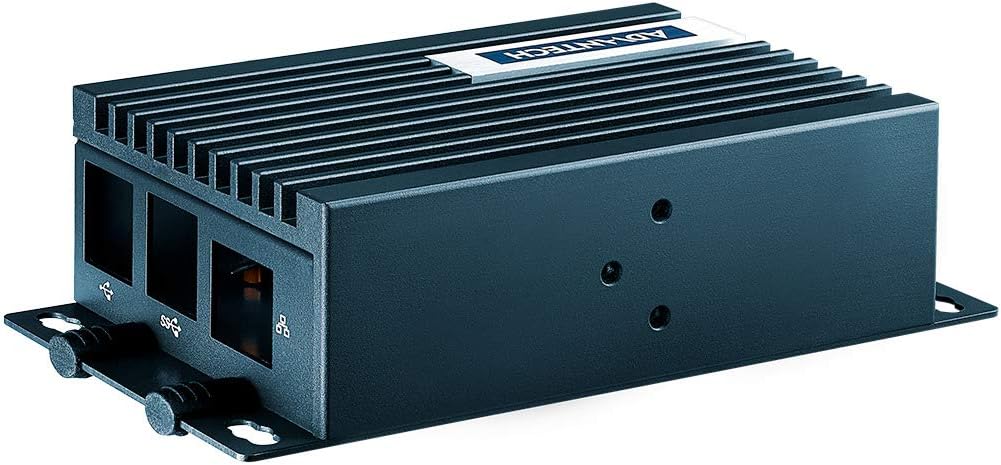
Figura 3: lateral view of the UNO-220-P4N1AE, displaying the USB ports for peripheral connections.

Figura 4: superior view of the UNO-220-P4N1AE, showing the heatsink fins designed for thermal management.
4. Instruccions de funcionament
After successful setup, connect the necessary peripherals such as a display via HDMI, a keyboard, and a mouse to the USB ports. Connect the power supply to the device. The pre-installed operating system and drivers will allow the Raspberry Pi to identify the UNO-220 and automatically configure the GPIOs and other functionalities. Refer to the Raspberry Pi documentation for specific operating system commands and software development guides.
Arrencada inicial
- Connect the power adapter to the UNO-220.
- The system will boot automatically.
- Follow on-screen prompts for initial setup of the operating system, if any.
Using GPIO and Serial Ports
The UNO-220 provides RS232/485 and GPIO interfaces. These can be accessed and controlled via the operating system using appropriate libraries and commands. Consult the ADVANTECH documentation or Raspberry Pi community resources for detailed programming examples and pinout information.
5. Manteniment
Regular maintenance ensures optimal performance and longevity of your UNO-220-P4N1AE Gateway Kit.
- Neteja: Keep the device free from dust and debris. Use a soft, dry cloth for cleaning. Avoid liquid cleaners.
- Connexions: Periodically check all cable connections (power, HDMI, USB, serial, GPIO) to ensure they are secure.
- Actualitzacions de programari: Regularly update the operating system and any installed software to benefit from the latest features, security patches, and bug fixes.
- Condicions ambientals: Feu funcionar el dispositiu dins dels rangs de temperatura i humitat especificats per evitar danys.
6. Solució De Problemes
Aquesta secció ofereix solucions a problemes comuns que podeu trobar.
Sense poder
- Ensure the power adapter is correctly connected to both the device and a working power outlet.
- Verify the power outlet is supplying power.
Problemes de visualització
- Check the HDMI cable connection between the device and the monitor.
- Assegureu-vos que el monitor estigui encès i configurat a la font d'entrada correcta.
Perifèric no detectat
- Prova de connectar el perifèric a un port USB diferent.
- Ensure the peripheral is functioning correctly on another device.
- Check if necessary drivers are installed for the peripheral.
Software or OS Errors
- Reinicieu el dispositiu.
- Ensure the operating system is up to date.
- Consult Raspberry Pi community forums or ADVANTECH support for specific error messages.
7. Especificacions
Detailed technical specifications for the ADVANTECH UNO-220-P4N1AE Raspberry Pi Gateway Kit:
| Característica | Especificació |
|---|---|
| Dimensions del paquet | 14.48 x 14.17 x 9.92 polzades |
| Pes de l'article | 10.14 lliures |
| Fabricant | ADVANTECH |
| ASIN | B08KFR5H4Q |
| Data de primera disponibilitat | 29 de setembre de 2020 |
| Marca | ADVANTECH |
| Capacitat d'emmagatzematge de memòria | 8 GB |
| Tecnologia de connectivitat | I2C |
| Components inclosos | UNO-220 board, Raspberry Pi, Operating System, Drivers, Battery-backed RTC chip, 4 GPIO pins |
| Sistema operatiu | Linux |
8. Garantia i Suport
For warranty information, technical support, or service inquiries, please refer to the official ADVANTECH website or contact your local ADVANTECH representative. Keep your purchase receipt for warranty validation.
ADVANTECH Official Weblloc: www.advantech.com