1. Dispositiu acabatview
The OPPO A93 (CPH2121) is a smartphone designed for efficient mobile communication and multimedia use. It features an ultra-thin design, a 6.43-inch AMOLED display, and a versatile camera system.

Imatge: Anvers i revers view of the OPPO A93 Smartphone, showcasinel seu disseny elegant i el mòdul de càmera.
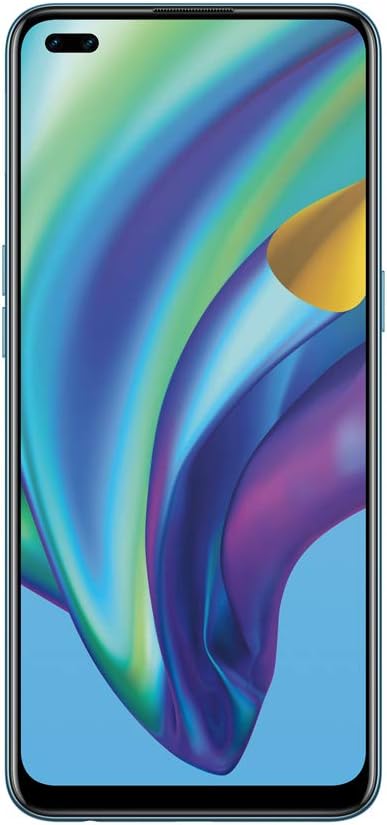
Imatge: Frontal view of the OPPO A93 Smartphone, highlighting the dual punch-hole display.

Imatge: Enrere view of the OPPO A93 Smartphone, showing the quad-camera setup and OPPO branding.
2. Guia de configuració
2.1 Inserció de targetes SIM i targeta SD
- Localitza la safata de la targeta SIM al lateral del dispositiu.
- Feu servir l'eina d'expulsió de la SIM proporcionada per obrir la safata.
- Carefully place your Nano-SIM cards and/or microSD card into the designated slots on the tray. Ensure correct orientation.
- Empenyeu suaument la safata cap enrere dins del dispositiu fins que quedi alineada amb el lateral.
2.2 Engegada i configuració inicials
- Premeu i manteniu premut el botó d'engegada (situat al costat dret) fins que aparegui el logotip d'OPPO.
- Segueix les instruccions que apareixen a la pantalla per seleccionar l'idioma i la regió i connectar-te a una xarxa Wi-Fi.
- Inicia la sessió amb el teu compte de Google o crea'n un de nou per accedir als serveis de Google i a Play Store.
- Set up your preferred screen lock method (PIN, pattern, password, fingerprint, or facial recognition).
2.3 Càrrega del dispositiu
Connect the USB Type-C cable to the charging port at the bottom of the phone and the other end to the power adapter. Plug the adapter into a power outlet. The device will indicate charging status on the screen.
3. Instruccions de funcionament
3.1 Navegació bàsica
- Toca: Toca una icona per obrir una aplicació o seleccionar un element.
- Llisca: Move your finger across the screen to scroll through pages, lists, or switch between home screens.
- Pessigar: Feu servir dos dits per ampliar o reduir les fotos i web pàgines.
- Premsa llarga: Mantingueu premut un element per obtenir més opcions o per moure'l.
3.2 Característiques de la càmera
The OPPO A93 features a 6 AI Portrait Camera system, enhancing photography capabilities:
- AI Super Night Portrait: Captures clear night selfies using HDR, facial recognition, and highlight suppression.
- AI Night Flare Portrait: Transforms low-light portraits into stunning images by adding artistic flare to city lights.
- AI Color Portrait: Isolates the subject in color while artistically fading the background.
- AI Super Clear Portrait: Utilizes AI deep learning to reconstruct facial features for enhanced clarity, even in challenging lighting.
3.3 Visualització i disseny
- Mini Dual Punch-Holes: Maximizes screen real estate on the FHD+ 2400 x 1080 pixel display.
- Shiny Matte Color: Provides a luxurious, fingerprint-resistant finish.
- Disseny ultraprim: Offers a smooth, rounded feel for comfortable handling.
4. Manteniment
4.1 Cura de la bateria
- Eviteu exposar el dispositiu a temperatures extremes.
- No deixeu que la bateria es descarregui completament amb freqüència.
- Feu servir només carregadors i cables aprovats per OPPO.
4.2 Actualitzacions de programari
Comproveu i instal·leu regularment si hi ha actualitzacions de programari per garantir un rendiment òptim, seguretat i accés a noves funcions. Navegueu a Configuració > Actualització de programari.
4.3 Neteja del vostre dispositiu
Use a soft, lint-free cloth to gently wipe the screen and back of the phone. Avoid using harsh chemicals or abrasive materials.
5. Solució De Problemes
5.1 El dispositiu no s'encén
- Assegureu-vos que la bateria estigui carregada. Connecteu el carregador i espereu uns minuts abans d'intentar engegar-lo.
- Mantingueu premut el botó d'engegada durant almenys 10-15 segons per forçar un reinici.
5.2 La pantalla no respon
- Force restart the device (see above).
- If the issue persists, consider performing a factory reset (data will be erased).
5.3 Problemes de connectivitat de xarxa
- Check if Airplane Mode is enabled.
- Reinicieu el vostre dispositiu.
- Reset network settings via Settings > System settings > Backup and reset > Reset phone > Reset network settings.
5.4 Realització d'un restabliment de fàbrica
Un restabliment de fàbrica esborrarà totes les dades del telèfon. Fes una còpia de seguretat de les dades importants abans de continuar. Ves a Settings > System settings > Backup and reset > Reset phone > Erase all data.
6. Especificacions
| Característica | Especificació |
|---|---|
| Marca | OPPO |
| Nom del model | CPH2121 |
| Sistema operatiu | Android 10.0 |
| Mida de la memòria RAM instal·lada | 8 GB |
| Model de CPU | Snapdragon |
| Velocitat de la CPU | 2.2 GHz |
| Capacitat d'emmagatzematge de memòria | 128 GB |
| Mida de la pantalla | 6.43 polzades |
| Resolució | 1080 x 2400 |
| Freqüència d'actualització | 90 Hz |
7. Garantia i Suport
Per obtenir informació sobre la garantia i assistència tècnica, consulteu la targeta de garantia inclosa amb el producte o visiteu el lloc web d'assistència oficial d'OPPO. website. You can also contact OPPO customer service for assistance with any issues not covered in this manual.


