Introducció
Thank you for choosing the Xigmatek POSEIDON EN42883 PC Gaming Case. This manual provides essential information for the proper installation, operation, and maintenance of your new computer chassis. Please read this manual thoroughly before beginning the assembly process to ensure optimal performance and longevity of your system.

Imatge: Anglesa view of the Xigmatek POSEIDON EN42883 PC Gaming Case, showcasing its tempered glass side panel and front-mounted Rainbow LED fans.
Configuració i instal·lació
This section guides you through the process of setting up your Xigmatek POSEIDON EN42883 PC case and installing your components.
1. Desembalatge i inspecció
- Traieu amb cura la carcassa de l'ordinador del seu embalatge.
- Inspeccioneu la caixa per detectar qualsevol signe de danys durant el transport. Si trobeu danys, poseu-vos en contacte amb el vostre distribuïdor immediatament.
- Traieu totes les pel·lícules protectores dels panells de vidre temperat.
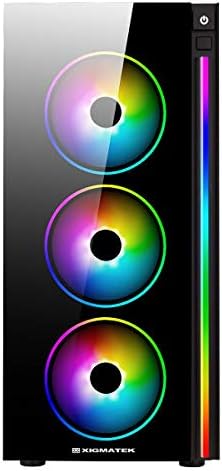
Imatge: Frontal view of the Xigmatek POSEIDON EN42883 PC Gaming Case, highlighting the three 12cm Rainbow LED fans.
2. Instal·lació de components
Before installing components, ensure the case is placed on a stable, flat surface. Refer to your individual component manuals for specific installation instructions.
2.1. Instal·lació de la font d'alimentació (PSU)
- Localitzeu la zona de muntatge de la font d'alimentació a la part inferior posterior de la carcassa.
- Secure the PSU with the provided screws.
2.2. Instal·lació de la placa base
- Instal·leu la protecció d'E/S a l'obertura posterior de la carcassa.
- Align your ATX, MicroATX, or Mini-ATX motherboard with the standoffs inside the case.
- Fixeu la placa base amb els cargols adequats.

Imatge: Interior view of the Xigmatek POSEIDON EN42883 PC Gaming Case, showing the motherboard tray, drive bays, and cable management cutouts.
2.3. Instal·lació de la unitat d'emmagatzematge
- Install 2.5" SSDs or 3.5" HDDs into the designated drive bays. Refer to the case's internal layout for specific mounting points.
- Secure drives with screws or tool-less mechanisms if available.
2.4. Instal·lació de la targeta gràfica (GPU) i la targeta d'expansió
- Traieu les cobertes de les ranures PCIe necessàries de la part posterior de la carcassa.
- Inseriu la targeta gràfica o altres targetes d'expansió a les ranures PCIe de la placa base.
- Fixeu les targetes amb cargols.
3. Gestió de cables
Aprofita els retalls de cables i els punts d'amarratge que hi ha darrere de la safata de la placa base per gestionar els cables. Això millora la circulació del flux i l'estètica.
4. Connecting Front Panel I/O
Connect the front panel cables (USB, audio, power switch, reset switch, LED indicators) to the corresponding headers on your motherboard. Consult your motherboard manual for header locations.

Imatge: Superior view of the Xigmatek POSEIDON EN42883 PC Gaming Case, showing the front I/O panel with USB ports, audio jacks, and power button.
Instruccions de funcionament
Once all components are installed and connected, your Xigmatek POSEIDON EN42883 case is ready for operation.
1. Encendre/apagar
- Press the power button located on the top front panel to turn on your system.
- To turn off, either shut down via your operating system or press and hold the power button for a few seconds.
2. Connectivitat del panell frontal
- Ports USB: Use the USB ports on the top panel to connect peripherals such as keyboards, mice, and external storage devices.
- Preses d'àudio: Connect your headphones or microphone to the dedicated audio jacks.
3. Control de la il·luminació RGB
The Xigmatek POSEIDON EN42883 features pre-installed Rainbow LED fans and an LED strip. Lighting effects are typically controlled via a dedicated button on the front panel (if present) or through your motherboard's RGB software if connected to an RGB header.
Manteniment
Un manteniment regular ajuda a garantir un rendiment òptim i allarga la vida útil dels components del teu PC.
1. Neteja del filtre de pols
- The case is designed for easy cleaning. Regularly check and clean the dust filters located on the top and bottom (for the PSU intake) of the case.
- Gently slide out the filters, clean them with compressed air or a soft brush, and reinsert them.

Imatge: Part inferior view of the Xigmatek POSEIDON EN42883 PC Gaming Case, showing the feet and the removable dust filter for the power supply unit.
2. Neteja exterior
- Wipe the exterior surfaces, including the tempered glass, with a soft, damp tela. Eviteu els netejadors abrasius.
3. Internal Dust Removal
- Periodically open the case and use compressed air to remove dust buildup from internal components and fans. Ensure the system is powered off and unplugged before performing internal cleaning.
Resolució de problemes
Aquesta secció tracta problemes comuns que podeu trobar.
System Does Not Power On
- Assegureu-vos que el cable d'alimentació estigui connectat correctament tant a la font d'alimentació com a la presa de corrent.
- Check that the PSU switch is in the 'ON' position.
- Verifiqueu que el cable de l'interruptor d'alimentació del panell frontal estigui connectat correctament a la placa base.
- Confirm all internal power cables (24-pin ATX, CPU, GPU, etc.) are securely seated.
Fans or LEDs Are Not Working
- Check that the fan power cables are properly connected to the motherboard or fan controller.
- Ensure any RGB/LED cables are correctly connected to the motherboard's RGB header or a dedicated controller.
- Consult your motherboard manual for fan and RGB header locations and settings.
Front Panel USB/Audio Ports Not Functioning
- Verify that the USB and audio cables from the front panel are correctly connected to the corresponding headers on your motherboard.
- Check your motherboard's BIOS/UEFI settings to ensure USB and audio ports are enabled.
Especificacions
Below are the technical specifications for the Xigmatek POSEIDON EN42883 PC Gaming Case:
| Característica | Detall |
|---|---|
| Marca | Xigmatek |
| Model | POSEIDON EN42883 |
| Tipus de cas | Estoig de jocs de mitja torre |
| Suport de la placa base | ATX, MicroATX, Mini-ATX |
| Dimensions (P x A x A) | 48.6 cm x 29.6 cm x 50.8 cm (aproximadament 19.13 x 11.65 x 20 polzades) |
| Pes | 7.16 quilograms (aproximadament 15.78 lliures) |
| Color | Negre |
| Ventiladors preinstal·lats | 4 x 12cm Rainbow LED Fans |
| Panell lateral | Vidre temperat |
| E / S del tauler frontal | USB Ports, Audio Jacks, Power Button, Reset Button |

Image: Diagram illustrating the dimensions of the Xigmatek POSEIDON EN42883 PC Gaming Case.
Garantia i Suport
For warranty information and technical support, please refer to the official Xigmatek website or contact your local retailer. Warranty terms and conditions may vary by region and purchase date.
- Assistència en línia: Visit the official Xigmatek weblloc web per a preguntes freqüents, descàrregues de controladors i recursos d'assistència.
- Atenció al client: Contact Xigmatek customer service for direct assistance with product issues.


