Introducció
The Cisco Business CBS250-48T-4X Smart Switch is designed to provide powerful network performance, security, and reliability for small business networks. This smart switch combines essential network features with ease of management, making it an ideal solution for expanding your network infrastructure.
Les característiques clau inclouen:
- 48 ports Gigabit Ethernet: Proporciona ample connectivity for numerous devices.
- 4 x 10GE SFP+ Uplink Ports: Offers high-speed fiber connectivity for network backbone or server connections.
- Gestió simplificada: Intuitive Cisco Business Dashboard or on-box User Interface for easy network operations and lifecycle management.
- Seguretat millorada: Features IEEE 802.1X port security, Denial-of-Service (DoS) attack prevention, and extensive Access Control Lists (ACLs) to protect your network.
- Disseny compacte: An elegant and compact form factor suitable for various installation environments, including retail stores, offices, and classrooms.
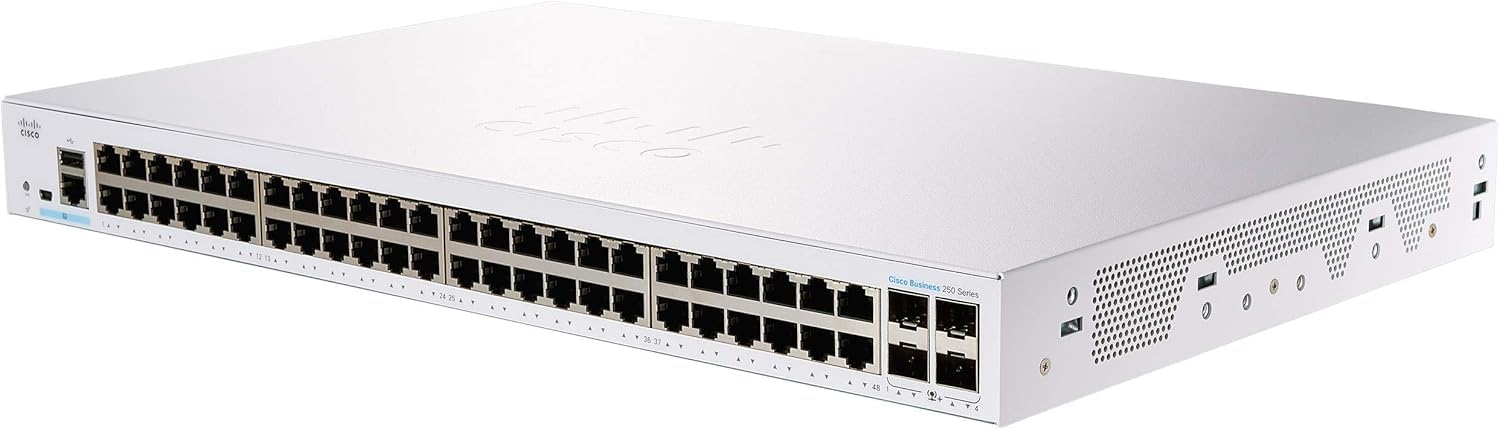
Imatge: Frontal view of the Cisco Business CBS250-48T-4X Smart Switch, showing the 48 Gigabit Ethernet ports and 4 SFP+ uplink ports. The device is white with the Cisco logo on the top and front.
Configuració
This section outlines the basic steps for setting up your Cisco Business CBS250-48T-4X Smart Switch. For detailed instructions, refer to the official Quick Start Guide and User Manual.
Contingut del paquet
Assegureu-vos que tots els components estiguin presents al paquet:
- Cisco Business CBS250-48T-4X Smart Switch
- Cable d'alimentació o adaptador
- Mounting hardware (for rack or wall mounting)
- Guia d'inici ràpid
Passos d'instal·lació
- Col·locació física: Choose a suitable location for the switch. Ensure adequate ventilation and maintain proper operating temperature (up to 40 degrees Celsius). The compact design allows for flexible placement.
- Muntatge: Use the provided mounting hardware to install the switch in a rack, on a wall, or place it on a desktop.
- Connexió d'alimentació: Connect the power cord to the switch and then to a grounded electrical outlet.
- Connexions de xarxa:
- Connect your network devices (computers, servers, access points) to the 48 Gigabit Ethernet ports using standard Ethernet cables.
- For high-speed uplinks or connections to other network segments, use SFP+ transceivers and fiber optic cables in the 4 x 10GE SFP+ ports.
- Configuració inicial: The switch can be configured via its on-box User Interface (Web UI) or through the Cisco Business Dashboard. Refer to the Quick Start Guide for initial access details (e.g., default IP address).
For advanced setup and network integration, consult the comprehensive Cisco Business 250 Series Smart Switch User Guide (PDF).
Funcionament de l'interruptor
Once installed and configured, the Cisco Business CBS250-48T-4X Smart Switch operates as a central component of your network, facilitating data flow between connected devices.
Connectivitat de xarxa
- Ports Ethernet: The 48 Gigabit Ethernet ports automatically detect the speed and duplex mode of connected devices (10/100/1000 Mbps).
- Ports SFP+: The 10 Gigabit SFP+ ports support various SFP+ transceivers for fiber optic connections, enabling high-bandwidth uplinks to core network devices or servers.
Interfície de gestió
The switch can be managed through its web-based graphical user interface (GUI) or via the Cisco Business Dashboard. These interfaces allow you to:
- Monitor port status and network traffic.
- Configure VLANs for network segmentation.
- Implement Quality of Service (QoS) to prioritize critical traffic.
- Manage security features like 802.1X and ACLs.
- Actualitza el firmware.
Característiques de seguretat
The switch incorporates several security features to protect your network:
- IEEE 802.1X Port Security: Authenticates devices connecting to the network, preventing unauthorized access.
- Denial-of-Service (DoS) Attack Prevention: Helps protect the network from common DoS attacks, ensuring network uptime.
- Llistes de control d'accés (ACL): Allows granular control over network traffic, filtering packets based on various criteria to enhance security and prevent unauthorized access.
Manteniment
Proper maintenance ensures the longevity and optimal performance of your Cisco Business CBS250-48T-4X Smart Switch.
- Condicions ambientals: Ensure the switch is operated within its specified temperature and humidity ranges. Avoid placing it in direct sunlight or near heat sources.
- Ventilació: Do not obstruct the ventilation openings on the switch. Ensure adequate airflow around the device to prevent overheating.
- Neteja: Netegeu periòdicament l'exterior de l'interruptor amb un drap suau i sec. No utilitzeu netejadors líquids ni en aerosol.
- Actualitzacions de firmware: Consulteu regularment el suport tècnic de Cisco weblloc web per a actualitzacions de firmware. L'aplicació del firmware més recent pot millorar el rendiment, afegir noves funcions i solucionar vulnerabilitats de seguretat.
- Gestió de cables: Mantingueu els cables de xarxa organitzats i correctament fixats per evitar desconnexions o danys accidentals.
Resolució de problemes
This section provides basic troubleshooting steps for common issues. For more complex problems, refer to the official user manual or contact Cisco support.
Sense poder
- Verify the power cord is securely connected to the switch and the electrical outlet.
- Comproveu si la presa de corrent funciona connectant-hi un altre dispositiu.
- Ensure the power switch (if present) is in the ON position.
Sense connectivitat de xarxa
- Check the Ethernet cables connecting devices to the switch ports. Ensure they are properly seated and not damaged.
- Observe the link/activity LEDs on the switch ports. A solid green or amber light typically indicates a valid link, while blinking indicates activity. No light suggests a cable or device issue.
- Verify the network settings (IP address, subnet mask, gateway) on the connected devices.
- If using SFP+ ports, ensure the correct transceivers are used and fiber optic cables are clean and properly connected.
- Accés a l'interruptor web UI to check port status and configuration.
Slow Network Performance
- Check for excessive network traffic or broadcast storms using the switch's monitoring tools.
- Ensure all devices are operating at their optimal speed (e.g., Gigabit Ethernet for Gigabit ports).
- Verify duplex settings are consistent between the switch port and the connected device.
- Consider implementing QoS (Quality of Service) to prioritize critical applications.
Especificacions
Detailed technical specifications for the Cisco Business CBS250-48T-4X Smart Switch:
| Característica | Especificació |
|---|---|
| Número de model | CBS250-48T-4X |
| Tipus de canvi | Interruptor intel·ligent |
| Nombre de Ports | 48 x 10/100/1000 Gigabit Ethernet, 4 x 10GE SFP+ |
| Tipus d'interfície | Ethernet, SFP+ |
| Velocitat de transferència de dades | 88 gigabits per segon (capacitat de commutació) |
| Dimensions (LxWxH) | 17.32 x 11.33 x 1.73 polzades |
| Pes de l'article | 12.42 lliures |
| Material de la caixa | Metall |
| Classificació de temperatura superior | 40 graus centígrads |
| Fabricant | CISCO |
| UPC | 889728295116 |
| Primera data disponible | 7 d'octubre de 2020 |
Garantia i Suport
The Cisco Business CBS250-48T-4X Smart Switch comes with Limited Lifetime Protection, providing peace of mind regarding your investment.
For comprehensive support, including detailed documentation, software downloads, and technical assistance, please refer to the official Cisco resources:
- Guia oficial d'usuari: Access the full Cisco Business 250 Series Smart Switch User Guide (PDF) for in-depth information on configuration, management, and advanced features.
- Suport de Cisco: Visita l'oficial Botiga Cisco a Amazon or the main Cisco weblloc web per a assistència del producte, preguntes freqüents i informació de contacte.
Always ensure you are consulting official Cisco documentation and support channels for the most accurate and up-to-date information.


