Introducció
This manual provides comprehensive instructions for the Fossil Women's Monroe Hybrid Smartwatch HR, Model FTW7040. This innovative timepiece combines the classic aesthetics of an analog watch with the advanced functionalities of a smartwatch. It features an always-on readout display for quick access to information like heart rate, message previews, and weather, all while offering an extended battery life of up to two weeks on a single charge.
The Monroe Hybrid Smartwatch HR is designed to work seamlessly with both iPhone and Android phones, providing a blend of style and smart technology for daily use.
Configuració
1. Càrrega inicial
Before first use, fully charge your Fossil Monroe Hybrid Smartwatch HR. Use the included magnetic USB charger. Align the charger with the charging points on the back of the watch. A full charge typically takes approximately one hour and provides up to two weeks of battery life, depending on usage.
2. Download the Fossil Smartwatches App
To unlock all features and customize your smartwatch, download the Fossil Smartwatches App from your smartphone's app store (available for iOS and Android).
3. Emparellament amb el telèfon intel·ligent
- Assegureu-vos que el Bluetooth estigui habilitat al vostre telèfon intel·ligent.
- Open the Fossil Smartwatches App and follow the on-screen instructions to create an account or log in.
- Select "Add New Device" and choose your Monroe Hybrid Smartwatch HR from the list of detected devices.
- Confirm the pairing code on both your watch and smartphone.
- Once paired, the app will guide you through initial setup, including setting time, date, and personal preferences.
Funcionament del rellotge intel·ligent
Visualització i navegació
The Monroe Hybrid Smartwatch HR features an always-on readout display integrated into the watch face. This display shows various information at a glance. The watch also has physical buttons on the side for navigation and quick access to functions.

Descripció de la imatge: This image displays the front of the Fossil Monroe Hybrid Smartwatch HR. The watch features a silver-toned case and a matching silver mesh band. The watch face is white with Roman numerals and traditional watch hands. Within the center of the watch face is a circular digital display, showing four distinct data points: heart rate (75 bpm), date (20 FRI), weather (72 degrees Fahrenheit), and steps (4500). This illustrates the always-on readout display functionality.

Descripció de la imatge: This image provides a close-up side view of the Fossil Monroe Hybrid Smartwatch HR. The silver watch case is visible, featuring a textured edge. On the right side of the case, three distinct push buttons are clearly shown, which are used for navigating the watch's functions and accessing various features.
Característiques i funcions clau
- Seguiment de la freqüència cardíaca: Monitor your heart rate throughout the day and during workouts.
- Activity & Sleep Tracking: Track steps, distance, calories burned, and monitor sleep patterns (deep, light, awake).
- Notificacions de telèfon intel·ligent: Receive alerts for calls, texts, app notifications, and message previews directly on your wrist.
- Calendar & Weather Updates: Stay informed with real-time calendar events and local weather conditions.
- Control de música: Controla la reproducció de música al teu telèfon intel·ligent directament des del rellotge.
- Botons personalitzables: The three physical buttons can be customized via the Fossil Smartwatches App to quickly access your most used features.
- Customizable Watch Face: Personalize the information displayed on your watch face through the app, creating multiple profiles for different activities.
- Resistència a l'aigua: The watch is water resistant up to 100ft (30m), suitable for splashes and brief immersion, but not for diving or high-velocity water sports.
Manteniment
Carregant
Charge your watch using the provided magnetic USB charger. Connect the charger to a USB power source. The watch's battery can last up to 2+ weeks on a single charge, though actual battery life may vary based on usage and software updates.
Neteja
To clean your watch, gently wipe the case and band with a soft, damp cloth. Avoid using harsh chemicals or abrasive materials. For the sensor area on the back, ensure it is clean and dry for accurate readings.
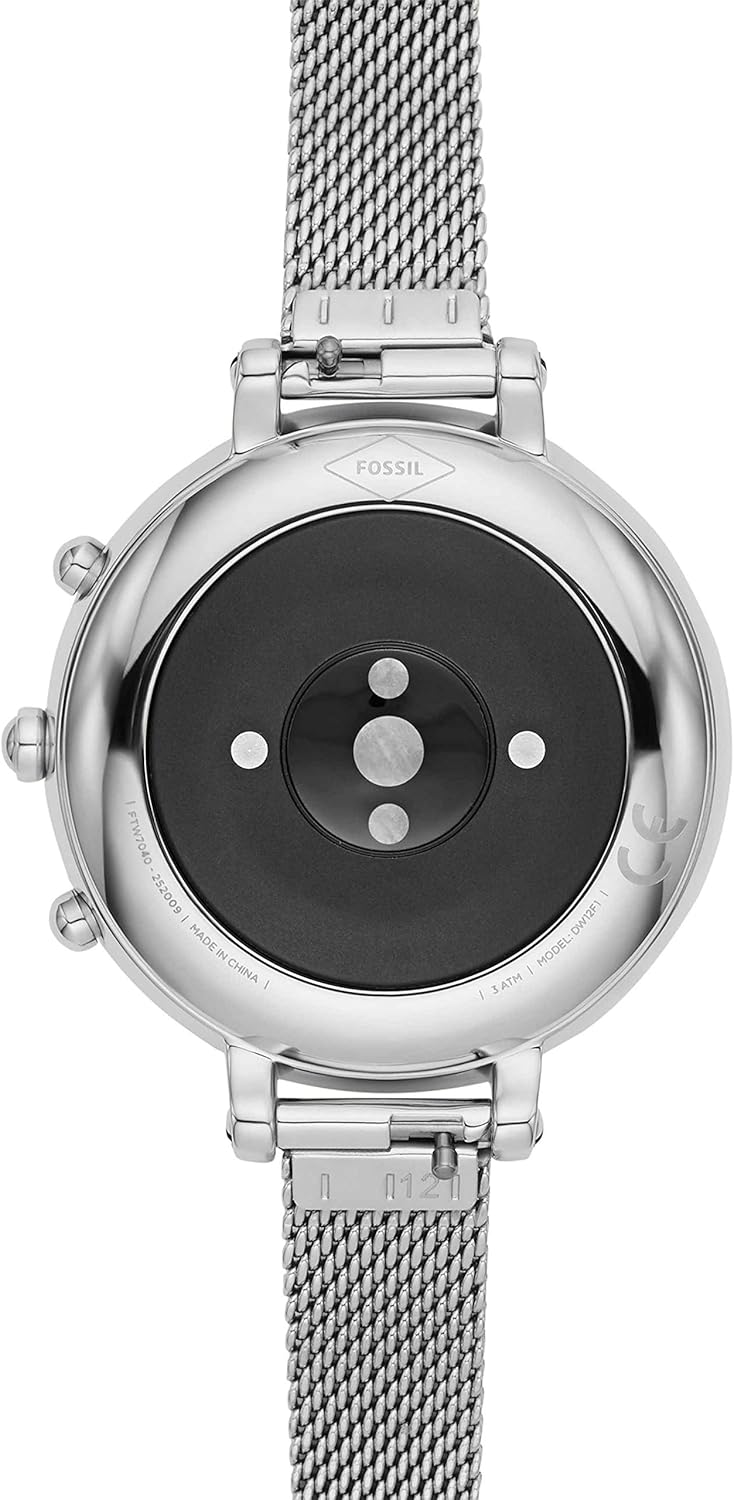
Descripció de la imatge: This image shows the back of the Fossil Monroe Hybrid Smartwatch HR. The polished silver case surrounds a black circular area which houses the heart rate sensor and charging contacts. The model number and water resistance rating are also visible around the edge of the case back.
Resistència a l'aigua
The watch is water resistant to 3 ATM (30 meters or 100 feet). This means it is suitable for everyday use and can withstand splashes or brief immersion in water. It is not recommended for swimming, showering, or diving. Prolonged exposure to water or use in high-pressure water activities may damage the device.
Resolució de problemes
If you encounter issues with your Fossil Monroe Hybrid Smartwatch HR, please refer to the common solutions below.
| Problema | Solució |
|---|---|
| Watch not charging or holding charge |
|
| Display light/wrist flick not consistent |
|
| Limited Bluetooth range/disconnection |
|
| Inaccurate activity tracking (e.g., steps, exercise) |
|
| Watch hands are misaligned or eccentric |
|
Especificacions
- Dimensions del producte: 1.5 x 0.47 x 0.47 polzades; 2.47 unces
- Número de model de l'article: FTW7040
- Departament: Dones
- Bateries: 1 bateria específica del producte necessària (inclosa)
- Data de primera disponibilitat: 7 d'octubre de 2020
- Fabricant: Fòssil
- ASIN: B08KTVVK3P
Garantia i Suport
For detailed warranty information, please refer to the official Warranty PDF document provided by Fossil. This document outlines the terms and conditions of your product's warranty.
For further assistance, technical support, or to access the full user guide, please utilize the Fossil Smartwatches App or visit the official Fossil support website. The app provides direct access to support resources and troubleshooting guides.
Guia d'usuari oficial (PDF): Descarrega la Guia d'usuari
Official Warranty (PDF): Descarrega el document de garantia
Vídeos oficials de productes
Currently, there are no official product videos from the seller available for embedding in this manual. All available videos are from customer reviews and are not included to maintain the informational tone and focus on official content.


