Introducció
This manual provides instructions for the Smartby Universal Remote Control, designed for use with various Sharp Roku TV models. This remote offers a straightforward, no-setup solution for controlling your compatible television. Please read this manual carefully to ensure proper use and to understand the remote's features and limitations.
Instruccions de configuració
1. Instal·lació de la bateria
The Smartby Universal Remote Control requires two (2) AAA alkaline batteries for operation. No programming or pairing is necessary. Simply install the batteries correctly, and the remote will be ready for use.
- Localitzeu el compartiment de la bateria a la part posterior del comandament a distància.
- Feu lliscar la tapa de la bateria cap avall per obrir-la.
- Insert two (2) new AAA alkaline batteries, ensuring the positive (+) and negative (-) terminals align with the indicators inside the compartment.
- Feu lliscar la coberta de la bateria al seu lloc fins que faci un clic de manera segura.

The back of the remote control where the battery cover is located. Insert two AAA batteries here.
2. Notes de compatibilitat
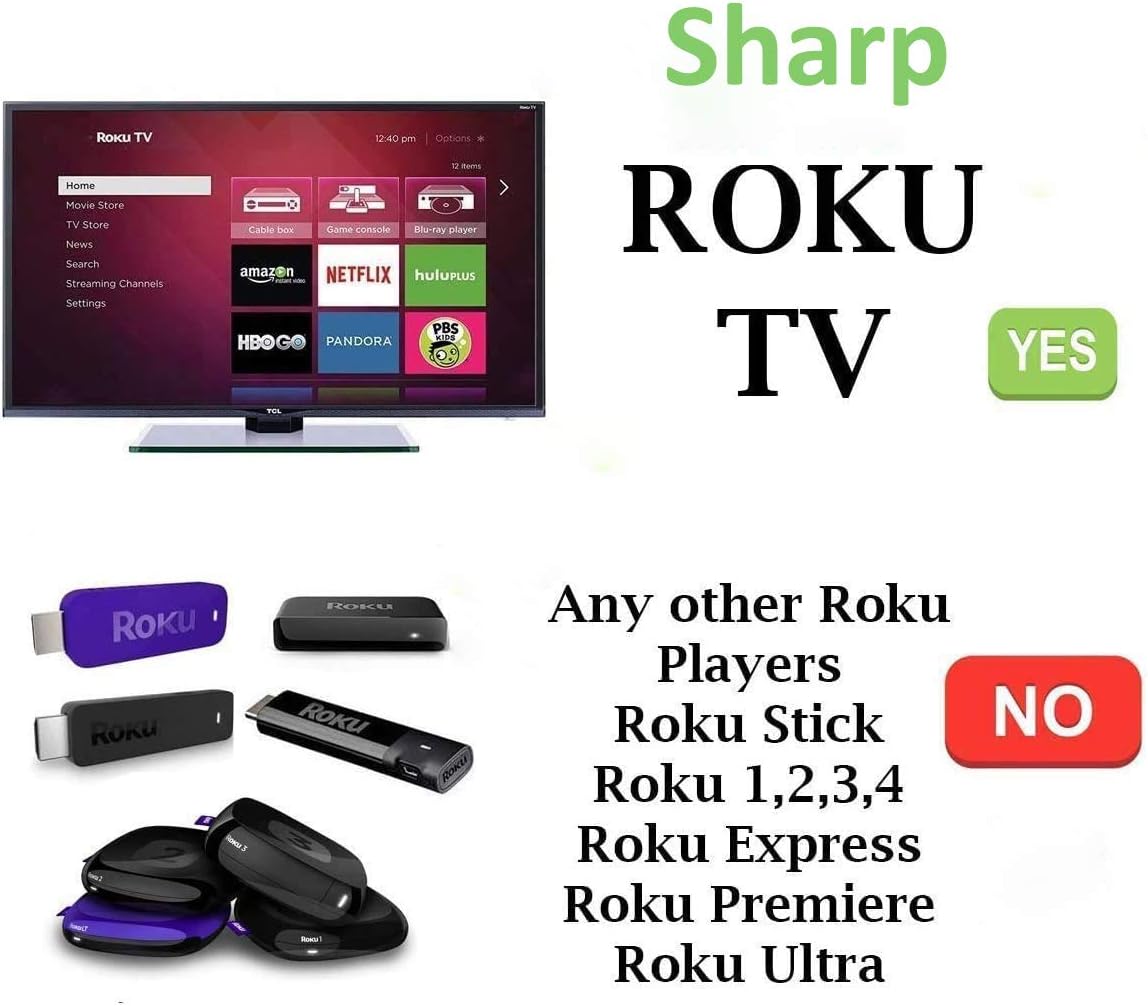
This remote control is specifically designed for Sharp Roku TVs. It operates using infrared (IR) technology. It is not compatible with Roku Players, Roku Sticks (HDMI or MHL), Roku Express, Roku Premiere, Roku Ultra, or other brands of Roku TVs. If your original remote uses RF or Wi-Fi and has a pairing button, this IR remote will not function as a direct replacement for those specific features.
Instruccions de funcionament
Once batteries are installed, point the remote directly at your Sharp Roku TV. The remote functions immediately without any additional setup.
Funcions clau:
- Botó d'encesa: Encén o apaga el televisor.
- Teclat de navegació (amunt, avall, esquerra, dreta, OK): S'utilitza per navegar pels menús i seleccionar elements.
- Botó enrere: Torna a la pantalla o menú anterior.
- Botó d'inici: Returns to the Roku TV home screen.
- Pujar/baixar el volum: Ajusta el volum del televisor.
- Botó de silenci: Silencia o activa l'àudio del televisor.
- Repetició instantània: Retrocedeix uns segons en la reproducció del vídeo.
- Rebobinar/avançar ràpid: Controla la velocitat de reproducció de vídeo.
- Reproduir/pausa: Controls video playback.
- Shortcut App Keys (Netflix, Hulu, Sling, NOW): Proporciona accés directe a aquestes aplicacions de transmissió en temps real.
The front of the remote control, displaying the power, navigation, volume, mute, and dedicated shortcut buttons for Netflix, Hulu, Sling, and NOW.
Compatibilitat
Compatible Sharp Roku TV Models:
- LC-24LB601U, LC-32LB601U, LC-40LB601U, LC-43LB601U, LC-50LB601U
- LC-32LB601C, LC-65Q7370U
- LC-43LBU591U, LC-50LBU591U, LC-55LBU591U
- LC-50LBU711U, LC-55LBU711U
Dispositius incompatibles:
- Roku Player (standalone devices)
- Roku Stick (HDMI or MHL versions)
- Roku Express, Roku Premiere, Roku Ultra
- Roku Game consoles
- Any Roku TV from brands other than Sharp
- Original remotes that use RF or Wi-Fi technology and require a pairing button.

This image clearly shows that the remote is designed for Sharp Roku TVs. It is not compatible with standalone Roku players, Roku Sticks, Roku Express, Roku Premiere, or Roku Ultra devices.
Manteniment
Substitució de la bateria:
Replace batteries when the remote's response becomes sluggish or stops working. Always replace both AAA batteries at the same time with new ones. Do not mix old and new batteries, or different types of batteries.
Neteja:
To clean the remote, gently wipe its surface with a soft, dry cloth. Avoid using liquid cleaners, solvents, or abrasive materials, as these can damage the remote's finish or internal components.
Resolució de problemes
El comandament a distància no respon:
- Comproveu les bateries: Ensure batteries are inserted correctly with the correct polarity (+/-). Replace with fresh AAA alkaline batteries if needed.
- Línia de visió: This is an IR remote. Ensure there is a clear line of sight between the remote's emitter and the TV's IR receiver. Obstructions can block the signal.
- Compatibilitat amb TV: Verify that your TV is a Sharp Roku TV model listed in the compatibility section. This remote is not designed for other Roku devices or non-Sharp Roku TVs.
- IR vs. RF/Wi-Fi: If your original remote was an RF or Wi-Fi type (often indicated by a pairing button), this IR remote will not function in the same manner.
Botons específics que no funcionen:
- Assegureu-vos que el comandament a distància estigui apuntant directament al televisor.
- Check for low battery power.
- Clean the remote's surface to ensure no debris is obstructing button presses.
Especificacions
| Número de model | SMTB-Sharp-RK-NOW |
| Dimensions del producte | 5.8 x 1.6 x 0.6 polzades |
| Pes de l'article | 1.76 unces |
| Font d'alimentació | 2 piles alcalines AAA (no incloses) |
| Tecnologia de connectivitat | Infrarojos (IR) |
| Dispositius compatibles | Sharp Roku Televisions |
Garantia i Suport
For any questions or issues not covered in this manual, please refer to the retailer's return policy or contact the seller directly for support. Specific warranty information may vary by purchase location and is typically provided at the point of sale.


