1. Introducció
The MOES WiFi WS-EUR-C Intelligent Touch Panel Roller Blind Switch provides versatile control for motorized roller blinds and curtains. This device supports manual touch control, RF remote control, voice commands via smart assistants, and intelligent control through the Smart Life/Tuya App. It allows for flexible operation and integration into smart home systems.
2. Informació de seguretat
Warning: Electrical installation should only be performed by a qualified electrician. Ensure power is disconnected before installation to prevent electric shock.
- Desconnecteu sempre l'alimentació de l'interruptor automàtic abans d'instal·lar o fer el manteniment de l'interruptor.
- Ensure the switch is installed in a dry environment, away from moisture.
- No supereu la càrrega màxima de 2.5 A / 500 W.
- Verifiqueu que totes les connexions de cablejat siguin segures i correctes segons el diagrama de cablejat.
- Aquest dispositiu està dissenyat només per a ús en interiors.
3. Especificacions del producte
| Característica | Especificació |
|---|---|
| Número de model | WS-EUR-C |
| Dimensions (LxWxH) | 8.5 x 8.5 x 3.5 cm |
| Material | Plàstic |
| Vol. Operatiutage | 90-250V AC 50/60Hz |
| Màx. Carrega | 2.5 A / 500 W |
| Protocol sense fils | Wi-Fi 2.4 GHz + RF |
| Tipus de canvi | Touch Panel, Single Pole |
| Certificacions | CE, IP44 |

4. Guia d'instal·lació
4.1 Esquema de cablejat

Seguiu aquests passos per al cablejat:
- Desconnecteu l'alimentació: Abans de començar, assegureu-vos que l'alimentació principal del circuit estigui tallada a l'interruptor.
- Identificar els cables: Identify the Live (L), Neutral (N), Ground, Open (for curtain up), and Close (for curtain down) wires from your existing setup and the motorized blind.
- Connect Live (L): Connect the Live wire from your power supply to the 'L' terminal on the switch.
- Connect Neutral (N): Connect the Neutral wire from your power supply to the 'N' terminal on the switch.
- Connecteu els cables del motor: Connect the 'Open' wire from your motorized blind to the 'OPEN' terminal on the switch. Connect the 'Close' wire from your motorized blind to the 'CLOSE' terminal on the switch.
- Connectar a terra: Connect the Ground wire to the appropriate terminal, typically indicated by a ground symbol.
- Connexions segures: Assegureu-vos que totes les connexions dels cables estiguin ben ajustades i correctament aïllades.
4.2 Instal·lació física
After wiring, carefully place the switch module into the wall box. Secure the switch to the wall box using screws. Attach the glass touch panel cover. Restore power at the circuit breaker.
5. Configuració i emparellament de l'aplicació
The MOES Smart Curtain Switch is compatible with the Smart Life and Tuya Smart applications. Follow these steps to pair your device:
- Descarregar l'aplicació: Download the "Smart Life" or "Tuya Smart" app from your mobile device's app store (iOS or Android).
- Registra't/Inici de sessió: Obre l'aplicació i registra't per obtenir un compte nou o inicia la sessió amb un compte existent.
- Introduïu el mode de vinculació: With the switch powered on, press and hold the 'Pause' button on the switch for approximately 5-10 seconds until the Wi-Fi indicator light on the switch starts blinking rapidly. This indicates pairing mode.
- Afegeix un dispositiu: In the app, tap the '+' icon (usually in the top right corner) to add a device. The app should automatically detect the switch via Wi-Fi and Bluetooth for quick pairing.
- Confirm Network: Select your 2.4GHz Wi-Fi network and enter the password. The switch does not support 5GHz Wi-Fi.
- Maridatge complet: Follow the on-screen prompts to complete the pairing process. Once successfully paired, the Wi-Fi indicator light on the switch will stop blinking and remain solid.

6. Instruccions de funcionament
6.1 Control tàctil manual
The touch panel allows for direct control of your roller blinds:
- Open Button (<>): Touch to open the roller blind.
- Pause Button (||): Touch to pause the roller blind at its current position.
- Close Button (X): Touch to close the roller blind.
6.2 Control d'aplicacions
Once paired with the Smart Life/Tuya app, you can control your blinds remotely and set schedules:
- Comandament a distància: Use the app interface to open, close, or pause your blinds from anywhere.
- Programació: Set timers and schedules for automatic opening and closing of blinds at specific times (e.g., 7:30 AM open, 6:00 PM close).
- Compte enrere: Utilize countdown functions (e.g., 1/5/30 minutes, 1 hour) for temporary operations.
- Estat del relé: Configure the switch to remember its last state (open/closed/paused) after a power outage.


6.3 Control de veu
Integrate the switch with Amazon Alexa or Google Home for hands-free voice control:
- Comptes d'enllaç: A l'aplicació Alexa o Google Home, enllaça el teu compte Smart Life/Tuya.
- Descobriu els dispositius: Demana al teu assistent intel·ligent que descobreixi dispositius nous.
- Comandaments de veu: Use commands like "Alexa, open the curtains" or "Hey Google, close the blinds."

Control remot RF 6.4
The switch supports RF433 remote control for an additional layer of convenience. Pair a compatible RF remote (sold separately) to control your blinds without Wi-Fi or app access.

Control de retroiluminació 6.5
The switch features an optional backlight. You can turn the backlight ON or OFF via the Smart Life/Tuya app settings to avoid disturbance during sleep or to suit your preference.

6.6 Control i compartició de grups
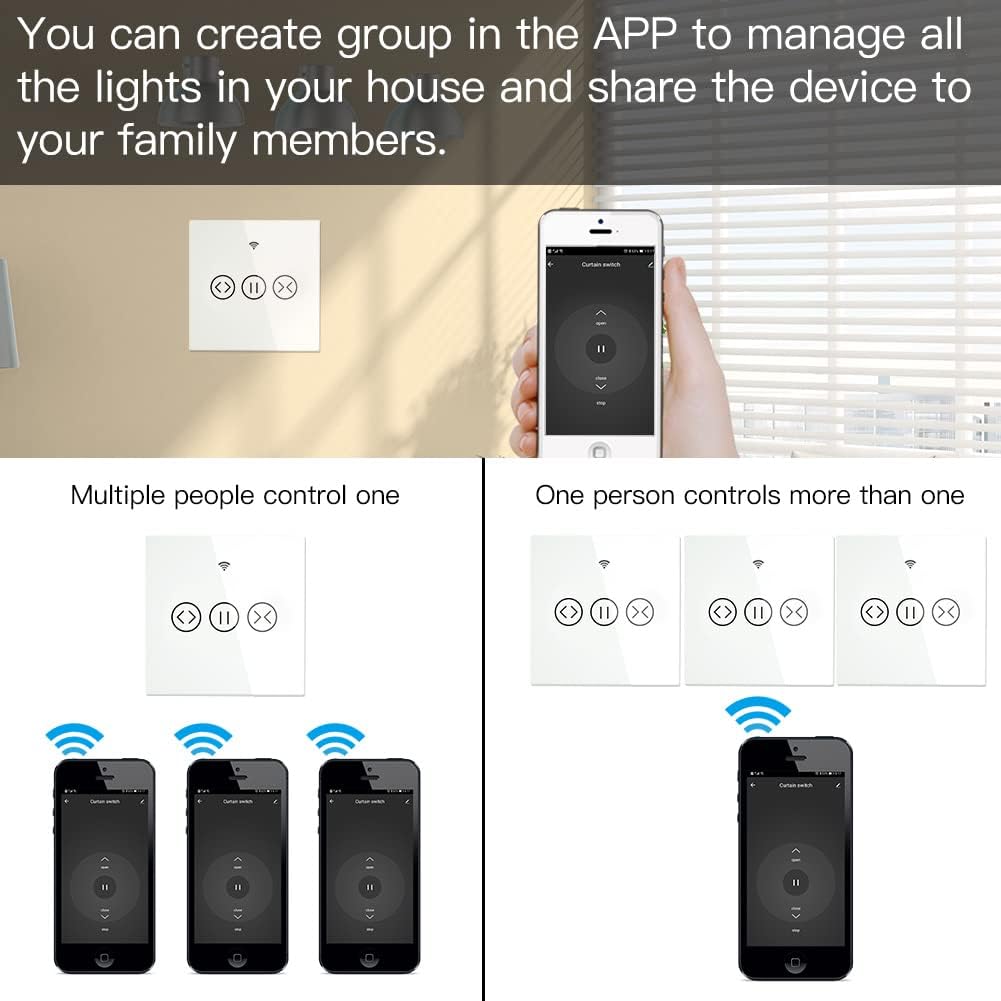
The app allows you to create groups of switches for simultaneous control and share device access with family members.
- Control de grup: Manage multiple switches as a single group within the app.
- Compartició de dispositius: Share control of the switch with other users who have the Smart Life/Tuya app, granting them access to operate the blinds.
7. Manteniment
- Neteja: Use a soft, dry cloth to clean the touch panel. Avoid abrasive cleaners or solvents.
- Actualitzacions de firmware: Periodically check the Smart Life/Tuya app for available firmware updates to ensure optimal performance and security.
- Condicions ambientals: Ensure the switch is not exposed to extreme temperatures or humidity, which can affect its operation and lifespan.
8. Solució De Problemes
- L'interruptor no respon: Check if the power supply is connected correctly. Ensure the circuit breaker is ON.
- App Pairing Failure:
- Assegureu-vos que la vostra xarxa Wi-Fi sigui de 2.4 GHz. Les xarxes de 5 GHz no són compatibles.
- Verify the switch is in pairing mode (Wi-Fi indicator blinking rapidly).
- Comproveu que la contrasenya de la Wi-Fi sigui correcta.
- Acosteu l'interruptor al vostre encaminador Wi-Fi durant l'emparellament.
- El control per veu no funciona:
- Confirm that your Smart Life/Tuya account is correctly linked to Alexa or Google Home.
- Ensure the device is discovered and named appropriately in the smart assistant app.
- Comproveu la vostra connexió a Internet.
- RF Remote Not Controlling: Ensure the RF remote is properly paired with the switch according to its own instructions.
- Connexió intermitent: Check your Wi-Fi signal strength. Consider repositioning your router or using a Wi-Fi extender.
9. Garantia i Suport
This MOES product comes with a 2 any de garantia i a 60-day refund guarantee to ensure your satisfaction. For technical support or warranty claims, please contact MOES customer service through the retailer where you purchased the product or visit the official MOES weblloc per obtenir informació de contacte.