1. Introducció
This manual provides comprehensive instructions for the installation, operation, and maintenance of the Cisco C9200L-24T-4G-E 24-Port Full Gigabit Layer 2 Access Switch. This device is designed to provide reliable network connectivity with advanced features for various network environments.
2. Informació de seguretat
Please read all safety warnings and instructions before installing or operating this equipment. Failure to follow these guidelines may result in injury or damage to the device.
- Ensure proper grounding for the device.
- No utilitzeu el dispositiu en mullat o damp condicions.
- Feu servir només la font d'alimentació proporcionada o especificada pel fabricant.
- Eviteu bloquejar les obertures de ventilació per evitar el sobreescalfament.
- Demaneu tot el servei a personal qualificat.
3. Producte acabatview
The Cisco C9200L-24T-4G-E switch features 24 Gigabit Ethernet ports and 4 1G SFP uplink ports, designed for efficient network access and aggregation.
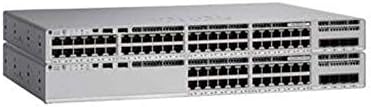
Figura 3.1: Davant view of the Cisco C9200L-24T-4G-E switch, showing 24 Ethernet ports and 4 SFP uplink ports.

Figura 3.2: En angle view of the Cisco C9200L-24T-4G-E switch, highlighting the port layout and chassis design.
Característiques del panell frontal:
- 24 x 10/100/1000Base-T Ports: For connecting network devices.
- 4 x 1G SFP Uplink Ports: For high-speed fiber or copper uplinks to other switches or routers.
- Indicadors LED: System status, port status, and power indicators.
4. Configuració i instal·lació
4.1 Desembalatge
Carefully unpack the switch and verify that all components are present. Inspect the device for any signs of damage during shipping. If any items are missing or damaged, contact your vendor immediately.
4.2 Instal·lació física
- Muntatge en bastidor: The switch is designed for standard 19-inch rack mounting. Secure the switch using the provided rack-mount brackets and screws.
- Ubicació d'escriptori: If not rack-mounting, place the switch on a flat, stable surface, ensuring adequate ventilation around the device.
4.3 Connexió de potència
- Connecteu el cable d'alimentació a l'entrada d'alimentació de CA del panell posterior de l'interruptor.
- Connecteu l'altre extrem del cable d'alimentació a una presa de corrent amb connexió a terra.
- Verify that the power LED on the front panel illuminates, indicating the switch is receiving power.
4.4 Connexions de xarxa
- Ports Ethernet: Connect network devices (computers, servers, other switches) to the 24 10/100/1000Base-T ports using standard Ethernet cables.
- SFP Uplink Ports: Insert compatible 1G SFP transceivers into the 4 SFP uplink ports. Connect fiber optic or copper cables from these transceivers to your core network or other switches.
5. Instruccions de funcionament
The Cisco C9200L-24T-4G-E is a Layer 2 access switch with Layer 3 capabilities. Initial configuration typically involves accessing the switch via a console port, Telnet, SSH, or a web-interfície basada.
5.1 Configuració bàsica
- Accés a la consola: Connect a console cable to the console port and use a terminal emulator (e.g., PuTTY) to access the command-line interface (CLI).
- Assignació d'adreça IP: Configure an IP address for the management VLAN interface to enable remote access.
- Comptes d'usuari: Create secure user accounts with appropriate privilege levels.
5.2 Característiques clau
- Suport VLAN: Crear i gestionar xarxes d'àrea local virtuals per segmentar el trànsit de xarxa.
- QoS (Qualitat de servei): Prioritize critical network traffic for optimal performance.
- SNMP (Protocol simple de gestió de xarxa): Monitor and manage the switch remotely.
- LACP (Link Aggregation Control Protocol): Bundle multiple physical links into a single logical link for increased bandwidth and redundancy.
- Layer 3 Capabilities: Supports OSPF, EIGRP, ISIS, RIP, and routed access for advanced routing functionalities.
6. Manteniment
- Neteja regular: Keep the switch free from dust and debris. Use a soft, dry cloth for cleaning.
- Actualitzacions de firmware: Periodically check the Cisco weblloc web per a actualitzacions de firmware per garantir un rendiment i una seguretat òptims.
- Control ambiental: Ensure the operating environment maintains appropriate temperature and humidity levels as specified in the product's technical specifications.
7. Solució De Problemes
7.1 Sense poder
- Verifiqueu que el cable d'alimentació estigui connectat correctament tant a l'interruptor com a la presa de corrent.
- Comproveu la presa de corrent amb un altre dispositiu per assegurar-vos que funciona.
- Ensure the power supply unit (if external) is correctly connected and functional.
7.2 Sense connectivitat de xarxa
- Check the Ethernet cable connections to ensure they are secure and not damaged.
- Verify the link/activity LEDs on the switch ports are illuminated for connected devices.
- Confirm IP address settings and VLAN configurations are correct.
- Test with a different cable or port.
7.3 Rendiment de xarxa lent
- Check for network congestion or excessive broadcast traffic.
- Ensure duplex settings match between the switch and connected devices.
- Verify that QoS policies are correctly configured if prioritizing traffic.
8. Especificacions
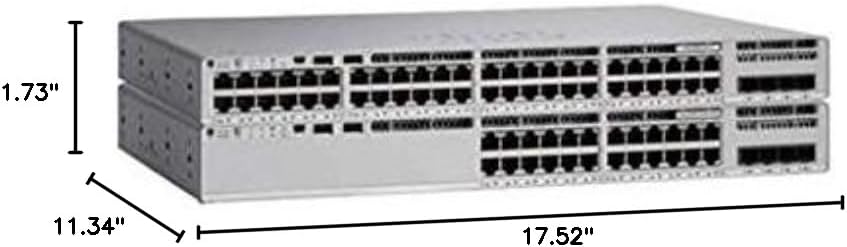
Figura 8.1: Physical dimensions of the Cisco C9200L-24T-4G-E switch.
| Característica | Descripció |
|---|---|
| Número de model | C9200L-24T-4G-E |
| Ports | 24 x 10/100/1000Mbps Ethernet, 4 x 1G SFP Uplink |
| Velocitat de transmissió | 10/100/1000 Mbps |
| Capacitat de commutació | 56 Gbps |
| Taxa de reenviament | 41.66 Mpps |
| Mode de comunicació | Dúplex complet i semidúplex |
| Dimensions (L x P x A) | 44.5 x 28.8 x 4.4 cm (17.52" x 11.34" x 1.73") |
| Font d'alimentació | PWR-C5-125WAC (Default Primary AC) |
| Layer 3 Capabilities | OSPF, EIGRP, ISIS, RIP, Routed Access |
| Certificacions | FCC, CE, RoHS, ISO9001 |
| UPC | 764256220338 |
9. Garantia i Suport
The Cisco C9200L-24T-4G-E switch typically comes with a 1-year warranty. For detailed warranty information, technical support, or to download the latest drivers and firmware, please visit the official Cisco website or contact your authorized reseller.
Official Cisco Store: Cisco Store on Amazon


