Introducció
The EPOS Expand 80T is a premium, scalable Bluetooth speakerphone designed for conference calls with up to 16 in-room participants. It features six adaptive, beamforming microphones for clear voice pickup and a high-quality speaker for natural sound reproduction. This manual provides essential information for setting up, operating, and maintaining your device.

Image: EPOS Expand 80T speakerphone, showcasing its sleek black and silver design from an angled top-down perspective.
Què hi ha a la caixa
Verifiqueu que tots els components siguin presents a l'embalatge:
- EPOS Expand 80T Speakerphone
- Cable USB-C
- BTD 800 USB dongle
- Unitat d'alimentació universal
- Adaptador USB-C a USB-A
- Guia de seguretat
- Guia ràpida
- Full de compliment

Image: The underside of the EPOS Expand 80T, illustrating the integrated cable management system and connection ports.
Producte acabatview
The Expand 80T features intuitive touch controls and a robust design suitable for various meeting environments.

Imatge: Frontal view of the EPOS Expand 80T speakerphone, highlighting the control panel and speaker grille.
Característiques principals:
- Adaptive Microphones: Six beamforming microphones isolate voices and reduce ambient noise.
- Superior Speaker: Delivers rich, natural sound for clear communication.
- Connectivitat: Bluetooth and USB-C for versatile connection options.
- Certificació de Microsoft Teams: Optimized for seamless integration with Microsoft Teams.
- Escalable: Suitable for up to 16 in-room participants.

Imatge: Un primer pla view of the EPOS Expand 80T's touch controls and the EPOS brand logo, showing the detailed texture of the speaker grille.
Configuració
1. Connexió d'alimentació
- Connect the universal power supply unit to the speakerphone's power input.
- Plug the power supply into a wall outlet. The device will power on automatically.
2. USB Connection (PC/Soft Phone)
- Connect the supplied USB-C cable to the speakerphone.
- Connect the other end of the USB-C cable to your computer's USB-C port. If your computer only has USB-A ports, use the provided USB-C to USB-A adapter.
- The speakerphone will be recognized as an audio device by your operating system.
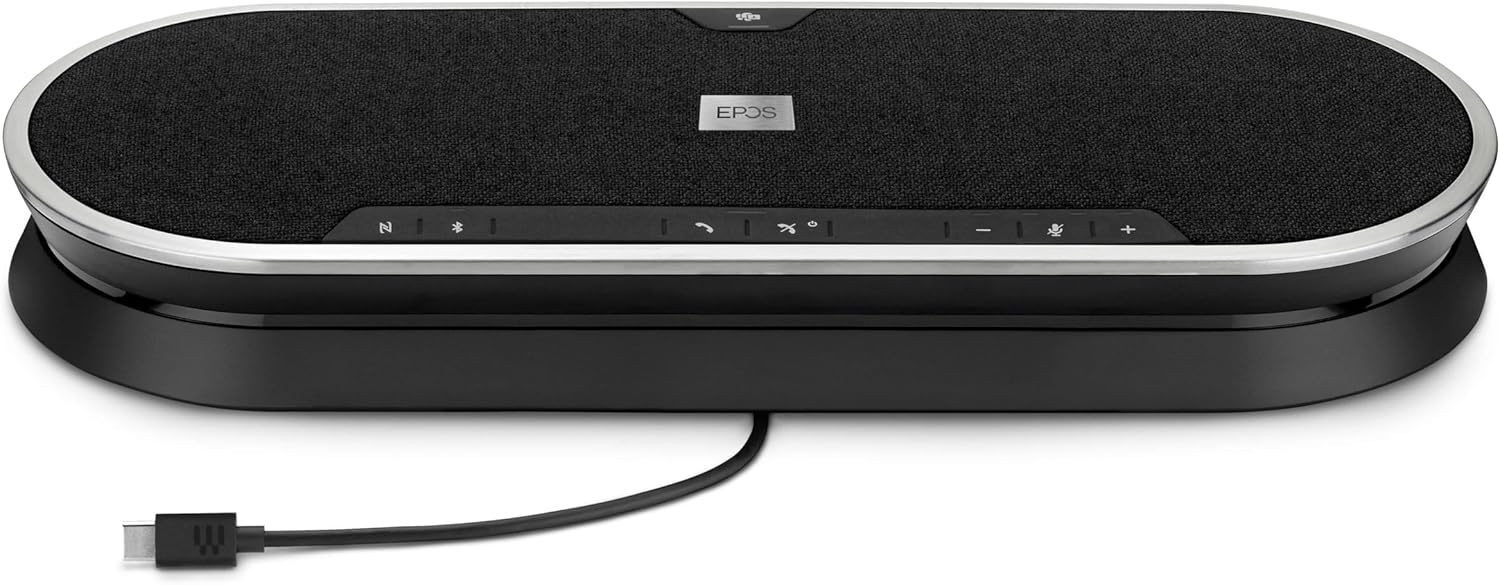
Image: The EPOS Expand 80T speakerphone with its USB-C cable connected, ready for wired communication.
3. Bluetooth Pairing (Mobile Phone/Tablet)
- Press and hold the Bluetooth button on the speakerphone until the LED indicator flashes blue. This indicates pairing mode.
- On your mobile phone or tablet, go to Bluetooth settings and select "EPOS Expand 80T" from the list of available devices.
- Un cop connectat, l'indicador LED es tornarà blau continu.
4. Using the BTD 800 USB Dongle
- Plug the BTD 800 USB dongle into a USB port on your computer.
- The dongle will automatically pair with the Expand 80T. The LED on the dongle will turn solid blue when connected.
- This provides a dedicated, optimized Bluetooth connection for your PC.
Funcionament de l'altaveu
The EPOS Expand 80T features touch-sensitive controls for easy management of calls and audio.

Imatge: Side profile of the EPOS Expand 80T speakerphone, showcasing its slim design and subtle curves.
Gestió de trucades:
- Respondre/Finalitzar la trucada: Toqueu Truca botó.
- Silenciar/activar el micròfon: Toqueu Silenciar button. The LED will indicate mute status.
- Pujar/baixar el volum: Toqueu + or - botons.
- Microsoft Teams Button: Toqueu Equips button to launch Microsoft Teams or bring it to the foreground (when connected to a PC with Teams installed).
Reproducció d'àudio:
- When connected via Bluetooth or USB, the Expand 80T can play audio from your connected device.
- Use the volume controls on the speakerphone or your connected device to adjust playback volume.
Manteniment
To ensure the longevity and optimal performance of your EPOS Expand 80T, follow these maintenance guidelines:
- Neteja: Use a soft, dry cloth to clean the surface of the speakerphone. Do not use liquid cleaners or abrasive materials.
- Emmagatzematge: Guardeu el dispositiu en un lloc fresc i sec, allunyat de la llum solar directa i de temperatures extremes.
- Eviteu la humitat: The device is not waterproof. Keep it away from liquids and high humidity.
- Cura del cable: Handle cables gently. Avoid sharp bends or excessive pulling.
Resolució de problemes
If you encounter issues with your EPOS Expand 80T, refer to the following common solutions:
- Sense energia:
- Ensure the power supply is securely connected to both the speakerphone and a working wall outlet.
- Comproveu si la presa de corrent funciona.
- Sense àudio/Mala qualitat d'àudio:
- Verify that the speakerphone is selected as the default audio output/input device in your computer's sound settings or conferencing application.
- Adjust the volume on both the speakerphone and your connected device.
- If using Bluetooth, ensure the device is within range (up to 10 meters) and there are no obstructions.
- Try reconnecting the USB cable or re-pairing the Bluetooth device.
- El micròfon no funciona:
- Ensure the microphone is not muted on the speakerphone or in your conferencing software.
- Check microphone input settings on your computer or device.
- Desconnexió Bluetooth:
- Move the speakerphone closer to the connected device.
- Elimineu qualsevol font potencial d'interferència (per exemple, altres dispositius sense fil).
- Forget the device in your phone/PC's Bluetooth settings and re-pair.
Especificacions
| Nom del model | AMPLIAR 80T |
| Número de model de l'article | 1000203 |
| Marca | EPOS |
| Tecnologia de connectivitat | Bluetooth, USB |
| Tecnologia de comunicació sense fils | Bluetooth |
| Interval Bluetooth | 10 metres |
| Interval màxim | 30 Meters (for certain connections, e.g., with BTD 800 dongle) |
| Tipus d'altaveu | Multimedia or Conference |
| Potència de sortida màxima dels altaveus | 80 watts |
| Mode de sortida d'àudio | estèreo |
| Característica especial | Built-in Microphone, USB connectivity, Universal, Speakerphone |
| Dispositius compatibles | Mobile phone, Desk phone, PC / Soft phone, Tablet |
| Mètode de control | Toca |
| Dimensions del producte (LxWxH) | 12.4" x 4.7" x 1.8" (31.5 cm x 11.9 cm x 4.6 cm) |
| Pes de l'article | 2.19 lliures (aprox. 0.99 kg) |
| Font d'alimentació | Elèctric amb cable |
| Components inclosos | USB-C cable, BTD 800 USB dongle, power supply unit (universal), USB-C to USB-A adapter, safety guide, quick guide, compliance sheet |
Garantia i Suport
The EPOS Expand 80T comes with a manufacturer's warranty. For specific warranty terms and conditions, please refer to the included safety guide or visit the official EPOS weblloc.
For technical support, troubleshooting assistance, or to inquire about replacement parts, please contact EPOS customer support through their official channels. Keep your product model number (1000203) and proof of purchase readily available when seeking support.
Podeu trobar més informació i recursos de suport a EPOS Store on Amazon.


