Introducció
Thank you for choosing the HiQuick AA/AAA Battery Charger and Rechargeable Batteries. This product is designed to provide efficient and reliable power for your electronic devices. The intelligent charger features individual charging slots, an LCD screen for monitoring, and multiple protection mechanisms, ensuring safe and fast charging for your Ni-MH AA and AAA rechargeable batteries.
Informació de seguretat
- Llegiu atentament totes les instruccions abans d'utilitzar.
- Do not attempt to charge non-rechargeable batteries. This charger is designed for Ni-MH AA and AAA batteries only.
- Do not mix battery types or capacities during charging.
- Ensure correct polarity (+/-) when inserting batteries into the charger. Incorrect insertion can cause damage to the charger or batteries.
- Do not expose the charger or batteries to water, fire, or extreme temperatures.
- Mantenir fora de l'abast dels nens.
- Desendolleu el carregador de la font d'alimentació quan no l'utilitzeu o abans de netejar-lo.
- No utilitzeu el carregador si està danyat.
- Do not use both Type-C and Micro USB input ports simultaneously.
Contingut del paquet
Si us plau, comproveu el paquet per veure si hi ha els elements següents:
- 1 x HiQuick LCD Battery Charger (4-slot)
- 8 x HiQuick AA 2800mAh Ni-MH Rechargeable Batteries
- 1 x cable micro USB
- 2 x Durable Plastic Battery Storage Cases
- 1 x Manual d'usuari
Producte acabatview

Image: The HiQuick 4-slot battery charger shown with four AA batteries inserted and four additional AA batteries beside it. The charger's LCD screen displays charging status indicators.
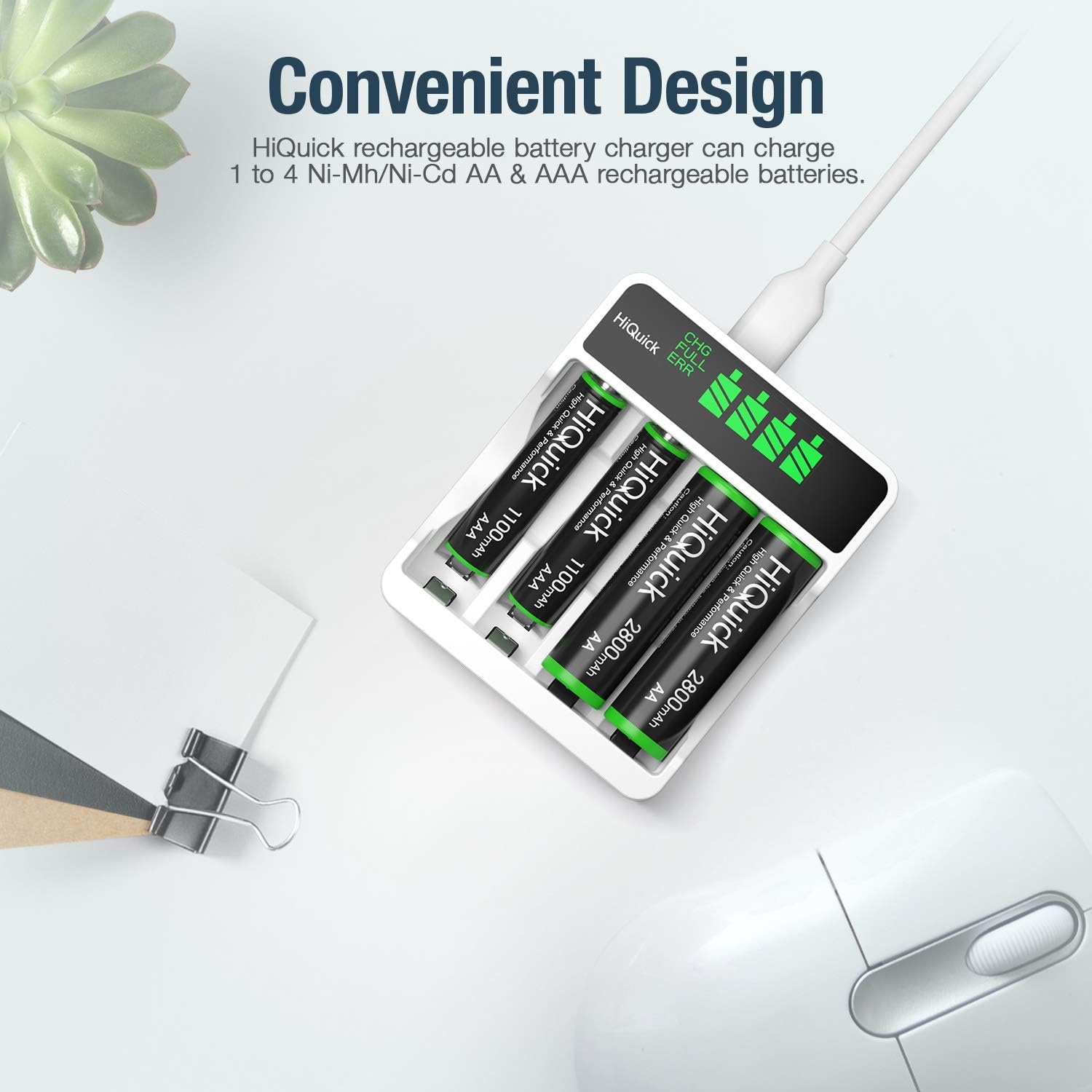
Image: A HiQuick rechargeable battery charger with two AA and two AAA batteries inserted, demonstrating its compatibility with both battery types. The text "Convenient Design" highlights its versatility.
Charger Features:
- Individual Charging Slots: Allows charging of 1 to 4 AA or AAA Ni-MH batteries independently.
- Pantalla LCD intel·ligent: Displays charging status (CHG - Charging, FULL - Fully Charged, ERR - Error/Incompatible Battery) for each slot.
- Ports d'entrada dual: Equipped with both Micro USB and Type-C input ports for versatile power connection (5V/1A input).
- Tecnologia de càrrega ràpida: High current mode for quick battery restoration.
- Protecció múltiple: Built-in safeguards against over-current, over-voltage, over-heat, over-charge, and short-circuit.

Image: The HiQuick charger highlighting its multiple protection features, including over-current, over-voltage, over-heat, over-charge, and short-circuit protection, indicated by icons around the charger.
Característiques de la bateria:
- Tipus: AA Ni-MH Rechargeable Battery
- Capacitat: 2800 mAh
- Recycling Life: Fins a 1200 cicles
- Quantitat: 8 pieces included
Configuració
- Connecteu el carregador:
Connect the provided Micro USB cable to either the Micro USB port or the Type-C port on the charger. Connect the other end of the USB cable to a 5V/1A USB power source, such as a computer USB port, a wall adapter, or a power bank. Important: Do not use both charging ports simultaneously.

Image: The HiQuick charger illustrating its Micro USB and Type-C input ports, emphasizing the two popular charging ways available.
- Preparació de les piles: Ensure the batteries you intend to charge are Ni-MH AA or AAA rechargeable batteries.
Instruccions de funcionament
- Insereix les piles:
Carefully insert the AA or AAA rechargeable batteries into the charging slots, ensuring the correct polarity (+ and - ends match the markings on the charger). The charger supports individual charging, so you can charge any number of batteries from 1 to 4.

Image: The HiQuick charger illustrating its individual battery charging technology, showing how both AA and AAA batteries can be charged in any slot, from 1 to 4 batteries at a time.
- Monitor de l'estat de càrrega:
Once batteries are inserted, the intelligent LCD screen will display the charging status for each slot:
- CHG: Indicates that the battery is currently charging. The battery icon will show segments filling up.
- COMPLET: Indicates that the battery is fully charged. The battery icon will be completely filled.
- ERR: Indicates an error, such as an incompatible battery, short-circuit, or incorrectly inserted battery.

Image: A close-up of the HiQuick charger's intelligent LCD screen, clearly displaying "ERR" to indicate an error condition for a specific battery slot.
- Temps de càrrega:
Charging times vary depending on battery capacity and the number of batteries being charged. The fast charging technology can restore most of the power in approximately 3 hours for 2x 2800mAh AA batteries.
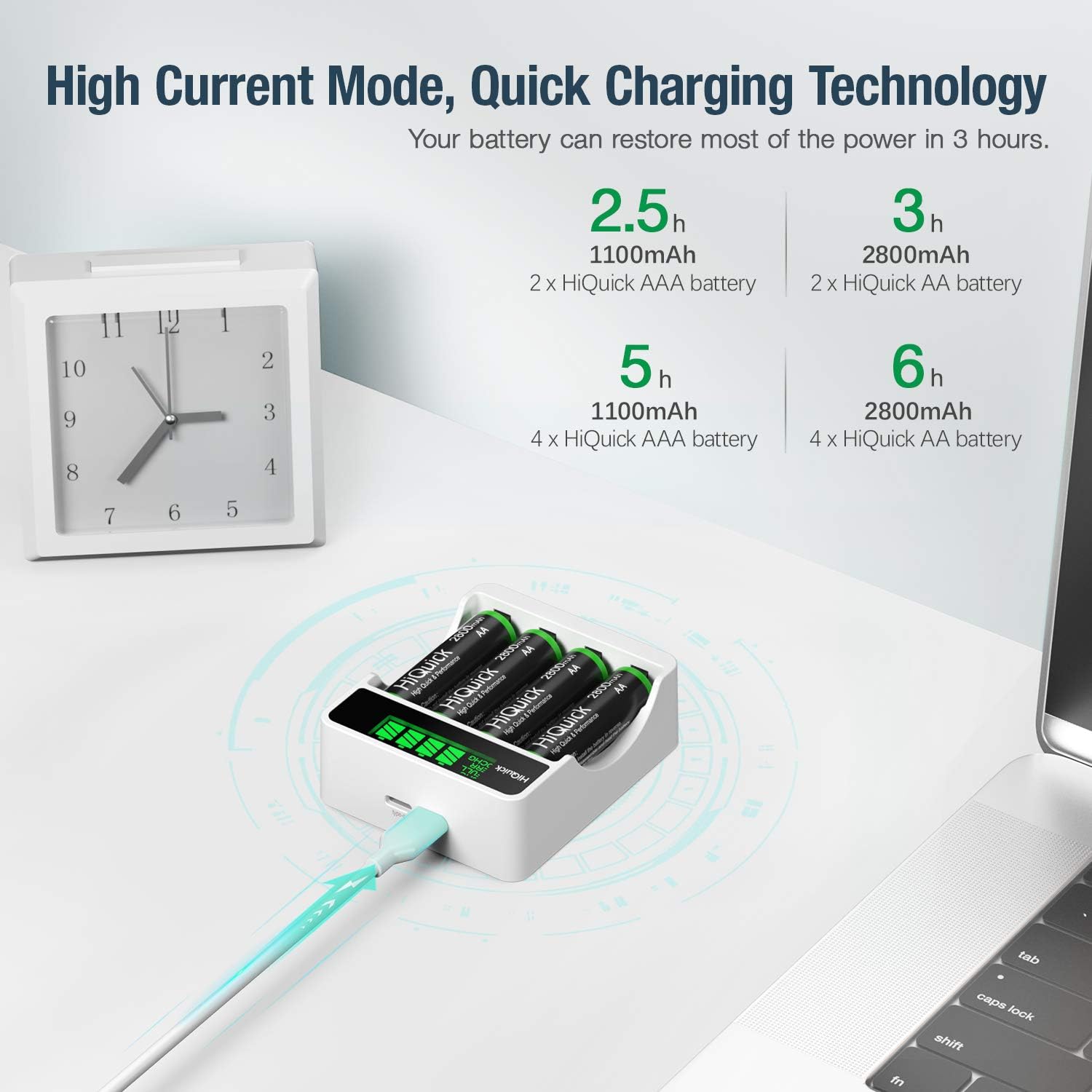
Image: The HiQuick charger highlighting its high current mode and quick charging technology, with estimated charging times for different battery configurations (e.g., 2.5h for 2x AAA 1100mAh, 3h for 2x AA 2800mAh).
- Traieu les bateries: Once the LCD screen shows "FULL" for a battery, it is fully charged and can be removed.
Manteniment
- Neteja: Disconnect the charger from the power source before cleaning. Use a soft, dry cloth to wipe the charger and batteries. Do not use abrasive cleaners or solvents.
- Emmagatzematge: Store the charger and batteries in a cool, dry place away from direct sunlight and extreme temperatures. Use the provided plastic storage cases for batteries when not in use.
- Cura de la bateria: For optimal battery life, it is recommended to fully discharge and recharge Ni-MH batteries periodically.
Resolució de problemes
| Problema | Causa possible | Solució |
|---|---|---|
| Charger LCD shows "ERR" |
|
|
| Les bateries no es carreguen |
|
|
| Càrrega lenta |
|
|
Especificacions
- Marca: Hola ràpid
- Número de model: C9026+50AA1800
- Entrada del carregador: Micro USB / Type-C, 5V/1A
- Tipus de bateries compatibles: Ni-MH AA, Ni-MH AAA
- Nombre d'espais: 4 individual charging slots
- AA Battery Capacity: 2800mAh Ni-MH
- AA Battery Recycling Life: Fins a 1200 cicles
- Proteccions de seguretat: Sobreintensitat, sobrevoltage, Over-heat, Over-charge, Short-circuit protection
Garantia i Suport
HiQuick products are manufactured with high quality standards. For any questions, issues, or warranty claims, please contact HiQuick customer support through the retailer's platform or the official HiQuick website. Please have your purchase receipt and product model number ready when contacting support.
Information regarding specific warranty periods and terms may be found on the product packaging or the official HiQuick weblloc.