1. Introducció
Welcome to the user manual for your HUMAX Aura Android TV 4K Freeview Play Recorder. This guide provides detailed instructions on setting up, operating, and maintaining your device to ensure optimal performance and enjoyment of its features.
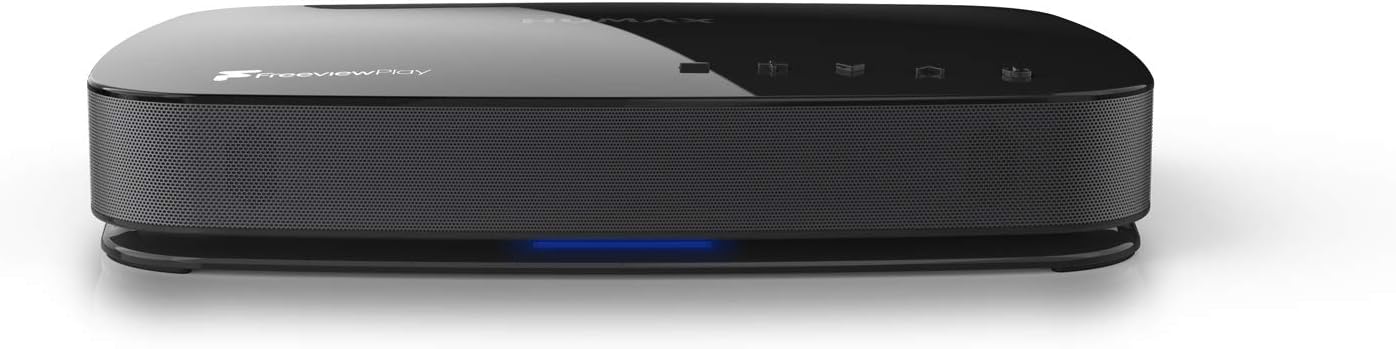
Davant view of the HUMAX Aura recorder, showcasing its sleek design and illuminated indicator light.

The HUMAX Aura recorder alongside its retail packaging, highlighting the product's branding and key features.
2. Què hi ha a la caixa
Upon unboxing your HUMAX Aura, please verify that all the following items are included:
- 1x Aura 1TB Recorder
- 1x Bluetooth Remote Control
- 1x Guia d’inici ràpid
- 1x HDMI Lead
- 2x piles AAA
3. Configuració
3.1. Connexió del dispositiu
Before powering on your HUMAX Aura, ensure all necessary cables are securely connected. This device is designed for use with aerial antenna connections and is not compatible with satellite dishes.

Rear panel connections of the HUMAX Aura, indicating compatibility with aerial antennas (RF IN/OUT) and incompatibility with satellite dishes. Ports include HDMI, Ethernet, USB, SPDIF, and Power.
- Connect your aerial cable to the RF IN port.
- Connecteu un cable HDMI des del HDMI port on the Aura to an HDMI input on your television.
- (Optional) For wired internet, connect an Ethernet cable to the ETHERNET port.
- Connecteu l'adaptador d'alimentació a PODER port and then to a wall outlet.
3.2. Initial Setup and Google Account Sign-in
Upon first power-on, the device will guide you through the initial setup process. This includes network configuration and signing in with your Google Account.

The Google sign-in process, showing how to use a smartphone to quickly and securely sign into your Google Account, syncing content and preferences.
Using your phone to speed up the setup process and sign in securely with your existing Google Account is recommended to sync all your content and preferences across compatible devices.
4. Operating Your HUMAX Aura
4.1. Control remot sobreview
The included Bluetooth remote control provides full functionality for navigating your HUMAX Aura. Familiarize yourself with its layout for seamless operation.

The HUMAX Aura Bluetooth remote control, featuring dedicated buttons for Google Assistant, apps, playback controls, Freeview Play, and numerical input.
4.2. Gratuïtview Play and Recording Features
The HUMAX Aura offers comprehensive Freeview Play functionality, allowing you to pause, record, and rewind live TV. With its built-in triple tuners, you can record up to four shows simultaneously while watching a fifth.

El Lliureview Play interface on a TV screen, demonstrating the ability to pause, record, and rewind live television content.

Illustration of the HUMAX Aura's capability to record up to four television shows concurrently.
Access the easy-to-use 7-day on-screen TV guide to set recordings, reminders, or access show links. You can also scroll backwards to catch up on shows from the beginning or instantly watch previously aired content on demand.

The 7-day Electronic Program Guide (EPG) interface, allowing users to browse channels, view program schedules, and manage recordings.
4.3. Android TV and Streaming
The HUMAX Aura runs on Android TV, providing access to thousands of apps and games from the Google Play Store, including popular streaming services like Amazon Prime Video, Disney+, and BT Sport (subscriptions may be required).

El Lliureview Play Recorder interface, showcasing a wide array of on-demand services and catch-up apps available.

The streaming interface, highlighting access to over 30,000 hours of TV and 700 boxsets from various on-demand services.

The Android TV interface, demonstrating Google Assistant integration and the ability to cast content from mobile devices using Chromecast built-in.

A visual representation of the vast amount of on-demand content available, emphasizing that the HUMAX Aura is a central hub for entertainment.
4.4. Control per veu amb l'Assistent de Google
The HUMAX Aura integrates Google Assistant, allowing you to control your TV and access information using voice commands via the remote control.

Using Google Assistant to control the TV, search for content, and get answers directly on screen with voice commands.
Simply press the Google Assistant button on your remote and speak your command. You can search for entertainment, change the volume, get answers to questions, and more.
4.5. Control intel·ligent de la llar
Leverage the power of Google Assistant to control compatible smart home devices directly from your HUMAX Aura. Create the perfect viewing environment by adjusting lighting, temperature, and other smart devices with your voice.

The smart home control feature, illustrating how to adjust smart devices like thermostats using voice commands through the HUMAX Aura.
4.6. High Performance Storage and Family Features
The 1TB internal storage provides ample space for recordings and ensures faster performance for apps and games. The Aura also offers family-friendly features, consolidating children's favorite shows from live TV and on-demand services into one easy-to-use screen.

The HUMAX Aura's high-performance storage, suitable for gaming and expanding entertainment options with various applications.

The 'Kids' feature, bringing together children's favorite live and on-demand shows into a single, user-friendly interface.
5. Manteniment
To ensure the longevity and optimal performance of your HUMAX Aura, follow these maintenance guidelines:
- Neteja: Feu servir un drap suau i sec per netejar l'exterior del dispositiu. Eviteu productes de neteja o dissolvents abrasius.
- Ventilació: Ensure the device is placed in a well-ventilated area, away from direct sunlight or heat sources, to prevent overheating.
- Actualitzacions de programari: The device may receive automatic software updates. Ensure your device is connected to the internet to receive these updates, which can improve performance and add new features.
6. Solució De Problemes
If you encounter issues with your HUMAX Aura, try the following troubleshooting steps:
| Problema | Possible solució |
|---|---|
| Sense imatge/so |
|
| El comandament a distància no respon |
|
| No es poden gravar programes |
|
| Internet connectivity issues |
|
| Device freezes or is unresponsive |
|
For further assistance, please refer to the official HUMAX support weblloc o poseu-vos en contacte amb el seu servei d'atenció al client.
7. Especificacions
| Característica | Detall |
|---|---|
| Número de model | FVP-4KGTR /GB/1TB |
| Capacitat d'emmagatzematge | 1 TB |
| Dimensions del producte | 25.8L x 20W x 4.3H cm |
| Pes | 764 g |
| Connectivitat | Wi-Fi, Ethernet, HDMI, USB, SPDIF |
| Dispositius compatibles | Television, Tablet |
| Piles incloses | 2 piles AAA (per al comandament a distància) |
| Fabricant | Humax |
| País d'origen | Corea, República de |
8. Garantia i Suport
For warranty information and customer support, please refer to the documentation included with your product or visit the official HUMAX website. The product typically comes with a manufacturer's warranty, details of which can be found on their support pages.
Nota: Guaranteed software updates until: unknown. Please check the official HUMAX website for the latest information regarding software support.
For online resources and frequently asked questions, please visit: HUMAX UK Support


