1. Introducció
This manual provides essential information for the safe and efficient operation of your Cecotec Ready Warm 800 Thermal Connected 600W Digital Heater. Please read these instructions carefully before using the appliance and retain them for future reference. This heater is designed to provide supplementary heating for indoor spaces and features Wi-Fi connectivity for remote control.
2. Instruccions de seguretat
ADVERTÈNCIA: Si no es segueixen aquestes instruccions de seguretat, es poden produir incendis, descàrregues elèctriques o lesions.
- Assegureu-vos que el voltagEl volum indicat a l'etiqueta de classificació coincideix amb el volum de la xarxa elèctricatage abans de connectar l'aparell.
- No tapeu l'escalfador. Es pot sobreescalfar si l'escalfador està tapat o obstruït.
- Keep flammable materials such as furniture, curtains, and bedding at least 1 meter (3 feet) away from the heater.
- No feu funcionar l'escalfador amb un cable o endoll danyats, o després que l'aparell no funcioni correctament o s'hagi deixat caure o s'hagi fet malbé de qualsevol manera.
- Aquest aparell no està pensat per ser utilitzat per persones (inclosos nens) amb capacitats físiques, sensorials o mentals reduïdes, o amb manca d'experiència i coneixements, tret que hagin rebut la supervisió o instruccions sobre l'ús de l'aparell per una persona responsable de la seva seguretat.
- Els nens han de ser supervisats per assegurar-se que no juguin amb l'aparell.
- No utilitzeu l'escalfador a l'entorn immediat d'una banyera, una dutxa o una piscina.
- Desendolleu sempre l'escalfador quan no l'utilitzeu o abans de netejar-lo.
- Do not insert any objects into the ventilation or exhaust openings as this may cause electric shock, fire, or damage to the heater.
3. Producte acabatview
Familiarize yourself with the components of your Cecotec Ready Warm 800 Digital Heater.

This image shows the Cecotec Ready Warm 800 Digital Heater from a side angle, highlighting its slim profile and the integrated control panel on the right side. The heater is white with black vents at the top and stands on two white feet.

The heater is shown in a home environment, positioned on a wooden floor next to a person seated on a black armchair, illustrating its compact size and how it fits into a living space.
Tauler de control i pantalla
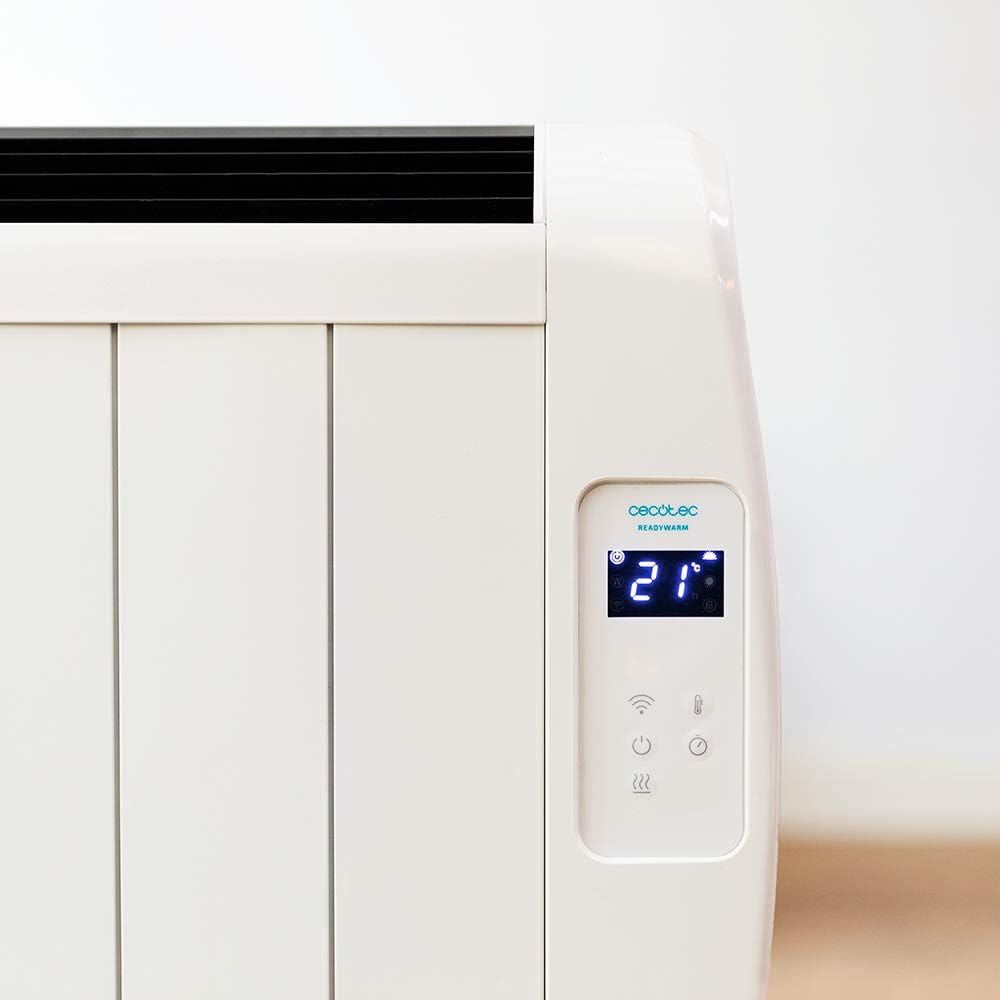
Un detallat view of the heater's digital control panel, featuring a clear LCD screen showing '21' degrees Celsius, indicating the current temperature setting. Below the screen are touch-sensitive buttons for power, Wi-Fi, mode selection, and temperature adjustment.

This image focuses on the digital control panel, showing the LCD screen set to a timer function, displaying '04' hours. This indicates the heater is programmed to operate for a specific duration.
The digital display shows the current temperature, timer settings, and Wi-Fi status. The touch-sensitive buttons allow for easy control of the heater's functions.
Interruptor d'alimentació

A close-up shot of the heater's base, revealing the physical on/off power switch. This switch provides a direct way to cut power to the unit.
A physical power switch is located at the base of the unit for complete power disconnection.
4. Configuració
- Desembalatge: Traieu amb cura l'escalfador del seu embalatge. Conserveu l'embalatge per a l'emmagatzematge o el transport.
- Col·locació: Place the heater on a firm, level surface. Ensure there is at least 1 meter (3 feet) of clear space around the heater from walls, furniture, and other objects. Do not place it directly under a power outlet.
- Connexió d'alimentació: Plug the power cord into a suitable 230V AC power outlet. Ensure the main power switch at the base of the unit is in the 'OFF' position before plugging in.
- Encesa inicial: Flip the main power switch at the base of the unit to the 'ON' position. The digital display on the control panel should illuminate.
Dimensions for Placement

This image provides a clear diagram of the heater's physical dimensions: 63 cm in width, 10.5 cm in depth, and 53.5 cm in height, useful for planning placement.
5. Instruccions de funcionament
Funcionament bàsic
- Encès/apagat: Premeu el botó d'engegada (U) on the control panel to turn the heater on or off.
- Ajust de temperatura: Use the temperature up (+) i cap avall (-) buttons to set your desired room temperature. The display will show the set temperature.
- Selecció del mode: Press the mode button to cycle through available heating modes (e.g., Low, Medium, High, or Eco, depending on the model's specific programming).
- Funció de temporitzador: Press the timer button to set an operating duration. Use the temperature adjustment buttons to set the desired hours (e.g., 0-24 hours). The heater will automatically turn off after the set time.
Connectivitat Wi-Fi i control d'aplicacions
The Cecotec Ready Warm 800 features Wi-Fi connectivity, allowing you to control the heater remotely via a smartphone application.

A hand holding a smartphone with the Cecotec Ready Warm mobile application open. The app interface shows a large dial indicating '33°C' and various control options, demonstrating remote control capabilities.
- Descarrega l'aplicació: Cerca the 'Cecotec Ready Warm' app in your smartphone's app store (iOS or Android).
- Registra't/Iniciar sessió: Creeu un compte o inicieu sessió si ja en teniu un.
- Afegeix un dispositiu: Follow the in-app instructions to add your Ready Warm 800 heater. This typically involves putting the heater into pairing mode (often by pressing and holding the Wi-Fi button on the control panel) and connecting it to your home Wi-Fi network.
- Comandament a distància: Once connected, you can control the heater's power, temperature, modes, and timer functions from your smartphone.
6. Manteniment
Un manteniment regular garanteix un rendiment òptim i una llarga vida útil del vostre escalfador.
- Neteja: Desendolleu sempre l'escalfador i deixeu-lo refredar completament abans de netejar-lo. Feu servir un drap suau i sec.amp drap per netejar les superfícies exteriors. No utilitzeu productes de neteja abrasius ni dissolvents.
- Eliminació de pols: Periodically use a vacuum cleaner with a brush attachment to remove dust from the air intake and exhaust vents.
- Emmagatzematge: If storing the heater for an extended period, unplug it, clean it thoroughly, and store it in a cool, dry place, preferably in its original packaging.
- Sense peces reparables per l'usuari: Do not attempt to open or repair the heater yourself. Refer all servicing to qualified personnel.
7. Solució De Problemes
If you encounter issues with your heater, refer to the following table for common problems and solutions.
| Problema | Causa possible | Solució |
|---|---|---|
| L'escalfador no s'encén. | No power supply. Main power switch off. | Check if the power cord is securely plugged in. Ensure the main power switch at the base is ON. Check the wall outlet. |
| Sense sortida de calor. | Temperature setting too low. Overheat protection activated. | Increase the desired temperature setting. Unplug the heater, let it cool for 30 minutes, then plug it back in. Ensure vents are not blocked. |
| La connexió Wi-Fi falla. | Incorrect Wi-Fi password. Heater too far from router. App issues. | Verify Wi-Fi password. Move heater closer to the router. Restart the app and heater. Ensure your router is 2.4GHz compatible. |
| L'escalfador s'apaga inesperadament. | Timer function activated. Overheat protection. | Check if the timer is set. If not, unplug the heater, let it cool, and check for obstructions. |
8. Especificacions
| Característica | Detall |
|---|---|
| Marca | Cecotec |
| Número de model | 05372 |
| Potència/Wattage | 600W |
| Voltage | 230 Volts |
| Dimensions del producte | 63 x 10.5 x 53.5 cm |
| Pes | 3.4 kg |
| Característiques especials | Portable, Wireless (Wi-Fi Control), LCD Screen |
| Mètode de calefacció | Radiant |
| Ús interior/exterior | Interior |
| Tipus de muntatge | Wall Mount (optional, accessories not included) / Freestanding |
9. Garantia i Suport
Your Cecotec Ready Warm 800 Digital Heater is covered by a manufacturer's warranty. Please refer to the warranty card included with your purchase for specific terms and conditions, including the warranty period and coverage details.
For technical support, troubleshooting assistance beyond this manual, or warranty claims, please contact Cecotec customer service. Contact information can typically be found on the Cecotec official weblloc web o a l'embalatge del producte.
Quan contacteu amb el servei d'assistència, tingueu a mà el número de model del vostre producte (05372) i el comprovant de compra.


