Introducció
This manual provides instructions for the KLIM Unity Wireless Keyboard and Mouse Set. This set is designed to offer a wireless input solution for various devices, including PCs, Macs, PS4, and PS5 consoles. It features a backlit keyboard with a semi-mechanical feel and an ergonomic mouse with adjustable DPI.

Image: The KLIM Unity Wireless Keyboard and Mouse Set, showcasing the keyboard's vibrant backlighting and the sleek design of the accompanying mouse.
Configuració
1. Desembalatge i components
Assegureu-vos que tots els components estiguin presents:
- KLIM Unity Wireless Keyboard
- KLIM Unity Wireless Mouse
- USB Receiver (located underneath the mouse)
- Cable de càrrega USB
2. Connexió del receptor USB
The KLIM Unity set operates wirelessly, connecting both the keyboard and mouse to your computer via a single USB receiver. The USB receiver is stored in a compartment underneath the mouse for convenience.
- Locate the USB receiver in its storage slot underneath the mouse.
- Inseriu el receptor USB a un port USB disponible de l'ordinador o de la consola.
- The devices should connect automatically.

Image: The wireless mouse and a portion of the keyboard, illustrating the compact USB receiver and key features like adjustable DPI.
3. Càrrega inicial
Both the keyboard and mouse feature built-in rechargeable batteries. For optimal performance, it is recommended to fully charge both devices before first use.
- Connect the supplied USB charging cable to the charging port on the keyboard and mouse.
- Connect the other end of the USB cable to a powered USB port (e.g., on your computer or a USB wall adapter).
- Charging indicators will typically show when the devices are charging and when they are fully charged.
Funcionament del teclat
1. Control de la llum de fons
The keyboard features colorful backlighting. You can adjust the lighting to suit your preference.
- Activació/desactivació: Use the dedicated backlight control keys (often indicated by a light bulb icon or combined with a Function key) to toggle the backlighting.
- Ajust de brillantor: Use the Function (Fn) key in combination with specific arrow keys or dedicated brightness keys to increase or decrease the backlight intensity.
- Changing Colors/Modes: Some models allow cycling through different color modes or static colors using Fn key combinations.
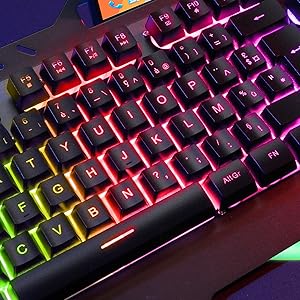
Imatge: Una imatge detallada view of the keyboard keys, showcasing the colorful RGB backlighting.
2. Tecles de funció i dreceres
The keyboard includes a special Function (Fn) key that, when pressed in combination with other keys, provides access to various shortcuts.
- Controls de mitjans: Common shortcuts include volume control (up, down, mute), play/pause, previous/next track.
- Dreceres d'aplicacions: Some keys may launch specific applications or functions.
3. Experiència de mecanografia
The keyboard features hybrid keys, combining elements of mechanical keyboards for a responsive feel with reduced noise levels, suitable for both typing and gaming.

Image: The keyboard with a smartphone in its integrated holder, demonstrating a practical feature.
Funcionament del ratolí
1. Disseny ergonòmic i adherència
The wireless mouse features an ergonomic design with anti-skid flanks for comfortable use during extended periods. Its symmetrical design accommodates both right-handed and left-handed users, though side buttons are located on one side only.
2. Ajust de DPI
The mouse includes adjustable DPI (Dots Per Inch) settings, allowing you to change cursor sensitivity to match your preferences or task requirements.
- Locate the DPI adjustment button, typically near the scroll wheel.
- Press the button to cycle through available DPI settings. The mouse's LED indicator may change color to indicate the current DPI level.
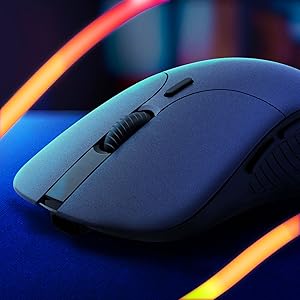
Imatge: Un primer pla view of the wireless mouse, highlighting its ergonomic contours.
Manteniment
1. Càrrega
To charge the keyboard and mouse, use the provided USB cable. Connect the cable to the respective charging ports on each device and to a powered USB source. The devices are designed with long-lasting built-in batteries.
2. Neteja
To clean the keyboard and mouse:
- Assegureu-vos que tots dos dispositius estiguin apagats.
- Use a soft, dry, lint-free cloth to wipe surfaces.
- Per a la brutícia persistent, una mica deamp es pot utilitzar un drap, assegurant-se que no entri humitat a les obertures.
- Eviteu productes químics o materials abrasius.
Resolució de problemes
1. Problemes de connectivitat
- Sense conexió: Ensure the USB receiver is securely plugged into a working USB port. Verify that both the keyboard and mouse are powered on.
- Interferència: Move the receiver closer to the devices or away from other wireless devices that might cause interference.
2. Lag or Delayed Response
- Bateria baixa: Charge both the keyboard and mouse fully. Low battery can affect wireless performance.
- Distància: Ensure the devices are within the operational range (up to 10 meters) of the USB receiver.
- Estalvi d'energia: Some devices may enter a power-saving mode after inactivity, which can cause a slight delay upon reactivation.
3. La llum de fons no funciona
- Check if the backlight is simply turned off using the dedicated control keys.
- Ensure the keyboard has sufficient battery charge, as backlighting consumes power.
Especificacions
| Característica | Detall |
|---|---|
| Dimensions del producte | 17.5 x 7.6 x 1.68 polzades |
| Pes de l'article | 1.98 lliures |
| Fabricant | KLIM |
| Número de model de l'article | k108-6 |
| Bateries | Necessites 1 piles de polímer de liti (incloses) |
| Tecnologia de connectivitat | Sense fil |
| Característiques especials | Backlit, Ergonomic |
| Dispositius compatibles | Mac, PS4, PS5, Personal Computer |
| Color | Negre |
Vídeo oficial del producte
Vídeo: Un funcionari ha acabatview of the KLIM Unity Wireless Keyboard and Mouse Set, demonstrating its features and design.
Garantia
The KLIM Unity Wireless Keyboard and Mouse Set comes with a 5 any de garantia, covering manufacturing defects and ensuring product reliability.
Suport
For any questions, technical assistance, or warranty claims, please contact KLIM Customer Service. The support team aims to provide a response within 24 hours.
Per a més informació, visiteu el Botiga KLIM a Amazon.


