Introducció
Gràcies per la compraasing the Overmax Multipic 4.1 Full HD 1080p LED Projector. This manual provides essential information for the safe and efficient use of your projector. Please read it thoroughly before operation and retain it for future reference.
Informació de seguretat
Per garantir un funcionament segur i evitar danys, observeu les precaucions següents:
- No bloquegeu les obertures de ventilació. Assegureu-vos que hi hagi un flux d'aire adequat al voltant del projector.
- Eviteu l'exposició directa dels ulls a la lent del projector quan elamp està activat.
- Do not place the projector on unstable surfaces.
- Mantingueu el projector allunyat de l'aigua o altres líquids.
- Feu servir només l'adaptador de corrent que s'inclou amb el projector.
- No intenteu obrir ni reparar el projector vosaltres mateixos. Encarregueu totes les tasques de manteniment a personal qualificat.
- Desendolleu el projector durant tempestes o quan no l'utilitzeu durant períodes prolongats.
Contingut del paquet
Verifiqueu que tots els elements siguin presents al vostre paquet:
- Overmax Multipic 4.1 Projector
- Control remot
- Cable d'alimentació
- Cable HDMI
- Cable fusible
- Manual d'usuari (aquest document)
Producte acabatview
Familiaritzeu-vos amb els components i els controls del projector.
Davant View

Imatge: Frontal view of the Overmax Multipic 4.1 projector. The main projection lens is visible on the right side, with ventilation grilles and an infrared receiver on the left.
Controls del tauler superior
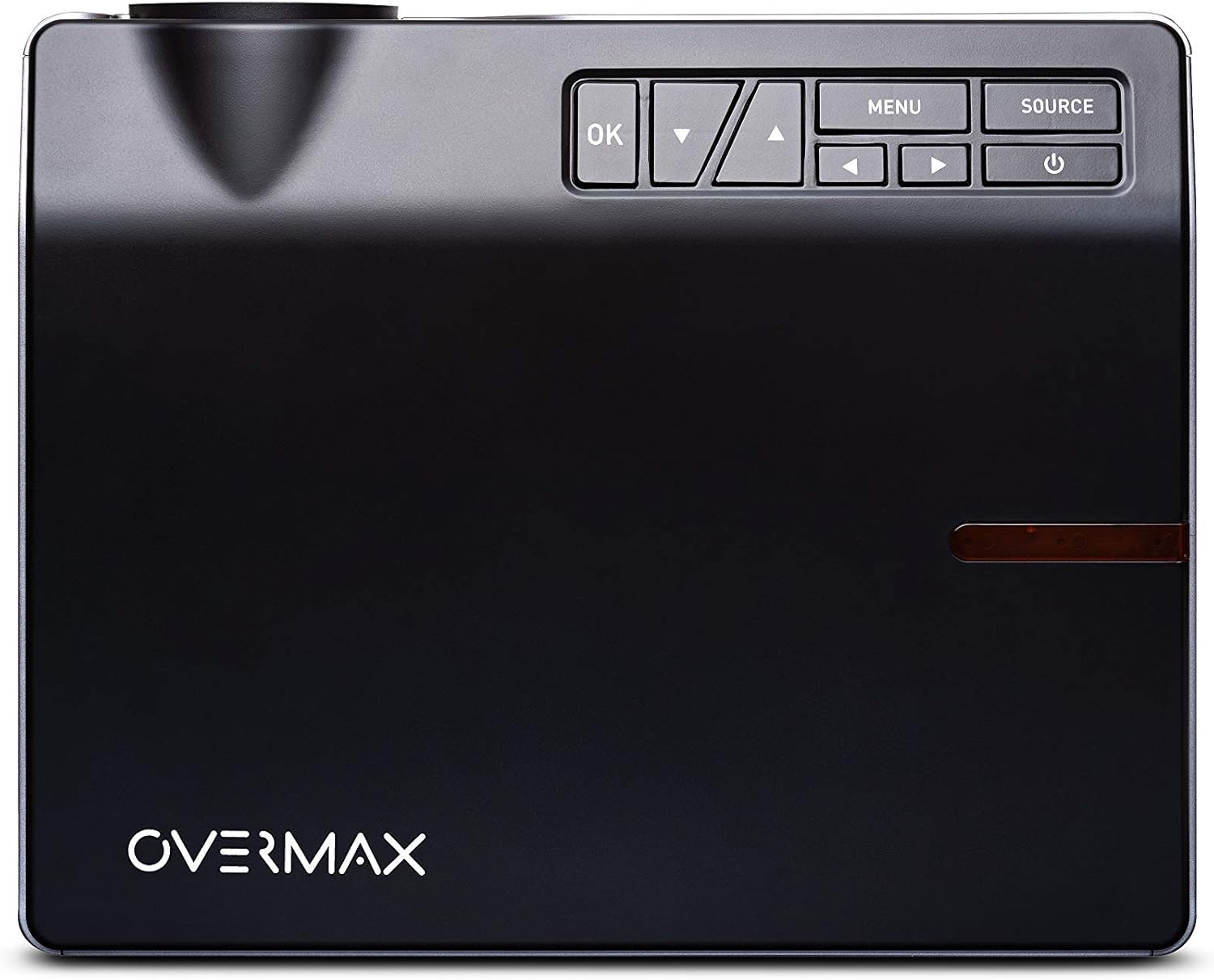
Imatge: Superior view of the Overmax Multipic 4.1 projector. The control panel is located on the top right, featuring buttons for Power, Source, Menu, OK, and directional navigation.
- Botó d'encesa: Encén o apaga el projector.
- Botó Font: Selects input source (HDMI1, HDMI2, USB, VGA, AV).
- Botó de menú: Accedeix al menú de configuració del projector.
- Botó D'acord: Confirma les seleccions del menú.
- Fletxes direccionals: Navega per les opcions del menú i ajusta la configuració.
Ports del panell posterior

Imatge: Part posterior view of the Overmax Multipic 4.1 projector. Ports include VGA, USB, HDMI1, HDMI2, and AV input, along with the power input and main power switch.
- Port VGA: Es connecta a ordinadors amb sortida VGA.
- Ports USB (x2): Connects USB storage devices for media playback.
- Ports HDMI (x2): Connects to devices like laptops, game consoles, or streaming sticks.
- Port AV: Connects to older devices using a composite video and stereo audio cable.
- Entrada d'alimentació: Connecta el cable d'alimentació.
- Interruptor principal d’alimentació: Controls the main power supply to the unit.
Ajust d'enfocament i Keystone

Imatge: Lateral view of the Overmax Multipic 4.1 projector, showing the focus ring (larger) and keystone correction ring (smaller) located near the lens.
- Anell de focus: Rotate to sharpen the projected image.
- Anell corrector de la distorsió trapezoidal: Adjusts the image shape to correct trapezoidal distortion if the projector is not perfectly perpendicular to the screen.
Configuració
1. Col·locació
Position the projector on a stable, flat surface or mount it to a ceiling or tripod. Ensure the projector is within a suitable distance from the projection surface to achieve the desired screen size (up to 200 inches diagonal).
- For ceiling mounting, use the four screw holes on the bottom of the projector.
- Assegureu-vos una ventilació adequada al voltant de la unitat.
2. Connexió d'alimentació
- Connecteu el cable d'alimentació al port d'entrada d'alimentació del projector.
- Connecteu l'altre extrem del cable d'alimentació a una presa de corrent.
- Flip the main power switch on the rear panel to the "ON" position.
3. Connexió de dispositius d'entrada
Connect your desired source device (e.g., laptop, game console, USB drive) to the appropriate port on the projector.
- HDMI: Use an HDMI cable to connect to HDMI1 or HDMI2 ports.
- USB: Insert a USB flash drive into one of the USB ports for direct media playback.
- VGA: Use a VGA cable to connect to a computer's VGA output.
- DE: Use a composite AV cable to connect to devices with AV output.
4. Ajust de l'enfocament i la distorsió trapezoidal
- Enceneu el projector i visualitzeu una imatge.
- Gira el Anell de focus (larger ring near the lens) until the image appears sharp and clear.
- Si la imatge sembla trapezoïdal (més ampla a la part superior o inferior), gireu el Anell corrector de pedra trapezoidal (smaller ring near the lens) to square the image.
Instruccions de funcionament
Encès/Apagat
- Per encendre: Press the Power button on the projector or remote control. The indicator light will turn on.
- Per apagar: Press the Power button again. The projector will initiate a shutdown sequence. Do not unplug the projector until the fan stops running.
Selecció de la font d'entrada
Després d'encendre, premeu el botó Font button on the projector or remote control to cycle through available input sources (HDMI1, HDMI2, USB, VGA, AV). Select the source corresponding to your connected device.
Navegació pel menú
Premeu el botó Menú button to access settings such as picture mode, aspect ratio, sound settings, and system preferences. Use the directional arrows to navigate and the OK botó per confirmar les seleccions.
Connectivitat Wi-Fi
The Multipic 4.1 supports Wi-Fi connectivity for screen mirroring from compatible smartphones, tablets, and computers.
- Navigate to the Wi-Fi settings in the projector's menu.
- Select your Wi-Fi network and enter the password if required.
- Once connected, follow the on-screen instructions to initiate screen mirroring from your device.
Sortida d'àudio
The projector features two built-in stereo speakers. Volume can be adjusted via the remote control or the projector's menu.
Manteniment
Neteja de la lent
Use a soft, lint-free cloth specifically designed for optical lenses. Do not use abrasive cleaners or excessive force, as this can scratch the lens.
Neteja de ventilacions
Regularly check and clean the air vents to prevent dust buildup, which can affect cooling and projector performance. Use a soft brush or compressed air to gently remove dust.
Lamp La vida
El LED lamp in your projector has an estimated lifespan of up to 50,000 hours. No lamp replacement is typically required during the product's lifetime under normal usage conditions.
Resolució de problemes
| Problema | Causa possible | Solució |
|---|---|---|
| No es mostra cap imatge |
|
|
| La imatge és borrosa |
|
|
| La imatge és trapezoïdal |
|
|
| Sense so |
|
|
| Problemes de connexió Wi-Fi |
|
|
Especificacions
| Característica | Detall |
|---|---|
| Número de model | OV-MULTIPIC 4.1 |
| Marca | Sobremàx |
| Resolució de visualització | 1920 x 1080 (Full HD 1080p Native) |
| Brillantor | 4000 lúmens |
| Relació de contrast | 4000:1 |
| Relació d'aspecte | 16:9 i 4:3 |
| Lamp Tipus | LED |
| Lamp La vida | Fins a 50,000 hores |
| Tecnologia de connectivitat | HDMI (x2), USB (x2), VGA, AV, Wi-Fi |
| Altaveus incorporats | 2 altaveus estèreo |
| Consum d'energia | 170 watts |
| Tipus de control | Control remot, botons del dispositiu |
| Tipus de muntatge | Ceiling Mount, Portable |
| Dispositius compatibles | Laptop, Tablet, Game Consoles, USB drives |
Garantia i Suport
For warranty information, please refer to the warranty card included with your product or contact your retailer. Overmax provides support for its products. For technical assistance or further inquiries, please visit the official Overmax weblloc o poseu-vos en contacte amb el seu departament d'atenció al client.
Nota: Els termes de la garantia i les dades de contacte d'assistència específiques poden variar segons la regió.
Vídeos oficials de productes
Actualment no hi ha vídeos oficials del venedor disponibles per a aquest model.


