Introducció
This manual provides detailed instructions for the setup, operation, and maintenance of your BUFFBEE Glow Alarm Clock HRS-BLACK. Please read this manual thoroughly before using the product to ensure proper function and longevity.
Producte acabatview
The BUFFBEE Glow Alarm Clock is a versatile device combining a digital alarm clock, FM radio, and a 7-color night light. It is designed to enhance your sleep and wake-up experience with customizable features.
Característiques principals:
- Funcionalitat 3 en 1: Digital alarm clock, FM radio, and night light.
- Llum nocturna de 7 colors: Adjustable with 5 brightness levels.
- Alarmes dobles: Set two independent alarms with choice of FM radio, built-in beep, or bird sounds.
- Adjustable Display Dimmer: 0-100% brightness control for the time display.
- Botons il·luminats: For easy operation in low light conditions.
- Temporitzador de migdiada: Quick nap setting from 10 to 120 minutes.
- Temporitzador de son amb apagada automàtica: Automatically turns off night light and FM radio after a set duration.
- Port de càrrega USB: Per carregar dispositius electrònics externs.
- Opcions d'energia: AC powered with AAA battery backup (batteries not included).
Contingut del paquet:
- 1 x BUFFBEE Glow Alarm Clock
- 1 x adaptador de corrent
- 1 x Manual d'usuari
Identificació de components:
Consulteu la imatge següent per obtenir més informacióview of the alarm clock's buttons and display.

Imatge: Frontal view of the BUFFBEE Glow Alarm Clock, showing the digital time display, alarm indicators, and control buttons on the top panel. The top edge features a light strip.
Configuració
1. Connexió d'alimentació:
- Connect the provided power adapter to the DC input port on the back of the alarm clock.
- Connecteu l'adaptador a una presa de corrent estàndard.
2. Battery Backup (Optional):
Per a un funcionament ininterromput durant l'apagadatages, install 3 AAA batteries (not included) into the battery compartment on the bottom of the unit. The clock will maintain time and alarm settings, and the alarm will still function, but the display and night light may be limited to conserve power.

Imatge: Part posterior view of the alarm clock showing the power input and battery compartment, alongside a power adapter and three AAA batteries (not included).
3. Initial Time Setting:
- When first powered on, the display will show a default time.
- Manteniu premut el botó HORA CONFIGURADA button (usually located on the top panel) until the hour digits flash.
- Utilitza el +/- buttons (or similar navigation buttons) to adjust the hour.
- Premeu HORA CONFIGURADA again to confirm the hour and move to minute adjustment.
- Utilitza el +/- botons per ajustar els minuts.
- Premeu HORA CONFIGURADA una vegada més per confirmar i sortir del mode de configuració de l'hora.
- Per canviar entre el format de 12 hores i el de 24 hores, premeu la tecla 12/24H button (if available, often combined with time set or a dedicated button).
Instruccions de funcionament
1. Setting Alarms (Alarm 1 & Alarm 2):
El rellotge admet dues alarmes independents.
- Premeu el botó ALARMA 1 botó (o ALARMA 2) once to display the current alarm time.
- Manteniu premut el botó ALARMA 1 (o ALARMA 2) button until the hour digits flash.
- Utilitza el +/- botons per ajustar l'hora.
- Premeu el botó ALARMA button again to confirm the hour and move to minute adjustment.
- Utilitza el +/- botons per ajustar els minuts.
- Premeu el botó ALARMA button again to select the alarm sound: FM radio, built-in beep, or bird sounds. Use +/- per anar ciclant entre les opcions.
- Premeu el botó ALARMA Premeu el botó una vegada més per confirmar i activar l'alarma. Apareixerà una icona d'alarma a la pantalla.
- Per desactivar una alarma activa, premeu el botó corresponent ALARMA button. The alarm icon will disappear.
2. Funció de repetició d'alarma:
Quan soni una alarma, premeu la tecla gran SNOOZE / LIGHT button on top to temporarily silence the alarm for 9 minutes. The alarm will sound again after the snooze period.
3. Night Light Operation:
The alarm clock features a 7-color night light with adjustable brightness.

Image: The alarm clock shown with its top light strip illuminated in various colors, demonstrating the 7-color night light feature.
- Premeu el botó LLUM button (often combined with SNOOZE or a dedicated button) to turn the night light on/off.
- When the night light is on, press the LLUM button repeatedly to cycle through the 7 available colors.
- To adjust the brightness, use the +/- buttons while the night light is active. There are 5 brightness levels.
4. Ràdio FM:
The built-in FM radio allows you to listen to your favorite stations.
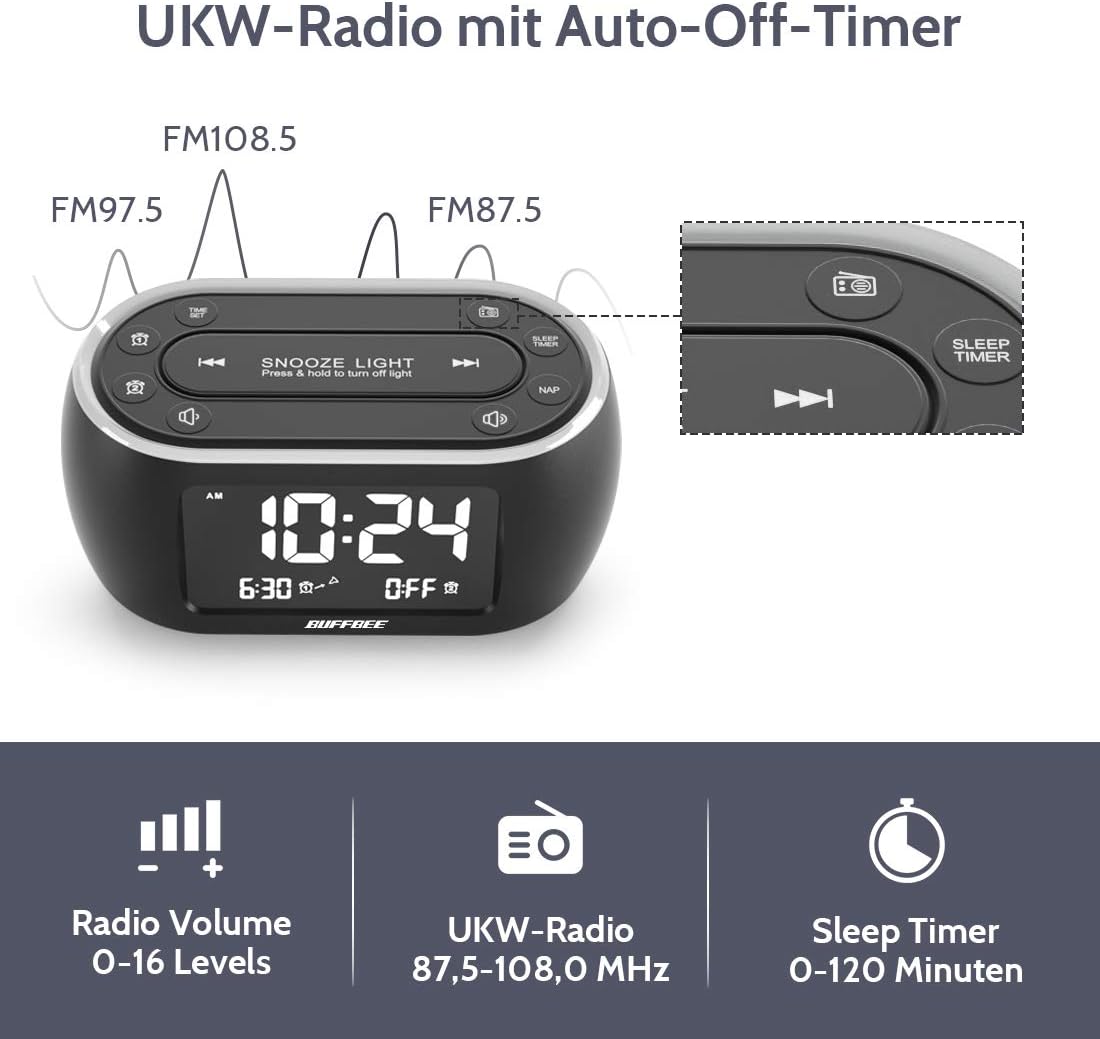
Image: The alarm clock display showing FM radio frequencies (FM108.5, FM97.5, FM87.5) and icons for radio volume and sleep timer.
- Premeu el botó RÀDIO button to turn the FM radio on/off.
- Premeu el botó ESCANEAR button (or similar) to automatically scan and save available FM stations.
- Utilitza el ANTERIOR / SEGÜENT buttons to navigate through saved stations or manually tune.
- Ajusteu el volum amb el botó VOLUM +/- buttons. The volume can be set from 0 to 16 levels.
5. Nap Timer:
The nap timer allows for quick, short sleep periods without affecting regular alarm settings.
- Premeu el botó NAP button. The display will show the default nap time (e.g., 10 minutes).
- Premeu el botó NAP button repeatedly to cycle through preset nap durations (e.g., 10, 20, 30, 60, 90, 120 minutes).
- The nap timer will start automatically after selection.
- To cancel the nap timer, press the NAP button until "OFF" is displayed.
6. Auto-Off Sleep Timer:
Set a timer for the night light and/or FM radio to automatically turn off after a specified duration.
- While the night light or FM radio is active, press the TEMPORIZADOR DE SOMNI botó.
- Premeu el botó TEMPORIZADOR DE SOMNI button repeatedly to cycle through available durations (e.g., 15, 30, 60, 90, 120 minutes, or OFF).
- The selected duration will be displayed, and the timer will begin. The night light and/or FM radio will turn off automatically when the timer expires.
7. Display Dimmer:
Adjust the brightness of the main time display from 0% to 100%.

Image: Six different views of the alarm clock display, illustrating the range of brightness from very dim to fully bright, and also showing the night light dimmer.
Utilitzeu el dedicat DIMMER marcar o DIMMER +/- buttons (if available) to adjust the display brightness to your preference. This allows for comfortable viewen qualsevol condició d'il·luminació.
8. Port de càrrega USB:
A USB port is located on the back of the unit for charging small electronic devices.

Image: The alarm clock with a smartphone plugged into its side USB port, indicating the charging function.
Connect your device's USB charging cable to the port. The clock must be powered by the AC adapter for the USB charging function to work.
Manteniment
To ensure the longevity and optimal performance of your BUFFBEE Glow Alarm Clock, follow these maintenance guidelines:
- Neteja: Wipe the unit with a soft, dry cloth. Do not use abrasive cleaners, waxes, or solvents as they may damage the surface.
- Potència: Always disconnect the power adapter from the wall outlet before cleaning or if the unit will be unused for an extended period.
- Medi ambient: Keep the alarm clock away from direct sunlight, heat sources, and excessive moisture.
- Substitució de la bateria: If using battery backup, replace AAA batteries annually or when the battery indicator suggests low power. Ensure correct polarity when inserting new batteries.
Resolució de problemes
If you encounter issues with your BUFFBEE Glow Alarm Clock, refer to the following common problems and solutions:
| Problema | Causa possible | Solució |
|---|---|---|
| Clock display is blank or flickering. | No power or loose connection. Low battery backup. | Ensure the power adapter is securely plugged into the clock and the wall outlet. Check if AAA batteries are installed correctly and have sufficient charge. |
| L'alarma no sona. | Alarm not activated. Alarm volume too low. | Verify that the alarm icon is displayed. Check the alarm volume setting. Ensure the correct alarm time is set. |
| La recepció de ràdio FM és deficient. | Weak signal. Antenna not extended. Interference. | Extend the FM antenna fully. Try repositioning the clock. Perform an auto-scan for stations again. |
| La llum nocturna no funciona. | Light function turned off. | Press the LIGHT button to turn it on. Check if the brightness is set to 0%. |
| La càrrega USB no funciona. | Clock not connected to AC power. Device not compatible. | Ensure the clock is powered by the AC adapter. Check if your device is compatible with standard USB charging. |
Especificacions
| Característica | Detall |
|---|---|
| Marca | BUFFBEE |
| Número de model | HRS-BLACK |
| Dimensions (L x A x A) | 12 x 3.81 x 6 cm (4.72 x 1.5 x 2.36 polzades) |
| Pes | 330 grams (0.73 lliures) |
| Entrada de potència | CA 100-240V, 50/60Hz |
| Còpia de seguretat de la bateria | 3 piles AAA (no incloses) |
| Tipus de visualització | Digital |
| Brillantor de la pantalla | 0-100% ajustable |
| Colors de llum nocturna | 7 colors |
| Night Light Brightness | 5 nivells regulables |
| Freqüència de ràdio FM | 87.5-108.0 MHz |
| Volum de l'alarma | 0-16 nivells ajustables |
| Característiques especials | Ambient light, Dual Alarm, Nap Timer, Sleep Timer, USB Charging Port |
Garantia i Suport
BUFFBEE products are designed for reliability and performance. For specific warranty information, please refer to the documentation included with your purchase or contact BUFFBEE customer support.
If you require technical assistance or have questions regarding your BUFFBEE Glow Alarm Clock, please visit the official BUFFBEE weblloc web o poseu-vos en contacte amb el seu departament d'atenció al client. Les dades de contacte normalment es troben a l'embalatge del producte o al fabricant. weblloc.


