1. Introducció
Gràcies per la compraasing the ELEPHAS Mini Portable Projector. This compact and versatile projector is designed to provide an immersive viewing experience for movies, videos, and games, whether at home or on the go. Its small size and multiple connectivity options make it an ideal entertainment solution for various environments. Please read this manual thoroughly before using the projector to ensure proper operation and to maximize its lifespan.
Què hi ha a la caixa:
- ELEPHAS Mini Portable Projector
- Cable HDMI
- Cable AV
- Control remot
- Cable d'alimentació
- Manual d'usuari (aquest document)
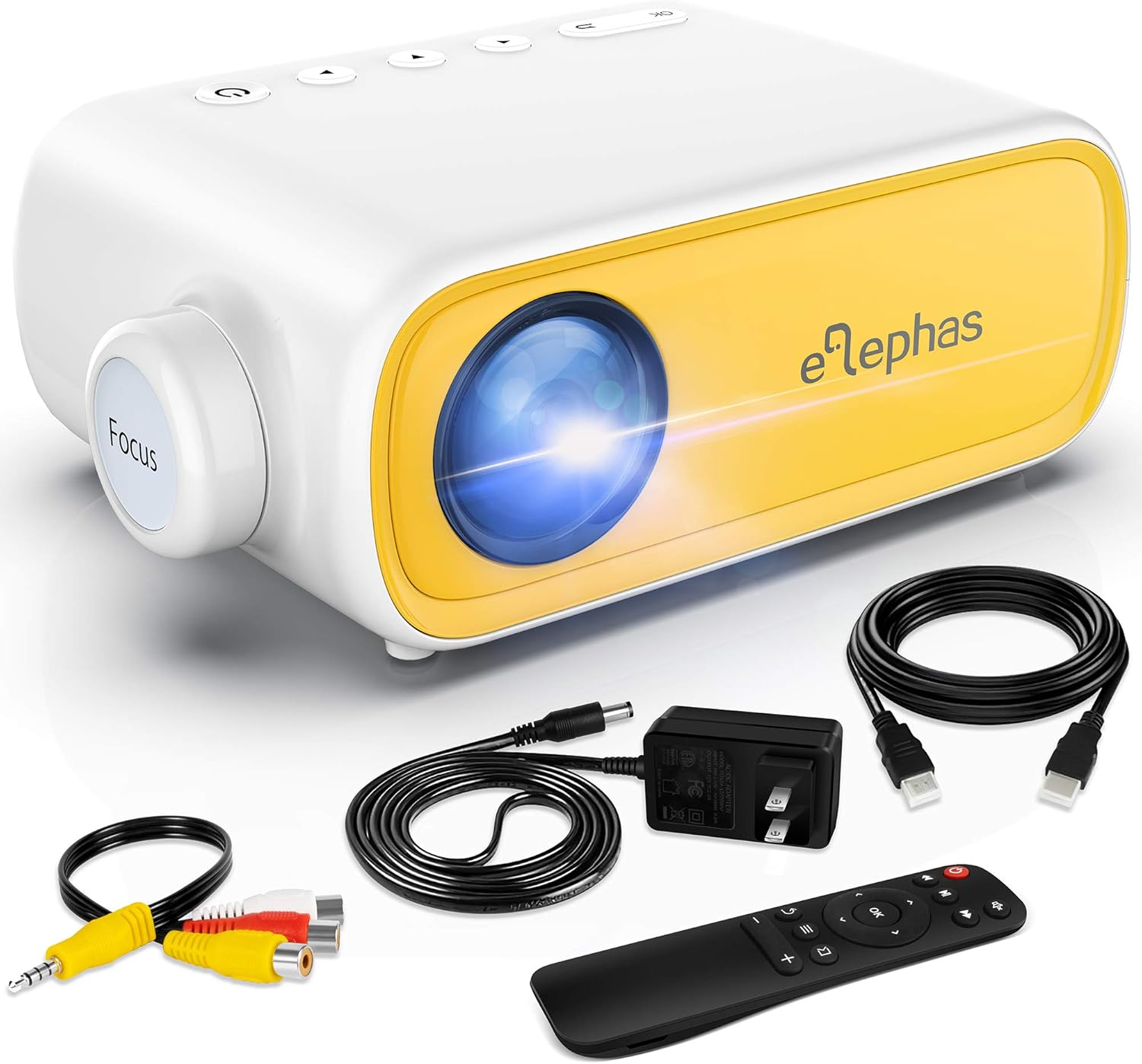
Figure 1.1: ELEPHAS Mini Portable Projector with its accessories including HDMI cable, AV cable, remote control, and power cord.
2. Informació de seguretat
To ensure safe and optimal operation of your projector, please observe the following safety precautions:
- Font d'alimentació: Use only the original power adapter and cord provided with the projector. Ensure the power outlet matches the voltage requisits.
- Ventilació: Do not block the ventilation openings on the projector. Ensure adequate airflow around the device to prevent overheating.
- Col·locació: Col·loqueu el projector sobre una superfície estable i plana. Eviteu exposar-lo a la llum solar directa, a prop de fonts de calor o en ambients amb molta humitat o pols.
- Seguretat ocular: No mireu directament a la lent del projector quan estigui encès.amp is on. The bright light can cause eye strain or damage.
- Neteja: Disconnect the power before cleaning. Use a soft, dry cloth for cleaning the exterior. For the lens, use a specialized lens cleaning cloth.
- Nens: Keep the projector and its accessories out of reach of small children. Adult supervision is recommended when children are using the device.
- Desmuntatge: No intenteu desmuntar ni reparar el projector vosaltres mateixos. Encarregueu totes les tasques de manteniment a personal qualificat.
3. Producte acabatview i Components
Familiarize yourself with the various parts and interfaces of your ELEPHAS Mini Portable Projector.

Figure 3.1: Rear and side view of the projector highlighting its input/output ports.
Components clau:
- Lent: Projecta la imatge a la pantalla.
- Anell de focus: Ajusta la claredat de la imatge projectada.
- Port DC-IN: Per connectar l'adaptador de corrent.
- Port AV: For connecting devices using the included AV cable.
- Port HDMI: For connecting devices with HDMI output (e.g., laptops, game consoles, TV boxes).
- Port USB: Per connectar unitats USB per reproduir contingut multimèdia files.
- Audio Out (3.5mm) Port: Per connectar altaveus externs o auriculars.
- Ranura per a targetes Micro SD/TF: Per reproduir mitjans filedirectament des d'una targeta Micro SD.
- Altaveu integrat: Proporciona sortida d'àudio.
- Botons de control: Power, navigation, and input selection buttons on top of the projector.
- Sensor de control remot: Rep senyals del comandament a distància.
4. Configuració
4.1 Connexió d'alimentació:
- Connecteu el cable d'alimentació a l'adaptador d'alimentació.
- Plug the power adapter into the DC-IN port on the projector.
- Connecteu l'altre extrem del cable d'alimentació a una presa de corrent.
4.2 Placement and Projection Distance:
Place the projector on a stable surface. The optimal projection distance ranges from 0.8 to 2 meters (approximately 31 to 79 inches) for a screen size of 24 to 60 inches. Adjust the distance to achieve your desired screen size.

Figure 4.1: Recommended projection distances and screen sizes.
4.3 Focus Adjustment:
After powering on the projector, rotate the focus ring on the front of the projector until the image appears clear and sharp on the projection surface.
5. Instruccions de funcionament
5.1 Encendre/apagar:
- Per encendre: Premeu el botó d'engegada del projector o del comandament a distància. L'indicador lluminós s'encendrà.
- Per apagar: Premeu de nou el botó d'engegada. El projector s'apagarà.
5.2 Input Source Selection:
After connecting your device, press the "Source" button on the projector or remote control to select the correct input source (e.g., HDMI, AV, USB, Micro SD).
5.3 Control de volum:
Use the volume buttons on the remote control to adjust the audio output level. You can also connect external speakers or headphones to the 3.5mm audio out port for enhanced sound.
6. Connectivitat
6.1 Connecting to Laptops/PCs/Game Consoles (HDMI):
- Connect one end of the HDMI cable to the HDMI port on your device.
- Connect the other end of the HDMI cable to the HDMI port on the projector.
- Select "HDMI" as the input source on the projector.
6.2 Connecting to USB Drives/Micro SD Cards:
- Insert your USB drive into the USB port or your Micro SD card into the TF card slot.
- Select "USB" or "Micro SD" as the input source.
- Navegueu pels mitjans de comunicació files using the remote control and select the desired content to play.
6.3 Connecting to Smartphones/Tablets:
To connect your smartphone or tablet, you will need an appropriate adapter (not included):
- For iOS devices (iPhone/iPad): A Lightning to HDMI adapter is required.
- For Android devices: A Micro USB to HDMI or Type-C to HDMI adapter is required.
- For wireless connection: A Wi-Fi network adapter (dongle) is needed.
Once connected via the adapter, select "HDMI" as the input source.

Figure 6.1: Smartphone connectivity options using HDMI adapters (adapters not included).
6.4 Streaming Services Note:
Due to HDCP copyright restrictions, this mini projector does not directly support streaming from apps like Netflix, Amazon Prime Video, or Hulu when connected via smartphone mirroring. To watch content from these services, you can use an external streaming device such as an Amazon Fire Stick or Roku Stick, connected to the projector's HDMI port.
7. Manteniment
- Neteja de lents: Gently wipe the projector lens with a soft, lint-free cloth specifically designed for optical lenses. Do not use abrasive cleaners or harsh chemicals.
- Neteja exterior: Feu servir un drap suau i sec per netejar l'exterior del projector. Per a marques difícils, netegeu lleugeramentamp es pot utilitzar un drap, seguit d'una neteja en sec.
- Ventilació: Regularly check that the ventilation openings are free from dust and debris to ensure proper heat dissipation.
- Emmagatzematge: Quan no l'utilitzeu durant períodes prolongats, guardeu el projector en un lloc fresc i sec, allunyat de la llum solar directa i de temperatures extremes. Es recomana utilitzar l'embalatge original per a l'emmagatzematge.
8. Solució De Problemes
| Problema | Causa possible | Solució |
|---|---|---|
| Sense poder | Cable d'alimentació no connectat; problema amb la presa de corrent. | Assegureu-vos que el cable d'alimentació estigui ben connectat. Proveu una altra presa de corrent. |
| Sense imatge | Incorrect input source selected; device not connected properly. | Select the correct input source (HDMI, AV, USB). Check all cable connections. |
| Imatge borrosa | Focus not adjusted; projection distance incorrect. | Rotate the focus ring until the image is clear. Adjust the projector's distance from the screen. |
| Sense so | Volume too low; external speakers not connected; audio format not supported. | Increase volume. Ensure external speakers are connected correctly or disconnect them to use built-in speaker. Check audio format compatibility. |
| El control remot no funciona | Batteries low/dead; sensor blocked. | Replace batteries. Ensure no obstructions between remote and projector sensor. |
9. Especificacions
| Característica | Detall |
|---|---|
| Número de model | JingHuier |
| Marca | ELEFAS |
| Dimensions del producte | 5 x 3.6 x 2.16 polzades |
| Pes de l'article | 10.4 unces |
| Resolució de visualització | 1920 x 1080 (compatible) |
| Tecnologia de connectivitat | HDMI, USB, AV, 3.5mm Audio, Micro SD/TF |
| Característica especial | Altaveu integrat, portàtil |
| Fabricant | ELEFAS |
| Primera data disponible | 28 d'octubre de 2020 |

Figure 9.1: The compact dimensions of the projector, emphasizing its portability.
10. Garantia i Suport
ELEPHAS products are manufactured to the highest quality standards. For information regarding warranty coverage, please refer to the warranty card included with your product or visit the official ELEPHAS weblloc.
If you encounter any issues or have questions about your ELEPHAS Mini Portable Projector, please contact our customer support team. Provide your model number (JingHuier) and a detailed description of the issue for prompt assistance.
Per a més ajuda, podeu visitar el ELEPHAS Store on Amazon.


