1. Introduction to Omron HeartGuide
The Omron HeartGuide is the first clinically accurate, wearable blood pressure monitor designed as a wrist-worn device. It allows users to conveniently measure blood pressure anytime, anywhere, and track vital health metrics throughout their day and night. This device is intended to support widespread cardiovascular health by providing actionable insights into how lifestyle affects blood pressure.
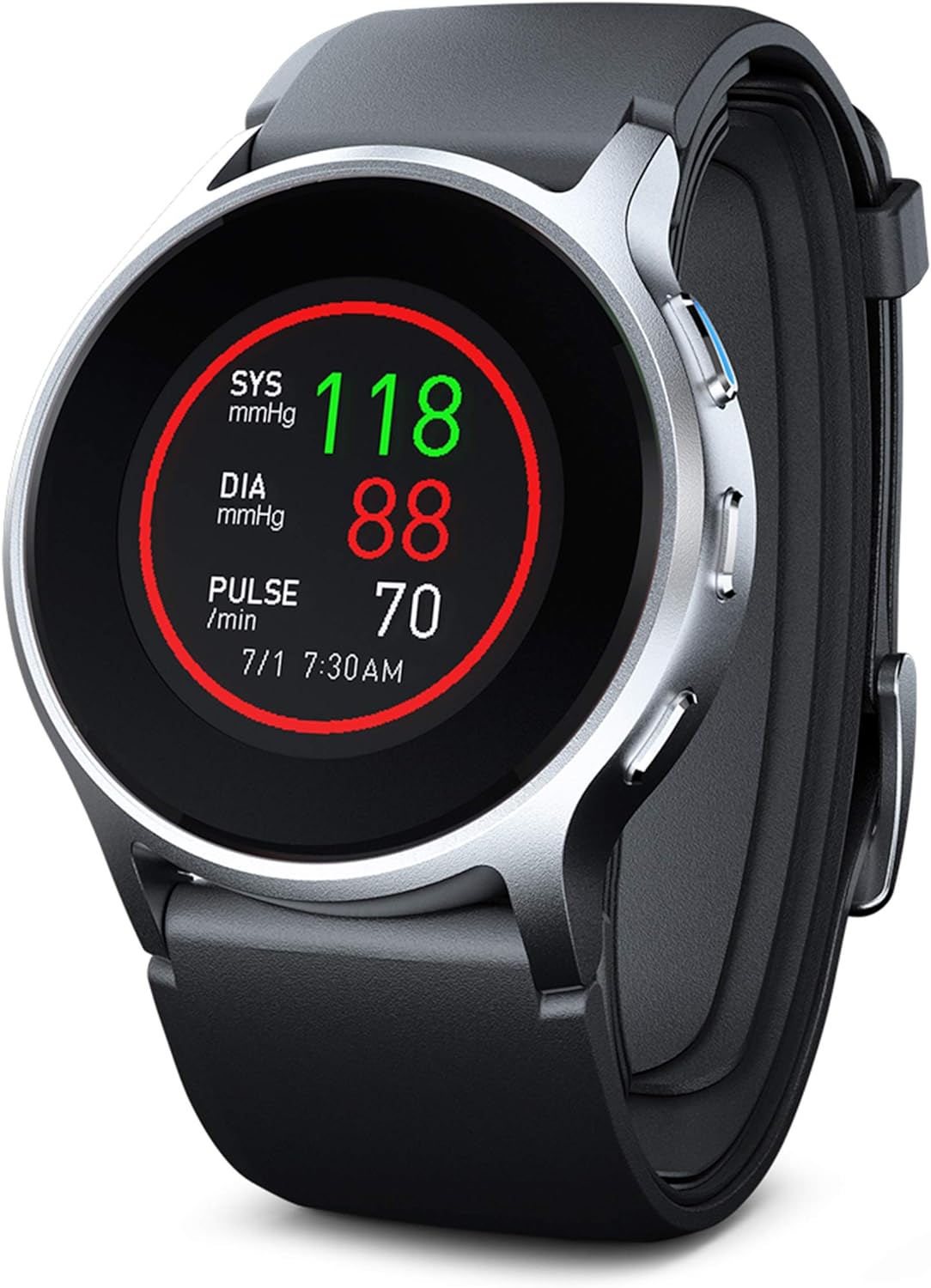
The Omron HeartGuide Smart Watch, showcasing its display with blood pressure (SYS, DIA) and pulse readings. The watch features a sleek, modern design with a black band and silver casing.
2. Getting Started: Setup and Charging
Before first use, ensure your HeartGuide is fully charged. Connect the charging cable to the watch and a USB power source. A full charge typically takes approximately 2 hours. Once charged, download the OMRON Connect app (or HeartAdvisor app) from your smartphone's app store. Follow the in-app instructions to pair your HeartGuide via Bluetooth and complete the initial setup, including personal profile creation and time synchronization.
2.1 Initial Device Pairing
- Assegureu-vos que el Bluetooth del vostre telèfon intel·ligent estigui activat.
- Open the OMRON Connect app and follow the prompts to add a new device.
- The app will guide you through the pairing process with your HeartGuide.
3. Instruccions de funcionament
3.1 Prendre una mesura de la pressió arterial
For accurate readings, proper positioning is crucial. The HeartGuide features an oscillometric measurement method, similar to traditional arm cuffs, but integrated into the wristband.
- Posicionament: Ensure the monitor is positioned properly on your wrist, approximately 1 inch from your hand.
- Postura: Seieu en una cadira còmoda amb els peus a terra.
- Iniciar la mesura: Press the blue button on the side of the watch to start the measurement.
- Heart Level: Place the monitor over your heart with approximately 2 inches of space between your wrist and chest.
- Romandre quiet: Remain still and silent until the measurement is complete and the results are displayed on the screen.

A woman demonstrates the correct posture and arm position for taking an accurate blood pressure measurement using the Omron HeartGuide. Key steps are listed alongside the image for clarity.
3.2 Monitoring Sleep Patterns
Wear the HeartGuide to bed to track your sleep habits. The device automatically monitors sleep duration and quality, providing insights into how your sleep patterns may affect your heart health. Data is synced to the OMRON Connect app for detailed analysis.
3.3 Tracking Activity Levels
The HeartGuide includes an activity tracker that monitors daily steps, distance, and calories burned. You can set activity goals and receive reminders to encourage a more active lifestyle. This data is also integrated into the OMRON Connect app for comprehensive health tracking.

A visual representation showing how blood pressure fluctuates over a 24-hour period, from 6 AM to 3 AM, highlighting the importance of continuous monitoring with HeartGuide.
3.4 Smartwatch Notifications and Reminders
Beyond health monitoring, the HeartGuide also functions as a smartwatch, allowing you to receive notifications for calls, texts, and emails directly on your wrist. You can also set custom reminders for blood pressure measurements or medication intake.
4. Característiques clau
- Clinically Accurate Blood Pressure Monitoring: Take precise blood pressure readings in as little as 30 seconds, directly from your wrist.
- Health Trend Tracking: Monitor blood pressure and track trends over time with colored charts and personalized data through the OMRON Connect app.
- Seguiment de l'activitat: Set goals and monitor daily activity levels, including steps, distance, and calories, to achieve a more active lifestyle.
- Sleep Pattern Monitoring: Wear the device to bed to track sleep habits and learn how they affect your heart health.
- FDA Registered Medical Device: HeartGuide is registered with the FDA, ensuring its reliability and accuracy for medical use.
- Integració d'aplicacions perfecta: Syncs with the OMRON Connect app (HeartAdvisor) to turn personal data into actionable knowledge, helping you understand how lifestyle affects your heart health.

An infographic summarizing the core functionalities of the HeartGuide: monitoring high blood pressure, tracking sleep patterns, fitness tracking, and staying connected with notifications.

A smartphone displaying the OMRON Connect app interface, highlighting features like tracking trends over time, daily actionable insights, facilitating doctor dialogue, and real-time heart health coaching. App download links are visible.
Official product video demonstrating the Omron HeartGuide Smart Wearable Blood Pressure Monitor in various daily scenarios, highlighting its ease of use, clinical accuracy, and integration with the HeartAdvisor app for comprehensive health insights.
5. Manteniment i cura
To ensure the longevity and accuracy of your HeartGuide, follow these maintenance guidelines:
- Neteja: Wipe the device regularly with a soft, dry cloth. Do not use abrasive cleaners or immerse the device in water.
- Cura de la bateria: Charge the device regularly. Avoid completely draining the battery for extended periods.
- Emmagatzematge: Store the HeartGuide in a cool, dry place away from direct sunlight and extreme temperatures.
- Evitar l'impacte: Protect the device from strong shocks or impacts, which can damage internal components.
6. Solució De Problemes
If you encounter issues with your HeartGuide, try the following common troubleshooting steps:
- El dispositiu no s'encén: Ensure the device is fully charged. Connect it to the charger and wait a few minutes before attempting to turn it on.
- Problemes d'aparellament: Ensure Bluetooth is enabled on your smartphone and the HeartGuide is within range. Try restarting both the watch and your phone.
- Lectures inexactes: Review Section 3.1 on proper measurement technique. Ensure the watch is correctly positioned and you remain still during measurement. Environmental factors or certain medical conditions can also affect readings.
- Problemes de sincronització de dades: Check your internet connection and ensure the OMRON Connect app is up to date. Try closing and reopening the app.
- La pantalla no respon: Try performing a soft reset by holding down the main button for an extended period (refer to the full manual for specific reset instructions).
For persistent issues, please refer to the comprehensive digital manual available via the OMRON Connect app or contact Omron customer support.
7. Especificacions
| Característica | Detall |
|---|---|
| Nom del model | BP8000-M |
| Característica especial | Blood Pressure Monitor, Sleep Monitor |
| Tecnologia de connectivitat | Sense fil (Bluetooth) |
| Composició de les cèl·lules de la bateria | Polímer de liti |
| Mida de la pantalla | 48 mil·límetres |
| Color | Negre |
| Wrist Circumference (Medium) | 6.3 "a 7.5" (160 a 190 mm) |

An infographic confirming HeartGuide's registration with the FDA as a medical device and providing wrist circumference recommendations for Medium and Large sizes.
8. Garantia i Suport
The Omron HeartGuide comes with a standard manufacturer's warranty. For detailed warranty information, product support, or to register your device, please visit the official Omron Healthcare weblloc web o poseu-vos en contacte amb el servei d'atenció al client. Conserveu el comprovant de compra per a reclamacions de garantia.
Assistència en línia: www.omronhealthcare.com


