1. Introducció
This manual provides essential information for setting up, operating, and maintaining your GOODTEL G3 10-inch Tablet. Please read it thoroughly to ensure proper use and to maximize your device's performance and longevity.

Figura 1: GOODTEL G3 Tablet with included accessories: Bluetooth keyboard, mouse, stylus, charger, and cables. This image displays the GOODTEL G3 10-inch tablet alongside its comprehensive accessory kit, including a wireless Bluetooth keyboard, wireless mouse, touch screen stylus, earphones, Type-C charger, USB data cable, and OTG cable. A protective leather case is also shown.
2. Configuració i configuració inicial
2.1 Contingut del paquet
Verifiqueu que tots els elements siguin presents al vostre paquet:
- GOODTEL G3 10.1-inch Tablet
- Teclat Bluetooth sense fil
- Ratolí sense fil
- Auriculars
- Touch Screen Stylus
- Estoig de pell
- Carregador tipus C
- Cable de dades USB
- Cable OTG
- Manual d'usuari
- Dust Cloth
2.2 Càrrega de la tauleta
Before first use, fully charge the tablet using the provided Type-C charger and USB data cable. The charging port is a Type-C port.
2.3 Engegada i configuració inicial
- Manteniu premut el botó d'engegada fins que la pantalla s'il·lumini.
- Segueix les instruccions que apareixen a la pantalla per seleccionar l'idioma, connectar-te a una xarxa Wi-Fi i configurar el teu compte de Google.
2.4 Instal·lació de la targeta SIM i la targeta MicroSD
The tablet supports dual SIM cards and a MicroSD card for expanded storage (4-128GB).
- Localitza la ranura per a la targeta SIM/MicroSD al lateral de la tauleta.
- Carefully insert your Mini-SIM card(s) into the designated SIM1 and SIM2 slots.
- Insert the MicroSD card into its slot.
- After installation, restart the tablet for the changes to take effect.

Figura 2: GOODTEL G3 Tablet with app icons and detailed view of SIM and MicroSD card installation. The tablet screen displays popular application icons. A detailed inset shows the dual SIM card slots (SIM 1, SIM 2) and the MicroSD card slot, supporting 4-128GB expansion. Instructions for SIM card installation and restarting the tablet are also present.
3. Com utilitzar la tauleta
3.1 Sistema operatiu Android 10
Your GOODTEL G3 tablet runs on Android 10.0, offering an intuitive and efficient user experience. Navigate using touch gestures, access apps from the home screen, and customize settings through the notification panel.

Figura 3: GOODTEL G3 Tablet displaying various applications and key specifications. The tablet screen is shown running a game, a YouTube video, and a document editing application. Below the tablet, icons highlight key specifications: 64GB ROM, 4GB RAM, 10-inch display, 8000mAh battery, Google Play support, and MicroSD card expansion.
3.2 Connexió d'accessoris Bluetooth
The included wireless Bluetooth keyboard and mouse can be easily paired with your tablet:
- Vés a Configuració > Dispositius connectats > Bluetooth.
- Turn on Bluetooth on your tablet.
- Put the keyboard or mouse into pairing mode (refer to their individual manuals if needed).
- Select the accessory from the list of available devices on your tablet to pair.
3.3 Ús de la càmera
The tablet features a 5MP front camera and an 8MP rear camera. Open the Camera app to capture photos and videos.
3.4 Característiques de visualització
The 10-inch IPS display with 1280x800 resolution provides a clear viewing experience for various activities.

Figura 4: GOODTEL G3 Tablet display features and user scenarios. This image illustrates the tablet's 10-inch IPS display with a 16:9 aspect ratio, emphasizing a comfortable viewing experience. It shows various users enjoying the tablet for entertainment and social interaction.
4. Manteniment i cura
4.1 Cura de la pantalla
The tablet comes with a pre-installed protective film and features a 2.5D tempered glass screen that is anti-scratch, easy to clean, and water-resistant. A replacement protective film is included in the package.
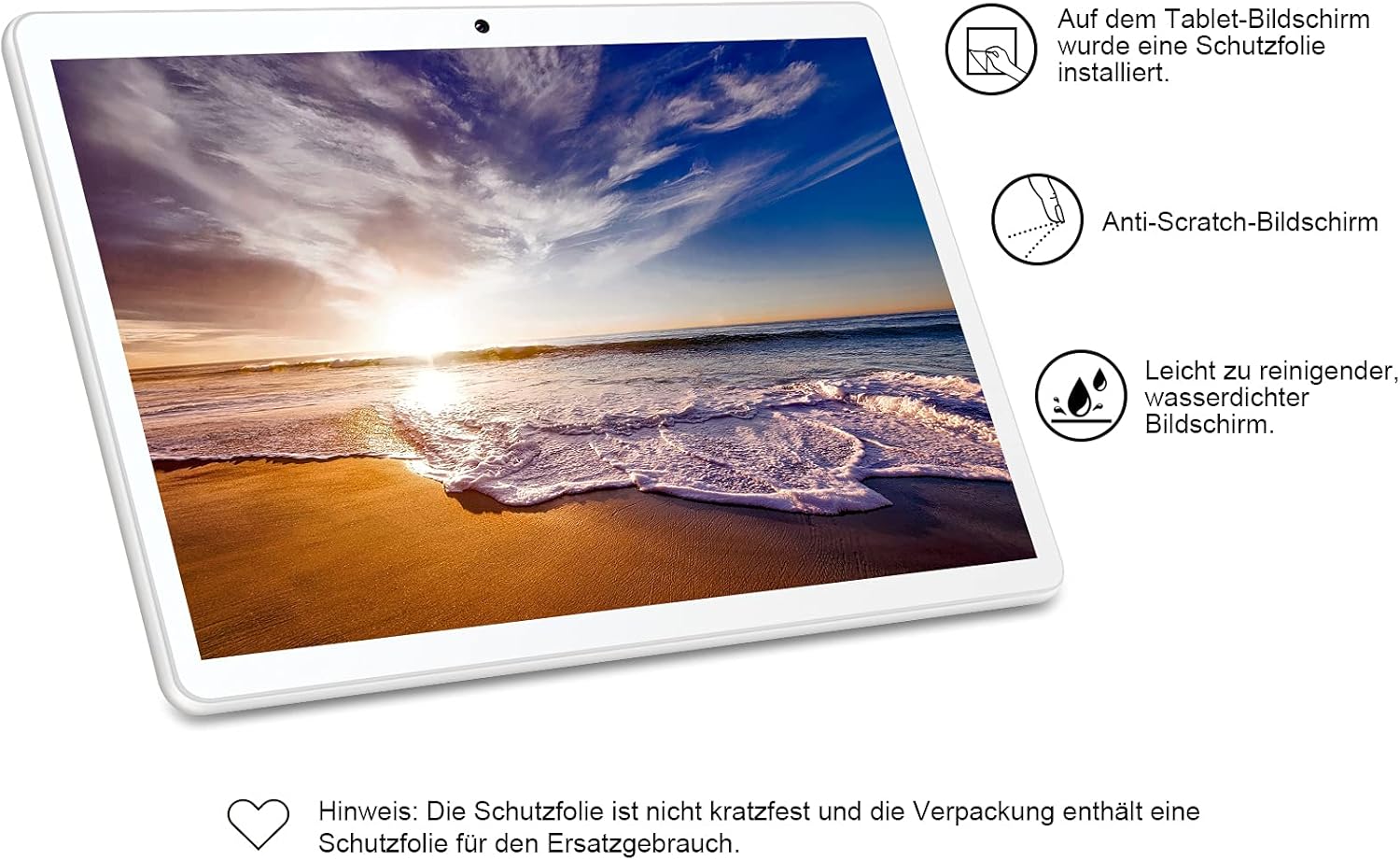
Figura 5: GOODTEL G3 Tablet screen protection features. This image emphasizes the screen protection features of the GOODTEL G3 tablet. It highlights that a protective film is pre-installed, the screen is anti-scratch, and it is easy to clean and water-resistant. A note mentions that the protective film is not scratch-proof and a replacement is included.
4.2 Neteja general
Use a soft, lint-free cloth to clean the tablet's screen and body. Avoid using harsh chemicals or abrasive materials.
4.3 Actualitzacions de programari
Comproveu periòdicament si hi ha actualitzacions del sistema a Configuració > Sistema > Actualització del sistema per assegurar-vos que la vostra tauleta tingui les funcions i els pegats de seguretat més recents.
5. Solució De Problemes
Si teniu problemes amb la tauleta, consulteu les solucions habituals següents:
- La tauleta no respon: Premeu i manteniu premut el botó d'engegada durant uns 10-15 segons per forçar un reinici.
- Apps are slow or crashing: Close unnecessary background applications. Clear app caches in Configuració > Aplicacions i notificacions > Nom de l'aplicació > Emmagatzematge i memòria cau. Consider uninstalling unused apps.
- Wi-Fi or Bluetooth connectivity issues: Toggle Wi-Fi/Bluetooth off and on. Restart your tablet and/or your router/Bluetooth device.
- La bateria es descarrega ràpidament: Redueix la brillantor de la pantalla, desactiva les funcions que no s'utilitzen com el GPS o el Bluetooth i tanca les aplicacions en segon pla.
- Tablet not charging: Ensure the charger and cable are securely connected and undamaged. Try a different compatible charger and cable if available.
- Restabliment de fàbrica: As a last resort for persistent software issues, you can perform a factory reset. Go to Configuració > Sistema > Restablir opcions > Esborra totes les dades (restabliment de fàbrica). Avís: Això esborrarà totes les dades de la tauleta. Fes una còpia de seguretat de les dades importants abans de continuar.
6. Especificacions
| Característica | Especificació |
|---|---|
| Model | GOODTEL G3 |
| Dimensions (L x A x A) | 25 x 17.8 x 0.8 cm (9.84 x 7.01 x 0.31 polzades) |
| Pes | 540 grams |
| Mostra | 10.1-inch IPS, 1280 x 800 pixels, 2.5D Tempered Glass |
| Sistema operatiu | Android 10 |
| Processador | Quad Core MTK 1.30 GHz |
| RAM | 4 GB |
| Emmagatzematge intern (ROM) | 64 GB |
| Emmagatzematge ampliable | MicroSD (supports 4-128 GB) |
| Càmera frontal | 5 MP |
| Càmera posterior | 8 MP |
| Wi-Fi | 802.11 a/b/g/n (2.4 GHz) |
| Bluetooth | V4.0 |
| Suport SIM | Dual Mini SIM |
| Bateria | 8000 mAh Lithium-ion Polymer |
| Entrada de potència | 5V/2A |
| Ports | Type-C, 3.5mm Headphone Jack, Mini SIM Slot, Micro SD Slot |
| Característiques addicionals | MIC, FM, GPS, G-sensor, Multi-language support |

Figura 6: GOODTEL G3 Tablet 8000mAh battery life performance. This graphic highlights the extended battery life of the GOODTEL G3 tablet, powered by its 8000mAh battery. It indicates approximately 4 hours of video playback, 6 hours of web browsing, 140 hours of standby time, and 8 hours of reading.

Figura 7: GOODTEL G3 Tablet features including Android 10, connectivity, and cameras. This image showcases the tablet's key features: Android 10 operating system, Wi-Fi connectivity, Dual SIM capability, dual cameras (5MP front, 8MP rear), and Bluetooth. The microphone hole is also indicated.
7. Informació sobre assistència i garantia
7.1 Atenció al client
GOODTEL provides a professional and efficient support team dedicated to assisting customers with pre-sale and after-sale inquiries. If you require assistance, please contact our support team through the contact information provided with your purchase or on the official GOODTEL weblloc.
7.2 Garantia
Please refer to the warranty card included in your product packaging for detailed warranty terms and conditions. Keep your proof of purchase for warranty claims.


