1. Introducció
The Renkforce USB 3.2 Gen 1 4 Port Hard Drive Copy Station is a versatile device designed for efficient data management. It allows users to connect up to four 2.5-inch or 3.5-inch SATA SSDs or HDDs simultaneously for data transfer to a computer or for offline cloning of one source drive to up to three target drives.
This manual provides detailed instructions for setting up, operating, and maintaining your device, along with troubleshooting tips and technical specifications.
2. Característiques del producte
- Four independent hard drive slots for 2.5-inch / 3.5-inch SSD or HDD hard drives.
- Supports USB 3.2 Gen 1 (USB 3.0) with data transfer rates up to 5Gbps.
- Offline clone function for direct drive-to-drive copying without a computer.
- Maximum hard drive capacity support of 40TB (4 x 10TB).
- LED status display for power, activity, and cloning progress.
- Audible sound signal upon completion of cloning process.
- Tool-free installation for quick and easy drive insertion and removal.
3. Contingut del paquet
Si us plau, comproveu el contingut del paquet en desempaquetar-lo per assegurar-vos que tots els elements hi són i no estan danyats:
- Renkforce USB 3.2 Gen 1 4 Port Hard Drive Copy Station
- Adaptador d'alimentació
- USB 3.0 Type-B to Type-A Cable
- Manual d'usuari (aquest document)

Image: Renkforce Hard Drive Copy Station with its power adapter and USB 3.0 cable.
4. Instruccions de seguretat
Please read the following safety instructions carefully before using the device to prevent injury or damage:
- No exposeu el dispositiu a la humitat, la pluja ni a temperatures extremes.
- Feu servir només l'adaptador de corrent proporcionat. L'ús d'un adaptador incompatible pot fer malbé el dispositiu.
- No obriu el dispositiu casing. Demaneu totes les tasques de manteniment a personal qualificat.
- Mantingueu el dispositiu allunyat de camps magnètics forts.
- Assegureu-vos que hi hagi una ventilació adequada al voltant del dispositiu durant el funcionament.
- Handle hard drives with care to avoid damage.
5. Producte acabatview
Davant View

Imatge: Frontal view of the Renkforce Hard Drive Copy Station.
- Badies d'unitat (1-4): Slots for inserting 2.5-inch or 3.5-inch SATA hard drives. Bay 1 is designated as the 'Source' drive for cloning. Bays 2, 3, and 4 are 'Target' drives.
- Botó d'encesa: Encén o apaga el dispositiu.
- Indicadors LED: Indicate power status, drive activity, and cloning progress for each bay.
posterior View

Imatge: Part posterior view of the Renkforce Hard Drive Copy Station.
- Port USB 3.0: Connecta l'estació d'acoblament a l'ordinador.
- Clone/PC Switch: Selects between offline cloning mode and PC connection mode.
- Botó INICI: Initiates the cloning process when in Clone mode.
- Botó de reset: Resets the device or cancels the cloning process.
- Port DC IN: Connecta l'adaptador de corrent.
6. Configuració
Follow these steps to set up your Renkforce Hard Drive Copy Station:
- Connectar l'alimentació: Plug the provided power adapter into the DC IN port on the back of the docking station, then plug the adapter into a power outlet.
- Connexió a l'ordinador (opcional): If you intend to use the device as an external hard drive dock, connect the USB 3.0 cable from the docking station's USB 3.0 port to an available USB port on your computer.
- Inserir discs durs: Gently slide your 2.5-inch or 3.5-inch SATA SSDs or HDDs into the drive bays until they are securely seated. Ensure the SATA connectors align correctly.
- Encès: Press the Power button on the front of the docking station. The power LED will illuminate.
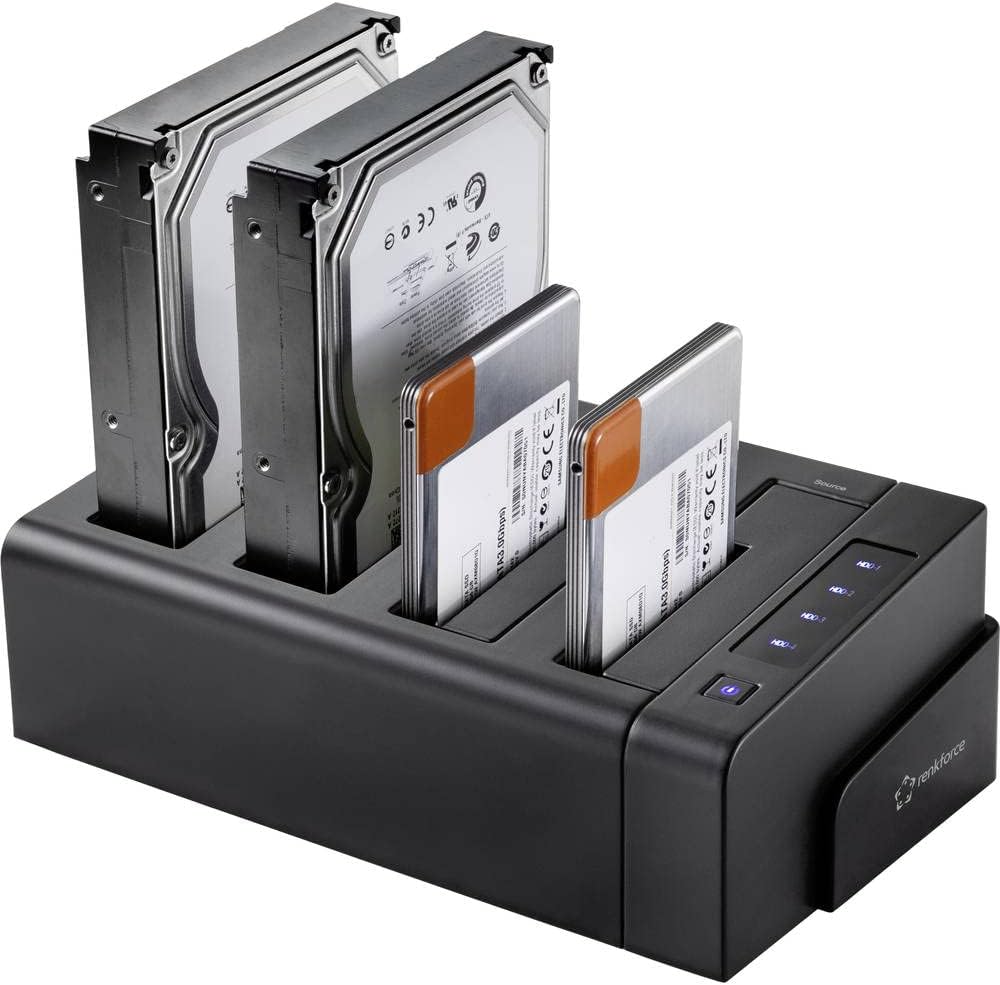
Image: Hard drives inserted into the docking station bays.
7. Instruccions de funcionament
7.1. Mode de transferència de dades (mode PC)
In this mode, the docking station functions as an external multi-bay enclosure for your computer.
- Assegureu-vos el Clone/PC switch on the rear is set to PC.
- Connect the USB 3.0 cable from the docking station to your computer.
- Insert the desired hard drives into any of the four bays.
- Enceneu l'estació d'acoblament.
- Your computer will detect the drives as external storage devices. You can now access, transfer, and manage files as you would with any external drive.
7.2. Offline Clone Function
The offline clone function allows you to duplicate a source hard drive to up to three target hard drives without needing a computer connection.
Consideracions importants:
- Ensure the target drive(s) have a capacity equal to or greater than the source drive.
- All data on the target drive(s) will be erased during the cloning process. Back up any important data before proceeding.
- Do not disconnect drives or power during the cloning process.
Steps for Offline Cloning:
- Assegureu-vos que l'estació d'acoblament estigui apagada i desconnectada de qualsevol ordinador.
- Inseriu el Font hard drive into Bay 1 (Source).
- Insert one, two, or three Objectiu hard drives into Bays 2, 3, and/or 4 (Target).
- Assegureu-vos el Clone/PC switch on the rear is set to Clonar.
- Enceneu l'estació d'acoblament.
- Manteniu premut el botó COMENÇA button for approximately 3-5 seconds until the cloning progress LEDs begin to flash.
- The cloning process will begin. The progress LEDs (25%, 50%, 75%, 100%) will illuminate sequentially to indicate completion percentage.
- Once the cloning is complete, all progress LEDs will be solid, and the device will emit three short beeps.
- Apagueu l'estació d'acoblament abans de treure les unitats.
8. Manteniment
Un manteniment adequat garanteix la longevitat i el rendiment òptim del dispositiu:
- Neteja: Feu servir un drap suau i sec per netejar l'exterior del dispositiu. No utilitzeu netejadors líquids ni aerosols.
- Emmagatzematge: Quan no l'utilitzeu, emmagatzemeu el dispositiu en un lloc fresc i sec, lluny de la llum solar directa i de temperatures extremes.
- Ventilació: Ensure the ventilation slots are not blocked during operation to prevent overheating.
- Manipulació: Eviteu deixar caure o sotmetre el dispositiu a forts impactes.
9. Solució De Problemes
If you encounter issues with your Renkforce Hard Drive Copy Station, refer to the table below for common problems and solutions:
| Problema | Causa possible | Solució |
|---|---|---|
| El dispositiu no s'encén. | L'adaptador de corrent no està connectat o està defectuós; problema amb la presa de corrent. | Check power adapter connection; try a different power outlet; ensure power button is pressed. |
| Drives not recognized by computer. | USB cable not connected properly; Clone/PC switch in wrong position; drive not initialized/formatted. | Ensure USB cable is securely connected; set switch to PC mode; check Disk Management (Windows) or Disk Utility (macOS) to initialize/format new drives. |
| La clonació falla o no s'inicia. | Target drive capacity is smaller than source; drives not seated correctly; switch not in Clone mode. | Ensure target drive(s) are equal or larger than source; re-insert drives firmly; set switch to Clone mode; press START button firmly. |
| Velocitats de transferència de dades lentes. | Connected to a USB 2.0 port; faulty USB cable. | Connect to a USB 3.0 (blue port) or higher port on your computer; try a different USB 3.0 cable. |
| Cloning process stops unexpectedly. | Power interruption; faulty drive; overheating. | Ensure stable power supply; check drives for errors; ensure adequate ventilation. |
10. Especificacions tècniques
| Característica | Especificació |
|---|---|
| Número de model | RF-4528332 |
| Unitats compatibles | 2.5" / 3.5" SATA I/II/III SSD & HDD |
| Nombre de badies | 4 (1 Source, 3 Target) |
| Capacitat màxima per unitat | Up to 10TB (40TB total) |
| Interfície | USB 3.2 Gen 1 (USB 3.0) |
| Velocitat de transferència de dades | Fins a 5 Gbps |
| Clon fora de línia | Yes (1-to-1, 1-to-2, 1-to-3) |
| Sistemes operatius compatibles | Windows, macOS, Linux |
| Font d'alimentació | Adaptador d'alimentació extern |
| Dimensions (L x A x A) | Aprox. 9.13 x 6.1 x 5.67 polzades |
| Pes | Aprox. 2.17 lliures (983 grams) |
11. Garantia i Suport
Renkforce products are designed and manufactured to the highest quality standards. This product is covered by a limited warranty against defects in materials and workmanship. For specific warranty terms and conditions, please refer to the warranty card included with your purchase or visit the official Renkforce weblloc.
For technical support, troubleshooting assistance, or to inquire about replacement parts, please contact Renkforce customer service through the contact information provided on the official Renkforce website or your retailer's support channels. Please have your model number (RF-4528332) and purchase details ready when contacting support.


