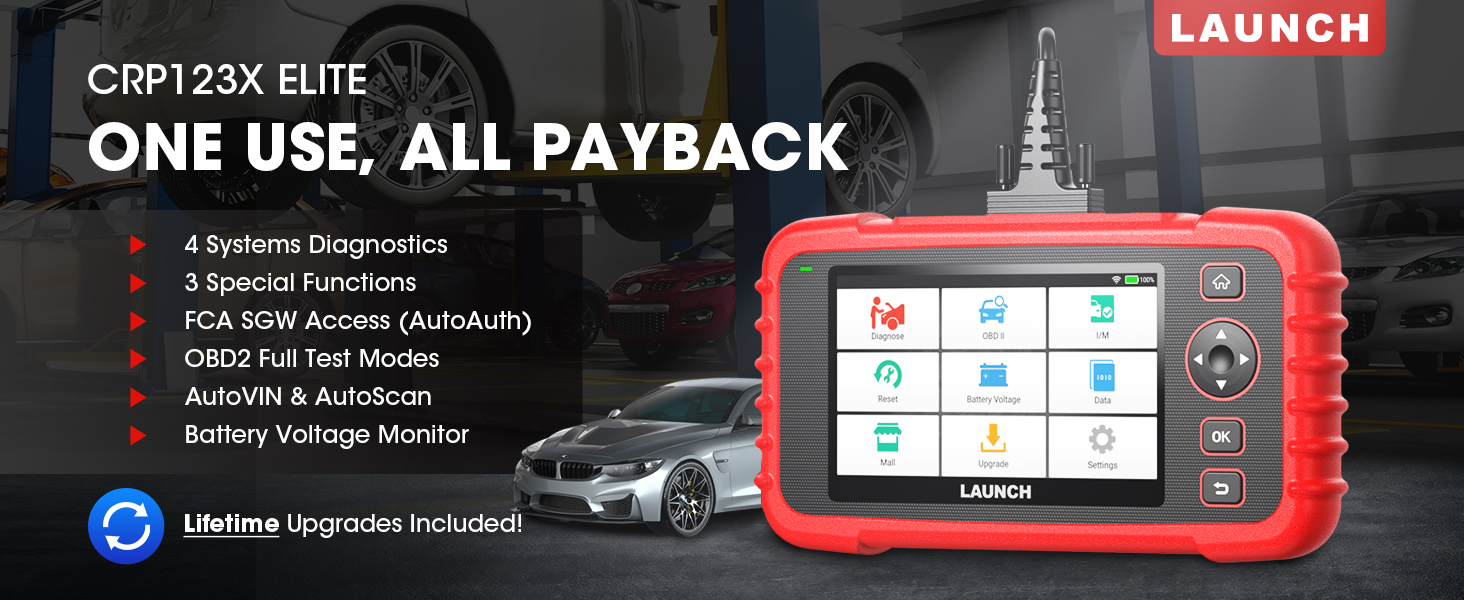
The LAUNCH CRP123X Elite is an advanced OBD2 diagnostic scan tool designed for comprehensive vehicle system analysis. It offers a wide range of functions including 4-system diagnostics (Engine, Transmission, ABS, SRS), 3 special reset services (Oil Reset, Electronic Throttle Relearn, Steering Angle Sensor Calibration), full OBD2 functions, AutoVIN technology, and lifetime free software updates via Wi-Fi. This manual provides detailed instructions for setting up, operating, and maintaining your CRP123X Elite scanner.
2. Característiques clau
Actualitzacions de programari gratuïtes de per vida: Ensures compatibility with future vehicles and systems, updated wirelessly via Wi-Fi.
3 Hottest Special Functions: Includes Oil Reset, Electronic Throttle Relearn (ETC Reset), and Steering Angle Sensor Calibration (SAS Reset).
4-System Diagnostics: Comprehensive diagnostics for Engine, Anti-lock Braking System (ABS), Supplemental Restraint System (SRS), and Transmission Control Module (TCM). Read and clear DTCs, view live data, and read ECU information.
Àmplia cobertura de vehicles: Supports over 72 car brands across US, EU, and Asia, including 2018+ FCA SGW (AutoAuth required).
AutoVIN i AutoScan: Automatically identifies vehicle information and quickly scans all modules in all systems for 2006+ vehicles.
All 10 OBD2 Test Modes: Supports all standard OBD2 functions for basic car issue diagnosis, including reading/clearing codes, live data, freeze frame, I/M readiness, O2 sensor test, EVAP system test, on-board monitor test, component test, and vehicle information retrieval.
Vol en temps realtage Monitor: Displays dynamic graphic representation of the car's battery voltage.
4-in-1 Graphic Live Data: Allows merging up to 4 PIDs data on one screen for easier analysis.
Diagnostic Report Sharing: Save and share diagnostic reports for further analysis or record-keeping.
Disseny fàcil d'utilitzar: Features a 5-inch HD touchscreen, Android 7.0 OS, 16GB memory, and anti-slip, shock-resistant casing.
3. Contingut del paquet
Verifiqueu que tots els elements siguin presents al vostre paquet:
LAUNCH CRP123X Elite Scanner (Red unit with 5-inch touchscreen)
DC 5V Charging Cable (USB cable)
OBD2 Cable (DB-15 diagnostic connector)
Carrying Bag (Black zippered case)
User Manual (Printed document)
Figure 3.1: LAUNCH CRP123X Elite Package Contents. This image displays the main scanner unit, a USB charging cable, an OBD2 diagnostic cable, a black carrying bag, and the printed user manual.
4. Guia de configuració
4.1 Engegada i càrrega inicials
Before first use, ensure the device is fully charged. Connect the provided DC 5V Charging Cable to the scanner's charging port and a suitable USB power adapter (not included) or computer USB port. The device will power on automatically or can be powered on by pressing the power button.
Figure 4.1: Scanner Ports and Buttons. This image highlights the 5V charging port, the DB-15 diagnostic connector, and the power button on the top side of the scanner.
4.2 Connexió Wi-Fi
Des del menú principal, toqueu "Configuració".
Seleccioneu "Wi-Fi" i activeu-lo.
Trieu la xarxa Wi-Fi que vulgueu de la llista i introduïu la contrasenya si se us demana.
Once connected, the Wi-Fi icon will appear in the status bar.
4.3 Initial Software Update
It is recommended to perform a software update after connecting to Wi-Fi to ensure you have the latest vehicle coverage and functions.
From the main menu, tap on "Upgrade".
The system will check for available updates. Select all necessary updates and tap "Download".
Allow the updates to complete. The device may restart during this process.
Figure 4.2: One-Click Wi-Fi Update. This image illustrates the simple process of updating the scanner's software via a Wi-Fi connection, highlighting its ease of use compared to other methods.
5. Instruccions de funcionament
5.1 Connexió al vehicle
Locate the vehicle's OBD2 port, usually under the dashboard on the driver's side. Connect the provided OBD2 cable to the scanner and then to the vehicle's OBD2 port. Turn the vehicle's ignition to the "ON" position (engine off or running, depending on the test).
Figure 5.1: Scanner Connected to Vehicle. This image shows the LAUNCH CRP123X Elite scanner connected to a vehicle's diagnostic port, ready for operation.
5.2 Diagnòstic del sistema (motor, ABS, SRS, transmissió)
The CRP123X Elite can diagnose four core vehicle systems:
Sistema del motor: Llegir i esborrar els codis d'error del motor, view live data streams, and check engine light status.
Sistema de frens antibloqueig (ABS): Diagnose ABS issues, read and clear ABS fault codes, and view ABS sensor data.
Sistema de retenció suplementari (SRS/Airbag): Read and clear airbag fault codes. Note: Crash data cannot be cleared from memory even with a new airbag.
Transmission Control Module (TCM): Diagnose transmission problems, read and clear transmission fault codes, and view transmission live data.
To perform a system diagnostic:
From the main menu, tap "Diagnose".
Select the vehicle make and model. The AutoVIN feature (for 2006+ vehicles) can automatically detect this.
Choose the system you wish to diagnose (e.g., "Engine", "ABS").
Select "Read Codes" to view Diagnostic Trouble Codes (DTCs) or "Clear Codes" to erase them.
Selecciona "View Data Stream" to monitor real-time sensor data.
Figure 5.2: 4 Systems Diagnostic Overview. This image visually explains the diagnostic capabilities for Engine, Transmission, SRS, and ABS systems, including reading/clearing codes and viewing data streams.Video 5.1: LAUNCH Code Reader - CRP123X OBD2 Scanner for Engine Transmission ABS SRS. This video demonstrates the diagnostic capabilities of the CRP123X scanner across engine, transmission, ABS, and SRS systems, showing how to read and clear codes and view dades en directe.
5.3 Reset Functions (Oil, ETC, SAS)
The scanner supports three common reset services:
Reinicialització d'oli: Resets the oil life reminder after an oil change or maintenance service.
Electronic Throttle Relearn (ETC Reset): Relearns the electronic throttle body for optimal engine performance and smooth idle.
Steering Angle Sensor Calibration (SAS Reset): Calibrates the steering angle sensor after alignment or component replacement.
To perform a reset function:
From the main menu, tap "Reset".
Select the desired reset function (e.g., "Oil Reset").
Seguiu les instruccions que apareixen a la pantalla per completar el procediment.
Figure 5.3: 3 Hottest Reset Functions. This image illustrates the three primary reset functions: Oil Reset, Electronic Throttle Control (ETC) Reset, and Steering Angle Sensor (SAS) Reset, which are crucial for vehicle maintenance.
5.4 All 10 OBD2 Test Modes
The CRP123X Elite supports all 10 modes of OBD2 testing, providing comprehensive diagnostic capabilities for emissions-related issues and general vehicle health:
Llegir codis: Mostra els codis de diagnòstic d'errors (DTC) actuals, pendents i permanents.
Esborra codis: Esborra els DTC de l'ordinador del vehicle i apaga l'indicador de fallades Lamp (MIL).
Flux de dades en directe: Mostra dades en temps real dels sensors del vehicle en format de text o gràfic.
Congela les dades del fotograma: Mostra una instantània de les condicions de funcionament en el moment en què es va produir una avaria relacionada amb les emissions.
Preparació I/M: Comprova la disponibilitat dels sistemes de monitorització d'emissions.
Prova del sensor d'O2: Retrieves and displays O2 sensor monitoring test results.
Prova del monitor integrat: Recupera els resultats de les proves per a components i sistemes del tren motriu relacionats amb les emissions que no es controlen contínuament.
Prova del sistema EVAP: Inicia una prova del sistema de control d'emissions evaporatives.
Prova de components: Permet iniciar una prova de fuites per al sistema EVAP del vehicle.
Informació del vehicle: Recupera el número d'identificació del vehicle (VIN), l'ID de calibratge (CID) i el número de verificació de calibratge (CVN).
Figure 5.4: Complete OBD2 Test Modes. This image displays icons and brief descriptions for each of the 10 OBD2 test modes, including Read Codes, Erase Codes, Live Data Stream, Freeze Frame, I/M Readiness, On-Board Monitor Test, O2 Sensor Test, EVAP System Test, Vehicle Information, and DTC Library.
5.5 Live Data Stream & Recording
The scanner can display live sensor data in various formats. You can select up to four data parameters to view simultaneously in a graphical format for easier comparison and analysis.
From the main menu, tap "Data".
Select "Live Data" and choose the parameters you wish to monitor.
Tap the "Record" icon to begin recording the data for later review.
Figure 5.5: 4-in-1 Live Data Stream. This image shows the scanner's ability to display multiple live data parameters simultaneously in a graphical format, along with options for data recording and playback.
5.6 Informe de diagnòstic
After completing a diagnostic session, you can generate and save a diagnostic report. This report can be printed via PC or emailed for record-keeping or sharing with a mechanic.
After a scan, navigate to "Data" and then "Diagnostic Report".
Tu pots view, playback, or share the report via email (requires Wi-Fi connection).
Figure 5.6: Diagnostic Report Generation and Sharing. This image highlights the scanner's capability to generate detailed diagnostic reports and offers options to print them via PC or share them electronically.
5.7 en temps real voltage Monitor
The scanner includes a feature to monitor the vehicle's battery voltage in real-time, displayed graphically.
From the main menu, tap "Battery Voltage".
Observa el volum en temps realtage readings and dynamic graphic.
Figure 5.7: Real-Time Voltage Monitor. This image demonstrates the scanner's ability to display the vehicle's battery voltage in real-time, including a dynamic graphical representation.
6. Manteniment
Neteja: Utilitzeu un suau, damp cloth to clean the scanner's exterior. Do not use abrasive cleaners or solvents.
Emmagatzematge: Store the device in its carrying bag in a dry, cool place away from direct sunlight and extreme temperatures.
Actualitzacions de programari: Regularly connect the device to Wi-Fi and perform software updates to ensure optimal performance and access to the latest vehicle data and features.
Cura de la bateria: Charge the device regularly, even if not in frequent use, to maintain battery health. Avoid fully discharging the battery for extended periods.
7. Solució De Problemes
Problema
Causa possible
Solució
El dispositiu no s'encén.
Bateria baixa; connexió defectuosa.
Charge the device fully. Ensure OBD2 cable is securely connected to vehicle and scanner.
Error de comunicació amb el vehicle.
Loose connection; vehicle not OBD2 compliant; ignition off; blown fuse in vehicle.
Check all connections. Verify vehicle is OBD2 compliant (1996 and newer for US). Turn ignition ON. Check vehicle's fuse for the OBD2 port.
La pantalla es bloqueja o el dispositiu no respon.
Error de programari; error temporal del sistema.
Press and hold the power button to force a restart. If issue persists, perform a factory reset (data will be lost).
No es pot connectar a la Wi-Fi.
Incorrect password; out of range; network issue.
Verify Wi-Fi password. Move closer to the Wi-Fi router. Restart the router.
For further assistance, please contact LAUNCH customer support.
8. Especificacions
Característica
Detall
Número de model
launch crp123x
Sistema operatiu
Android 7.0
Mostra
5-inch HD Touch Screen (LCD touch screen)
Memòria
16GB ROM, 2GB RAM
CPU
1.5 GHz
Connectivitat
Wi-Fi
Dimensions del producte
10.24 x 3.15 x 7.48 polzades (7.48" de llargada x 3.15" d'amplada x 10.24" d'alçada)
Pes
2.36 lliures
Llengua
English (and 9 other languages)
Primera data disponible
16 de novembre de 2020
Figure 8.1: Feature Comparison. This table compares the specifications of the CRP123X with other models, emphasizing its advantages in reset functions, wider coverage, Android OS, screen size, battery, memory, Wi-Fi update, AutoVIN, touchscreen, vehicle coverage, languages, system diagnosis, code search, online feedback, and battery voltage prova.Figure 8.2: Wide Car Compatibility & Language Options. This image illustrates the extensive vehicle compatibility of the scanner, covering American, European, and Asian car brands, along with the availability of 10 language options.
9. Garantia i assistència
LAUNCH stands behind the quality of the CRP123X Elite scanner with an extended 5-year product quality backup. Enjoy free lifetime software updates to ensure compatibility with future vehicles and systems.
For technical assistance or any inquiries, please contact LAUNCH Support:
Número gratuït: 1-888-756-2936
Horari de funcionament: Dilluns - Divendres, de 9:00 a 6:00 EST
Figure 9.1: 24/7/365 Service & Multi-Language Menu. This image highlights the comprehensive customer support offered by LAUNCH, including one-on-one technical assistance, 100% original LAUNCH products, 5-year quality backup, and lifetime update included, along with support for multiple languages.
Documents relacionats - CRP123X Elite
LLANÇAMENT DE L'ESCÀNER OBD2 CRP123X: Informació clau abans de la compra Guia essencial que cobreix 10 punts crucials per als usuaris de l'escàner OBD2 LAUNCH CRP123X, incloent-hi compatibilitat, actualitzacions, garantia, consells d'ús i accessoris inclosos. Aprèn sobre les característiques del producte, l'assistència i les polítiques de devolucions.
Guia del procés d'actualització de LAUNCH CReader VII+ Una guia pas a pas sobre com actualitzar l'eina d'escaneig de diagnòstic per a automòbils LAUNCH CReader VII+ mitjançant una targeta TF o un cable USB. Inclou instruccions de descàrrega, instal·lació i registre del programari.
Manual d'usuari de LAUNCH Creader Professional 123i: guia completa Exploreu les característiques i el funcionament de l'eina de diagnòstic per a automòbils LAUNCH Creader Professional 123i. Aquest manual d'usuari proporciona instruccions detallades sobre el diagnòstic del vehicle, les comprovacions del sistema, les actualitzacions i la configuració.