1. Introducció
This manual provides essential information for the installation, operation, and maintenance of your Sapphire Nitro+ AMD Radeon RX 6800 XT graphics card. Please read this manual thoroughly before installing and using the product to ensure proper functionality and to prevent damage.

Figura 1.1: The Sapphire Nitro+ AMD Radeon RX 6800 XT graphics card and its retail packaging. This image displays the overall design of the card with its triple-fan cooling solution and the product box.
2. Informació de seguretat
Observe the following safety precautions to prevent injury or damage to the graphics card and other components:
- Desconnecteu sempre la font d'alimentació de l'ordinador abans d'instal·lar o treure qualsevol component.
- Wear an anti-static wrist strap or frequently touch a grounded metal object to discharge static electricity before handling the graphics card.
- Manegeu la targeta gràfica per les vores per evitar tocar els components sensibles.
- Assegureu-vos de ventilar adequadament la carcassa de l'ordinador per evitar que s'escalfi massa.
- No exposeu la targeta gràfica a la humitat ni a temperatures extremes.
3. Configuració i instal·lació
3.1 Requisits del sistema
Abans de la instal·lació, assegureu-vos que el sistema compleixi els requisits mínims següents:
- PCI Express-enabled motherboard with one x16 graphics slot.
- Sufficient power supply unit (PSU) with appropriate PCIe power connectors. Consult your PSU manufacturer for compatibility.
- Minimum 16GB system memory (RAM) recommended for optimal performance.
- Compatible operating system (e.g., Windows 10 64-bit or later).
- Sufficient space within the PC case for the graphics card dimensions (approximately 17 x 9.5 x 3.5 inches).
3.2 Instal·lació física
- Prepareu el vostre sistema: Apagueu l'ordinador i desconnecteu tots els cables. Obriu la carcassa de l'ordinador.
- Localitza la ranura PCIe: Identifica una ranura PCI Express x16 disponible a la placa base. Treu les cobertes de les ranures d'expansió que obstrueixin la instal·lació.

Figura 3.1: A dalt view of the graphics card, showing the triple-fan cooling system. This perspective highlights the length and width of the card, which is important for case compatibility.
- Inseriu la targeta gràfica: Carefully align the graphics card with the PCIe slot and press down firmly until it is securely seated. Ensure the retention clip on the motherboard's PCIe slot locks into place.

Figura 3.2: En angle view de la targeta gràfica, mostraasing its robust cooling design and the PCIe connector. This view helps in understanding the card's physical dimensions and how it would sit in a motherboard slot.
- Assegureu la targeta: Fasten the graphics card to the computer case using the screws from the expansion slot covers.
- Connectar l'alimentació: Connect the required PCIe power cables from your power supply unit to the graphics card. The Sapphire Nitro+ RX 6800 XT typically requires two 8-pin PCIe power connectors. Ensure all connections are firm.

Figura 3.3: lateral view of the graphics card, highlighting the power connectors and the illuminated Sapphire logo. This image is useful for identifying where power cables connect and observing the card's aesthetic features.
- Tanca el cas i torna a connectar: Close your computer case and reconnect all external cables (monitor, keyboard, mouse, power).
3.3 Instal·lació del controlador
- Encès: Engegueu l'ordinador. Potser arrencarà en un mode de pantalla bàsic.
- Descarrega els controladors: Visiteu l'AMD oficial weblloc (www.amd.com/en/support) or the Sapphire support page (www.sapphiretech.com/en/consumer/nitro-radeon-rx-6800-xt-16g-gddr6) to download the latest AMD Radeon Software Adrenalin Edition drivers for your RX 6800 XT.
- Instal·leu els controladors: Run the downloaded installer and follow the on-screen instructions. It is recommended to perform a clean installation to avoid conflicts with previous drivers.
- Reinicia el sistema: Reinicieu l'ordinador després que s'hagi completat la instal·lació del controlador.
4. Funcionament de la targeta gràfica
4.1 Sortida de visualització
Connect your monitor(s) to the display outputs on the graphics card. The Sapphire Nitro+ RX 6800 XT typically features DisplayPort and HDMI outputs. Ensure your monitor is set to the correct input source.
4.2 AMD Radeon Software
The AMD Radeon Software Adrenalin Edition provides a comprehensive interface for managing your graphics card. Through this software, you can:
- Adjust display settings and resolutions.
- Optimize game settings for performance and visual quality.
- Monitor GPU performance, temperature, and fan speeds.
- Access features like Radeon Anti-Lag, Radeon Boost, and FidelityFX.
- Actualitza els controladors gràfics.
4.3 Sapphire TriXX Software
For advanced control and customization, Sapphire offers the TriXX software. This utility allows you to:
- Monitor hardware status in real-time.
- Adjust fan curves for optimal cooling and noise levels.
- Control and synchronize the external RGB LED lighting on the card.
- Utilize features like Fan Check and Nitro Glow.
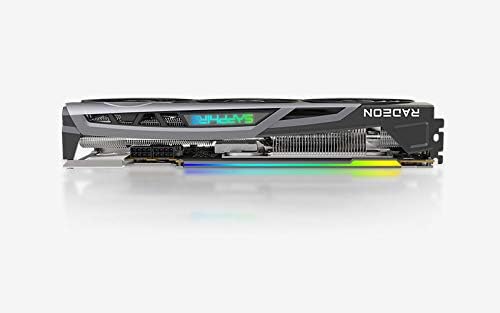
Figura 4.1: The Sapphire Nitro+ graphics card showcasing its customizable RGB LED lighting. This feature can be controlled via the Sapphire TriXX software for personalized aesthetics.
5. Manteniment
Un manteniment regular ajuda a garantir la longevitat i el rendiment òptim de la targeta gràfica.
- Eliminació de pols: Periodically clean dust from the heatsink fins and fan blades using compressed air. Ensure the fans are held stationary during cleaning to prevent damage to the bearings.
- Actualitzacions de programari: Keep your graphics drivers and Sapphire TriXX software updated to benefit from performance improvements and bug fixes.
- Monitorització de la temperatura: Use AMD Radeon Software or Sapphire TriXX to monitor GPU temperatures, especially during heavy loads, to ensure it operates within safe limits.
6. Solució De Problemes
If you encounter issues with your graphics card, refer to the following troubleshooting steps:
- Sense sortida de pantalla:
- Assegureu-vos que el cable del monitor estigui connectat correctament tant a la targeta gràfica com al monitor.
- Verifiqueu que el monitor estigui encès i configurat a la font d'entrada correcta.
- Check that the graphics card is fully seated in the PCIe slot and all power cables are connected.
- Si és possible, prova amb un cable de pantalla o monitor diferent.
- Inestabilitat o errors del sistema:
- Assegureu-vos que la vostra font d'alimentació (PSU) compleixi amb els requisits d'aigua recomanatstage for your system, including the graphics card.
- Actualitza els controladors gràfics a la versió més recent.
- Superviseu les temperatures de la GPU. El sobreescalfament pot causar inestabilitat.
- Check for conflicts with other installed drivers or software.
- Rendiment deficient en jocs/aplicacions:
- Verify that the latest graphics drivers are installed.
- Revisa la configuració del joc; redueix la resolució o la qualitat dels gràfics si cal.
- Assegureu-vos que la CPU i la RAM no estiguin congestionant la GPU.
- Monitor GPU utilization and clock speeds using AMD Radeon Software.
- Fan Noise or Malfunction:
- Netegeu la pols de les aspes del ventilador i del dissipador de calor.
- Use Sapphire TriXX software to adjust fan curves or check fan health.
- Assegureu-vos que no hi hagi cables que obstrueixin la rotació del ventilador.
7. Especificacions
| Característica | Detall |
|---|---|
| Processador gràfic | AMD Radeon RX 6800 XT |
| Memòria | 16 GB GDDR6 |
| Velocitat de memòria | 16 GHz |
| Game Clock | Fins a 2110 MHz |
| Augmenta el rellotge | Fins a 2360 MHz |
| Interfície | PCIe 4.0 x16 |
| Interfície de sortida de vídeo | DisplayPort, HDMI |
| Resolució de pantalla màxima | 3840x2160 (4K) |
| Dimensions (LxWxH) | 17 x 9.5 x 3.5 polzades (aprox.) |
| Pes de l'article | 4.53 lliures |
| Número de model | 11304-02-20G |

Figura 7.1: posterior view of the graphics card, showing the backplate and the overall robust construction. This view emphasizes the structural integrity and cooling design from the back.
8. Garantia i Suport
Sapphire products are manufactured to the highest quality standards. For information regarding the warranty period and terms for your Sapphire Nitro+ AMD Radeon RX 6800 XT graphics card, please refer to the warranty card included with your product or visit the official Sapphire weblloc.
For technical support, driver downloads, and frequently asked questions, please visit the Sapphire support portal: www.sapphiretech.com/en/support.


