1. Introducció
Thank you for choosing the Oticon OPN S1 miniRITE Power digital hearing aid. This manual provides essential information for the proper use, care, and maintenance of your new hearing aid system. Please read it thoroughly before using the device.
1.1 Producte acabatview
The Oticon OPN S1 miniRITE Power is a state-of-the-art digital hearing aid designed to provide clear and natural sound, even in challenging listening environments. It features advanced technologies such as Open Sound Navigator, Open Sound Optimizer, and Speech Guard LX to enhance speech understanding and reduce listening effort. This model is rechargeable and Made for iPhone (MFI) compatible, allowing for seamless connectivity with your Apple devices.

Figure 1.1: Oticon OPN S1 miniRITE Power hearing aids with their charging case. The image displays multiple hearing aid units in various colors (gold, silver, grey, black) connected to their receivers, alongside a central black oval-shaped charging unit with the "oticon" logo.
1.2 Contingut del paquet
- Oticon OPN S1 miniRITE Power Hearing Aid (Left Ear)
- Rechargeable Charger
- Manual d’instruccions de l’usuari
- Eines de neteja
- Ear Domes/Receivers (various sizes)
- Adaptador d'alimentació i cable
2. Informació de seguretat
Please read the following safety instructions carefully to prevent injury or damage to your hearing aid.
2.1 Advertències generals de seguretat
- Perill d'asfixia: Keep the hearing aid and its small parts out of reach of children and pets.
- Seguretat de la bateria: The device uses a built-in Lithium-Ion rechargeable battery. Do not attempt to replace the battery yourself. Do not expose the device to extreme temperatures, direct sunlight, or fire.
- Resistència a l'aigua: The hearing aid has an IP68 nano coating, offering protection against dust and water ingress. However, it is not designed for prolonged submersion. Avoid showering, swimming, or bathing with the hearing aid.
- Dispositius mèdics: Consult your physician or hearing care professional before using the hearing aid if you have a pacemaker or other implanted medical devices.
- Protecció auditiva: Do not expose the hearing aid to excessive noise levels, as this may cause further hearing damage.
2.2 Important Precautions
- Use only Oticon-approved chargers and accessories.
- Do not modify or attempt to repair the hearing aid yourself. Contact authorized service personnel.
- Remove the hearing aid before applying hairspray, perfumes, or other chemical sprays.
- If you experience any discomfort, pain, or unusual symptoms while using the hearing aid, discontinue use and consult your hearing care professional.
3. Configuració
3.1 Càrrega inicial
Before first use, fully charge your Oticon OPN S1 miniRITE Power hearing aid. The Lithium-Ion battery provides up to 24 hours of life on a full charge.
- Connect the charger to a power outlet using the provided power adapter and cable.
- Place the hearing aid into the charging slot in the charger. Ensure the hearing aid is correctly seated.
- The indicator light on the charger will show the charging status. A full charge typically takes approximately 3 hours.
- Once fully charged, the indicator light will change, indicating charging is complete.
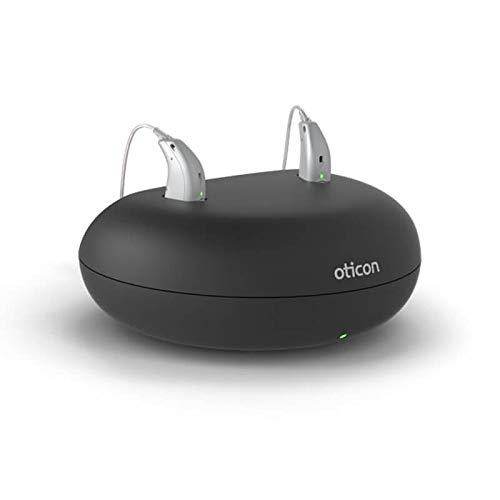
Figure 3.1: Oticon OPN S1 miniRITE Power hearing aids placed in their black charging case. The hearing aids are upright in their respective slots, and a small green light on the charger indicates power or charging status.
3.2 Inserting the Hearing Aid
Your hearing aid is specifically designed for the left ear. Follow these steps for proper insertion:
- Hold the hearing aid body between your thumb and forefinger.
- Gently insert the receiver (with the dome or custom mold) into your ear canal until it feels secure and comfortable.
- Place the main body of the hearing aid behind your ear, ensuring the thin wire connecting the receiver to the body rests comfortably over the top of your ear.
- Adjust the position until the hearing aid is snug and discreet.
3.3 Pairing with iPhone (Made for iPhone)
The Oticon OPN S1 is a Made for iPhone (MFI) hearing aid, allowing direct streaming and control from your iPhone.
- Ensure your hearing aid is fully charged and turned on.
- Al vostre iPhone, aneu a Configuració > Accessibilitat > Dispositius auditius.
- Your iPhone will search for available hearing aids. Select your Oticon OPN S1 when it appears.
- Seguiu les indicacions a la pantalla per completar el procés de vinculació.
3.4 Oticon ON App Setup
The Oticon ON app provides enhanced control and customization options for your hearing aid.
- Download the "Oticon ON" app from the Apple App Store.
- Open the app and follow the instructions to connect it to your paired hearing aid.
- The app allows you to adjust volume, change programs, monitor battery status, and access features like Tinnitus Sound Support.
4. Instruccions de funcionament
4.1 Encesa/apagada
- Encendre: Remove the hearing aid from the charger. It will automatically turn on after a few seconds.
- Apagar: Place the hearing aid back into the charger, or press and hold the button control on the hearing aid for a few seconds until the indicator light turns off.
4.2 Control de volum
You can adjust the volume using the button control on the hearing aid or through the Oticon ON app.
- Control al dispositiu: Press the upper part of the button to increase volume, and the lower part to decrease volume.
- Oticon ON App: Use the volume slider within the app interface.
4.3 Selecció de programes
Your hearing aid is equipped with multiple programs optimized for different listening environments. These include:
- Open Sound Navigator: Provides a 360-degree sound environment, reducing noise while preserving speech.
- Open Sound Optimizer: Prevents feedback and ensures clear sound.
- Open Sound Booster: Enhances speech understanding in very noisy situations.
- Speech Guard LX: Preserves the nuances of speech for better clarity.
- YouMatic LX: Personalized sound experience based on your preferences.
Switch between programs using the button control (short press) or the Oticon ON app.
4.4 Streaming and Connectivity
The Oticon OPN S1 supports 2.4 GHz stereo streaming for direct connection to compatible devices and accessories.
- Made for iPhone (MFI): Stream audio directly from your iPhone, iPad, or iPod touch.
- ConnectClip: A versatile accessory that functions as a remote microphone, hands-free headset for phone calls, and a streamer for other Bluetooth devices.
- TV Adapter 3.0: Stream sound directly from your television to your hearing aid.
- Phone Adapter 2.0: Connects your hearing aid to landline phones.
- EduMic: A remote microphone system for educational settings, streaming a teacher's voice directly to the hearing aid.
4.5 Tinnitus Sound Support
The Tinnitus Sound Support feature provides sound stimuli that can help relieve tinnitus symptoms. This feature can be activated and adjusted via the Oticon ON app, offering various sound options to suit individual needs.
5. Manteniment i cura
Proper maintenance ensures the longevity and optimal performance of your hearing aid.
5.1 Neteja diària
Clean your hearing aid daily to remove earwax and debris. The device features an IP68 nano coating for enhanced durability.
- Use a soft, dry cloth to wipe the hearing aid body.
- Use the provided cleaning brush or a wax pick to gently remove earwax from the dome/receiver and microphone openings.
- Do not use water, solvents, or cleaning fluids directly on the hearing aid.
5.2 Millors pràctiques de càrrega
- Always use the original Oticon charger.
- Charge your hearing aid overnight to ensure a full day's use.
- Avoid exposing the charger or hearing aid to extreme temperatures.
5.3 Emmagatzematge
When not in use, store your hearing aid in its charger or a dry, cool place away from direct sunlight and moisture. Keep it out of reach of children and pets.
6. Solució De Problemes
If you experience issues with your hearing aid, refer to the table below for common problems and solutions.
| Problema | Causa possible | Solució |
|---|---|---|
| Sense so o so dèbil | Low battery; blocked receiver/microphone; incorrect program. | Charge the hearing aid; clean the receiver/microphone; switch programs. |
| Whistling/Feedback | Improper fit; earwax buildup; damaged tubing/dome. | Re-insert the hearing aid; clean earwax; contact professional for replacement. |
| Cannot connect to iPhone/App | Bluetooth off; hearing aid off; pairing issue. | Ensure Bluetooth is on; turn hearing aid off/on; re-pair the device. |
| Durada de la bateria curta | Not fully charged; old battery (long-term). | Ensure full charge; contact service if issue persists after full charge. |
If the problem persists after trying these solutions, please contact Oticon customer support or your hearing care professional.
7. Especificacions
| Característica | Detall |
|---|---|
| Nom del model | Oticon OPN S1 miniRITE Power |
| Marca | Oticon |
| Tipus de bateria | Ió de liti recarregable |
| Durada de la bateria | Up to 24 hours (typical use) |
| Canals | 64 |
| Bandes | 16 |
| Gamma d'ajustament | Fins a 105 dB |
| Full On Gain | 72 dB |
| Connectivitat | Made for iPhone (MFI), 2.4 GHz Stereo Streaming |
| Resistència a l'aigua/pols | IP68 Nano Coating |
| Tipus de control | Button Control, Smartphone App (Oticon ON) |
| Dimensions | 10 x 10 x 10 cm (Paquet) |
| Pes | 300 g (pes de l'article) |
| Color | Pell |
| Material | Silicona |

Figure 7.1: An audiogram chart illustrating hearing levels across different frequencies. The chart shows typical ranges for normal hearing, mild, moderate, severe, and profound hearing loss, with plotted lines for left and right ear hearing thresholds.
8. Garantia i Suport
For any queries regarding your Oticon OPN S1 miniRITE Power hearing aid, or for support with configuration and service, please use the contact information below.
8.1 Atenció al client
You can reach our support team via phone or WhatsApp for assistance with your hearing aid. Please have your audiogram report ready for suitable device configuration.
- Número de línia d'ajuda: 8882525824 (Monday to Sunday)
- WhatsApp: 8882525824
- Correu electrònic: todaydealoffer@gmail.com
Kindly send your audiogram report before or after placing the order for proper configuration. We provide service after product purchase.
8.2 Exempció de responsabilitat legal
For any query regarding hearing aid, you can call us on 8882525824. You can also WhatsApp on this same number.


