Introducció
This manual provides detailed instructions for the safe and effective use of your Dolphin SP-807RBT Bluetooth Karaoke Speaker. Please read this manual thoroughly before operating the device and retain it for future reference.

Imatge: Frontal view of the Dolphin SP-807RBT Bluetooth Karaoke Speaker, showing the main speaker unit with a blue illuminated ring and an included microphone resting in front.
Què hi ha a la caixa
En desempaquetar, comproveu que hi hagi tots els elements següents:
- Dolphin SP-807RBT Bluetooth Karaoke Speaker
- Micròfon
- Control remot
- Adaptador de corrent de 9V
- Manual d'usuari (aquest document)

Image: The Dolphin SP-807RBT speaker shown with its included remote control and microphone, illustrating the main components of the package.
Característiques del producte
- PA Functionality: This portable PA system allows simultaneous karaoke and music playback. Connect a microphone and play music from a mobile device, AUX, or USB drive.
- Llums LED dinàmiques: The integrated lights on the speaker synchronize with the music's beat, changing colors to create a visual display.
- Àudio d'alta qualitat: Equipped with an 8-inch woofer and a horn tweeter for clear sound and strong bass.
- Wavesync Technology: Enables wireless pairing of two SP-807RBT speakers for a stereo setup (additional speaker sold separately).
- Configuracions múltiples: Can be used as a standalone floor speaker or mounted on a speaker stand (stand sold separately).
- Bateria de llarga durada: Features a built-in 7200 mAh battery providing over 7 hours of music playback. Full charge achieved in approximately 4 hours.

Image: Close-up of the Dolphin SP-807RBT speaker's front grille, highlighting the sound-activated LED lights in blue, with smaller insets showing red, blue, and yellow light variations.
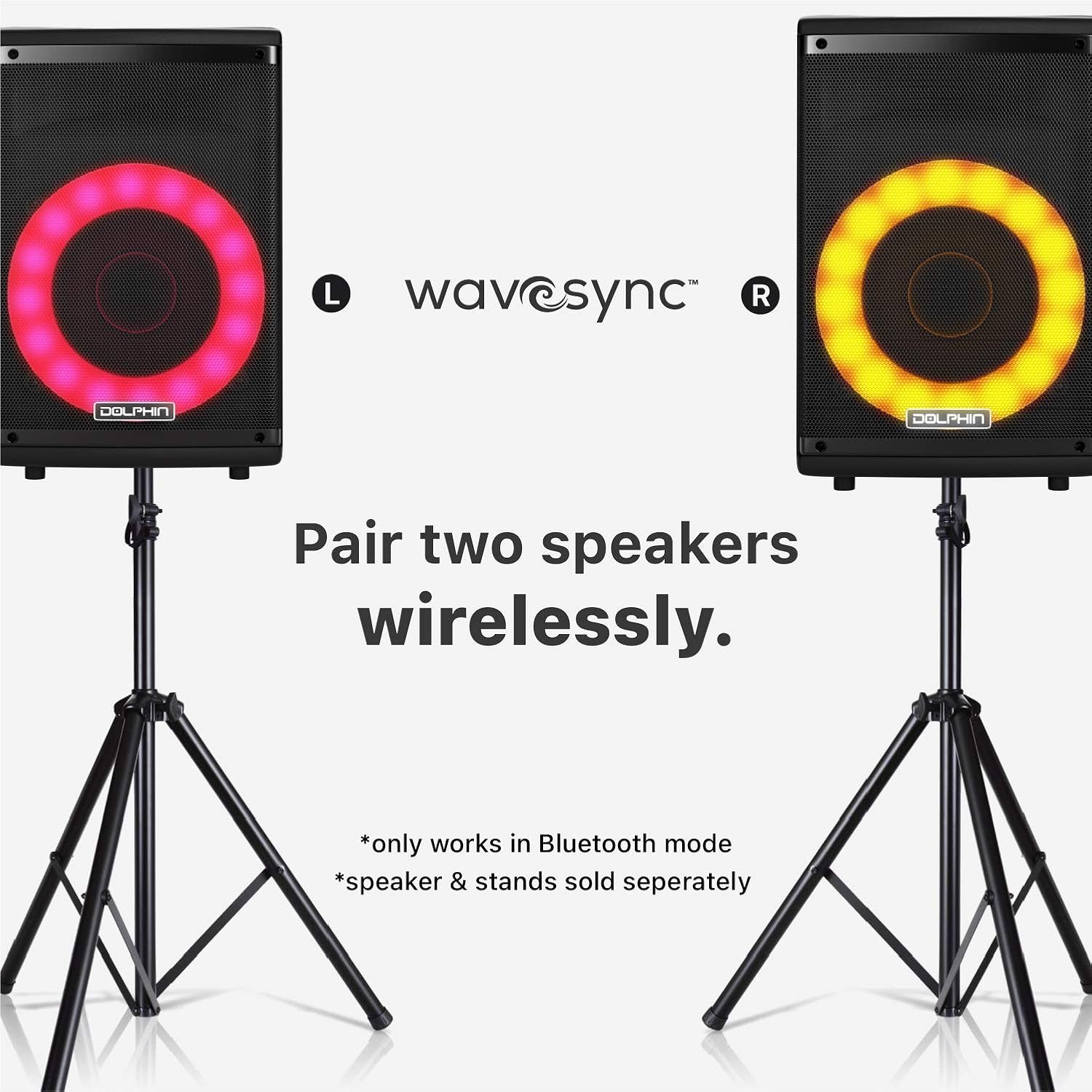
Image: Two Dolphin SP-807RBT speakers, each on a separate stand, illustrating the wireless pairing capability using Wavesync Technology for a stereo sound experience.
Configuració
1. Carregant l’altaveu
Before first use, fully charge the speaker. Connect the included 9V power adapter to the DC IN port on the speaker and plug it into a power outlet. The charging indicator light will illuminate. A full charge takes approximately 4 hours.
2. Encès / apagat
Localitza el PODER switch on the control panel. Flip the switch to the ON position to power on the speaker. Flip it to OFF per apagar.
3. Col·locació inicial
The speaker can be placed on a flat surface or mounted on a compatible speaker stand (sold separately). Ensure stable placement to prevent tipping.

Image: The Dolphin SP-807RBT speaker mounted on a stand, positioned next to a human silhouette to illustrate its approximate height and scale when in use.
Instruccions de funcionament
1. Tauler de control acabatview
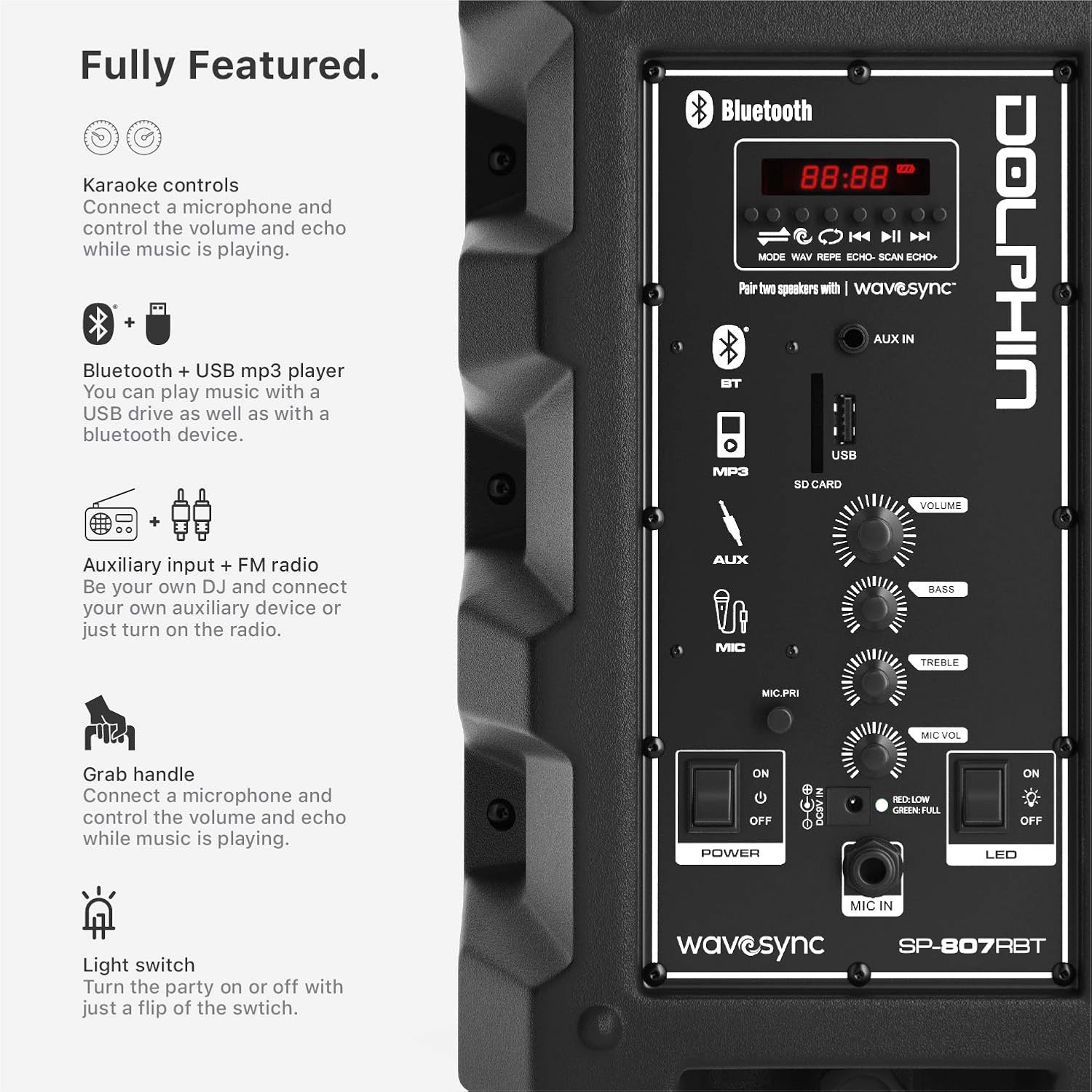
Imatge: Detallada view of the Dolphin SP-807RBT speaker's control panel, showing various inputs (Bluetooth, AUX, USB, SD Card), volume, bass, treble controls, and power/LED switches.
- Pantalla de visualització: Mostra el mode actual, el número de pista i altra informació.
- Botó de mode: Cycles through input modes (Bluetooth, AUX, USB, FM Radio).
- Botó Reproduir/Pausa: Controla la reproducció de suports.
- Botons anterior/següent: Navega per pistes o emissores de ràdio.
- Pom de volum: Ajusta el volum general de l'altaveu.
- Botons de greus/aguts: Adjusts audio equalization.
- Botó de volum del micròfon: Ajusta el volum d'entrada del micròfon.
- Botó d'eco del micròfon: Adjusts echo effect for microphone.
- Interruptor LED: Turns the dynamic LED lights on or off.
2. Connexió Bluetooth
- Enceneu l'altaveu.
- Premeu el botó MODE button until "Bluetooth" or "BT" appears on the display. The speaker will enter pairing mode, indicated by a flashing Bluetooth icon.
- Al dispositiu mòbil, activeu el Bluetooth i cerqueu els dispositius disponibles.
- Select "Dolphin SP-807RBT" from the list.
- Once connected, the Bluetooth icon on the speaker's display will stop flashing, and a confirmation tone may sound.
3. Entrada AUX
Connecteu un dispositiu d'àudio extern (per exemple, un telèfon intel·ligent o un reproductor MP3) al AUX IN port using a 3.5mm audio cable. Press the MODE button until "AUX" is selected.
4. Reproducció des d'una unitat USB
Inseriu una unitat flash USB que contingui àudio MP3 files a la USB port. The speaker will automatically switch to USB mode and begin playing. If not, press the MODE button to select USB.
5. Microphone Usage (Karaoke Function)
Connect the included microphone to the MIC IN port. Ajusteu el MIC VOL knob to control the microphone's volume and the MIC ECO knob for echo effects. You can sing along to music playing via Bluetooth, AUX, or USB.
6. Dynamic LED Lights
To activate or deactivate the sound-activated LED lights, use the LED switch on the control panel.
7. Wavesync Technology (Wireless Stereo Pairing)
To pair two Dolphin SP-807RBT speakers wirelessly for a stereo experience (only in Bluetooth mode):
- Assegureu-vos que tots dos altaveus estiguin encesos i en mode Bluetooth.
- En un altaveu (aquest serà l'altaveu principal), premeu i manteniu premut el botó WAVESYNC button (if available, or refer to specific pairing instructions on the control panel image). The speakers will attempt to connect to each other.
- Once successfully paired, a confirmation sound will be heard, and the primary speaker will control both units.
- Connect your mobile device to the primary speaker via Bluetooth as described in step 2.
Note: Wavesync pairing is only supported in Bluetooth mode. Additional speakers and stands are sold separately.
Manteniment
- Neteja: Feu servir un drap suau i sec per netejar l'exterior de l'altaveu. No utilitzeu netejadors abrasius, ceres ni dissolvents.
- Emmagatzematge: Quan no l'utilitzeu durant períodes prolongats, guardeu l'altaveu en un lloc fresc i sec, allunyat de la llum solar directa i de temperatures extremes.
- Cura de la bateria: To prolong battery life, avoid fully discharging the battery frequently. Recharge the speaker regularly, even if not in use, to maintain battery health. If storing for a long time, charge it to about 50% every few months.
- Ventilació: Assegureu-vos que les obertures de ventilació de l'altaveu no estiguin bloquejades per evitar el sobreescalfament.
Resolució de problemes
| Problema | Causa possible | Solució |
|---|---|---|
| L'altaveu no s'encén. | La bateria està esgotada; l'interruptor d'alimentació està apagat. | Charge the speaker using the provided adapter. Ensure the POWER switch is in the ON position. |
| No hi ha so de l'altaveu. | El volum és massa baix; S'ha seleccionat un mode d'entrada incorrecte; El dispositiu no està connectat correctament. | Increase the speaker's volume. Press the MODE button to select the correct input. Reconnect your device (Bluetooth, AUX, USB). |
| El dispositiu Bluetooth no es pot emparellar. | Altaveu no en mode d'emparellament; Dispositiu massa lluny; Interferències. | Ensure speaker is in Bluetooth pairing mode. Move device closer to speaker. Avoid strong electromagnetic interference. Try forgetting the device on your phone and re-pairing. |
| El micròfon no funciona. | Microphone not connected; Mic volume too low. | Ensure microphone is securely plugged into the MIC IN port. Increase the MIC VOL knob. |
| Wavesync pairing fails. | Speakers not in Bluetooth mode; Incorrect pairing procedure. | Ensure both speakers are in Bluetooth mode. Follow the Wavesync pairing instructions carefully, ensuring one speaker is designated as primary. |
Especificacions
| Característica | Detall |
|---|---|
| Número de model | SP-807RBT |
| Marca | Dofí |
| Tipus de muntatge | Terra de peu |
| Font d'alimentació | Funciona amb bateria |
| Tipus de connector | Aux |
| Pes de l'article | 9.68 lliures (4.4 quilograms) |
| Nombre de canals | 2 |
| Entrada d'àudio | Bluetooth, AUX, USB drive, Microphone |
| Usos recomanats | Música |
| Impedància | 4 ohms |
| UPC | 850006218554 |
| Dimensions del producte (L x A x A) | 9.7 x 11 x 17.9 polzades |
| Tipus de bateria | 1 bateria de ions de liti (inclosa) |
| Temps de joc de la bateria | Més d'7 hores |
| Temps de càrrega de la bateria | Aprox. 4 hores |
| Tecnologia de connectivitat | Bluetooth, USB |
| Color | Black or Gray |
| Dispositius compatibles | iPhone, Android, Bluetooth, AUX, iPod, Zune |
Garantia i Suport
Informació de la garantia
Dolphin products are designed for reliability and performance. For specific warranty terms and conditions, please refer to the warranty card included with your product or visit the official Dolphin weblloc web. Conserveu el comprovant de compra per a reclamacions de garantia.
Atenció al client
If you encounter any issues not covered in the troubleshooting section or require further assistance, please contact Dolphin customer support. Contact information can typically be found on the product packaging, the official Dolphin weblloc web o a través del vostre distribuïdor.
For the most up-to-date support resources, please visit the Dolphin Brand Store on Amazon.
Informació important de seguretat
- No exposeu l'altaveu a l'aigua ni a una humitat excessiva.
- No intenteu desmuntar ni reparar l'altaveu vosaltres mateixos. Encarregueu tot el manteniment a personal qualificat.
- Mantingueu l'altaveu allunyat de fonts de calor, la llum solar directa i materials inflamables.
- Feu servir només l'adaptador de corrent que s'inclou amb el producte.
- Eviteu escoltar música durant molt de temps a volums alts per evitar danys auditius.


