1. Introducció
Thank you for choosing the Xiaomi Mi Smart Watch Lite. This manual provides essential information on how to set up, operate, and maintain your device. Please read this manual carefully before using the product to ensure proper and safe operation.
2. Què hi ha a la caixa
The standard package for your Xiaomi Mi Smart Watch Lite includes:
- Xiaomi Mi Smart Watch Lite (1 unit)
Please ensure all components are present and in good condition upon unboxing.
3. Configuració
3.1 Càrrega inicial
Before first use, fully charge your Xiaomi Mi Smart Watch Lite. Connect the charging cable to the charging contacts on the back of the watch and plug the USB end into a power adapter (not included) or a computer's USB port. The watch display will indicate charging status.
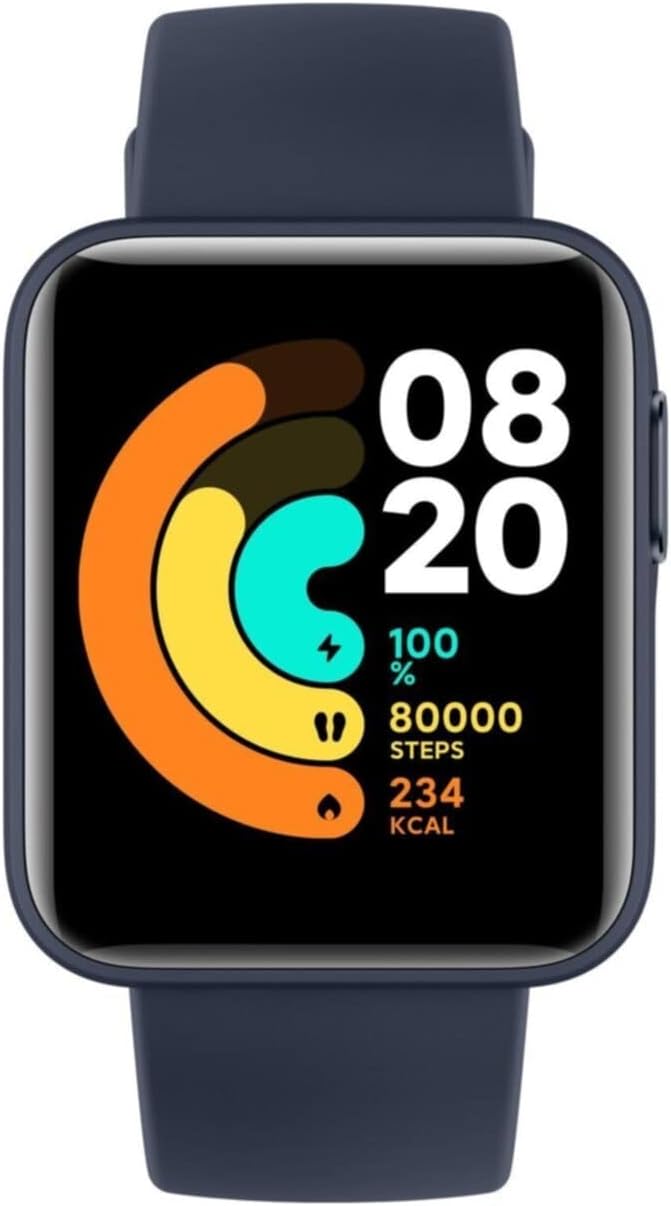
Imatge: Frontal view of the Xiaomi Mi Smart Watch Lite, displaying the time and activity metrics.
3.2 Emparellament amb el telèfon intel·ligent
- Download the official Xiaomi Wear app (or Xiaomi Wear Lite) from your smartphone's app store (Google Play Store for Android, Apple App Store for iOS).
- Assegureu-vos que el Bluetooth estigui habilitat al vostre telèfon intel·ligent.
- Obriu l'aplicació i seguiu les instruccions a la pantalla per crear un compte o iniciar sessió.
- Select 'Add Device' or 'Pair Device' within the app and choose 'Xiaomi Mi Smart Watch Lite'.
- Follow the prompts on both your watch and smartphone to complete the pairing process. A confirmation message will appear once successfully paired.
The watch is compatible with devices running Apple iOS 10.0 or above and Android 5.0 or above, utilizing Bluetooth 5.0 for connectivity.
4. Com utilitzar el rellotge intel·ligent
4.1 Navegació bàsica
The Xiaomi Mi Smart Watch Lite features a 1.4-inch touch screen for intuitive navigation. Swipe left/right, up/down, and tap to access various functions and menus.
4.2 Característiques clau
- Monitor de freqüència cardíaca: Equipped with a PPG sensor, the watch accurately detects your heart rate 24 hours a day. It can notify you if your heart rate goes above normal levels and continuously records up to 30 days of your resting heart rate.
- Seguiment del son: Analyze your sleep quality by recording complete sleep data, including deep sleep, light sleep, and sleep duration, to help maintain good sleeping habits.
- Seguiment de l'activitat: The watch supports 11 workout modes, including outdoor running, treadmill, outdoor cycling, open water swimming, freestyle, pool swimming, cricket, trekking, trail run, walking, and indoor cycling.
- Seguiment GPS: Integrated GPS + GLONASS and multiple smart sensors accurately track your trajectory, speed, distance, and calories burned during outdoor activities.
- Monitorització de l'estrès: Track and monitor your stress levels and receive suggestions to help manage and recover from stress.
- Notificacions: Receive call, message, and app notifications directly on your wrist when connected to your smartphone.

Image: The watch display showing a watch face with activity tracking data, including steps and calories.
4.3 Customization and Watch Faces
The Xiaomi Mi Smart Watch Lite offers various watch faces to personalize your device. You can change watch faces directly on the watch or through the connected app.
Video: This video demonstrates various customizable watch faces available for the Xiaomi Mi Smart Watch Lite, showcasing different styles and data displays.
5. Manteniment
5.1 Resistència a l'aigua
The watch has a 5ATM water resistance rating, meaning it can withstand pressures equivalent to a depth of 50 meters. It is suitable for swimming and other shallow-water activities. However, it is not suitable for hot showers, saunas, or diving. Avoid exposing the watch to high-velocity water or sudden temperature changes.
5.2 Neteja i cura
- Netegeu regularment el rellotge i la corretja amb un drap suau i sec.amp tela.
- Assegureu-vos que els contactes de càrrega de la part posterior del rellotge estiguin nets i secs abans de carregar-lo per evitar la corrosió.
- Eviteu utilitzar productes químics o materials abrasius per netejar.
- If the watch gets wet, dry it thoroughly before charging or prolonged storage.
5.3 Cura de la bateria
To maximize battery life (up to 9 days on a single charge), avoid extreme temperatures and do not allow the battery to fully discharge for extended periods. Charge the watch regularly, even if not in daily use.

Imatge: Part posterior view of the Xiaomi Mi Smart Watch Lite, highlighting the optical heart rate sensor and magnetic charging pins.
6. Solució De Problemes
If you encounter issues with your Xiaomi Mi Smart Watch Lite, try the following basic troubleshooting steps:
- El rellotge no s'encén: Assegureu-vos que el rellotge estigui completament carregat.
- No es pot emparellar amb el telèfon: Make sure Bluetooth is enabled on your phone and the watch is within range. Try restarting both the watch and your phone.
- Dades inexactes: Ensure the watch is worn snugly on your wrist. For GPS, ensure you are in an open area with clear sky view.
- Sense notificacions: Check app permissions on your phone and ensure notifications are enabled for the Xiaomi Wear app.
Per a problemes persistents, consulteu el suport oficial de Xiaomi. weblloc o contacteu amb el servei d'atenció al client.
7. Especificacions
| Característica | Detall |
|---|---|
| Marca | XIAOMI |
| Número de model | BHR4358GL |
| Dimensions del producte | 1.61 x 1.38 x 0.43 polzades |
| Pes de l'article | 1.23 unces (35 grams) |
| Mida de la pantalla | 1.4 polzades |
| Durada de la bateria | Fins a 9 dies |
| Resistència a l'aigua | 5 ATM (fins a 50 m) |
| Connectivitat | Bluetooth 5.0 |
| Sistema operatiu | Android (compatible with iOS 10.0+ and Android 5.0+) |
| Característiques especials | Activity Tracker, GPS, Heart Rate Monitor, Multisport Tracker, Notifications, Sleep Monitor |
8. Garantia i Suport
Per obtenir informació sobre la garantia i assistència al client, consulteu la targeta de garantia inclosa amb el producte o visiteu el lloc web oficial de Xiaomi. weblloc web. Conserveu el rebut de compra com a comprovant de compra.
Per a més ajuda, podeu contactar amb el servei d'atenció al client de Xiaomi a través dels seus canals oficials.


