1. Introducció
This manual provides comprehensive instructions for the One For All URC4912 Sony TV Replacement Remote Control. Designed to function identically to your original Sony TV remote, the URC4912 offers immediate compatibility with all Sony TV models (LCD, LED, Plasma) without requiring any setup. It also includes a learning feature for personalized customization of functions.
2. Configuració
2.1 Instal·lació de bateries
The URC4912 remote control requires two AA batteries (not included). Follow these steps to install them:
- Localitzeu la tapa del compartiment de la bateria a la part posterior del comandament a distància.
- Feu lliscar la coberta cap avall o premeu el pestell per obrir-la.
- Introduïu dues piles AA, assegurant-vos que els terminals positiu (+) i negatiu (-) s'alineïn correctament amb les marques de l'interior del compartiment.
- Torneu a col·locar la tapa del compartiment de la bateria fent-la lliscar fins que faci clic de manera segura.
Note: Always use new batteries and dispose of old batteries responsibly.
2.2 Initial Setup (No Configuration Required)
The One For All URC4912 remote control is pre-programmed for all Sony televisions. No setup or programming is required. Simply insert the batteries, and the remote is ready for immediate use with your Sony TV.
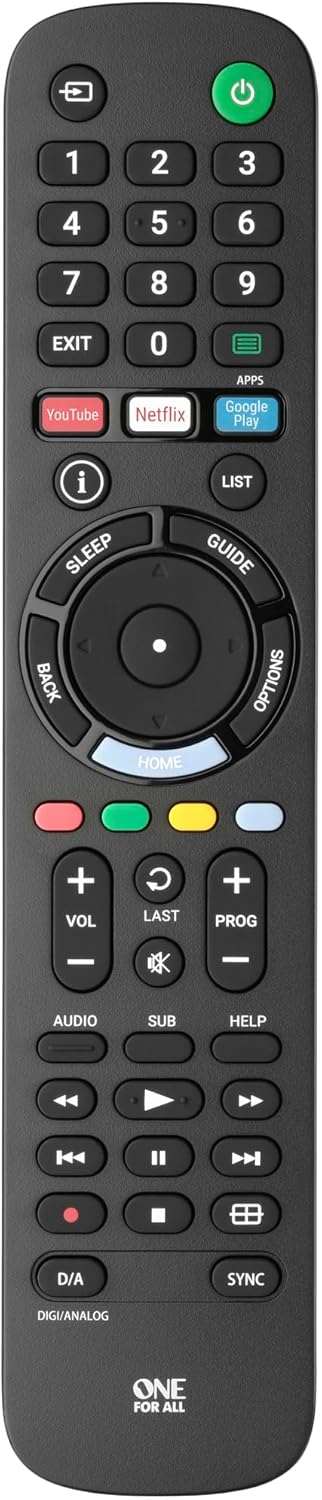
Imatge 1: Frontal view of the One For All URC4912 remote control. This image displays the remote's layout, including number buttons, navigation pad, volume and channel controls, and dedicated app buttons for services like YouTube and Netflix.
3. Funcionament del comandament a distància
3.1 Funcions bàsiques
The URC4912 remote provides all standard functions found on an original Sony TV remote:
- Botó d'encesa: Encén o apaga el televisor.
- Botons numèrics (0-9): Per a la selecció directa de canals.
- Pujar/baixar el volum (+/-): Ajusta el volum del televisor.
- Channel Up/Down (PROG +/-): Canvia els canals de televisió.
- Botó de silenci: Silencia l'àudio del televisor.
- Teclat de navegació (amunt, avall, esquerra, dreta, OK): Per a la navegació i selecció de menús.
- Botó enrere: Torna a la pantalla o menú anterior.
- Botó d'inici: Accedeix a la pantalla d'inici principal del televisor o a la interfície del televisor intel·ligent.
3.2 Specific Sony Functions
This remote supports common Sony-specific functions, including:
- Teatre: Activates or deactivates Theatre mode.
- i-Manual: Accesses the TV's electronic instruction manual.
- Opcions: Displays context-sensitive options for the current screen.
3.3 Learning Feature
The URC4912 remote includes a learning feature, allowing you to copy functions directly from your original remote control. This is useful for any specific functions not pre-programmed or for personalizing button assignments.
- Place the URC4912 remote and your original remote on a flat surface, facing each other, with their IR emitters approximately 1-2 inches apart.
- On the URC4912, press and hold the CONFIGURACIÓ button (if available, or refer to the full manual for specific button combination to enter learning mode) until the LED indicator blinks twice and then stays lit.
- Press the button on the URC4912 that you wish to program. The LED will blink rapidly.
- On your original remote, press and hold the corresponding function button until the URC4912's LED blinks twice to confirm successful learning.
- Repeat steps 3 and 4 for any other buttons you wish to program.
- Per sortir del mode d'aprenentatge, premeu la tecla CONFIGURACIÓ botó de nou. El LED s'apagarà.
Note: If the LED shows a long blink, the learning was unsuccessful. Try again, ensuring both remotes are stable and the original remote's batteries are fresh.

Imatge 2: Anglesa view of the One For All URC4912 remote control, highlighting its ergonomic design and button placement for easy access to various functions.
4. Manteniment
To ensure the longevity and optimal performance of your remote control:
- Neteja: Wipe the remote with a soft, dry cloth. Do not use abrasive cleaners or liquids.
- Substitució de la bateria: Replace batteries when the remote's response becomes sluggish or the LED indicator (if present) signals low power. Always replace both batteries simultaneously.
- Emmagatzematge: Guardeu el comandament a distància en un lloc sec, allunyat de la llum solar directa i de temperatures extremes.
5. Solució De Problemes
| Problema | Solució |
|---|---|
| El comandament a distància no respon. |
|
| Alguns botons no funcionen. |
|
| Learning feature fails. |
|
6. Especificacions
| Marca | Un per a tots |
| Model | URC4912 |
| Dispositius compatibles | Television (All Sony TV types: LCD, LED, Plasma) |
| Característiques especials | Infrared, Learning Function |
| Nombre d'articles | 1 |
| Tipus de bateria | 2 piles AA (no incloses) |
| Dimensions del producte | 19.5 x 4.4 x 2.5 cm |
| Pes de l'article | 100 g |
7. Informació de la garantia
For detailed warranty information regarding your One For All URC4912 remote control, please refer to the official One For All weblloc web o la targeta de garantia inclosa amb la compra. Els termes i condicions de la garantia poden variar segons la regió.
8. Suport
Should you require further assistance, technical support, or have questions not covered in this manual, please visit the official One For All support website or contact their customer service. You can often find FAQs, additional guides, and contact information on their brand page:


