1. Introducció
Welcome to the Xtrfy M42 RGB Ultra-Light Gaming Mouse user manual. The Xtrfy M42 is engineered for high performance and comfort, featuring an ultra-light design, state-of-the-art components, and an adjustable symmetrical shape. This manual will guide you through the setup, operation, customization, and maintenance of your new gaming mouse.

Figure 1.1: Xtrfy M42 RGB Ultra-Light Gaming Mouse (Miami Blue edition)
2. Contingut del paquet
Verifiqueu que tots els elements siguin presents al paquet del producte:
- Xtrfy M42 RGB Ultra-Light Gaming Mouse
- Two sizes of interchangeable mouse shells
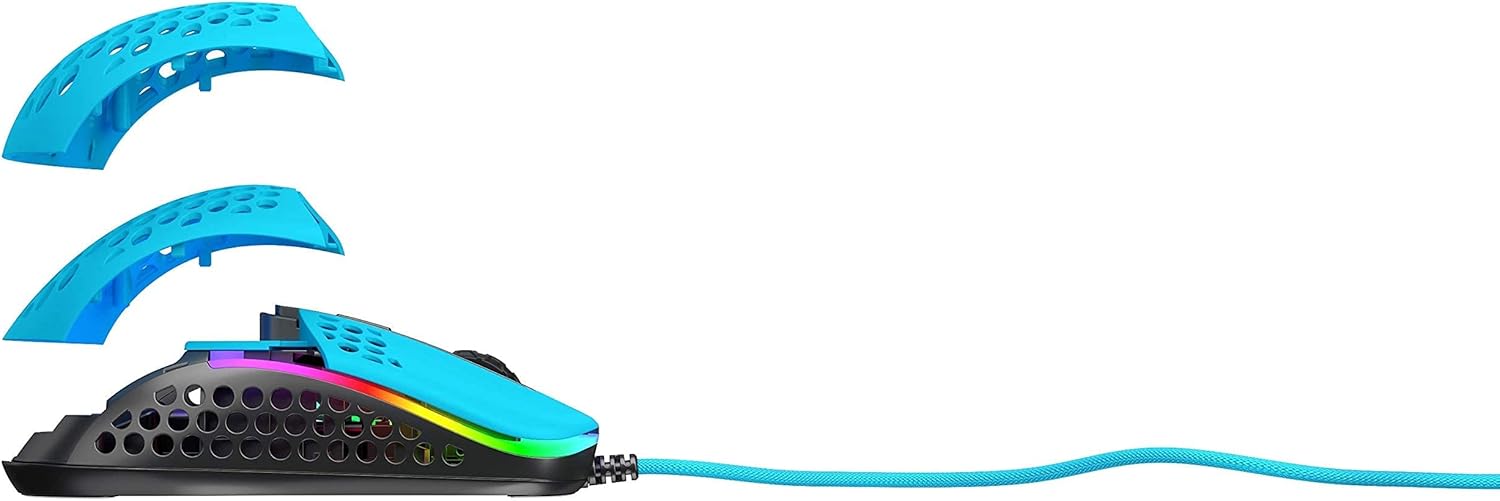
Figure 2.1: Xtrfy M42 with interchangeable top shells
3. Configuració
Follow these steps to set up your Xtrfy M42 gaming mouse:
- Connecteu el ratolí: Plug the USB connector of the Xtrfy M42 mouse into an available USB port on your computer.
- Instal·lació del controlador: The mouse is plug-and-play and typically does not require additional driver software. Your operating system will automatically detect and install the necessary drivers.
- Prova inicial: Move the mouse and click the buttons to ensure it is functioning correctly.

Figure 3.1: Xtrfy M42 connected via USB cable
4. Instruccions de funcionament
The Xtrfy M42 offers various functions for an optimized gaming experience.
4.1 Funcions bàsiques
- Clic esquerre: Botó d'acció principal.
- Clic dret: Botó d'acció secundària.
- Roda de desplaçament: Scrolls content up or down. Can also be clicked for a middle-click function.
- Botons laterals: Typically used for forward/backward navigation or custom in-game commands.
4.2 Ajust de DPI
The Xtrfy M42 features a Pixart 3389 sensor, allowing for precise DPI (Dots Per Inch) adjustments. The DPI button, usually located behind the scroll wheel, cycles through preset DPI levels. Refer to the Xtrfy website for specific DPI steps and corresponding LED indicators.
4.3 Il·luminació RGB
The mouse features customizable RGB lighting. All settings for LED effects, brightness, and color selection are controlled directly on the mouse, without the need for software. Consult the Xtrfy website or product packaging for specific button combinations to adjust RGB settings.
4.4 Taxa de sondeig
The polling rate, which determines how often the mouse reports its position to the computer, can typically be adjusted on gaming mice. Information on adjusting the polling rate for the M42 can be found on the official Xtrfy support page.
5. Personalització
The Xtrfy M42 is designed with an adjustable symmetrical shape to accommodate various grip styles (palm, claw, fingertip) and hand sizes. This is achieved through interchangeable parts.
5.1 Changing Mouse Shells
The mouse comes with two different sized top shells. To change the shell:
- Gently detach the currently installed top shell from the mouse body.
- Align the desired new top shell with the mouse body and press it firmly until it clicks into place.
This allows you to modify the mouse's hump height and overall feel for optimal comfort and control.
Figure 5.1: Illustration of interchangeable mouse shells
6. Manteniment
Proper maintenance ensures the longevity and performance of your Xtrfy M42 gaming mouse.
6.1 Neteja del ratolí
- Desconnecteu el ratolí de l'ordinador abans de netejar-lo.
- Feu servir un drap suau, sec i sense borrissol per netejar la superfície del ratolí.
- Per a la brutícia persistent, lleugerament dampNetegeu el drap amb aigua o una solució de neteja suau. Eviteu productes químics agressius.
- Use compressed air to clear dust from the holes in the shell and around buttons.
6.2 Caring for PTFE Skates
The M42 features 100% PTFE skates for smooth glide. Keep the mouse pad and the underside of the mouse clean to prevent debris from accumulating on the skates, which can affect glide performance. Avoid scratching or damaging the skates.

Figure 6.1: Underside of the Xtrfy M42 mouse, highlighting the PTFE skates
7. Solució De Problemes
If you encounter issues with your Xtrfy M42 mouse, try the following solutions:
- El ratolí no respon:
- Assegureu-vos que el cable USB estigui ben connectat a l'ordinador.
- Prova de connectar el ratolí a un port USB diferent.
- Reinicieu l'ordinador.
- Tracking Issues (Jittery or No Movement):
- Netegeu el sensor òptic de la part inferior del ratolí amb un drap suau i sec.
- Assegureu-vos que feu servir el ratolí sobre una superfície adequada (per exemple, una estora de ratolí). Eviteu superfícies molt reflectants o transparents.
- RGB Illumination Not Working:
- Check if the RGB lighting has been turned off via the on-mouse controls.
- Ensure the mouse is properly connected and receiving power.
For further assistance, refer to the Xtrfy official support resources.
8. Especificacions
| Característica | Detall |
|---|---|
| Número de model | M42 |
| Sensor | Pixart 3389 Optical |
| Interruptors | Pro player-optimized, rated for 20 million clicks |
| Pes | Aproximadament 2.08 unces (59 grams) |
| Dimensions (L x A x A) | 4.65 x 2.48 x 1.5 polzades (11.8 x 6.3 x 3.8 cm) |
| Connectivitat | USB |
| Patins | 100% PTFE with rounded edges |
| Il·luminació | RGB personalitzable |
| Forma | Adjustable Symmetrical (with interchangeable parts) |
9. Garantia i Suport
The Xtrfy M42 RGB Ultra-Light Gaming Mouse is covered by a manufacturer's warranty. For detailed warranty information, including terms and conditions, please refer to the warranty card included with your product or visit the official Xtrfy weblloc.
For technical support, frequently asked questions, or to download the latest firmware (if applicable), please visit the Xtrfy support page:


