1. Introducció
This instruction manual provides detailed guidance for the installation, operation, and maintenance of your Beghelli Dom-e Wi-Fi Full HD Pan/Tilt Surveillance Camera. Please read this manual thoroughly before using the product to ensure proper functionality and safety. Keep this manual for future reference.

Figure 1: Beghelli Dom-e Wi-Fi Full HD Pan/Tilt Surveillance Camera.
2. Producte acabatview
The Beghelli Dom-e Wi-Fi Camera is a versatile surveillance device designed for indoor use, offering Full HD 1080p resolution and comprehensive monitoring capabilities. It integrates seamlessly into your smart home system via the Dom-e Beghelli application.
Característiques principals:
- Resolució Full HD 1080p: Proporciona un vídeo clar i detallattage.
- Pan and Tilt Functionality: Motorized rotation of 355° horizontally and 85° vertically, controllable via the app.
- Visió nocturna: Equipped with IR LEDs for clear visibility up to 10 meters in low-light conditions.
- Detecció de moviment: Sends real-time push notifications to your smartphone upon detecting movement, including specific person detection.
- Seguiment automàtic: The "Tracking" function enables the camera to automatically follow moving subjects.
- Àudio bidireccional: Built-in microphone and speaker allow for hands-free communication.
- Opcions de gravació flexibles: Record directly to your smartphone, to a MicroSD card (up to 128GB, not included), or via optional cloud storage.
- Connectivitat Wi-Fi: Connects to your home Wi-Fi network (2.4 GHz).
- Xifratge de dades: Ensures the security of your video data.
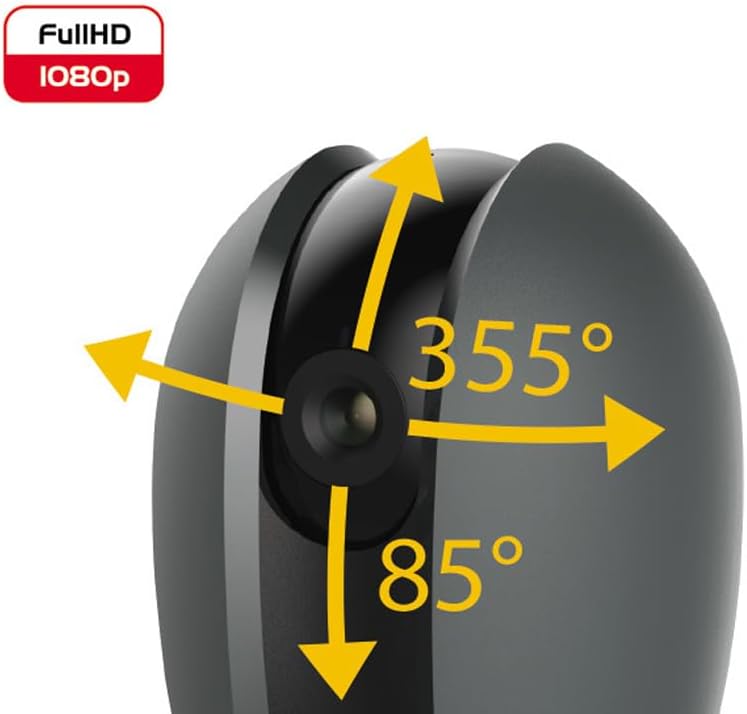
Figure 2: Camera's pan and tilt capabilities.
3. Contingut del paquet
Verifiqueu que tots els elements siguin presents al paquet:
- Beghelli Dom-e Wi-Fi Full HD Pan/Tilt Surveillance Camera
- USB Power Adapter (230V – DC 5V/1A)
- Mounting accessories (if included, not explicitly listed but implied by "wall or ceiling installation")
- Manual d'instruccions (aquest document)

Figure 3: Product packaging for the Beghelli Dom-e Camera.
4. Configuració
4.1 Engegar la càmera
- Connect the provided USB power adapter to the camera's power input.
- Plug the adapter into a standard 230V power outlet. The camera will power on and initiate its startup sequence.
4.2 Mobile Application Installation
The Beghelli Dom-e camera is controlled via the dedicated "Dom-e Beghelli" mobile application.
- Download the "Dom-e Beghelli" app from the Apple App Store (for iOS 8.0 or later) or Google Play Store (for Android 4.2 or later).
- Instal·leu l'aplicació al telèfon intel·ligent o a la tauleta.
- Registra't per obtenir un compte nou o inicia la sessió si ja en tens un.
4.3 Connecting to Wi-Fi and Pairing
Ensure your Wi-Fi network is 2.4 GHz (IEEE802.11 b/g/n). The camera does not support 5 GHz networks.
- Open the Dom-e Beghelli app and follow the on-screen instructions to add a new device.
- Select the Beghelli Dom-e camera from the list of available devices.
- Enter your Wi-Fi network name (SSID) and password when prompted.
- The app will guide you through the pairing process, which typically involves scanning a QR code displayed on your phone with the camera, or listening for an audio prompt.
- Once successfully paired, the camera's status indicator will change, and you will see the live feed in the app.

Figure 4: Simplified setup steps via the Dom-e Beghelli app.
4.4 Muntatge de la càmera
The camera can be installed on a wall or ceiling. Choose a location that provides the desired viewangle d'inclinació i que estigui dins de l'abast de la vostra xarxa Wi-Fi i d'una presa de corrent.
- Mark the drilling points on the desired surface using the mounting template (if provided).
- Perfora forats i insereix tacs de paret si cal.
- Secure the mounting bracket (if provided) to the surface.
- Fixeu la càmera al suport de muntatge.
- Adjust the camera's angle manually or via the app after installation.
5. Instruccions de funcionament
5.1 Viu View i control de panoràmica/inclinació
- Open the Dom-e Beghelli app and select your camera to view el feed en directe.
- Use the directional controls within the app to pan the camera horizontally (355°) and tilt it vertically (85°) to adjust the viewzona d'ing.
5.2 Detecció de moviment i notificacions
- Navigate to the camera settings in the app to enable motion detection.
- Configure sensitivity levels and detection zones as needed.
- Enable push notifications to receive alerts on your smartphone when motion is detected.
- The camera also features person detection for more accurate alerts.
5.3 Àudio bidireccional
- Mentre viewing the live feed, tap the microphone icon in the app to speak through the camera's speaker.
- The camera's built-in microphone will capture audio from the monitored area, allowing you to listen in.
5.4 Enregistrament i emmagatzematge
- Enregistrament amb targeta MicroSD: Insert a MicroSD card (up to 128GB, not included) into the camera's slot for continuous recording or event-triggered recording.
- Smartphone Recording: You can manually record video clips directly to your smartphone while viewemetent el transmissió en directe.
- Emmagatzematge al núvol: An optional cloud storage service is available via subscription for off-site video backup. Refer to the app for details.
- Enregistrament programat: Set up specific times for the camera to record automatically through the app settings.
5.5 Visió nocturna
The camera automatically switches to night vision mode in low-light conditions, utilizing its IR LEDs to provide clear black-and-white footage up to 10 meters.
6. Mobile Application (Dom-e Beghelli App)
The Dom-e Beghelli app is the central control interface for your camera and other compatible smart home devices. It allows for:
- Remote control of camera pan and tilt.
- Access to live video feed and recorded footage.
- Configuration of motion detection, notifications, and recording schedules.
- Comunicació d'àudio bidireccional.
- Integration with other Dom-e smart home devices (e.g., alarms, smart plugs, lighting).
- Voice control compatibility with Google Assistant and Amazon Alexa (if associated with a compatible smartphone).

Figure 5: The Dom-e Beghelli app interface for camera control.
7. Especificacions
| Característica | Especificació |
|---|---|
| Número de model | 60021 |
| Resolució | Full HD 1080p (2 Megapixels) |
| Sensor | CMOS 1/2.9" |
| Lent | 3.6 mm / f2.0 / 105° |
| Velocitat d'obturació | 1/25 - 1/100,000 sec |
| Rotació panoràmica | 355° horitzontal |
| Rotació d'inclinació | Vertical de 85 ° |
| Gamma de visió nocturna | Fins a 10 metres (LEDs IR) |
| Àudio | Two-way, hands-free (in/out) |
| Emmagatzematge | MicroSD card up to 128GB (not included), Smartphone, Cloud (optional subscription) |
| Wi-Fi estàndard | IEEE802.11 b/g/n (2.4 GHz) |
| Banda de freqüència | 2.4 GHz - 2.4835 GHz |
| Entrada de potència | 230V – DC 5V/1A (USB adapter included) |
| Consum màxim d'energia | 4.5 W |
| Dimensions (L x A x A) | 63 x 58 x 96 mm (Product description) / 7 x 7 x 11 cm (Specifications) |
| Pes | 330 grams |
| Material | Plàstic |
| Compatibilitat de sistemes operatius | Apple iPhone iOS 8.0 or later / Android 4.2 or later |
| Ús recomanat | Seguretat interior |
Note: Some dimensions may vary slightly between product description and specifications list.
8. Manteniment
8.1 Neteja
- Assegureu-vos que la càmera estigui apagada i desendollada abans de netejar-la.
- Feu servir un drap suau i sec per netejar el cos de la càmera.
- For the lens, use a specialized lens cleaning cloth to avoid scratches.
- No utilitzeu netejadors líquids, aerosols ni dissolvents abrasius.
8.2 Actualitzacions de programari
Periodically check the Dom-e Beghelli app for firmware updates. Keeping your camera's firmware updated ensures optimal performance, security, and access to new features.
9. Solució De Problemes
| Problema | Solució |
|---|---|
| La càmera no s'encén | Ensure the USB power adapter is securely connected to the camera and a working power outlet. Verify the outlet has power. |
| No es pot connectar a la Wi-Fi |
|
| Sense transmissió de vídeo en directe |
|
| La detecció de moviment no funciona |
|
| Cannot reconnect after Wi-Fi password change | If your Wi-Fi password changes, you will likely need to reset the camera and re-pair it with the app using the new Wi-Fi credentials. Refer to the app for device reset instructions. |
10. Garantia i Suport
For warranty information and technical support, please refer to the documentation provided with your purchase or contact Beghelli customer service directly. You can typically find contact details on the Beghelli official website or within the Dom-e Beghelli application.
Manufacturer: Beghelli
Model: 60021


